What Is AI Traffic? How to Check It in GA4 and Read the Results
AI traffic means visits that arrive through links in AI answers. Learn how to check it with GA4’s AI Assistant channel, and how to read it separately from Search Console’s generative AI report and Bing’s Citation Share.
AI traffic means visits to your site that arrive through links in answers from ChatGPT, Gemini and similar AI services. In GA4, you can check it with the standard “AI Assistant” channel added in May 2026 [1].
But when your manager asks, “How much comes from AI, and will it grow?”, GA4 alone cannot answer. How often AI showed or cited your site is counted in other tools.
This guide is for staff who can view GA4 reports. It covers what AI traffic means, how to check it in GA4, how to separate it from other metrics, and what to watch when forecasting. All counts in this article are fictional examples.
What Is AI Traffic: Visits from Links in AI Answers
AI traffic is a visit in which a person follows a link in an AI answer to your site, and the visit is recorded and classified by your analytics. It is different from AI impressions and from AI crawling.
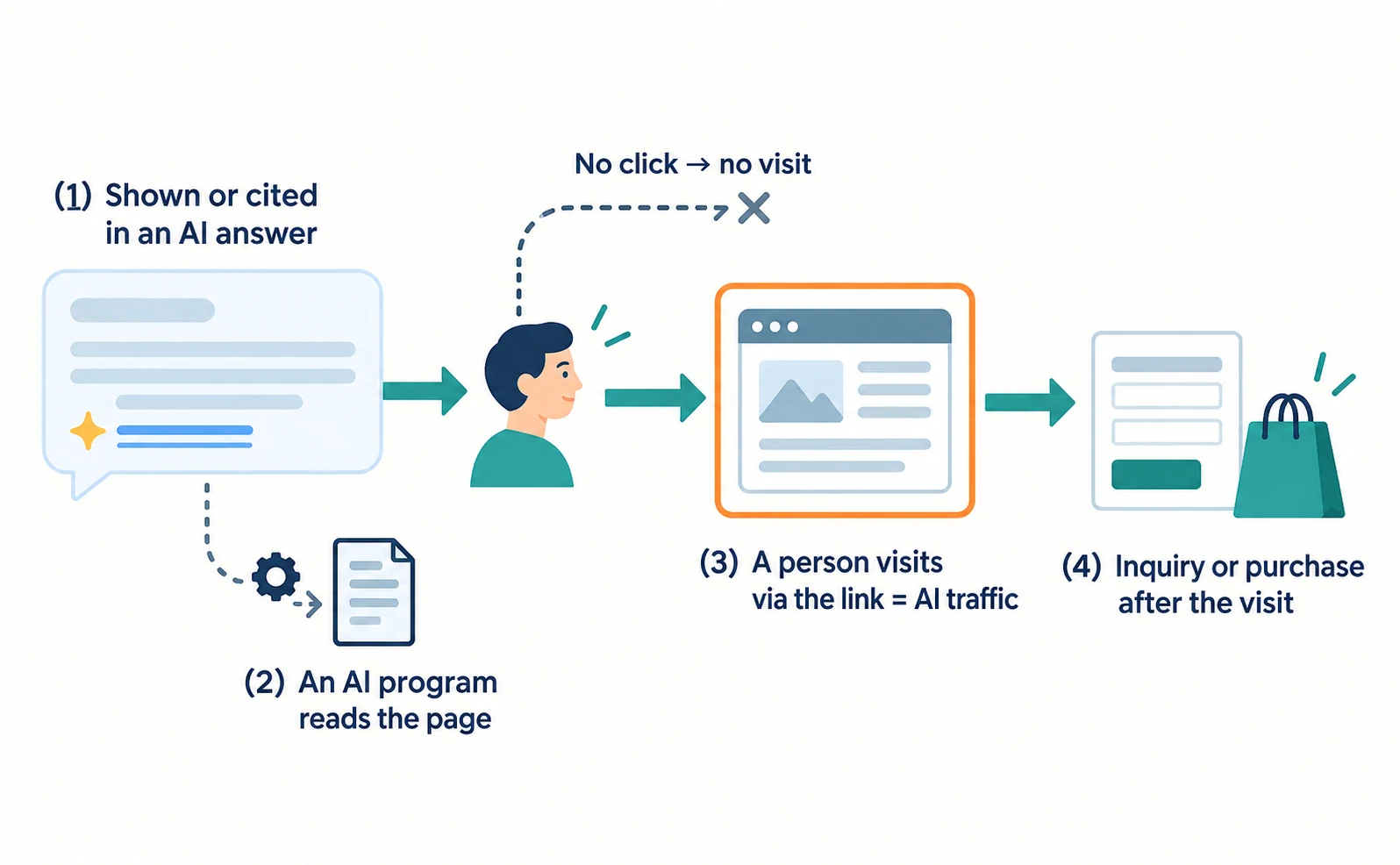
AI-related events fall into at least four groups.
| Event | Where you mainly see it | Counted as AI traffic? |
|---|---|---|
| Your site is shown or cited in an AI answer | Search Console generative AI report (Google), Bing Webmaster Tools | No |
| An AI company’s program fetches your pages | Server access logs | No |
| A person visits via a link in the answer | GA4 | Yes (if classified) |
| The visitor then inquires or buys | GA4 key events | Outcome after the visit |
OpenAI, for example, separates OAI-SearchBot for search, GPTBot for training, and ChatGPT-User, which acts when a user triggers it [2]. ChatGPT-User is not used for automatic crawling or to decide what appears in search [2]. Keep these program fetches separate from human visits.
An impression without a click creates no visit. So low AI traffic does not mean AI never mentioned you—keep that in mind from the start.
How to Check AI Traffic with GA4’s AI Assistant Channel
Open the Traffic acquisition report and read the AI Assistant row under “Session default channel group.”
On May 13, 2026, Google added AI Assistant to the default channel group [1]. When the referrer matches a recognized AI assistant, the medium becomes “ai-assistant,” the channel “AI Assistant,” and the campaign “(ai-assistant)” [1]. Google names ChatGPT, Gemini and Claude as examples [1].
Follow these steps. Menu names may differ depending on your property’s settings and interface updates.
- Sign in to Google Analytics and select your site’s property.
- Open Reports → Acquisition → Traffic acquisition.
- Fix the date range, for example to a completed month.
- Set the table dimension to Session default channel group and read the sessions in the AI Assistant row.
- To see individual services, switch the dimension to Session source / medium and search for “chatgpt” or similar.
A session is a group of interactions, not a person. One person who visits twice may create two sessions.
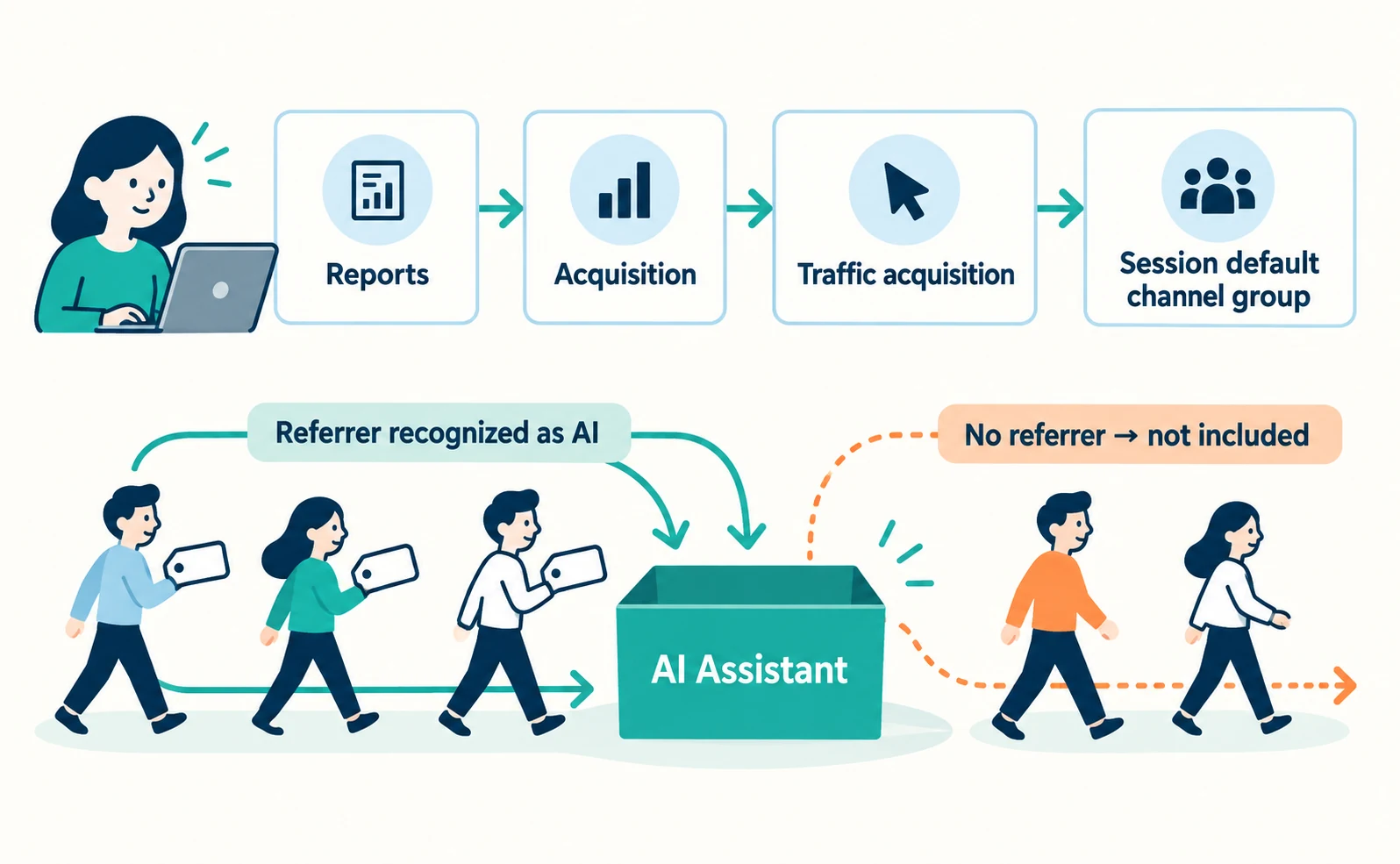
This channel covers visits whose referrer is recognized as an AI assistant [1]. It cannot capture visits that leave no referrer. The sources we checked also do not say whether visits from Google’s AI Overviews or AI Mode fall into this row. If you already built a custom AI grouping, record its count separately from the standard one rather than adding them, because the same visit may appear in both.
The sources we checked do not say how far back the standard AI Assistant channel applies to historical data. When comparing months before and after its launch, check whether a difference comes from the classification change.
Measuring AI Traffic: Read Visits, Outcomes and Impressions Separately
Put GA4 visits and outcomes, Search Console generative AI impressions and Bing Citation Share side by side as separate metrics. Do not merge them into one number.
In GA4, you can show key events (actions designated as important outcomes) next to the AI Assistant row. Before reporting, check the tracking records with whoever set them up:
- What do key events include—purchases only, or inquiries too?
- Does purchase tracking include amounts, and do they match order records?
If you cannot confirm these, report visits only. Do not call the key-event total an order count.
Here is a fictional month of records.
| Metric | Fictional value | What it counts |
|---|---|---|
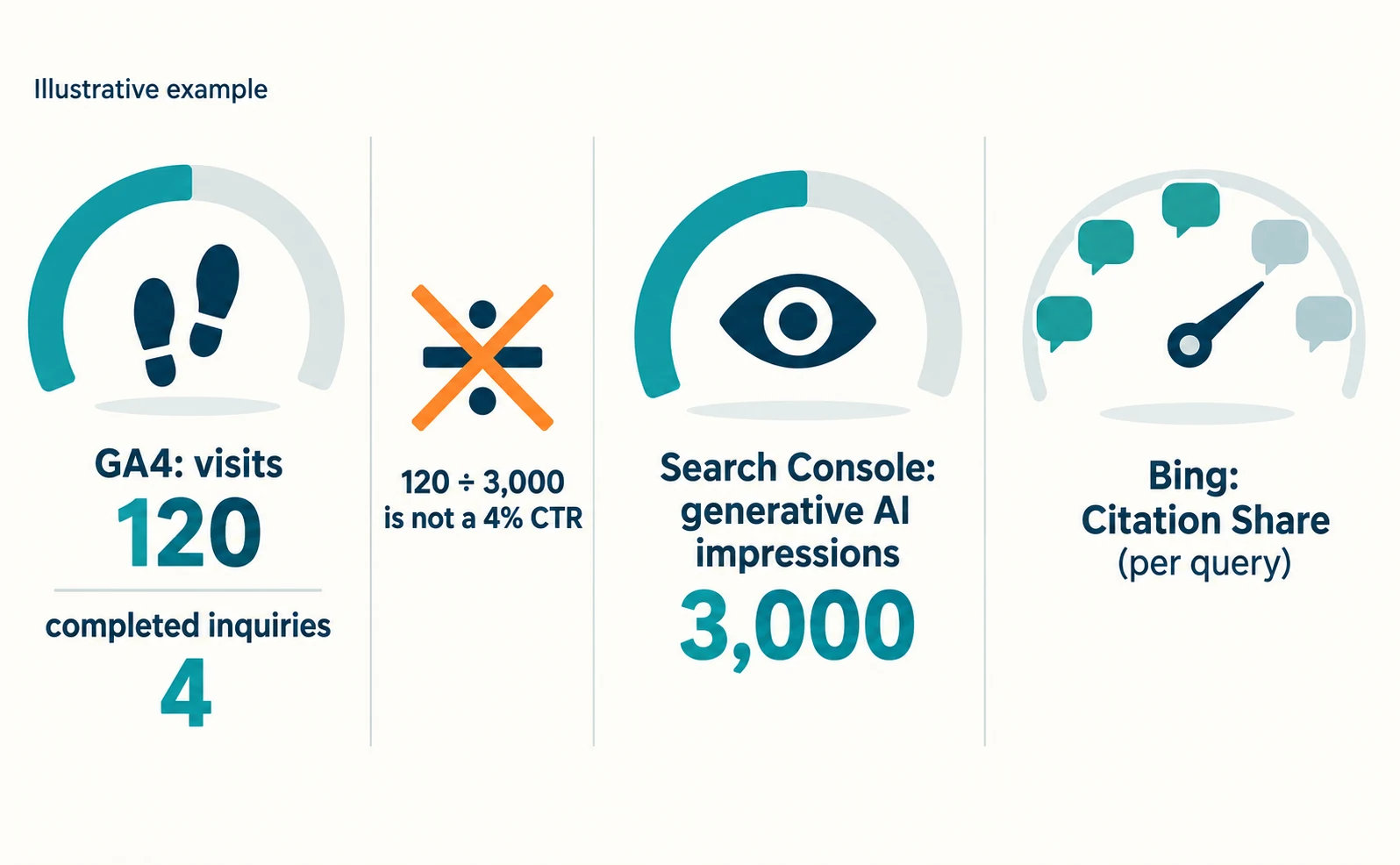
| GA4 AI Assistant sessions | 120 | Visits from AI answers (those classified) |
| Of which key events (only completed inquiries designated) | 4 | Outcomes after the visit |
| Search Console generative AI impressions | 3,000 | Appearances in Google’s generative AI features |
| Bing Citation Share | Recorded per query | Share of citations in Bing |
These count different events. Do not divide 120 visits by 3,000 impressions and call it a 4% click-through rate—the services covered and the date boundaries may not match.
What Search Console’s Generative AI Report Shows
It shows how often your URLs appeared in Google’s AI Overviews and AI Mode, by page, country, device and date.
Google announced the report in June 2026 and later noted it had rolled out to all websites worldwide as of August 31 [3]. The same data is also included in the overall search performance report [3]. Open your property in Search Console to check it. Search and Discover have separate reports; this guide covers the Search report, where device breakdowns are available [3].
Keep these points in mind [4]:
- Search Labs experiments are not included.
- If impressions are low, the report may not appear.
- Page data is mostly assigned to the canonical URL.
- Dates are in Pacific Time.
- In exported data, values shown as “~” or “-” become 0.
The metric described in the help page is impressions [4]. In this guide, visits are checked in GA4.
Bing Citation Share Is Not Traffic Volume
Bing’s Citation Share is your site’s share of all citations shown for a specific query. It is not a ranking or a share of traffic.
Microsoft describes Citation Share as an observational metric [5]. It does not reveal competitor domains or represent traffic share [5]. It has been available as a preview since June 2026 [5].
A Compare feature arrived at the same time, letting you overlay a previous period on the current view [5]. Even if the month your Citation Share rose matches the month your GA4 AI traffic grew, you cannot say one caused the other.
Forecasting AI Traffic: Numbers You Can and Cannot Use
You can think in ranges from your own past trend and impressions. You cannot convert search volume or Citation Share into a traffic forecast.
| Number | Usable for forecasting? | Why |
|---|---|---|
| Your monthly AI Assistant sessions | Yes (as a range) | Same classification, same site |
| Trend in Search Console generative AI impressions | As a reference | Shows direction of impressions |
| Google search volume | No | Not the number of questions asked to AI |
| Bing Citation Share | No | Not a share of traffic |
| Growth rates from other companies’ cases | No | Different conditions and metrics |
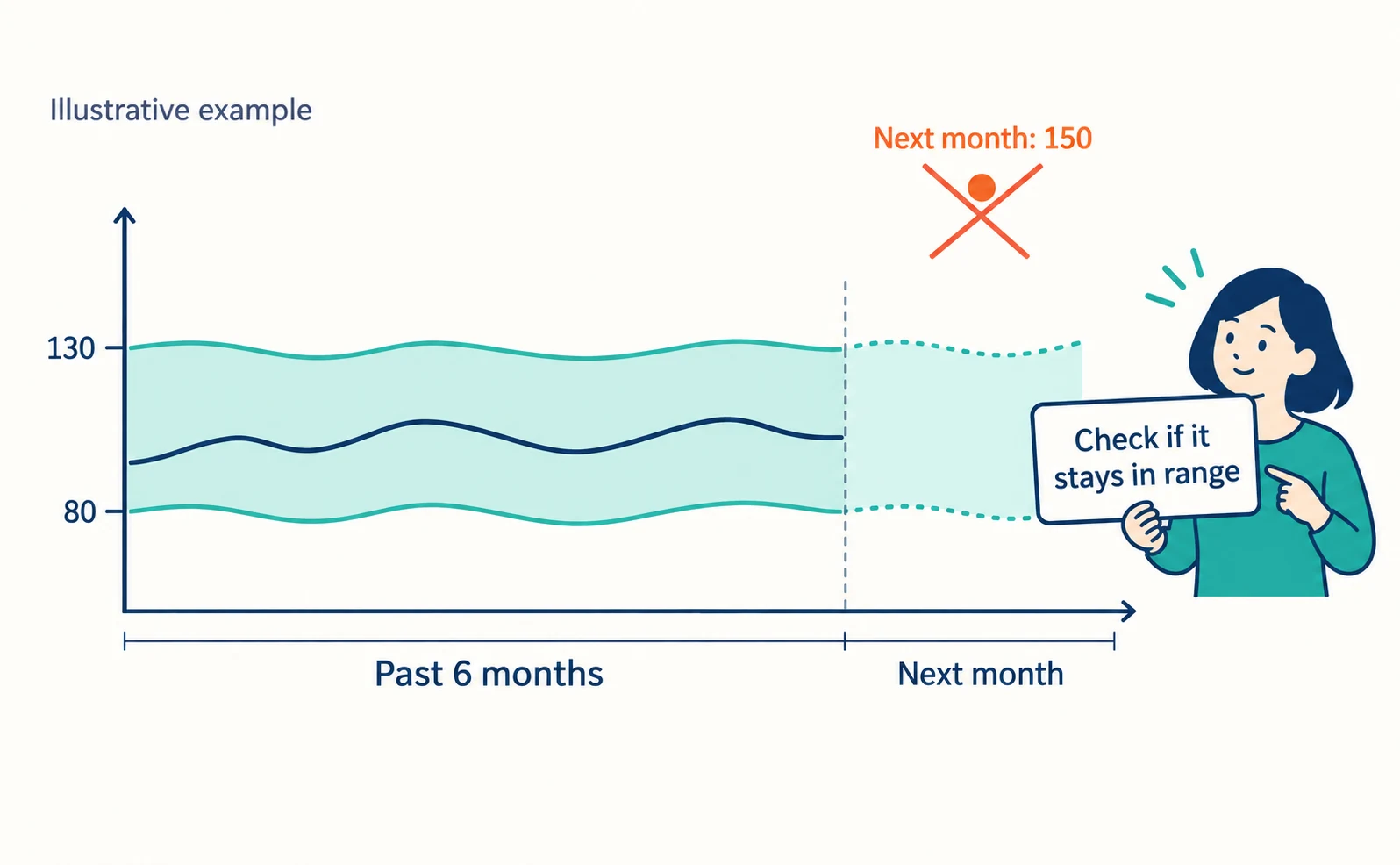
Suppose your AI Assistant sessions moved between a fictional 80 and 130 over the past six months. You can report, “We will check whether next month stays in that range.” You cannot say, “Next month will reach 150.”
In a monthly report, list the period, the classification used, what key events include, Search Console impressions and what remains unknown. Before trying to grow visits, check that pages AI visitors land on actually open—see How to Check and Fix Links from AI Answers That Won’t Open and, for choosing landing pages, the Ahrefs case. To record visits with AgentSignal, start with installing the tracking tag.
FAQ
- Q. Can Search Console alone tell me my AI traffic?
- Search Console’s generative AI report shows how often your URLs appeared in Google’s AI features. Check visits in GA4 or another analytics tool, and record the two numbers separately.
- Q. If Citation Share goes up, will traffic go up too?
- Not necessarily. Bing’s Citation Share is an observational share of citations for specific queries, not a share of traffic. Check traffic separately in GA4.
- Q. If no AI Assistant row appears, has AI not recommended us?
- You cannot conclude that. AI Assistant only classifies visits with a recognized referrer. Mentions that got no click, and visits without a referrer, do not appear in that row.
Sources
- [1] What's new in Google Analytics (Google Analytics Help) — accessed 2026-09-23
- [2] Overview of OpenAI crawlers (OpenAI) — accessed 2026-09-23
- [3] Introducing Search Generative AI performance reports in Search Console (Google Search Central Blog) — accessed 2026-09-23
- [4] Generative AI performance report (Search) (Google Search Console Help) — accessed 2026-09-23
- [5] New AI Visibility Insights in Bing Webmaster Tools: Intents, Topics, Citation Share, Compare (Microsoft Bing Blogs) — accessed 2026-09-23
About the author
Shogo MizushimaCEO of kairos Inc. / AgentSignal Developer
Develops AgentSignal, a tool for measuring AI crawler visits and AI-referred traffic, and diagnosing AIO readiness. Writes about measurement and practical improvements for AI search using observed data.
Related articles
Measurement and site improvement
How to Check and Fix Links from AI Answers That Won’t Open
If clicking a link in an AI answer shows “Page not found,” the cause is usually a move, a deletion or an outage. Learn to tell them apart from visit records and response codes, then fix redirects and notices.
Published
Case studies and research
Where Do AI Visitors Land? Choosing Pages to Improve from the Ahrefs Case
Ahrefs reported that AI-referred visits land on pages beyond its blog. Learn how to find the landing pages for your own AI traffic and choose which pages to improve first.
Published
Measurement and site improvement
What Do Visitors from AI Do? Fix Your Entry Page Based on Their Behavior
People arrive from AI answers, yet enquiries do not follow. Use session recordings to see what happens on the entry page: how to filter recordings to AI referrals, how to use page-wide heatmaps as a supplement, what to fix for each behavior pattern and how to recheck after the change.
Published