Claude video generation: seven Opus 5.5 workflows compared
Compare seven Claude video workflows. Start with motion graphics written by Claude Code alone, with no external video generation or MCP, then find setup guides for HyperFrames, Remotion, image animation, Higgsfield, HeyGen and ElevenLabs.
Making a video with Claude can involve several different production setups, depending on what you want to show.
Some creators animate text and shapes with code. Others generate people, footage and audio in separate services, then use Claude to coordinate the work. Start with what you want to show, rather than the model name.
Code-only motion graphics do not require external video generation or MCP, a way of connecting Claude to outside tools. Claude Code, Anthropic’s command-line coding tool, can write the animation itself.
This guide starts with that Claude Code-only route, then compares six more setups up to avatar explainers, for seven in total, with links to practical setup instructions. These are proposed production workflows, not results from testing every combination ourselves.
How Claude video generation works, and where Opus 5.5 fits
Claude plans scripts, writes animation code, calls external tools when needed and helps assemble assets. For text and shapes, Claude Code can write code that a web browser draws on its own.
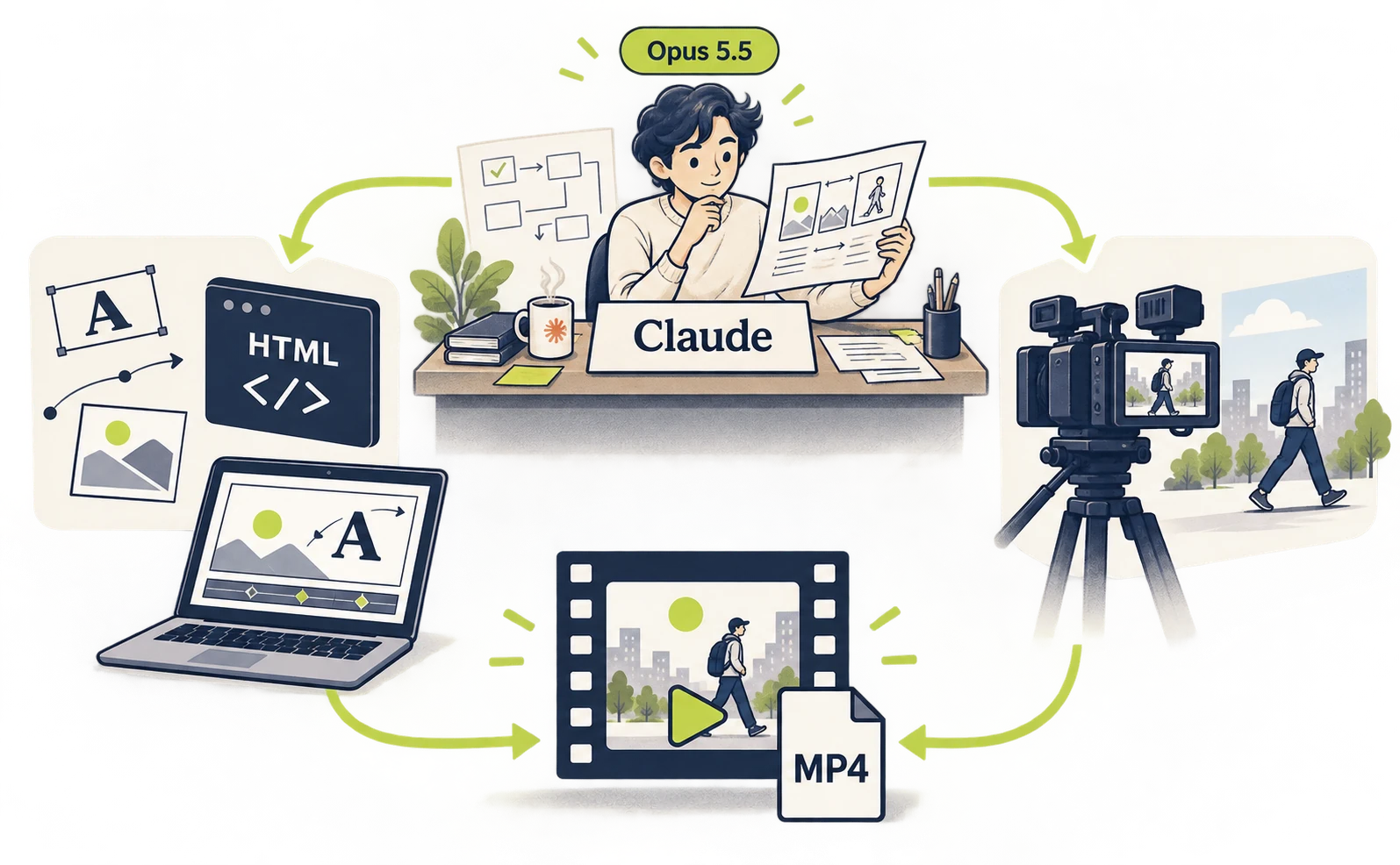
Think of Claude as planning the meal and coordinating the cooking.
For text and shapes, the browser draws the code Claude Code writes, so no external generation service is involved. A dedicated framework such as HyperFrames is optional and can make rendering easier.
A service name flying onto a screen can be made by changing the position and size of text over time. Creating new footage of a person walking down a street calls for a different approach, such as a video generation model.
Both appear under the broad phrase “Claude video generation.” In the comparison below, distinguish the tool making the visuals from the tool making the sound.
Seven ways to make videos with Claude
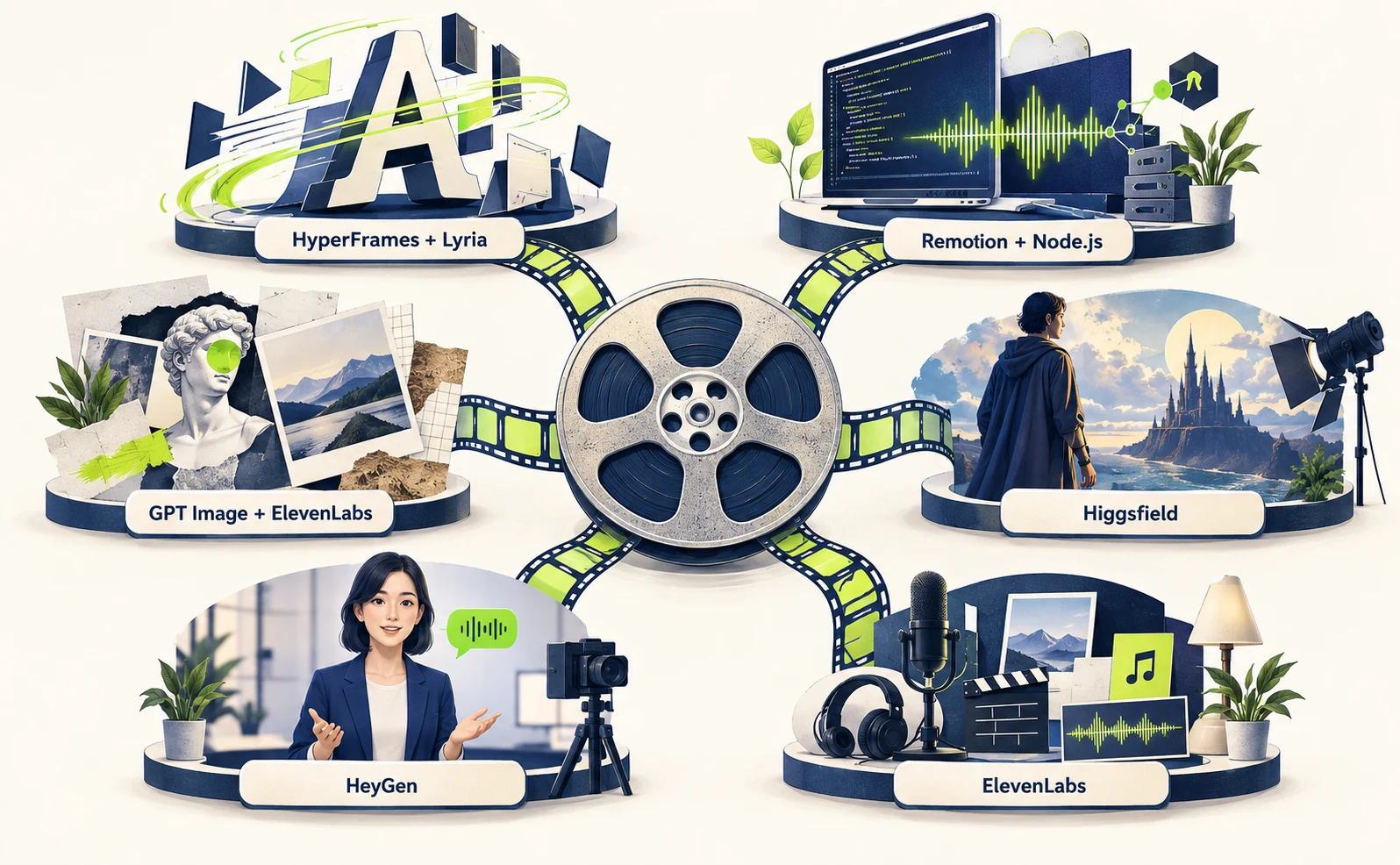
The seven patterns below differ in what appears on screen and how the assets are made. The first uses Claude Code alone; the other six add external tools. Compare each tool’s role to choose a setup for your needs.
The illustration below shows the six setups that rely on external tools. The Claude Code-only route is not pictured; it appears in the first table row and the next section.
| Setup | Main visual material | Audio | Example use | How to make it |
|---|---|---|---|---|
| Claude Code alone | Text and shapes animated in code | None at first; optional synthesized sound | Short showreels and service introductions | Guide ↓ |
| HyperFrames + Lyria | Animated text, shapes and assets | Lyria music | Service introductions and short promos | Guide → |
| Remotion + Node.js | Visuals drawn with code | Sound made with code | Numbers and interface explanations | Guide → |
| GPT Image + ElevenLabs | Animation built from generated images | Separately prepared audio | Illustrated explainers | Guide → |
| Higgsfield with other tools | Generated people and footage | Clip audio and background music | Live-action-style introductions | Guide → |
| HeyGen | A talking avatar | Spoken narration | News and explanations | Guide → |
| ElevenLabs | Images, footage and audio assets | Voice, music and effects | Consolidating asset creation | Guide → |
Claude Code alone: motion graphics written in code
Claude Code can write text and shape animation on its own. For example: a 15-second reel where large words switch in rhythm, circles rotate, bar graphs grow and the brand name appears at the end.
Reference video published on X
{{tweet:https://x.com/stephanlivera/status/2103315922098470926}}
The creator says this video was made with Opus 5.5 on Max effort. Original post
Max effort is a setting for how deeply Claude reasons. It is not the Claude Max subscription.
In replies, the creator says no tools or APIs were supplied reply 1, and that no MCP servers or plugins reply 2, Skills reply 3 or Remotion reply 4 were used, just stock Claude Code.
This is the creator’s own account, not an audit of the source code. The rendering library and the path to MP4 are not identified in the posts and replies checked here.
The steps below are our proposed workflow for a similar type of video. They will not reproduce the creator’s code or result.
The idea is simple. Claude Code writes HTML, CSS and JavaScript that draw text and shapes, and a web browser plays them. Redrawing the picture a little at a time creates animation. MDN animation tutorial
Before you start: install Claude Code on your Mac using the official setup guide. Opus 5.5 requires version 2.1.280 or later. If yours is older, update it in Terminal, the Mac app for typing commands: run claude update for the native installer, or brew upgrade --cask claude-code if you installed with Homebrew.
1. In Terminal, create a project folder and start Claude Code.
mkdir showreel
cd showreel
claude
2. In the Claude Code conversation, switch the model. From here on, you are typing messages to Claude, not Terminal commands. Model configuration docs
/model claude-opus-5-5
3. Paste this prompt into the conversation. Replace [Your brand] with your service name. 30fps means 30 frames per second.
Make a 15-second showreel at 1920x1080,
30fps.
Keep it in one self-contained
index.html file.
Use only HTML, CSS, JavaScript and SVG
or Canvas.
Animate bold type and simple shapes in
rhythm.
End on the text [Your brand].
Do not use external AI or video
generation.
Do not use Remotion, HyperFrames or
frameworks.
Do not use MCP, CDNs or any external
URLs.
Add Play and Replay buttons.
Write a README with preview steps and a
plan
for rendering output/showreel.mp4
later.
Do not create the MP4 yet.
Before installing anything, name it and
why.
Do not run anything that could incur
charges.
4. Preview in a browser. When Claude Code finishes, open the showreel folder in Finder and double-click index.html. Check that Play starts the animation and Replay runs it from the beginning.
Success means text and shapes move for about 15 seconds and end on your brand name. If the page is blank or shows an error, save a screenshot in the showreel folder. Then tell Claude in the conversation: “The page is blank. The screenshot is [file name]. Find and fix the cause,” using the actual file name.
5. Optionally export an MP4. Export each frame as an image, then use FFmpeg, a video conversion program, to combine the numbered images into one video. FFmpeg cannot turn HTML into video directly. FFmpeg documentation Once you approve the preview, paste this:
I approved the preview. Render it frame
by frame
to numbered images, then encode
output/showreel.mp4.
Drive motion by frame number, not the
clock.
List the tools you need and wait for
approval.
The browser and FFmpeg run on your own computer. They are separate from external AI integrations, so this route uses neither a video generation subscription nor MCP.
HyperFrames + Lyria: promos with animated text and shapes
Reference video published on X
{{tweet:https://x.com/Majin_AppSheet/status/2103497319899693327}}
The linked tutorial offers a starter workflow for a similar type of video.
HyperFrames turns web technologies such as HTML into video. Official HyperFrames repository
This is also code-driven motion graphics. The difference from the first route is a dedicated workflow for producing and rendering video. Lyria music is optional; you can render locally without it.
Example video: a 15-second promo for a note-taking app. An opening line invites viewers to capture an idea. Three note cards then appear and move into an organized layout, followed by a closing message. Light background music accompanies the animated text and cards.
The setup guide includes a prompt for this sequence, HyperFrames installation, adding Lyria music and exporting an MP4.
Remotion + Node.js: visuals and sound made with code
Reference video published on X
{{tweet:https://x.com/_nogu66/status/2103665780160421939}}
The linked tutorial offers a starter workflow for a similar type of video.
Remotion is another way to create video from code. One proposed setup combines its animation with sound prepared using Node.js. Remotion audio guide
Example video: a 15-second animation that turns scattered information into an organized layout. Three squares appear with an opening label, move into alignment at the five-second mark, and trigger a short sound. A large closing message then replaces the scene.
The guide explains how to install Remotion, create a short cue with Node.js and place it at the same moment as the visual change.
GPT Image + ElevenLabs: animating generated artwork
Reference video published on X
{{tweet:https://x.com/scisterna/status/2103600499861623106}}
The linked tutorial offers a starter workflow for a similar type of video.
This approach starts with still artwork, then changes its position and layering over time. GPT Image supplies the artwork, while ElevenLabs supplies assets such as narration. Official ElevenLabs connection guide
Example video: a short illustrated story with a bird moving through a forest and spoken narration. The forest background slowly enlarges while a separate bird image travels across the screen. A calm voice accompanies the scene, followed by a closing line of text.
The guide shows how to save the background and bird as separate assets, animate them with HyperFrames and add ElevenLabs narration.
Higgsfield + image generation + Remotion: videos with people
Reference video published on X
{{tweet:https://x.com/showheyohtaki/status/2103552919249563691}}
The linked tutorial offers a starter workflow for a similar type of video.
Different tools handle character images, moving footage, music and on-screen text. The proposed setup uses Higgsfield for footage, image generation and Lyria for other assets, and Remotion to combine elements such as text. Official Higgsfield connection guide
Example video: a 10-second café ad combining a person on screen with an animated message. The first half shows a live-action-style scene of someone holding a cup. The second half presents a short invitation to take a break, with background music connecting the scenes.
The guide walks through Higgsfield sign-in and footage generation, preparing Lyria music and building the closing text scene with Remotion.
HeyGen: a presenter-led explainer
HeyGen’s MCP integration provides a route for requesting avatar videos from Claude. It serves a different purpose from HyperFrames, although both are offered by HeyGen. Official MCP overview
Example video: a talking avatar announcing a workshop in Japanese. Against a simple background, the presenter introduces an exercise: write down ideas, sort them into themes, then choose one action. Captions follow the spoken explanation.
The guide covers connecting HeyGen, choosing an avatar and voice, entering the script, checking captions and saving the MP4.
ElevenLabs: generating images, video and audio together
The official ElevenLabs MCP supports image and video generation as well as audio. It is an option when several asset types should be available through one connection. Official announcement
Example video: a roughly 10-second café introduction built around rising steam and calm narration. A plain white cup sits on a table in morning light. Steam moves gently while a voice invites the viewer to pause, accompanied by quiet piano music.
The guide explains how to prepare the image, short footage, voice and music through ElevenLabs, then arrange and export them in Studio.
Skills, MCP and APIs in a video workflow
A Skill is a set of working instructions. MCP connects an assistant to external tools. An API is an interface through which software requests an operation from a service.
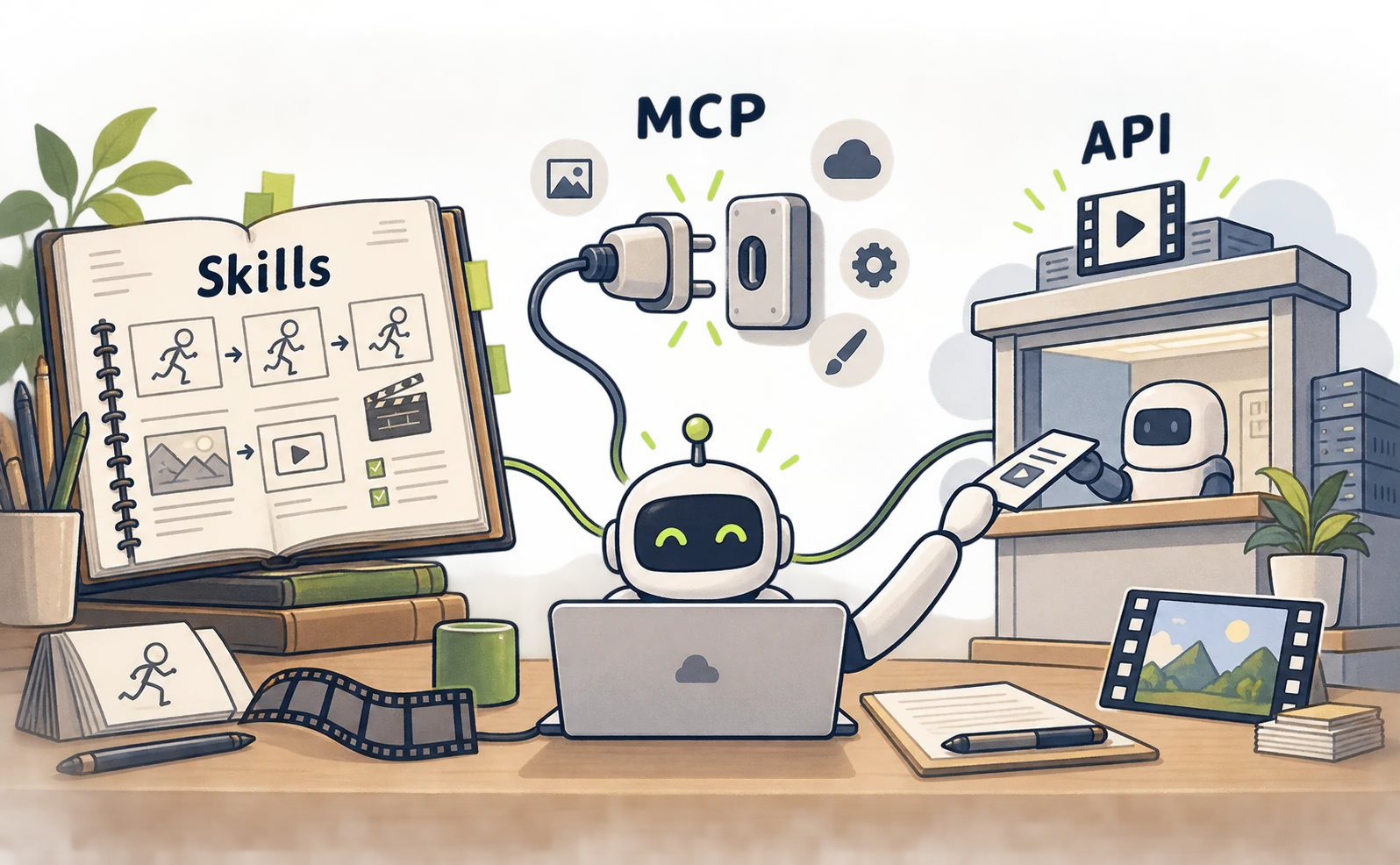
Adding a Skill that teaches animation techniques does not include a video model’s usage allowance. Connecting through MCP still involves the external account and its terms.
Check three things separately:
- What instructions does Claude need?
- Which service may Claude connect to?
- Which tool turns the assets into the final video file?
Answering these questions exposes missing steps, such as a setup that creates images but has no way to render a video.
The Claude Code-only route needs neither Skills nor MCP. The browser plays the code Claude writes, and FFmpeg can export it if needed.
Choose one first action from the table below. Each linked guide includes setup commands and a proposed starter prompt.
| First exercise | Setup guide |
|---|---|
| Animate text and shapes without external services | Getting started with Claude Code alone |
| Animate text and save an MP4 | HyperFrames installation and export |
| Align graphics and sound | Remotion plugin setup |
| Animate artwork with narration | Asset paths and ElevenLabs connection |
| Create a short character scene | Higgsfield sign-in and generation |
| Turn a script into a presenter video | HeyGen connection and authentication |
| Prepare images, voice and music together | ElevenLabs MCP command |
During connection checks, ask the assistant to inspect available tools without generating anything. Then create and save one short asset. This order makes it easier to identify which stage is failing.
Where Claude video production costs arise
Claude’s subscription alone does not determine the total cost. If your setup uses external asset generation, that matters too, as does the rendering environment. The Claude Code-only route requires no external generation subscription.

| Cost area | What to check |
|---|---|
| Claude | Plan, usage limits and extra-usage settings |
| Image, video and audio generation | External plan, credits and regeneration costs |
| Rendering | Local computer or cloud, plus software licensing |
| Revisions | Which assets must be made again |
A service may use account-based OAuth authentication without requiring a manually entered API key. That does not make generation free.
For a trial, we suggest making one short finished scene before committing to a long video. It lets you assess pronunciation, character appearance and caption size, then decide what needs revision.
Choosing a setup for ads, service introductions and news
Choose based on what viewers need to see: text and numbers, people in a scene, or a presenter explaining something.

For testing ad headlines, favor editable text. For a person’s visual presence, consider generated footage. For spoken explanation, consider an avatar. This is a useful first decision before comparing tool details.
An ad test might change only the opening line while keeping duration, music and destination consistent. None of the tools described here guarantees a higher CTR or lower CPC.
Before commissioning a video, write down the audience, the single message and what should appear in each scene. Choosing the tools from that brief makes the desired result easier to share than starting with a list of services.
Sources
- [1] Official HyperFrames repository — accessed 2026-09-27
- [2] Remotion audio guide — accessed 2026-09-27
- [3] Official ElevenLabs connection guide — accessed 2026-09-27
- [4] Official Higgsfield connection guide — accessed 2026-09-27
- [5] Official MCP overview — accessed 2026-09-27
- [6] Official announcement — accessed 2026-09-27
- [7] Original post of a video reportedly made with stock Claude Code — accessed 2026-09-27
- [8] Creator reply: no tools or APIs supplied — accessed 2026-09-27
- [9] Creator reply: no MCP or plugins — accessed 2026-09-27
- [10] Creator reply: stock Claude Code, no Skills — accessed 2026-09-27
- [11] Creator reply: no Remotion — accessed 2026-09-27
- [12] MDN animation tutorial — accessed 2026-09-27
- [13] FFmpeg documentation — accessed 2026-09-27
- [14] Claude Code official setup guide — accessed 2026-09-27
- [15] Claude Code model configuration docs — accessed 2026-09-27
About the author
Shogo MizushimaCEO of kairos Inc. / AgentSignal Developer
Develops AgentSignal, a tool for measuring AI crawler visits and AI-referred traffic, and diagnosing AIO readiness. Writes about measurement and practical improvements for AI search using observed data.
Related articles
Case studies and research
Claude Code and HyperFrames: make a video and add Lyria music
Set up Claude Code and HyperFrames, add Lyria music, preview a composition and export an MP4 with commands and a 15-second starter prompt.
Published
Case studies and research
Claude and Remotion: make visuals and sound with code
Install the Remotion plugin for Claude Code, build a text-and-shapes video, add a Node.js sound cue and render an MP4. Includes paths and troubleshooting.
Published

Case studies and research
Animate images with Claude, GPT Image and ElevenLabs
Create artwork with GPT Image, animate it with Claude and add ElevenLabs narration. Follow asset paths, transparency checks, MCP setup and export steps.
Published