What Is NLWeb? Finding Site Products and Articles in Natural Language
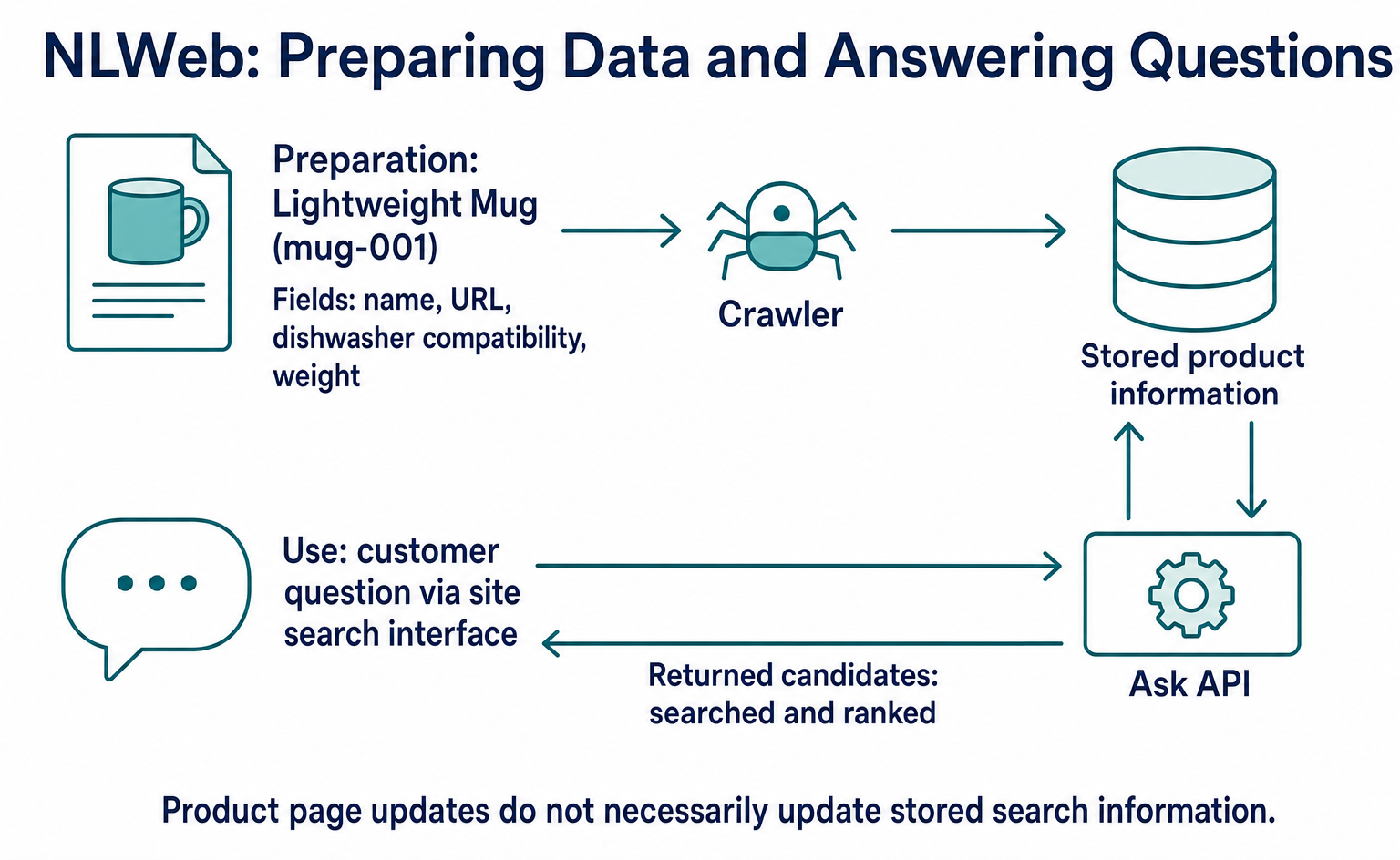
NLWeb helps developers build search that accepts needs and conditions in everyday language. Follow one product from data preparation to search results using a pinned Ask Agent version, and learn how search differs from ordering and payment.
NLWeb is a development framework for building search that lets people find products or articles on a site using natural language, such as “a lightweight mug that is dishwasher-safe.” It gives visitors a way to find options based on their needs, even when they do not know a product name or category. It is relevant to e-commerce and website teams looking to improve product or article discovery.[4]
Its main role is to find candidates within imported information. Receiving search results does not mean an order or payment has been completed. It is not a service you can use simply by signing up through an admin screen. You need to prepare product information and develop and operate the search environment.
This introductory guide is based on official materials as of September 10, 2026. All concrete examples use the pinned nlweb-ask-agent commit 065581c06d0dad21cdbb7c6623ba99c37517347b, which we distinguish from other NLWeb repositories.[4][5][6][7]
1. Search by Need, Not Product Name
Imagine a customer on an online tableware store typing, “I’m looking for a lightweight mug that is dishwasher-safe.” Instead of repeatedly changing keywords, the customer states their requirements in one sentence.
NLWeb searches stored information for candidates that are close in meaning to the question, then uses AI to assess their relevance. This supports searches based on use cases and features that product-name matching alone may miss.[4]
However, it cannot reliably supply product facts, such as weight or dishwasher compatibility, that the store has not provided. To make candidates easier to find, the searchable information must include details that can answer customers’ questions.
Below, we follow an illustrative product called “Lightweight Mug,” identified as mug-001. All product information, questions, and response values are examples, not measured search results or rankings. This guide also covers a single question, not how to continue a conversation based on previous questions.
2. Separate Information Preparation from Search
Ask Agent includes a Crawler that collects information, an Ask API that receives questions, and a Chat App that provides a search interface. The store prepares product information. The implementation team sets up collection, storage, and search, along with an interface that sends questions from the site.[4]
| Stage | Responsible party or component | Lightweight Mug example |
|---|---|---|
| Prepare information | Store’s product information team | Provide the product name, URL, dishwasher compatibility, and weight |
| Import and store | Crawler and storage destination | Read mug-001 data and make it searchable |
| Send a question | Site’s search interface | Send the customer’s text to the Ask API |
| Return candidates | Ask API | Return searched and ranked candidates to the interface |
Search uses a process called embedding, which converts features of text into numbers. Storing these numbers makes it possible to find information close in meaning to a question. In the default setup, Azure AI Search stores the search data, and Azure Cosmos DB stores the full documents.[4]
Importing product information and answering questions are separate workflows. Updating a product page does not necessarily update the search storage, so site operations must manage both.
3. Import Product Data
A Sitemap Is Not Product Detail Data
The README’s domain-crawling example requires sitemap.xml at the site’s root. The implementation team sends the following body to POST /crawler/api/sites to specify the site to crawl. site_url is the target site’s URL, not a field for submitting the product itself.[4]
{
  "site_url": "https://example.com"
}
A standard sitemap mainly provides a list of URLs. It does not itself contain product details such as a mug’s weight or dishwasher compatibility. Treat site registration and product data loading as separate tasks.
In the pinned Crawler version, extract_objects_from_schema_file parses JSON objects and arrays, JSONL, TSV, and RSS from fetched file contents. TSV processing separates a URL and JSON with a tab, while RSS processing converts content into article data. These formats are not all handled identically without conditions.[5]
Do not assume that the README’s phrase “schema.org sitemaps” means every standard sitemap or piece of structured data on a product page will be imported as-is. Work with the implementation team to check the “entry-point sitemap” and the “data file supplying product details” separately.
Put the Lightweight Mug Information into JSON
For this example, the following product object is placed in a JSON file that the Crawler will read. This is source data the store provides for search, not the body of a question sent to the API.[5]
{
  "@context": "https://schema.org",
  "@type": "Product",
  "@id": "https://example.com/products/mug-001",
  "url": "https://example.com/products/mug-001",
  "name": "軽量マグ",
  "description": "食洗機対応。重さ180gの軽量マグカップです。"
}
@type indicates the item’s type, @id identifies this product, and url gives the product page’s location. name and description contain the display name and features useful for search. This example uses the same URL for identification and the product page.
The loading process extracts the relevant object from JSON like this and identifies it using @id. Product is not among the excluded types checked in the code, so this example can follow the branch that reads a JSON object.[5]
The next stage passes the identifier, target site, and product object together to the storage process, which adds or updates the full document in Cosmos DB. Combined with storing the numerical search data in Azure AI Search, this prepares information that can be found in later questions.[4][5]
What we can trace here is how product data that reaches the loader is passed to storage with an identifier. This is not a complete implementation procedure that also covers configuring discovery and registration of this JSON file through the sitemap.
Site operators should check not only “Did collection start?” but also “Were the name and features of mug-001 stored and made searchable?” The README points to /crawler for checking progress.[4]
4. Send a Question and Receive Candidates
Send from the Interface to the Ask API
After product information has been imported, the site’s search interface sends a question to POST /ask. In the README’s example for running from source, the local destination is http://localhost:8080/ask.[4]
The following example adds a response-format setting from the same pinned version’s type definitions to the README’s question format. It explicitly selects conv_search so we can explain the returned candidate list.[4][7]
{
  "query": {
    "text": "食洗機で洗える、軽いマグカップを探しています"
  },
  "prefer": {
    "streaming": false,
    "response_format": "conv_search"
  }
}
query.text contains the customer’s question. prefer.streaming: false specifies that the response should not arrive incrementally. prefer.response_format sets the response format. Its default in the type definitions is chatgpt_app, so this example changes it to conv_search to work with a candidate list.[7]
In the same type definitions, the required parts of the question body are query and the string text inside it. Settings such as the number of search results have defaults and are omitted here. The example also omits site filtering, so it assumes a dedicated environment containing only the relevant products.[7]
Where to Look in the Response
The Ask API searches stored information and ranks candidates. The example below shows a case in which mug-001 is selected, following the same pinned version’s AnswerResponseConvSearch, ResultObject, and RankedResult.to_dict conversion logic.[6][7]
The following is illustrative JSON containing only the fields needed to track the product, extracted from the response’s results section. A complete response also includes required fields such as _meta. This excerpt should not be treated as a complete response.
{
  "results": [
    {
      "@type": "Product",
      "@id": "https://example.com/products/mug-001",
      "url": "https://example.com/products/mug-001",
      "name": "軽量マグ",
      "description": "食洗機対応。重さ180gの軽量マグカップです。",
      "grounding": {
        "source_urls": [
          "https://example.com/products/mug-001"
        ]
      }
    }
  ]
}
The interface reads the results array of candidates. Within it, name provides the product name, url the product page, and description the features. Comparing @id with the source data lets you track the same mug-001.
The conversion logic outputs details such as the retrieved product’s URL and name, and carries over attributes from the original product object. grounding.source_urls holds supporting URLs, so this example points to the product page.[6]
In other words, the store’s information—“Lightweight Mug,” “dishwasher-safe,” and “180g”—passes through storage and search to become material for displaying a candidate. The interface is responsible for displaying the name and URL and creating a link to the product page. Search-quality testing must establish whether this product is actually selected and whether products that fail the conditions can be excluded.
5. Watch for Implementation Differences
Even within NLWeb documentation, query types and settings differ. Give the implementation team materials that match the repository and version they will run.
| Materials | Question and response differences | Implementation differences |
|---|---|---|
| Pinned Ask Agent version | query is an object containing text. The response format is specified through prefer.[4][7] |
PyPI installation is planned. Crawler connections are limited to Azure.[4] |
| NLWeb_Core README | query is a string in the POST example.[2] |
Includes a PyPI installation example and multiple search databases.[2] |
| NLWeb REST API documentation | Describes conversation history and other result formats.[3] | Do not reuse these as Ask Agent request and response formats. |
This article’s response example is based on Ask Agent’s own types and conversion logic. Finding the same field names in another document does not establish compatibility of the settings or the full response.
6. Finding Candidates and Placing Orders Are Separate
Suppose a customer finds the Lightweight Mug and types, “I’d like to buy two of these if the total, including shipping, is no more than ¥3,000.” Sending that sentence to a search API is separate from checking stock and the total price and accepting an order.
For example, at ¥1,200 each, two mugs cost ¥2,400 before shipping. Whether the purchase fits the budget depends on shipping and other charges. The purchase process must also check stock, present the purchase details, obtain the customer’s authorization, and proceed through payment and order processing.
Ask Agent’s type definitions include optional actions that can be attached to results, and their description mentions AddToCartAction as an example. However, this is a data field for describing an action. It does not establish that a particular store’s cart or payment system has been implemented and connected, or that a purchase will succeed.[7]
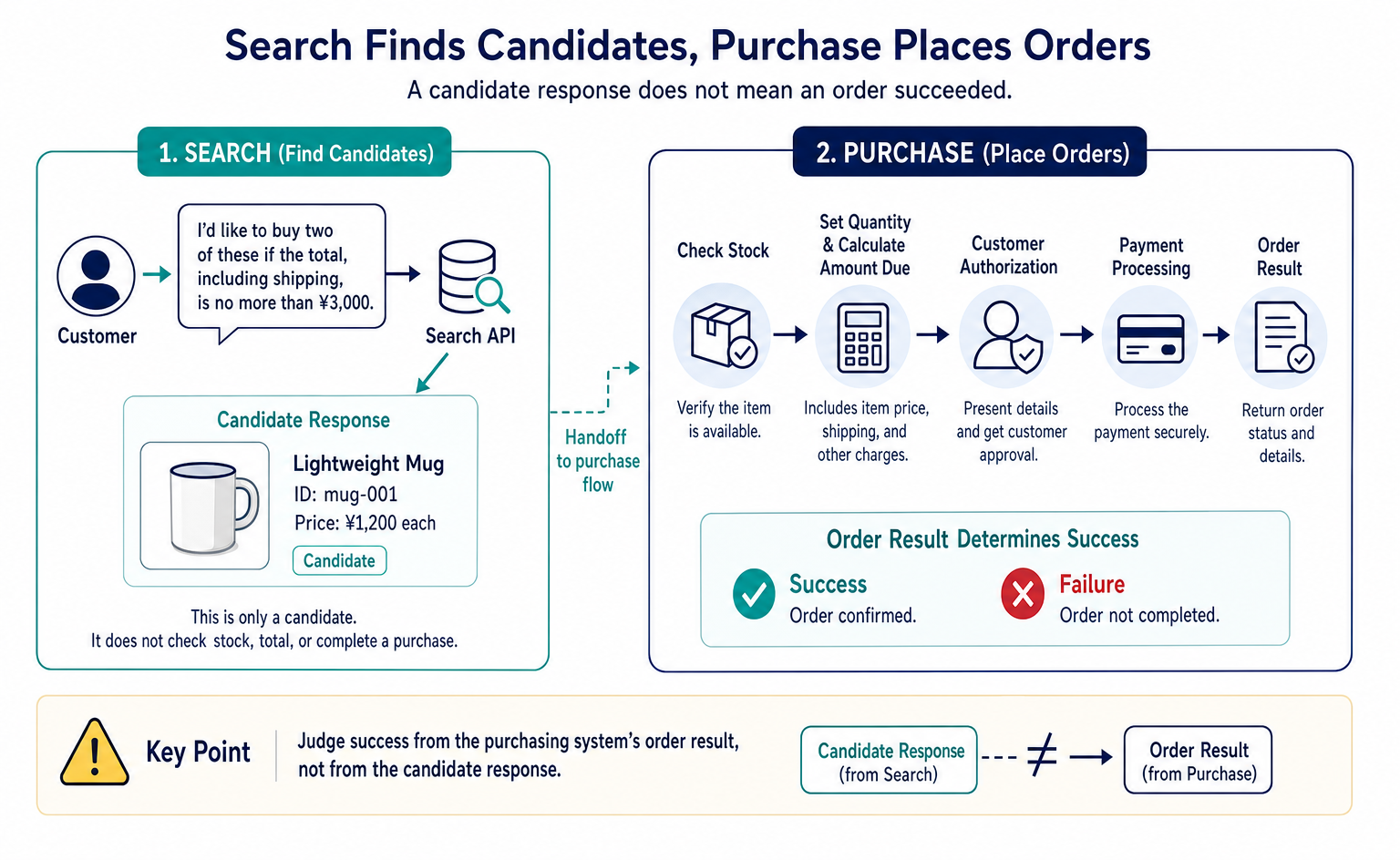
If you use an existing e-commerce cart, the purchasing system must check current stock and the amount due. The handoff from search results needs a separate design. Judge success from the purchasing system’s order result, not from the candidate response.
The README also lists /mcp for MCP and /a2a for A2A. Supporting these connection methods does not by itself add booking, ordering, or payment capabilities. Permission to call an API must also be distinguished from the customer’s authorization to make a purchase.[4]
7. What to Check Before Implementation
NLWeb is worth considering when products are hard to find by name or category alone, and you want to guide visitors to candidates based on their needs and conditions. For an article site, it can offer a way for readers to find articles by what they want to learn, without knowing the titles.
Start with these three checks:
- Can you provide the information? Do you have product features or article content that answer common questions, and can you turn them into data the loader can read?
- Can you test quality? Can you check that representative questions return appropriate candidates, names, and links, and see how products that do not meet the conditions are handled?
- Can you sustain operations? Can you assign responsibilities and budgets for collection, storage, AI, and the interface, and handle updates and errors?
For the Lightweight Mug example, first check that both the product page and source data include dishwasher compatibility and weight. Then work with the implementation team to check, in order, how the data is discovered, what is stored, and which candidates are returned for questions. You can also consider dividing responsibilities with existing features for exact product-code searches and price or stock filters.
Scope of This Guide
This guide explains the pinned version’s README, loading logic, type definitions, and result conversion. It is not a deployment procedure that has been tested in operation. You must check discovery and import settings for your own data, the time it takes for updates and deletions to appear, Japanese-language search quality, public API authentication and access restrictions, and operating costs in your implementation environment.
This guide does not include live connections to external services or tests of ordering and payment. If your goal is better search, start with product data and representative questions. If you also want to delegate purchasing, separately check the ordering and payment specifications and connections.
FAQ
- Q. Is NLWeb a service I can use by signing up through an admin screen?
- The nlweb-ask-agent covered here is a development framework whose code you obtain, configure, and run. It combines a search API, Crawler, search interface, and other components. Along with preparing product information, you must develop and operate the environment. The pinned version’s README says installation through PyPI is planned.[4]
- Q. Are product pages and a sitemap enough to make products searchable?
- You cannot tell from those alone. The README’s domain registration example requires sitemap.xml at the root, but a standard sitemap does not contain product details. The pinned loader parses JSON objects and arrays, JSONL, TSV, and RSS. Separately check which data will supply your product details and how the loader will reach it.[4][5]
- Q. Should I put the question directly into query?
- It depends on the implementation. In the pinned Ask Agent version, query is an object, and the question goes in its text field. Do not mix this with the NLWeb_Core README example, which puts a string directly into query.[2][7]
- Q. Where can I find candidate product names and links in the response?
- In the conv_search format specified here, the candidate list is results. The pinned version’s result conversion outputs name, url, description, and other fields, and carries over original product attributes. The article shows an illustrative excerpt that omits required metadata and other fields, not a complete API response.[6][7]
- Q. Can NLWeb alone handle orders and payments?
- A search setup alone does not establish that ordering and payment are possible. The result types include optional actions and a reference to AddToCartAction, but this does not mean a particular store’s cart, stock checks, shipping calculations, purchase authorization, and payments are connected. Check the purchasing specifications and order results separately.[4][7]
- Q. Can I use it without Azure?
- That depends on the component and repository. NLWeb_Core lists multiple search databases, but the pinned Ask Agent version used here states that Crawler connections are limited to Azure and that configuration for other storage destinations is not yet supported.[2][4]
- Q. Can it continue a conversation based on earlier questions?
- The pinned Ask Agent version’s types define context for passing earlier questions and other information. However, this guide covers only the flow from a single question to candidate results. Conversation continuation, its behavior in the interface, and Japanese-language quality are outside the scope of the checks covered here.[7]
Sources
- [1] nlweb-ask-agent README(main・初回参照資料) (nlweb-ai) — accessed 2026-09-10
- [2] NLWeb Core README (nlweb-ai) — accessed 2026-09-10
- [3] NLWeb Rest API (nlweb-ai) — accessed 2026-09-10
- [4] nlweb-ask-agent README(固定コミット065581c) (nlweb-ai) — accessed 2026-09-10
- [5] Ask Agent Crawler worker.py(固定コミット065581c) (nlweb-ai) — accessed 2026-09-10
- [6] Ask Agent ranked_result.py(固定コミット065581c) (nlweb-ai) — accessed 2026-09-10
- [7] Ask Agent protocol/models.py(固定コミット065581c) (nlweb-ai) — accessed 2026-09-10
About the author
Shogo MizushimaCEO of kairos Inc. / AgentSignal Developer
Develops AgentSignal, a tool for measuring AI crawler visits and AI-referred traffic, and diagnosing AIO readiness. Writes about measurement and practical improvements for AI search using observed data.
Related articles
Measurement and site improvement
What Are AI Crawlers? Why Blocking GPTBot Doesn’t Remove You from ChatGPT Search
AI crawlers are programs AI companies use to read public web pages. Learn how GPTBot differs from OAI-SearchBot, how Google-Extended works, why visits can continue after a robots.txt block and how to choose settings by purpose.
Published
AI shopping and booking
How to List Products on ChatGPT: From ACP Product Integration to Orders
A step-by-step guide to applying for product integration, sending and updating product data, and directing shoppers to checkout. Learn when order APIs are needed, how to test version 2026-04-17, and which features were available or still proposed as of September 10, 2026.
Published
Connecting AI and the web
WebMCP forms can now pass: reading the Lighthouse 13.5 audit changes
Lighthouse is a tool for auditing websites. This update makes a site's form coverage for WebMCP easier to interpret in the audit output.
Published