How to List Products on ChatGPT: From ACP Product Integration to Orders
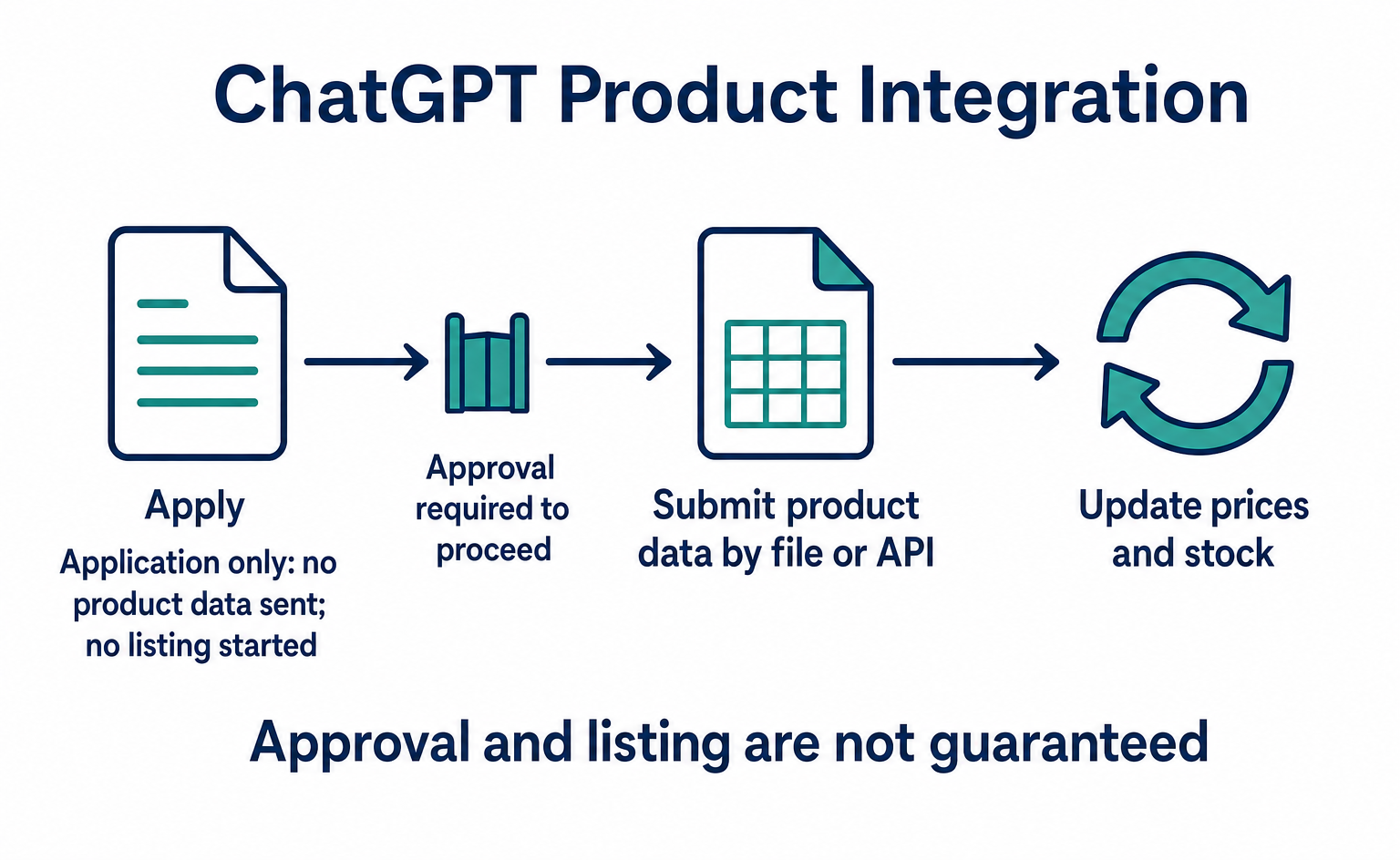
A step-by-step guide to applying for product integration, sending and updating product data, and directing shoppers to checkout. Learn when order APIs are needed, how to test version 2026-04-17, and which features were available or still proposed as of September 10, 2026.
If you want your products to appear on ChatGPT, start with product integration: delivering your product information. A collection of data such as product names, images, prices, and stock levels is called a “product feed.” OpenAI explains how to send this data as part of its ACP setup guidance. ACP, short for Agentic Commerce Protocol, is a shared set of rules that AI services and stores use to exchange product information and order details [8].
For example, a store selling water bottles would prepare product names, photos, prices, stock information, and purchase-page URLs. This prepares the information for ChatGPT to use when finding or comparing products. Direct product feed integration is for approved partners, so you must apply first [8][12].
This article follows this sequence: apply → send and update product information → connect shoppers to a purchase page → prepare order APIs if needed. Ecommerce managers who want their products listed can see what to do first and when additional development becomes necessary.
This implementation guide was written on September 9, 2026, and the official guidance was checked again on September 10. It is not a new announcement made today. The first half explains where to apply for product integration and how to send data. The second half covers the order APIs in version 2026-04-17, payments, and checks to make when something fails.
1. Apply to deliver product information to ChatGPT
Start by checking the application process for product integration, which lets you send your product list to ChatGPT. Before developing order APIs, choose an integration method available to your business [8][12].
OpenAI: receiving product information for ChatGPT product searches
OpenAI provides a way to receive product names, images, prices, stock information, and other details from stores. This product-list data is called a “product feed.” ChatGPT uses the information supplied by stores when finding or comparing products [8].
For example, sending updated prices and stock information for a water bottle gives ChatGPT information to use when recommending it, rather than relying only on old information. The endpoint for sending product information is on OpenAI’s side. Its role differs from the store’s order-taking APIs discussed in Section 6.
On the merchant page checked on September 10, 2026, the guidance was that purchases generally take place on the store’s website or app. Applying to share a product feed does not also enable payment within ChatGPT. Separate developer documentation describes checkout plugins as a pilot with approved partners [9][12].
How to apply for OpenAI product integration
- Open OpenAI’s merchant page in Japanese and go to “Apply to share your product feed.” The application form is below this heading. The English page uses the label “Apply to share your product feed” [12].
- Read the eligibility information first. The guidance on that date said Shopify and Etsy catalogs were already integrated, with no additional setup or application required. People who had already applied were on the waitlist and should not apply again. This guidance concerns product catalogs; it does not mean purchasing features are available in every region.
- If your company needs to apply, enter or select the information below. Labels differ between the Japanese and English pages, so this table explains what to enter.
| Form field | Information to enter |
|---|---|
| Name, job title, LinkedIn, work email (氏名・職種・LinkedIn・仕事用メール) | Details of the person handling the application and their LinkedIn URL |
| Company, headquarters country, store website (会社・本社所在国・店舗サイト) | Company name, country where its headquarters are located, and your ecommerce site URL |
| Main product category (主な商品カテゴリ) | The category of products your company sells |
| Desired integration (希望する連携) | The option to integrate a product feed for inclusion in ChatGPT product searches |
| Product feed readiness (商品フィードの準備状況) | Whether you have data ready that meets OpenAI’s specification. Do not claim it is ready if you have not checked |
| Number of products (商品数) | The number of distinct products counted by product identifier, not units sold or total stock |
| Additional information (その他の連絡事項) | Anything else you want to communicate, in a free-text field |
- Review your entries and apply using “Submit” at the bottom of the form. This completes the application only. It does not send your product information or start a listing. After approval, use the connection method provided to you [8][12].
The merchant page on that date described shopping features as intended for users in the United States. The presence of a headquarters-country field does not guarantee availability in Japan or approval for your company [12].
2. After approval, send product data and update prices and stock
After approval, use OpenAI’s getting-started guide to choose whether to supply your product list as a file or send it through an API. Check the product data format, gather the required fields, and submit the data. One common approach suggested is to send a full file once a day and use the API for changes during the day [8].
At this stage, the store needs a product list and a way to update it. The guidance does not tell you to finish all order APIs before applying.
Are APIs for adding and updating products public?
Specifications are publicly available for APIs that create product lists and add or update products. An API is a connection point through which systems send information to each other. Here, the store sends product information to OpenAI for use in ChatGPT product searches [14][15][16].
| Step | Action | Public API |
|---|---|---|
| 1 | Create a container for the product list and receive its ID | POST /product_feeds |
| 2 | Add products to that list. Update an existing product using the same product ID | PATCH /product_feeds/{id}/products |
| 3 | Retrieve the product data in the list | GET /product_feeds/{id}/products |
The {id} in the URL is the product-list ID received in the first step. It is different from each individual product’s ID. Product information can include a name, description, product-page URL, images, and prices and stock levels for each color or size. The API adds or updates only the products you send; products you do not send remain unchanged [15][16].
For example, when you change a water bottle’s price, send the new price with that product’s ID. When it sells out, update its stock status. If you send data once and never update it, shoppers may arrive at your store to find a different price or stock status.
The documentation describes authentication using an API key [14]. However, it does not say that submitting the application form automatically issues a key. Check the post-approval instructions for the actual destination and available credentials. Do not add a guessed domain to the paths above and send data to it.
In a successful product-submission API response, accepted indicates whether the submitted data was accepted. It does not guarantee that the product will appear in every answer or receive a particular ranking [16].
Can products appear on ChatGPT without a product feed?
Products can also be found by crawling websites. The merchant page says a product feed is not required if your site is already being crawled. A feed is a way for the store to provide more accurate, up-to-date information [12].
“Applied,” “data accepted,” and “featured in an actual answer” are different states. Keep application and submission records, and check that product names, prices, and stock information are being sent correctly.
3. Decide where shoppers will purchase the products they choose
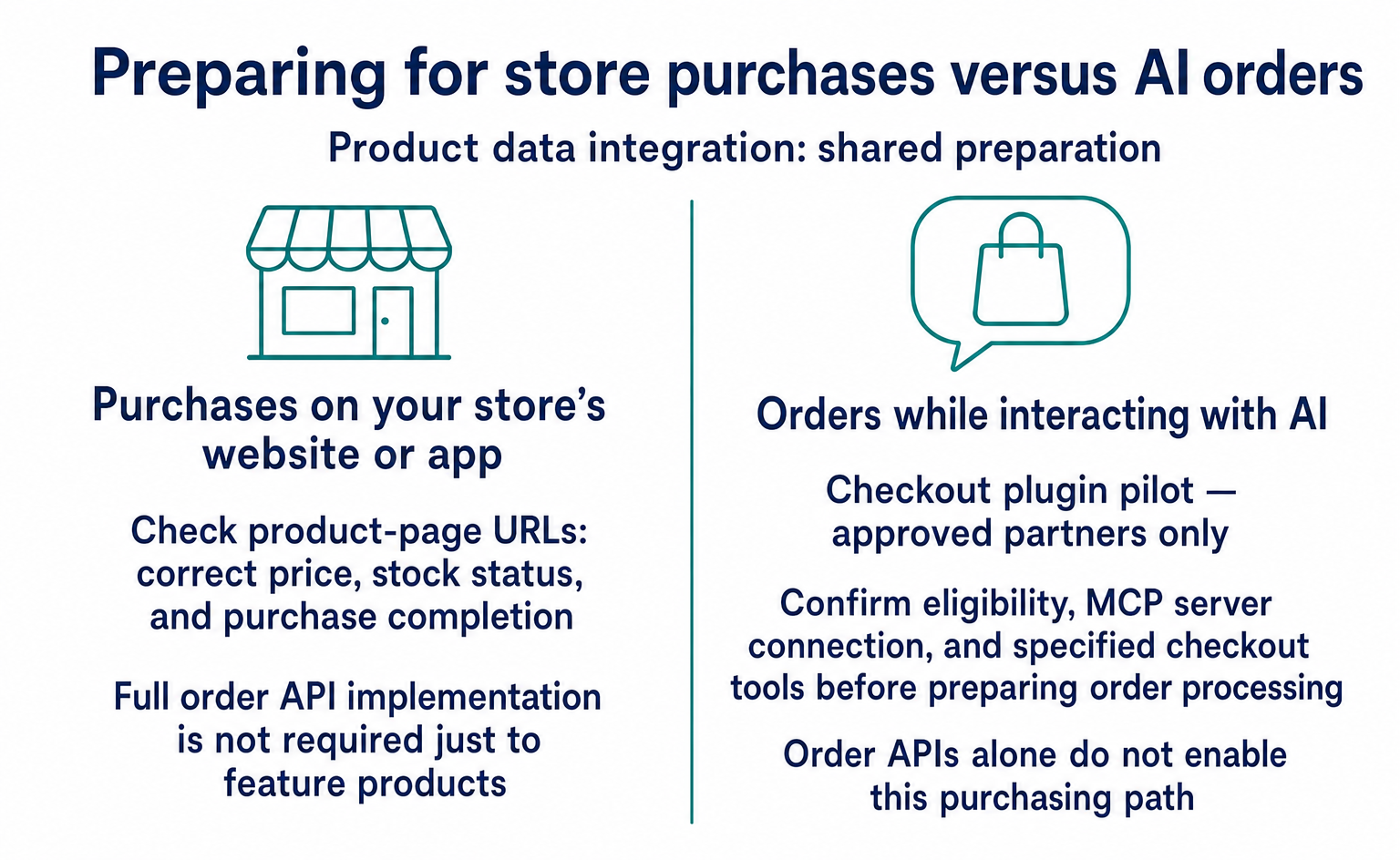
As of September 10, 2026, the basic flow was to discover a product on ChatGPT and buy it on the store’s website or app. First, check that the product-page URLs you send let shoppers confirm the correct price and stock status and proceed through purchase [12].
With this flow, you do not need to implement all the order APIs in the following sections just to have ChatGPT feature your products. If your goal is to drive purchases on your own ecommerce site, start with product integration and purchase-page checks.
If you want shoppers to place orders while interacting with AI
Checkout plugins are described as a pilot with approved partners. In addition to product data integration, the guidance calls for a connection mechanism called an MCP server and specified checkout tools [9].
If you want to use this approach, confirm your eligibility and the required connection method before preparing order processing. The following sections explain a setup using ACP’s public order APIs. Building these APIs alone does not enable ChatGPT’s purchasing features.
What Stripe can do: connect AI product recommendations to payment
Stripe’s AI selling features can deliver product information to supported AI services and connect shoppers who choose products there to purchase and payment. For stores, this provides a way to sell to people who search for products using AI. These features require application approval and completion of product integration and checkout setup [10][17].
Stripe is a service that processes online payments. Its AI selling features also provide ways to deliver product lists to AI services and move customers through checkout [10][17].
For example, suppose a customer searches for a water bottle in a supported AI service and chooses one they like. The AI asks Stripe to start checkout, then collects delivery and payment information to continue the purchase. Once the purchase is complete, the store’s system receives a notification and can prepare the shipment. This example follows the flow in Stripe’s official guide [10].
“Supported AI services” here means AI services configured as available sales channels. The guidance does not say that applying to Stripe enables this purchase method in every AI service, including ChatGPT. Check the available purchase methods and participation requirements separately from the ChatGPT product integration described above [10][12].
What do Stripe, the AI, and the store each handle?
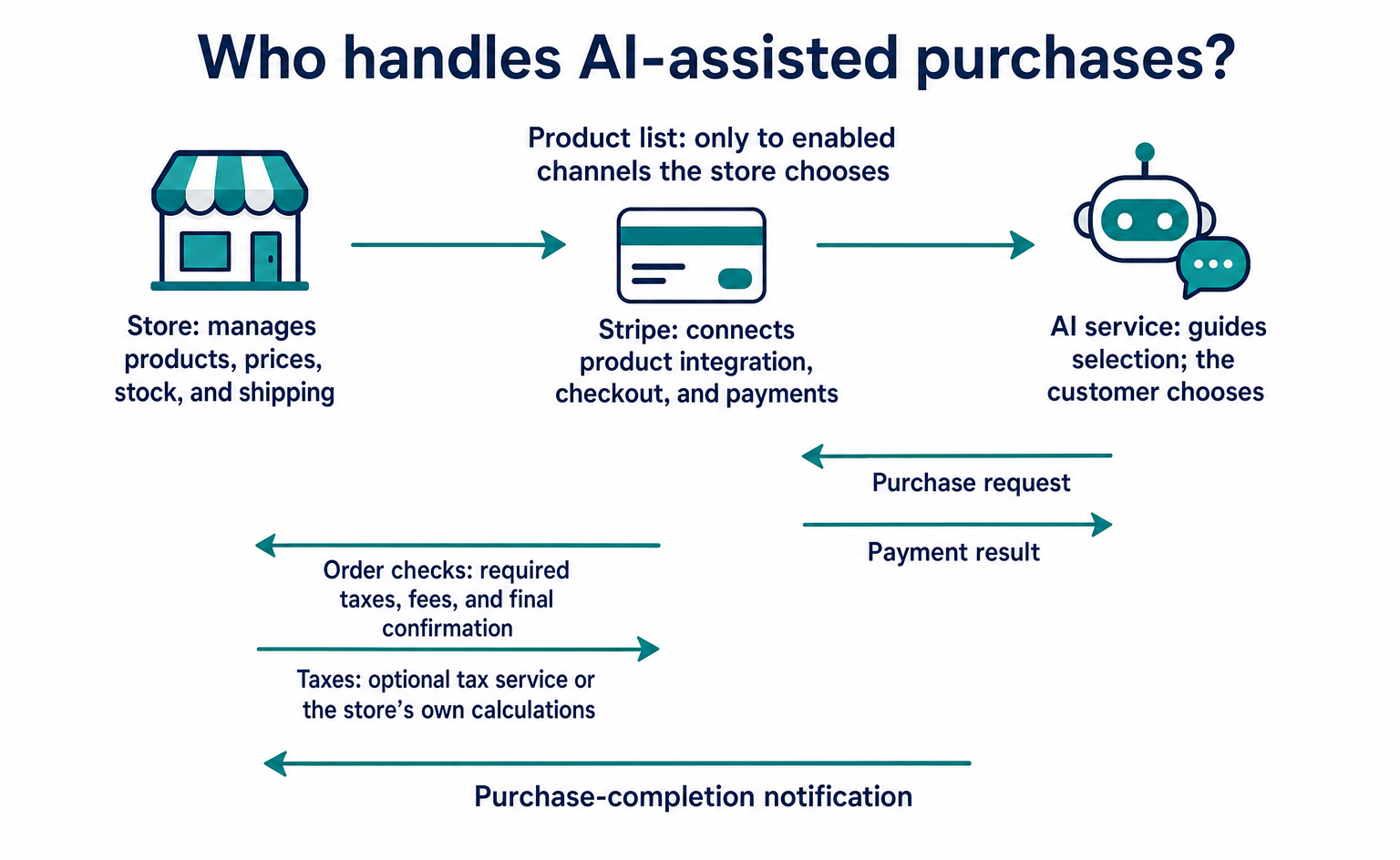
The AI interacts with the shopper, Stripe handles product information transfer and checkout and payment processing, and the store manages products and shipping. In purchase order, the roles are as follows [10].
| Purchase stage | Responsibility |
|---|---|
| Deliver products to AI services | The store supplies a product list to Stripe, which sends it to enabled AI sales channels |
| Choose a product | The customer selects a product in the AI service and proceeds to purchase |
| Check order details | Stripe advances checkout and asks the store’s system for any required taxes, fees, and final order confirmation |
| Complete payment | Stripe processes the purchase and payment using the configured method and returns the result to the AI |
| Ship the product | The store receives Stripe’s purchase-completion notification and ships the product |
The store still needs to prepare accurate product information and update prices and stock. You can choose to have Stripe Tax calculate taxes or return your own tax calculations through the integration. Configure platform fees and final order checks to suit your chosen setup. Using Stripe does not mean it automatically takes over product management or shipping [10].
Connecting multiple stores together
The official Stripe guide discussed here is for companies operating ecommerce services used by multiple stores. Stripe calls such an operator a “platform.” The operator connects each store’s Stripe account and integrates its product list and checkout processing [10].
For example, an ecommerce service used by several general-goods stores would send each store’s product list and build a system to handle order checks and purchase-completion notifications. Each store chooses whether to join an AI sales channel. The following application and setup steps are for companies using this structure. If you only want to send your own products directly to OpenAI, applying to Stripe is not also mandatory [8][10].
First steps in applying to Stripe
- Open Stripe’s waitlist application page. Its title is “Join the waitlist for the Agentic Commerce Suite” [13].
- Enter your work email under “Work email” and select the country where you operate under “Country/Region.” On the first screen checked on September 10, 2026, the choices were Canada and the United States. Japan was not an option. Businesses in Japan should not substitute another country; treat this form as unavailable to you at this stage.
- If you operate in an eligible country, select “Continue” and follow the application fields shown. Only the first screen was checked for this article. Required fields on the next screen and the final submission screen were not verified.
The application page addresses North America, but the specified platform guide explicitly says it is for US businesses and requires waitlist approval. Canada appearing in the form does not establish that every feature in that guide is available in Canada. The application page lists individual merchants, companies supporting multiple stores, and AI services seeking to embed purchasing features as eligible types of applicants [10][13].
What do you configure after Stripe approval?
After approval, open the Agentic commerce settings page in the relevant Stripe account. If you are not signed in, you will be taken to the login screen. The steps below follow the official guide; they are not the results of operating an approved account’s settings for this article [10].
- Create a “Stripe Profile” with your business information.
- Set up how customer payments flow. Choose between processing payments on the store’s Stripe account (direct charges) and processing them on the platform’s account before transferring funds to the store (destination charges with
on_behalf_of). In both cases, the store is the entity selling the product to the customer. - Enable the AI connections through which products will be sold.
- Configure the URL that receives notifications such as completed purchases, the receipt format, and the customer support policy.
Next, prepare each store’s product list and check that it loads in the test environment. Choose Stripe Tax or your own tax calculations, and configure any necessary fee and order-check integrations. Only at this stage are you connecting product information and checkout processing to your operations. Joining the waitlist, receiving approval, completing setup, and successfully processing a live order are separate stages.
The action to take now is to open the application page that matches your goal and read the eligibility requirements. If eligible, enter your business information and apply. If not, wait for changes to supported countries or application requirements.
4. If you need order APIs, confirm the connection and supported version
ACP stands for Agentic Commerce Protocol. In addition to product information integration, it has public specifications for exchanging order information. From here, the article is for people considering implementation of the order APIs [5][6].
You can read the API specifications and data examples in the public ACP repository maintained by OpenAI and Stripe. The README labels ACP as beta. This does not mean it is a final specification that every AI service can use in the same way [5].
How much of the order API setup was settled as of September 10, 2026?
You can use the public version to prototype order processing and check the participation requirements of the AI service where you want to sell. Not everything is complete, including the mechanism for telling AI services where to connect.
| What to check | Status found | What you can do now |
|---|---|---|
| Order APIs and request/response data | Public version 2026-04-17 is available. ACP overall is beta [5][6][7] | Create test orders using this version. Use the format checks and order tests in Sections 6–8 |
| Order API authentication | The OpenAPI specification used here defines Bearer authentication [6] | Agree with the connecting party on who issues, shares, and revokes credentials |
| File that tells AI services where the APIs are | /.well-known/acp.json is Proposal / unreleased [11] |
Read it as a design proposal and check whether the service you connect to has adopted it |
| ChatGPT product integration and purchasing features | Product integration is for approved partners. Checkout plugins are a pilot with approved partners [8][9] | Check whether your company can participate through the official application channels |
| Implementation by an external service | Stripe describes an offering subject to supported-country and participation-approval requirements [10] | Review the features, supported countries, and application screen in Section 3 |
“A public version is available” means that version can serve as an implementation baseline. It does not mean it is a final, unchanging specification or that every AI service can use it. Do not assume a proposed feature will work in production until the service you connect to confirms adoption.
Do the APIs have to use the same domain as the ecommerce site?
You need APIs capable of processing the merchant’s orders, but they do not necessarily have to run on the merchant’s own servers. The public specifications reviewed did not appear to require product pages and APIs to share a domain. An external service could host the APIs. Check which connections are accepted alongside the requirements of the AI service you plan to join [6][10].
When this article says “the store builds the APIs,” “the store” means the party processing the store’s orders. The store may develop them itself or ask an ecommerce service or external provider to implement and operate them.
| Example setup | Product pages | Where the ACP APIs run |
|---|---|---|
| The store builds its own setup | shop.example.com |
Servers managed by the store |
| An external provider uses a dedicated store subdomain | shop.example.com |
An external service, with the connection domain and certificates also configured |
| An external service receives requests on its own domain | shop.example.com |
The external service’s shared API |
These are possible architectures, not a guarantee that any domain will be accepted without conditions. Stripe publishes a mechanism through which platforms support product integration and checkout for multiple merchants. However, that guidance is for US businesses and also requires participation approval [10].
Will AI automatically use an endpoint if you publish its URL?
Simply writing a URL on a page does not complete setup. You must coordinate merchant information, API destinations, authentication, and payment methods with the AI service you connect to. Check ChatGPT participation requirements separately as well [8].
The public ACP repository includes a design document for publishing an api_base_url through /.well-known/acp.json. It also describes an external platform supporting multiple stores, but the document reviewed was marked Proposal / unreleased [11].
The proposal is for a mechanism that lets AI services look up an API’s location and supported features in a standard place. The document explains that without a common way to announce connection details, API URLs must be shared separately. Authentication that authorizes purchases and registration of AI services are outside this file’s scope [11].
The document checked on September 10, 2026, did not provide a general-release date. It is not yet something you should expect ChatGPT to discover and use for orders merely because you publish the file.
For now, ask the AI service where you want to sell: “What is the process for registering our API URL?” and “Do you support this discovery file?” While awaiting an answer, you can still test with your store’s product IDs, stock, and shipping charges. Once adoption is confirmed, follow that service’s required version and settings. Both the public repository’s status and the connecting service’s support should inform when you review your setup.
For the first test, choose one order you want to accept. For example, narrow the scope to “buy one water bottle at the standard price for domestic delivery.” Assess the need for personalization, subscriptions, and complex discounts afterward.
This is a way to keep the first test small, not a limit on the products ACP can handle. Once you have defined the product and order conditions, it becomes easier to see which existing features are sufficient.
5. The store decides prices and stock availability
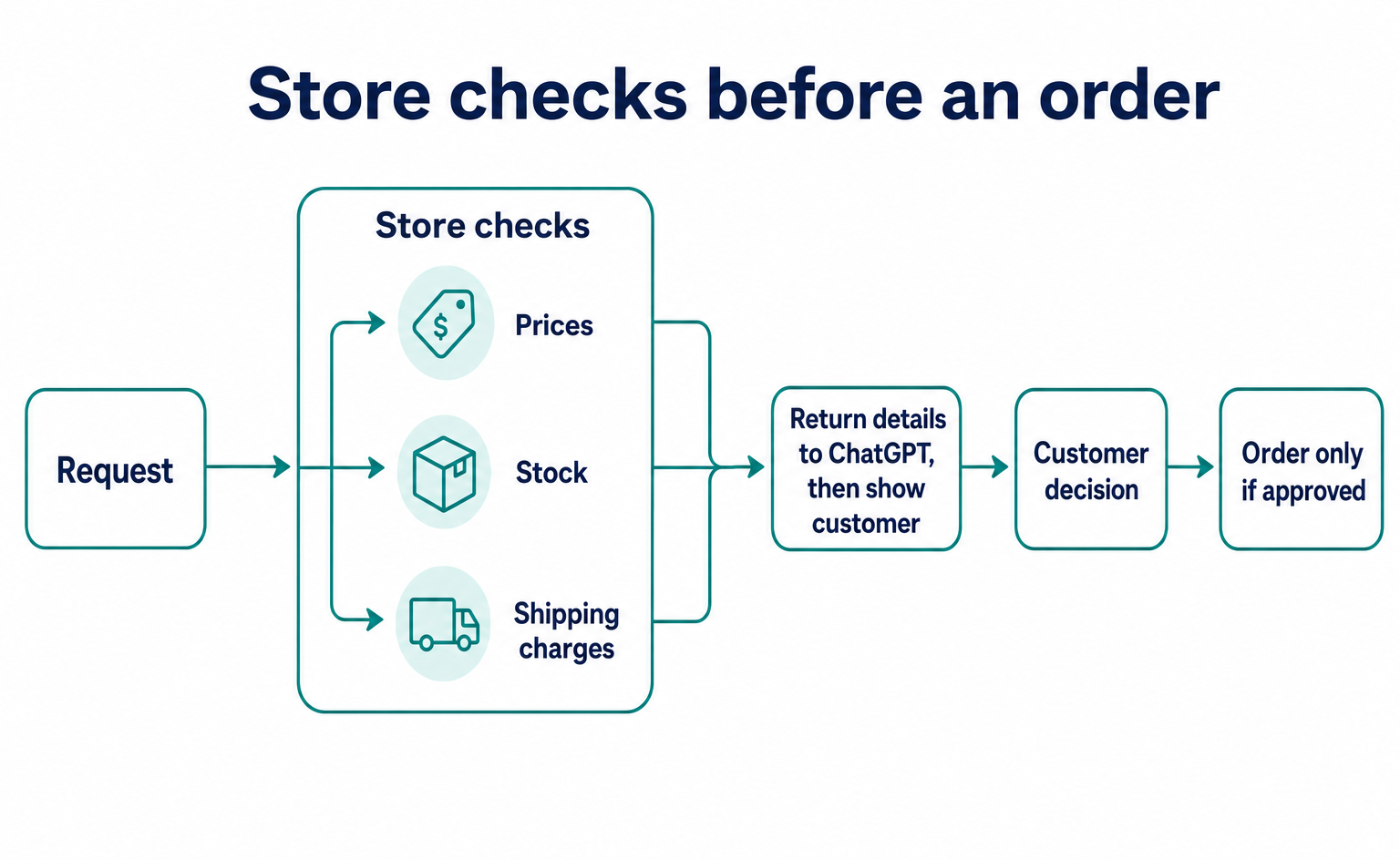
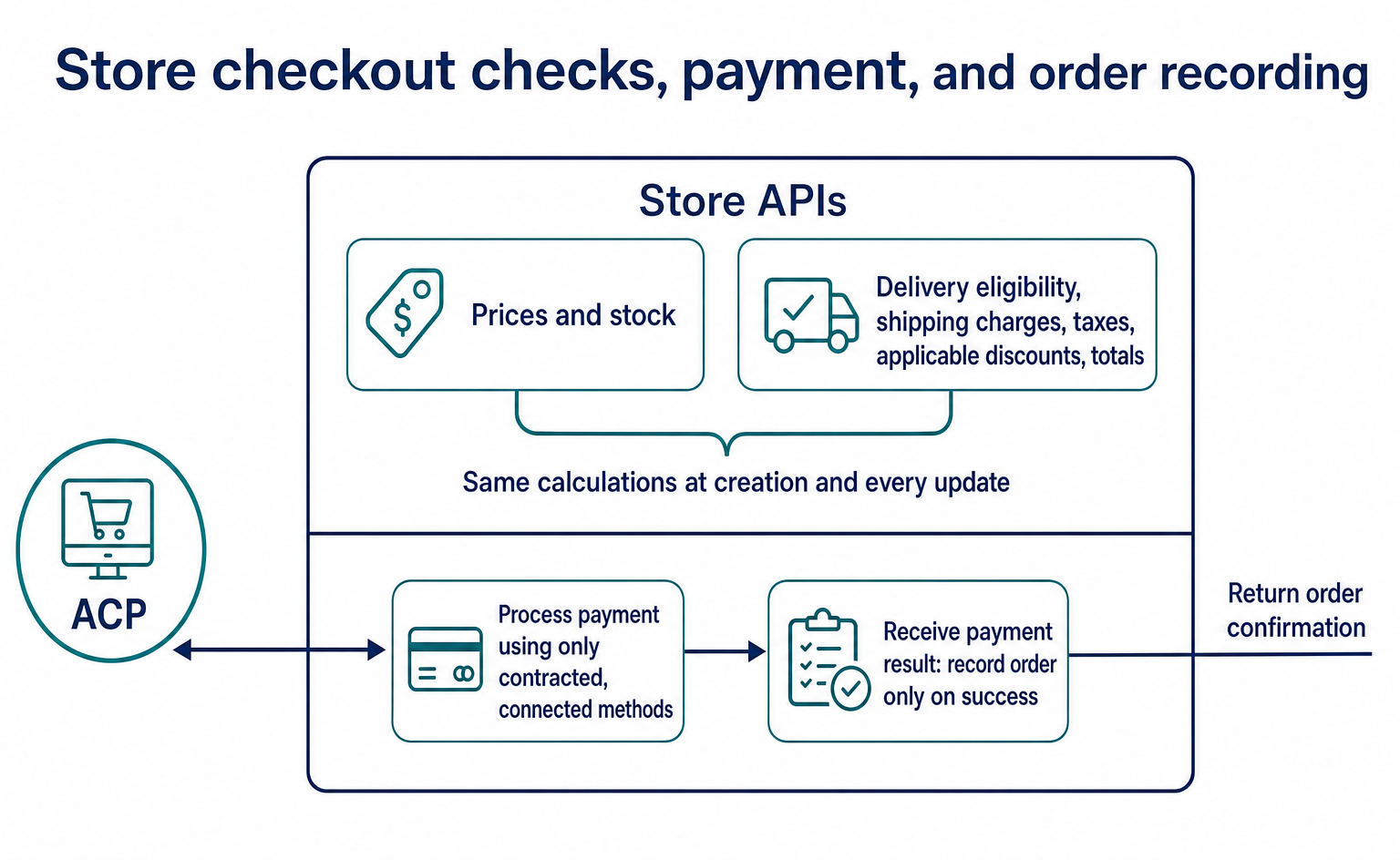
Even when AI advances an order, the store sets the sales terms. The official explanation also assigns merchants responsibility for prices, taxes, shipping charges, inventory, payments, and fulfillment [1].
The amounts below are illustrative. If a water bottle costs ¥3,000 and shipping is ¥500, check that the total shown to the customer and the total charged by the store both equal ¥3,500. If a change in delivery address increases shipping costs, checkout must not continue using the old amount.
Stock requires the same checks. A product may be in stock when AI recommends it but sold out by the time an order is placed. Rather than trusting the information used for the recommendation, check availability when accepting the order.
| Changing condition | What the store should check |
|---|---|
| Delivery address | Are shipping charges and supported delivery areas correct? |
| Product quantity | Do the total and stock availability update? |
| Discount conditions | Are ineligible products being discounted by mistake? |
| Order time | Has the order cutoff passed? |
This table is an example checklist to adapt to your products. Not every store has the same discounts or cutoff times. List the conditions used by your current online store and check that orders through AI produce the same results.
6. Build five store-side endpoints to handle orders
You are implementing APIs that connect AI-originated orders to your existing ecommerce system. An API is a connection point through which systems exchange information. ACP’s public specification defines the endpoint names and the format of data sent and received [5][6].
Read this part with the person responsible for implementation. Use 2026-04-17 as the fixed reference version. Do not mix in code examples from unreleased development material or other versions. The URLs below are paths for APIs built on the store side, not destinations on OpenAI’s API.
| Store-side API to build | Processing in the store’s system |
|---|---|
POST /checkout_sessions |
Look up products and create a checkout session. Return 201 on successful creation |
GET /checkout_sessions/{id} |
Return the current state of a saved checkout session |
POST /checkout_sessions/{id} |
Update details such as the delivery address, then recheck stock and amounts |
POST /checkout_sessions/{id}/complete |
Process payment and return the order result |
POST /checkout_sessions/{id}/cancel |
Cancel an unfinished checkout session |
Replace {id} with the checkout-session ID returned at creation. Manage it separately from the order number. If your existing ecommerce system already calculates prices and accepts orders, call those functions from inside the APIs. Maintaining a second price list makes discrepancies with website purchases more likely.
The initial data to send
The following creation request specifies the illustrative product bottle_001. It uses the JSON data format. currency specifies the currency, and capabilities describes the features the AI side can handle. The empty {} means this example declares no additional features [6][7].
{
  "line_items": [{"id": "bottle_001"}],
  "currency": "jpy",
  "capabilities": {}
}
In this version, creation data must include line_items, currency, and capabilities. Copying a published example unchanged does not guarantee it will work. The same specification file still contains examples using items, which does not match the required-field definitions [6][7].
Quantity also needs checking. In this version, the creation-side Item does not define quantity, while the response-side LineItem does. The response example below assumes the store sets the quantity to 1 for illustration. To handle multiple units, confirm the format accepted by the connecting service rather than adding fields by guesswork.
If you save the JSON above as create.json and send it to a store-side test API, the command takes the following form. Use this example only after preparing the destination and credentials. The hostname and key shown are dummy values.
curl --request POST 'https://merchant.example.com/checkout_sessions' \
  --header 'Authorization: Bearer TEST_MERCHANT_TOKEN' \
  --header 'Content-Type: application/json' \
  --header 'API-Version: 2026-04-17' \
  --header 'Idempotency-Key: 94a2f603-c15c-4bf6-87b4-e36b43d7de90' \
  --data-binary @create.json
Authorization contains credentials used to verify the caller, and API-Version specifies the version of the specification. Idempotency-Key identifies a repeated attempt at the same operation. This version requires it for every POST request [6]. Use a new key for a new operation and the same key when retrying the same operation.
Data the store calculates and returns
The store uses the product ID to look up price and stock, saves the checkout session, and returns it. Below is an example response for a ¥3,000 product before a delivery address has been supplied. The amount is illustrative. Because shipping charges are not yet final, the session is not marked ready for payment.
{
  "id": "cs_demo_001",
  "protocol": {"version": "2026-04-17"},
  "status": "not_ready_for_payment",
  "currency": "jpy",
  "line_items": [{
    "id": "li_demo_001",
    "item": {"id": "bottle_001"},
    "name": "水筒",
    "quantity": 1,
    "unit_amount": 3000,
    "totals": [{"type": "total", "display_text": "商品代金", "amount": 3000}]
  }],
  "totals": [{"type": "total", "display_text": "送料確定前の金額", "amount": 3000}],
  "fulfillment_options": [],
  "messages": [],
  "links": [],
  "capabilities": {}
}
totals is an array listing the amounts that make up the total. amount is an integer expressed in the currency’s smallest unit; for Japanese yen, ¥3,000 is 3000 [7]. Calculate the charge from the store’s product data rather than accepting an amount sent by AI.
This example illustrates the data structure. Actual responses should also provide guidance on missing information, delivery methods, links to terms, and supported payment methods according to your store’s requirements. Move to ready_for_payment only after the delivery address and payment method are available and the amount can be finalized [1][3].
Update the delivery address and shipping charges
After the delivery address is entered, update the same checkout-session ID. For example, send data like the following to POST /checkout_sessions/cs_demo_001. The address and name are test examples.
{
  "fulfillment_details": {
    "name": "テスト購入者",
    "address": {
      "name": "テスト購入者",
      "line_one": "テスト町1-1",
      "city": "千代田区",
      "state": "東京都",
      "country": "JP",
      "postal_code": "1000001"
    }
  }
}
The store checks whether it can deliver to the area and returns delivery methods and shipping charges. If the AI selects a delivery method, it updates selected_fulfillment_options using the ID of a returned method [6]. If shipping is ¥500, check that the total with the earlier product price is ¥3,500.
Recalculate stock availability, shipping, taxes, and applicable discounts on every update. Use the same calculation process at creation and update so that old shipping charges or expired discounts do not remain.
7. Connect payments and confirm that an order was created
Even after receiving payment information, the store must implement payment processing and order creation. Accepting ACP data alone does not complete charging or shipping [1][2].
First, use capabilities.payment.handlers in the response to declare the payment methods the store supports. Each method requires an ID, method name, version, payment service, configuration, and other details. Return only methods you have actually contracted for and connected [6][7].
The completion API receives payment_data in the following form. card_tokenized must match the ID of a payment method the store previously offered. spt_TEST_ONLY is an illustrative string and cannot make a real payment.
{
  "payment_data": {
    "handler_id": "card_tokenized",
    "instrument": {
      "type": "card",
      "credential": {
        "type": "spt",
        "token": "spt_TEST_ONLY"
      }
    }
  }
}
This example passes payment information in place of the card number itself [7]. The store checks that handler_id matches a method it offered, then routes processing to the corresponding payment service. Check that service’s documentation for spt support and the credentials required to process it.
Ask the implementation team to build the following process. This is a design example for integration into existing order and payment processing, not finished production code.
- Check the checkout session’s owner and current state. Do not start a new payment for a canceled or completed session.
- Look up the processing record for the same
Idempotency-Key. If complete, return the saved response. Reject a request that uses the same key with different content. - Check stock and the final amount, and save the payment-processing ID. Use database uniqueness constraints or locks to prevent the same order from proceeding concurrently.
- Request payment from the payment service. Use that service’s duplicate-prevention mechanism for this call as well.
- Save the result and, once success is confirmed, create the order exactly once. Set the session to
completedand return it with the order information.
The order object requires the order ID in id, the original checkout-session ID in checkout_session_id, and the order-confirmation page in permalink_url [7]. Link your order table to the checkout-session ID so that later AI queries return the same order.
Plan for the store’s system to stop immediately after payment succeeds. After recovery, it must be able to check the payment record and resume saving the order. Rolling back the store’s database does not also cancel an external payment.
Encrypt communications with HTTPS and accept requests only from authenticated parties. The official security guidance also describes signed communications. The curl example above does not show every production connection setting, including signatures. Confirm the signature method and verification procedure required by the connecting party [4][6]. Also establish a rule against logging complete payment tokens or addresses in troubleshooting records.
8. Decide in advance what to tell customers when a purchase fails
Test orders that stop midway, not just successful ones. The next instruction depends on whether the problem is an incomplete address, an out-of-stock item, a payment failure, or something else.
ACP distinguishes states such as missing information, ready for payment, payment in progress, completed, and canceled. A completed checkout cannot be reversed with the same cancellation operation used before completion [3]. Check post-purchase returns and refunds separately as part of the store’s procedures.
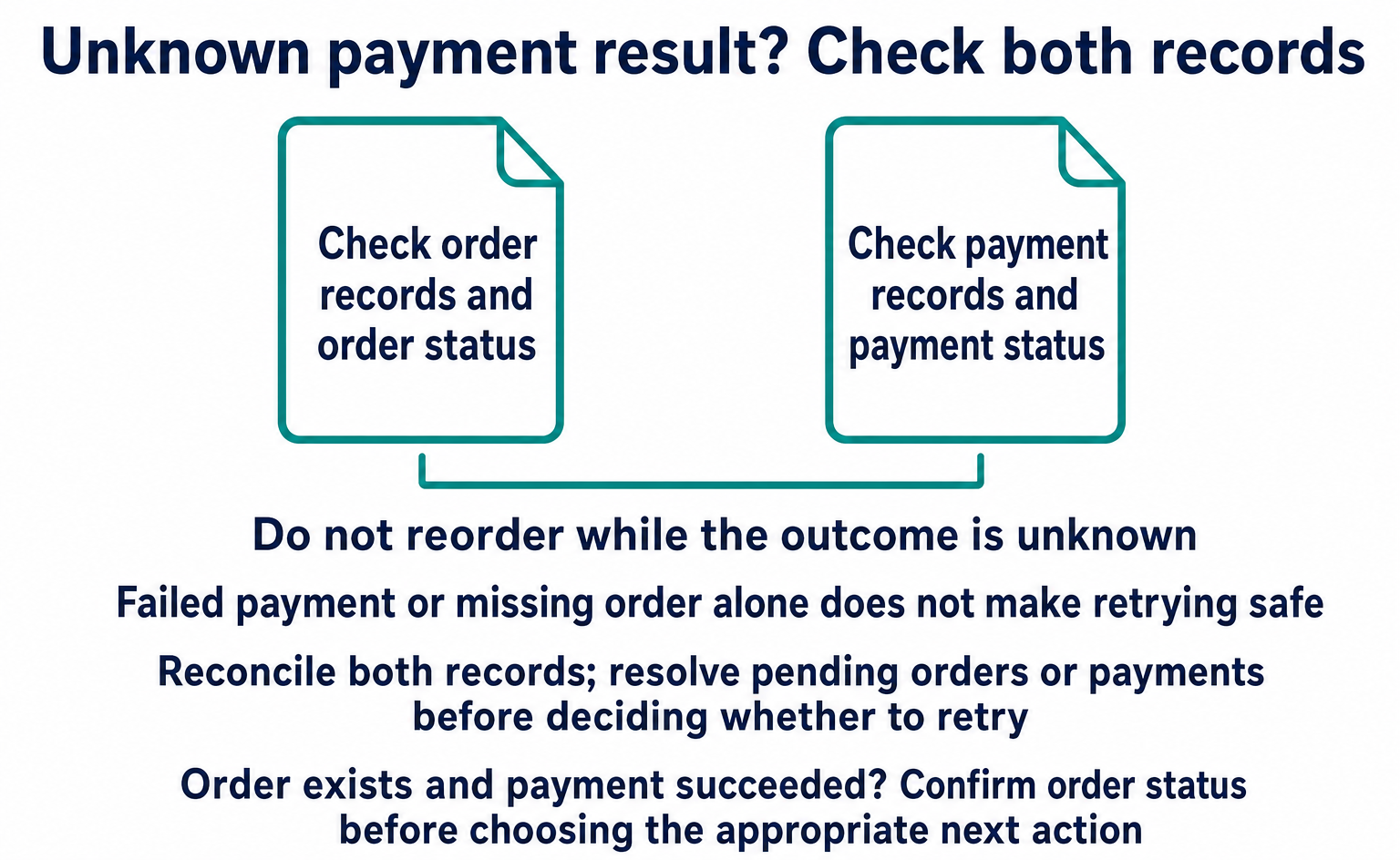
For example, consider a connection dropping during payment. Even if the customer’s screen does not show completion, the store may already have created the order. Immediately creating another order could produce a duplicate.
Prepare for this by deciding which order to query to find the result. Do not advise reordering while the result is unknown. Establish a procedure for checking both order and payment records. This operational check is necessary whether or not AI is involved.
| Test scenario | What to verify |
|---|---|
| Part of the address is missing | The missing information is identified and the customer can correct it |
| The last unit was sold to someone else | The system reports that the item cannot be purchased and does not create a valid order |
| No payment result is returned | Order and payment records can be checked before deciding what to do next |
| The same request arrives again | Orders and charges are not duplicated |
| The customer wants a return after ordering | The customer can be directed to the contact details and return procedure |
Use test orders and record expected and actual results. Do not stop at “an error appeared.” Check what the customer saw and what records remained in the store’s system. Those details can also help customer support.
Test data formats separately from actual orders
You can use the ACP Data Checker to validate this article’s JSON examples or your own test data. Start with “Try a sample” (サンプルで試す). Input is processed in your browser. This tool checks order-data formats; it does not register products on ChatGPT.
The four JSON examples shown were checked for required fields and types against both the OpenAPI definitions and JSON Schema in the referenced version. This does not mean they were connected to ChatGPT or used to complete a payment successfully.
To check creation data locally, put the earlier create.json in the same folder as check_payload.py, containing the code below. This process only retrieves the public specification and checks the JSON structure. It does not place orders or process payments.
import json
from urllib.request import urlopen
from jsonschema import Draft202012Validator

commit = "7fdd78df677a94dce04c770644b0fbbb1401272b"
url = (
    "https://raw.githubusercontent.com/"
    "agentic-commerce-protocol/agentic-commerce-protocol/"
    f"{commit}/spec/2026-04-17/json-schema/"
    "schema.agentic_checkout.json"
)
with urlopen(url, timeout=30) as response:
    schema = json.load(response)
with open("create.json", encoding="utf-8") as source:
    payload = json.load(source)
validator = Draft202012Validator({
    **schema, "$ref": "#/$defs/CheckoutSessionCreateRequest"
})
validator.validate(payload)
print("作成データの形式を確認しました")
Run the following commands in order in an environment with Python 3. This example installs the validation libraries in a dedicated environment.
python3 -m venv .acp-check
.acp-check/bin/python -m pip install jsonschema
.acp-check/bin/python check_payload.py
After a successful check, try changing the field to items or deleting capabilities, and confirm that errors occur. Checking that only valid examples pass makes field changes easier to catch.
During implementation, supplement these format checks by calling the five APIs in sequence in a test environment. Check the 201 response at creation, the amount after updates, the order number after completion, and the state returned by queries. Create a separate session to test cancellation.
Retries also need testing. This version defines a 400 response when a POST retry key is missing, 409 when processing with the same key is still in progress, and 422 when the same key is used with different content [6]. Also check that resending identical content leaves only one order and one charge.
9. Verify sales using order records
Record increases in AI-driven visits separately from increases in orders through ACP. A purchase may proceed within an AI interaction without the shopper opening your pages.
For example, even if 10 people visit your site after an AI recommendation, that does not mean all 10 placed orders. Conversely, an order may reach the store’s system even when no page visit is recorded. These numbers are illustrative, not measured results.
AgentSignal can be used to check AI-driven visits to your website and actions within pages. However, a website tracking tag alone cannot capture every ACP order or payment. Use ecommerce order records and payment records to confirm purchases.
Start by making it possible to compare accepted, completed, and failed orders over the same period. Decide how to count duplicates and cancellations so that comparisons remain consistent even when the person responsible changes.
You can use the AIO Check to review preparation that helps AI read product information, including product-page HTML and structured data. This check examines the page’s condition; it does not verify product listings or answer content on ChatGPT. First prepare your product information and purchase pages, then move to order processing once the required connection method is clear.
If you are ready to apply, use the OpenAI link in Section 1 to review eligibility and the form fields. Send product information, update prices and stock, and connect shoppers to the purchase destination. Services supporting multiple stores can also review the Stripe approach in Section 3. If order APIs are needed, proceed to the connection, implementation, and testing steps in Sections 4–8.
FAQ
- Q. What should I do first?
- Read the product integration eligibility requirements on OpenAI’s merchant page and check whether you need to apply. After approval, send your product list and keep prices and stock information updated. You do not need to build all the order APIs first to have your products featured.
- Q. Is ACP also used to register products?
- OpenAI includes sharing a product feed in its ACP setup guidance. There are APIs for delivering product data and APIs through which a store accepts orders. This article starts with product integration.
- Q. If I support ACP, can I accept orders from every AI service?
- No. Separately from ACP support, you need to check the requirements of the AI service, the country where you sell, and the payment service.
- Q. Can I keep using my current payment service?
- An existing contract alone does not answer that question. Confirm with your integration partner whether the service can process the payment information received through ACP.
- Q. If the connection drops during an order, can the customer order again?
- Check the order and payment records first. The store may have finished processing the order even if the screen does not show completion. Establish a procedure to prevent duplicate orders.
- Q. Are cancellations and returns handled in the same way?
- Check cancellation of an unfinished ACP checkout separately from returns and refunds after purchase. A completed checkout cannot be reversed using the same operation used to cancel an unfinished one.
- Q. How much does implementation cost, and how long does it take?
- That depends on your ecommerce and payment systems, the products involved, and the scope of additional development. Choose the services and order types you want to support, then assess development and operating costs.
- Q. Where can I read the ACP specification?
- The public GitHub repository maintained by OpenAI and Stripe contains API specifications, data definitions, and examples. This article refers to version 2026-04-17. Publication of the specification and approval to participate in ChatGPT are separate matters.
- Q. Do ACP APIs have to use the same domain as the ecommerce site?
- The public specifications reviewed did not appear to require the same domain. An external service could connect to the store’s ecommerce system. However, this still requires acceptance by the service you connect to, merchant authentication, and integration with ecommerce and payment systems. Simply placing a URL on a page does not activate the service.
Sources
- [1] Getting Started for Sellers (ACP) — accessed 2026-09-10
- [2] Architecture (ACP) — accessed 2026-09-10
- [3] Checkout Lifecycle (ACP) — accessed 2026-09-10
- [4] Security (ACP) — accessed 2026-09-10
- [5] ACP公開リポジトリ・README (OpenAI / Stripe) — accessed 2026-09-10
- [6] Agentic Checkout OpenAPI 2026-04-17 (ACP) — accessed 2026-09-10
- [7] Agentic Checkout JSON Schema 2026-04-17 (ACP) — accessed 2026-09-10
- [8] Get Started — Agentic Commerce (OpenAI) — accessed 2026-09-10
- [9] Product checkout conversion spec (OpenAI) — accessed 2026-09-10
- [10] Sell through agents as a SaaS platform (Stripe) — accessed 2026-09-10
- [11] Agentic Checkout Discovery — Proposal / unreleased (ACP) — accessed 2026-09-10
- [12] Power product discovery in ChatGPT — merchant application (OpenAI) — accessed 2026-09-10
- [13] Join the waitlist for the Agentic Commerce Suite (Stripe) — accessed 2026-09-10
- [14] Agentic Commerce API Overview (OpenAI) — accessed 2026-09-10
- [15] Feeds API (OpenAI) — accessed 2026-09-10
- [16] Products API (OpenAI) — accessed 2026-09-10
- [17] Agentic commerce overview (Stripe) — accessed 2026-09-10
About the author
Shogo MizushimaCEO of kairos Inc. / AgentSignal Developer
Develops AgentSignal, a tool for measuring AI crawler visits and AI-referred traffic, and diagnosing AIO readiness. Writes about measurement and practical improvements for AI search using observed data.
Related articles
Connecting AI and the web
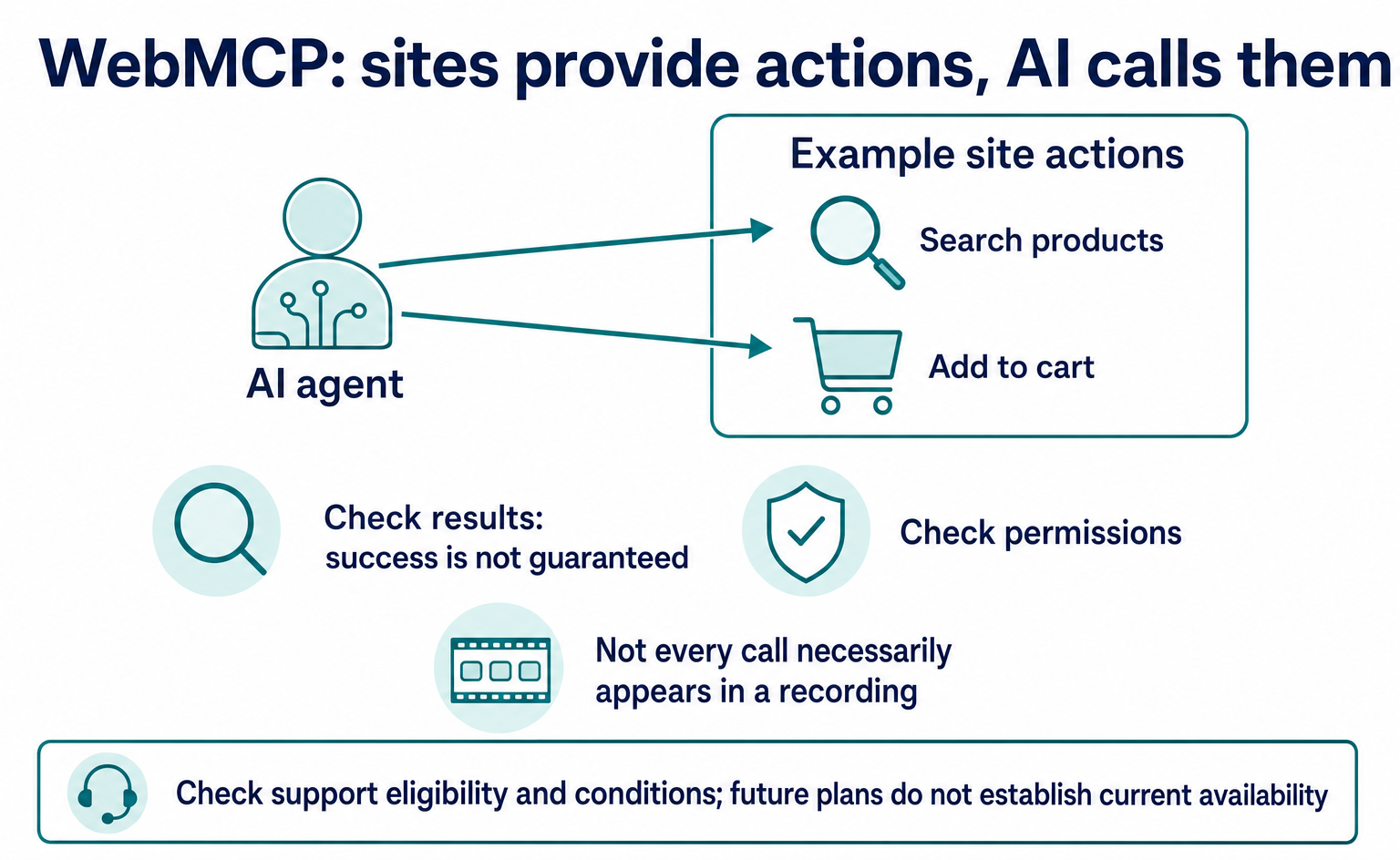
What Is WebMCP? How AI Operates Websites and Current Support
WebMCP tells AI which actions a website offers, such as product search and adding items to a cart. As of September 2026, it is not a formal standard. Learn about support in Chrome, Edge, ChatGPT, Cloudflare and Shopify, what to ask developers, and how to test and record actions.
Published
AI shopping and booking
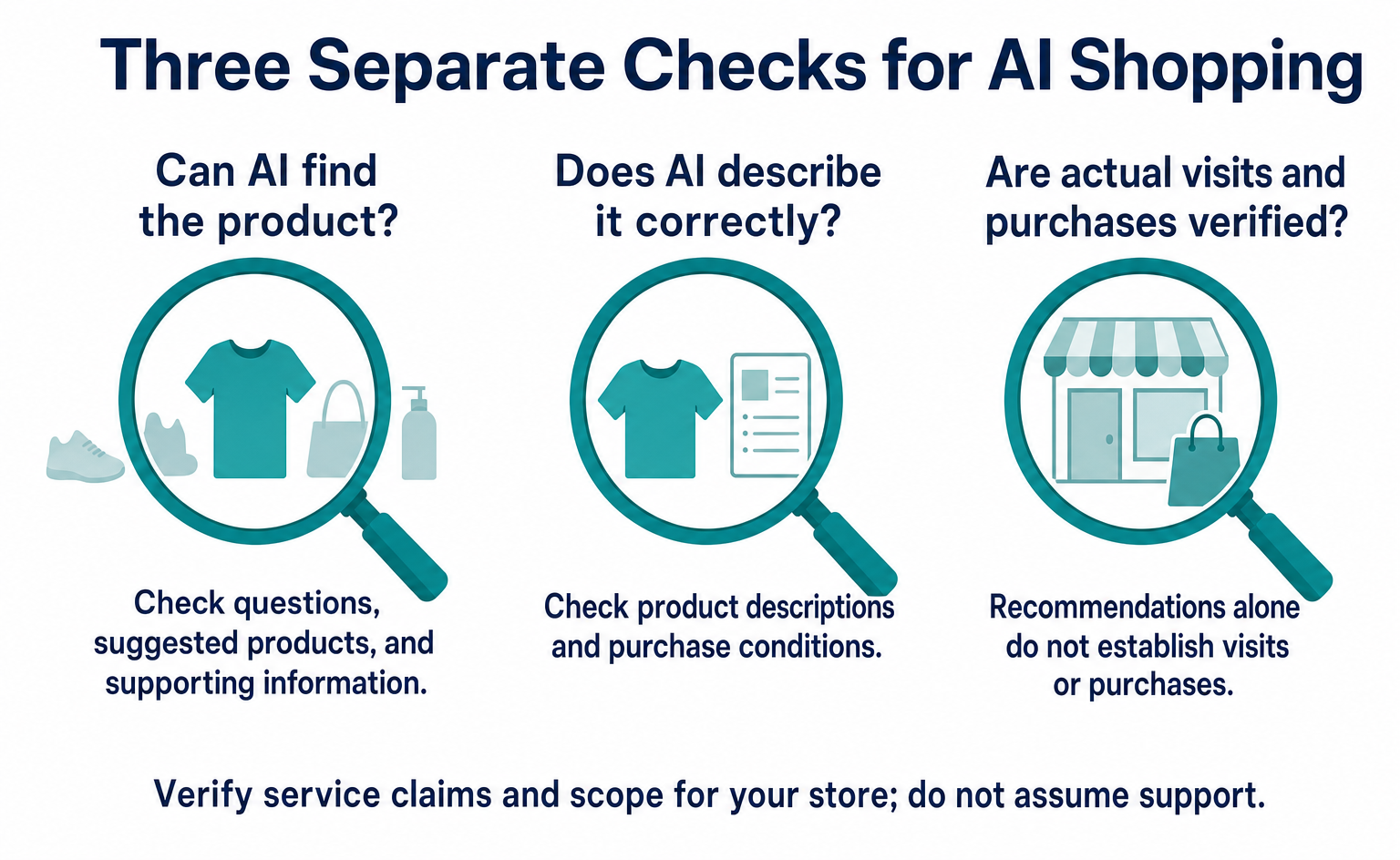
How Can AI Find Your Products? Checks Highlighted by Azoma
Based on Azoma’s September 7, 2026 announcement, learn what to check in product details, pricing, stock, shipping, and returns. Includes questions to test AI answers, ways to investigate errors, and steps to track visits and purchases, starting with a few products.
Published

AI shopping and booking
51% of US consumers use AI shopping tools. How much has product selection changed?
That does not mean AI placed 51% of orders. It is the share of US consumers who reported using at least one AI-powered shopping tool during the past month.
Published