Before Adding More AI-Focused Articles: Five Questions Your Pricing Page Should Answer
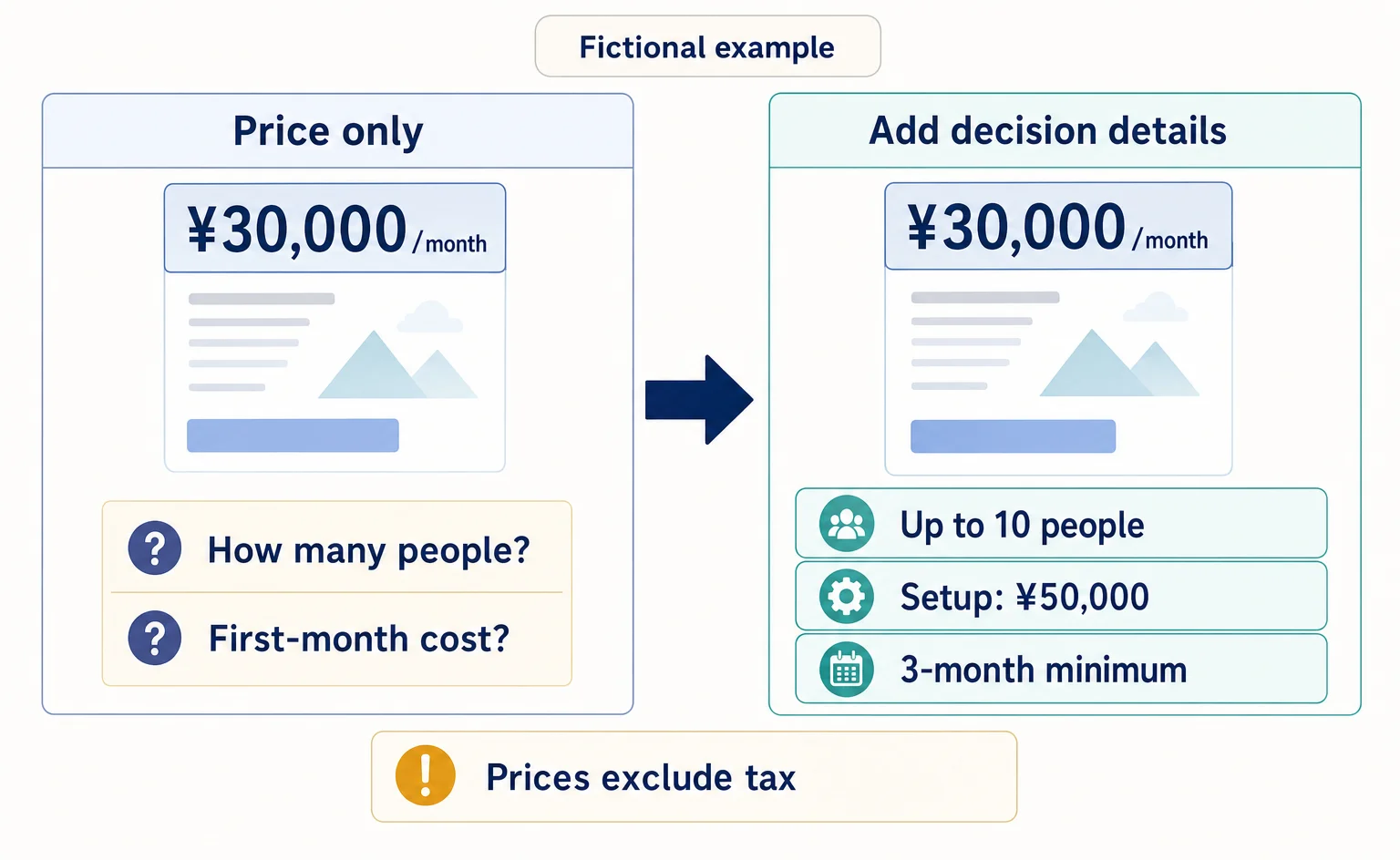
Getting visits but few inquiries for your business service? Use this worksheet and a fictional before-and-after example to review what pricing includes, extra charges, cost calculations, contract terms, and what happens after someone applies.
Your pricing page gets visits, but they do not lead to inquiries. If you manage a service for business customers, check this before adding more articles: could a visitor use this page alone to explain the costs and terms that would apply to their company? This article provides a worksheet to help you find missing information readers need to evaluate pricing and decide what to add and where.
Creating articles to help your company appear in AI-generated answers and creating explanations that help visitors consider a contract are separate tasks. This article addresses the latter. Rather than assuming that pricing explanations are the only reason visitors do not inquire, start by identifying the questions your page leaves unanswered.
Sources checked: September 15, 2026. The five questions, worksheets, and service examples below are our own editorial suggestions. They are neither Google requirements for being cited in AI answers nor measured examples of improved results.
Review whether readers can make a decision, not just whether prices are listed
Google's content self-assessment guidance asks whether readers will get enough information to achieve their goal and whether they will still need to search elsewhere. It also recommends creating content that helps people, rather than making search traffic the primary purpose.[1]
For a pricing page, the question is not, “Does this look inexpensive?” It is whether, for example, someone considering the service for 12 people could explain the monthly cost, the charges included in the first payment, and when they can cancel. Even a listed price cannot support a budget if the number of people it covers is unclear.
The five questions are a starting point for your review. If your service charges by usage count rather than headcount, substitute usage count. If installation work is required, add installation costs, and remove irrelevant items. Prioritize whether your intended customers can make a decision, not whether you have filled in all five items.
For an explanation of what optimizing for AI-generated answers means and how it fits together, see this article.
First, compare your pricing page with your internal terms
This review looks for information your company can answer internally but has not included on the public page. The person responsible for editing the pricing page should open the live page and compare it with the pricing schedule, contract terms, and post-application guidance currently in use. Do not enter information in an administration screen or change settings at this stage.
Copy the following table into your usual document or spreadsheet and fill it in. Under “Current wording and location,” record the explanation on the page and where it appears. “Unconfirmed” means information whose correct terms have not yet been established internally. “Who to check with” means the person responsible for determining the correct terms. Do not fill gaps with guesses; pass them on as unconfirmed items.
Our review worksheet: a template to fill in with your company's information
| Reader's question | Current wording and location | Missing or unconfirmed information | Who to check with | Where to add it |
|---|---|---|---|---|
| What does the price include? | [Fill in] | [Fill in] | [Fill in] | [Fill in] |
| What triggers extra charges? | [Fill in] | [Fill in] | [Fill in] | [Fill in] |
| What would our company pay? | [Fill in] | [Fill in] | [Fill in] | [Fill in] |
| How long does the contract last? | [Fill in] | [Fill in] | [Fill in] | [Fill in] |
| What happens after we apply? | [Fill in] | [Fill in] | [Fill in] | [Fill in] |
Start with one plan. Mixing several plans can lead you to describe support included in only one plan as available under every contract. Even if existing sales materials or frequently asked questions contain the answer, check whether readers can find it from the place where they are reviewing pricing.
How fully should you answer the five questions?
The following explanations use a fictional business application-management service called “Application Note.” Neither the product nor its prices are real. We assume a service whose cost varies by the number of users, and use the same conditions in the completed worksheet and before-and-after examples later in the article.
1. What does this price include?
Place the scope of use and support close to the price. “All basic features” does not tell readers whether the service can handle the work they have in mind. For Application Note, make it specific: “Includes use by up to 10 people, receiving applications, checking approval status, and email support on weekdays.”
Also list exclusions that could otherwise cause misunderstanding. In this example, transferring existing data is not included in the standard price. Distinguishing support that answers questions from work in which a staff member transfers data makes it clear how much the customer can delegate.
2. When do extra charges apply?
For each extra charge, state both what triggers it and the unit used to calculate it. For Application Note, the wording is: “An additional ¥2,000 per month for each person beyond the first 10.” This tells readers what to count more clearly than “Additional charges depend on the number of users.”
For work that cannot be given a fixed price, state what information is needed for a quote. For transferring existing data, one possible explanation is that a separate quote will be provided after checking the number of data records and the original file format. When a charge has not yet been determined, do not present the standard price alone as an all-inclusive total.
3. What would our company pay?
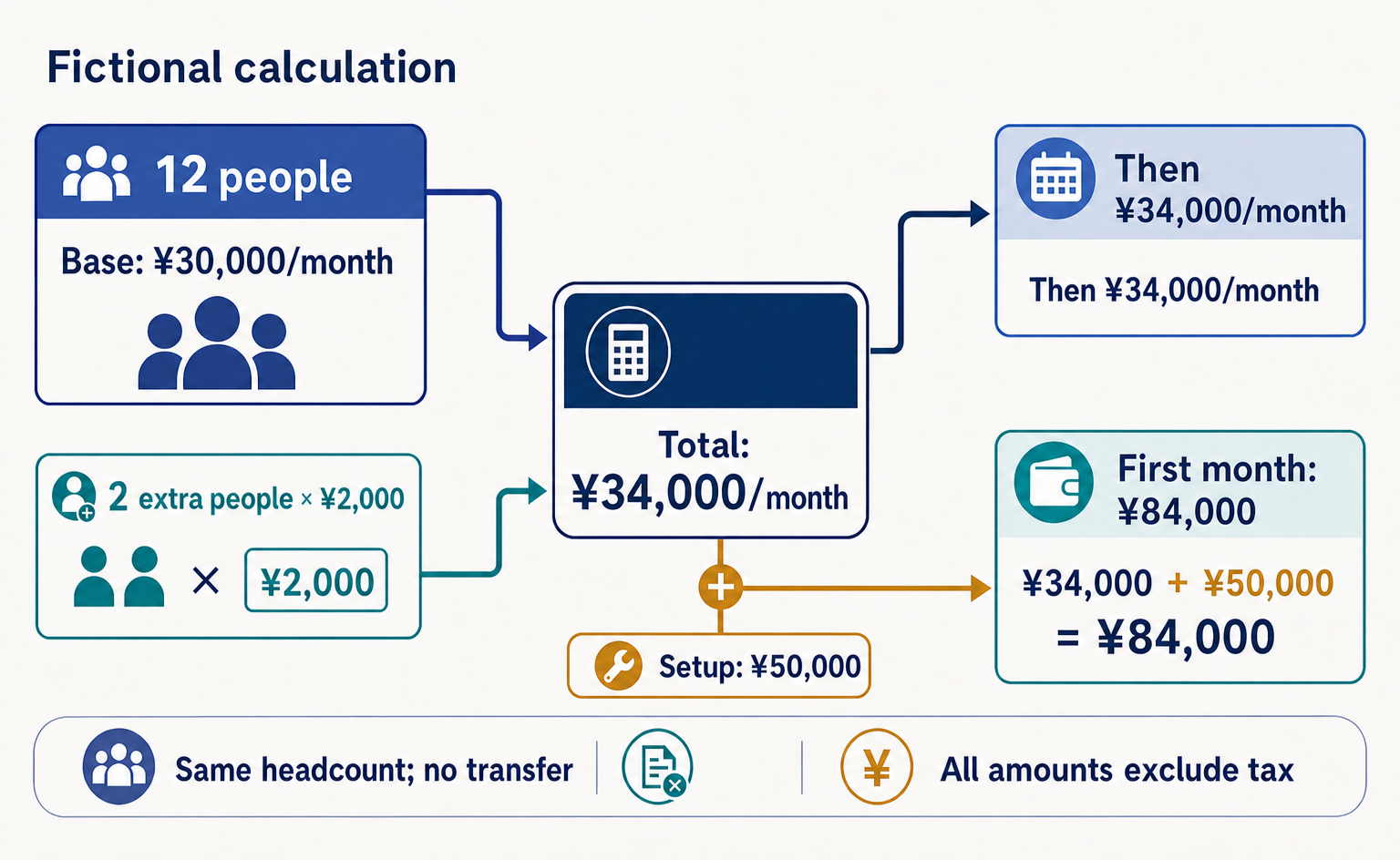
Include the number of people, the period covered, setup charges, and whether extra work is included in each calculation example. Application Note costs ¥30,000 per month for up to 10 people, with an initial setup fee of ¥50,000. All amounts from this point onward are illustrative and exclude tax.
For 12 people, without requesting a transfer of existing data, the monthly cost is ¥30,000 + 2 people × ¥2,000 = ¥34,000. If the initial setup fee is billed in the first month, that month's total is ¥84,000, followed by ¥34,000 per month from the second month onward. Show these amounts separately from the tax-inclusive amount billed.
If the number of people changes during the service period, readers also need to know which date's headcount is used for billing. This example applies only when the number stays the same. If you have not confirmed internally how partial-month charges or changes in headcount are handled, do not yet publish a calculation example that covers those situations.
4. How long does the contract last, and how can it be ended?
A monthly price alone does not tell readers whether they can cancel after one month. Near the pricing, summarize the minimum commitment period—the shortest period the contract requires customers to keep using the service—along with the renewal method and cancellation notice deadline. Include a link or direction to the full contract terms. If these differ by plan, explain them for each plan.
In the Application Note example, the minimum commitment is three months, followed by automatic monthly renewal. Customers must contact the designated support channel by the end of the month before the month in which they want to cancel. There is no cancellation fee after the minimum commitment ends. The person responsible for managing contracts should verify these terms before anyone polishes the wording.
5. What happens next if someone applies?
At the end of the page, distinguish an inquiry from a formal application and the start of service. A button labeled only “Apply” does not explain whether clicking it creates a contract or merely requests an explanation. Choose wording that matches what your team actually accepts at that stage.
For Application Note, the first submission is a consultation request. A staff member asks how many people will use the service and whether existing data needs to be transferred, then provides a quote. The customer agrees to the details and formally applies, and service begins after initial setup. If the start date is arranged individually, avoid wording that suggests same-day access.
Use the completed example to decide where to add information
Below is a fictional completed review worksheet for Application Note. It is our own editorial suggestion, not a record of work performed at an actual company. The roles under “Who to check with” are illustrative; replace them with the people who can determine the terms at your company.
| Reader's question | Current wording and location | Missing or unconfirmed information | Who to check with | Where to add it |
|---|---|---|---|---|
| What does the price include? | Only a monthly price in the pricing section | No explanation that 10 people and email support are included | Product owner | Directly below the monthly price |
| What triggers extra charges? | “Additional charges apply” | No per-person rate or conditions for data-transfer work | Pricing owner | Additional charges section |
| What would our company pay? | No calculation example | Need first-month and ongoing monthly costs for 12 people | Billing owner | Below the pricing table |
| How long does the contract last? | Only a link or direction to contract terms | Minimum commitment and cancellation deadline are not on the page | Contract owner | Below the calculation example |
| What happens after we apply? | Only “Apply” | No distinction between a consultation request and a formal application | Inquiry-handling owner | Immediately before the consultation button |
This table shows what you can add without changing the monthly price itself. First, confirm terms that directly affect payment and contract decisions, such as setup charges and the minimum commitment. Establish accurate answers that are approved for publication before working on phrasing.
You do not need to collect every answer in a frequently asked questions section at the bottom of the page. In this example, we suggest placing the user limit close to the price and the steps after a consultation request close to the consultation button. Even when a separate page provides full details, keep a short answer needed for the decision in the relevant spot.
Compare an illustrative before-and-after using the same conditions
The following is a proposed pricing-page rewrite, not a measured result. What changes is the information explained, not the price or service terms. “Improvement” here does not mean that inquiries increased.
Before: only a price and an invitation to apply
Application Note
From ¥30,000 per month. Setup and additional charges are separate.
Contact us for details.
[Apply]
This wording does not let readers calculate the monthly cost for 12 people. Although they can see that another charge applies in the first month, they do not know its amount or the contract duration. They also cannot tell whether clicking the button will move them toward a contract.
After: add cost conditions and the next steps
Application Note: ¥30,000 per month for up to 10 people, excluding tax
Includes receiving applications, checking approval status, and email support on weekdays. Each person beyond the first 10 costs an additional ¥2,000 per month. The initial setup fee is ¥50,000, billed in the first month.
Example for 12 people
If the number of people stays the same and you do not request a transfer of existing data, the first month costs ¥84,000, followed by ¥34,000 per month from the second month onward. All amounts exclude tax. Data-transfer work is quoted separately after we check the number of data records and the original file format.
Contract terms
The minimum commitment is three months. The contract then renews automatically each month. Please contact the designated support channel by the end of the month before the month in which you want to cancel. There is no cancellation fee after the minimum commitment ends.
From consultation to service start
After receiving your consultation request, we will ask how many people will use the service and whether you need data-transfer work, then provide a quote. Once you agree, we accept your formal application and carry out the initial setup. The service start date is arranged individually. Sending a consultation request alone does not create a contract.
[Discuss service terms]
The revised wording distinguishes the standard costs for 12 people from work that requires a separate quote. However, do not copy it directly for your own company. Replace the product name, amounts, method of counting users, scope of support, contract terms, and steps after an inquiry with information your company has verified.
Check on-page actions with AgentSignal
If you use AgentSignal and a recording of the target page is available, select a visit containing that page in Web Recordings. Replay it to see which controls the visitor clicked and how far they progressed. For a form, review actions around an input error; for a pricing page, review the path to the application guidance.
A recording alone does not establish why someone left or whether an order was completed. Compare the visible actions with the page copy and actual receipt records. Past actions that were not recorded cannot be replayed, so check collection conditions and retention as well.
Before publication, check whether readers can calculate costs; afterward, check for remaining questions
Before publication, ask someone inside your company who did not write the draft to read the proposed pricing page itself. For this example, ask them: “What would the first and second months cost for 12 people?” “What remains undecided if we request data-transfer work?” and “Does sending a consultation request create a contract?” This is a suggested editorial check, not a reader test that has already been conducted.
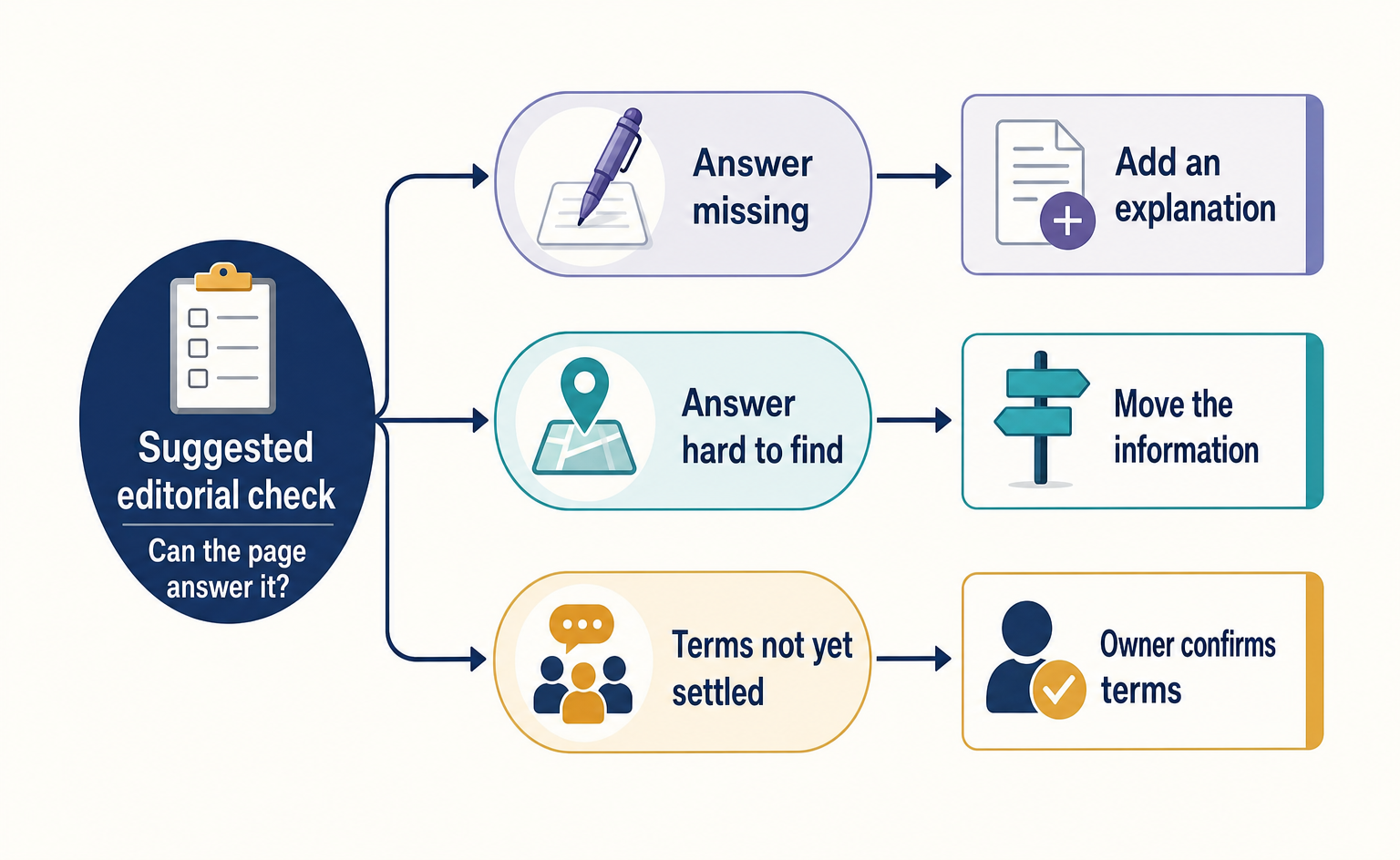
If the answer is missing from the page, add it. If the answer is there but hard to find, move it. If the terms are not yet settled internally, the responsible person should confirm them before wording is drafted. Do not turn an unconfirmed detail into a firm promise merely to make the page look better.
After publication, record the date and details of each change, then review whether inquiries about the same questions continue. Look beyond inquiry counts: distinguish inquiries that end with a price check from those in which customers understand the terms and are considering using the service. A single before-and-after comparison does not establish that the pricing page caused a change.
Adding the five items in this article alone does not guarantee citations in AI answers or more inquiries.
Start with one missing answer that customers need to make a budget or contract decision. For example, if they cannot calculate the first month's cost, place the relevant conditions and a calculation example close to the pricing. You can decide whether to add more articles after checking what explanations are missing for the people already visiting.

Official guides for your own checks
For recording actions as visitors reach the inquiry form, consult GA4’s event setup guide[2]. W3C’s form-notification guide explains communicating success and input errors[3]. Check whether people can complete the inquiry as well as understand the price.
FAQ
- Q. Will answering the five questions get my page cited in AI answers?
- There is no guarantee of a citation. The five items are our own editorial suggestions to help readers evaluate pricing. The Google guidance cited here supports self-assessment of helpful content; it does not identify these five items as requirements for citations in AI answers.[1]
- Q. What should I write if pricing is based on individual quotes?
- This article suggests explaining the conditions that affect the price and the information needed for a quote. Do not present work whose price has not yet been determined as included in the standard price.
- Q. Is the before-and-after example a real case with proven results?
- No. It is our own proposed rewrite using a fictional service. The prices and contract terms are illustrative, and there are no measured results such as an increase in inquiries.
- Q. Do all five questions need their own separate sections?
- No. We suggest adapting the items to your offering and placing short answers where readers make decisions: for example, the user limit near the price and the steps after a consultation request near the consultation button.
Sources
- [1] Creating Helpful, Reliable, People-First Content | Google Search Central | Documentation | Google for Developers (Google) — accessed 2026-09-15
- [2] Set up events | Google Analytics | Google for Developers (Google) — accessed 2026-09-15
- [3] User Notification | Web Accessibility Initiative (WAI) | W3C (W3C WAI) — accessed 2026-09-15
About the author
Shogo MizushimaCEO of kairos Inc. / AgentSignal Developer
Develops AgentSignal, a tool for measuring AI crawler visits and AI-referred traffic, and diagnosing AIO readiness. Writes about measurement and practical improvements for AI search using observed data.
Related articles

AIO and AI search
What Is AIO? Its Two Meanings and Where to Start with AI Optimization
AIO has two meanings: work to get your company featured in AI answers, and Google Search’s AI Overviews. Learn how it relates to SEO, what to confirm in a proposal, what Search Console and Bing reports show, and your first tasks.
Published
Measurement and site improvement
How to Fix Contact Forms That Leave Customers Thinking They Have Submitted
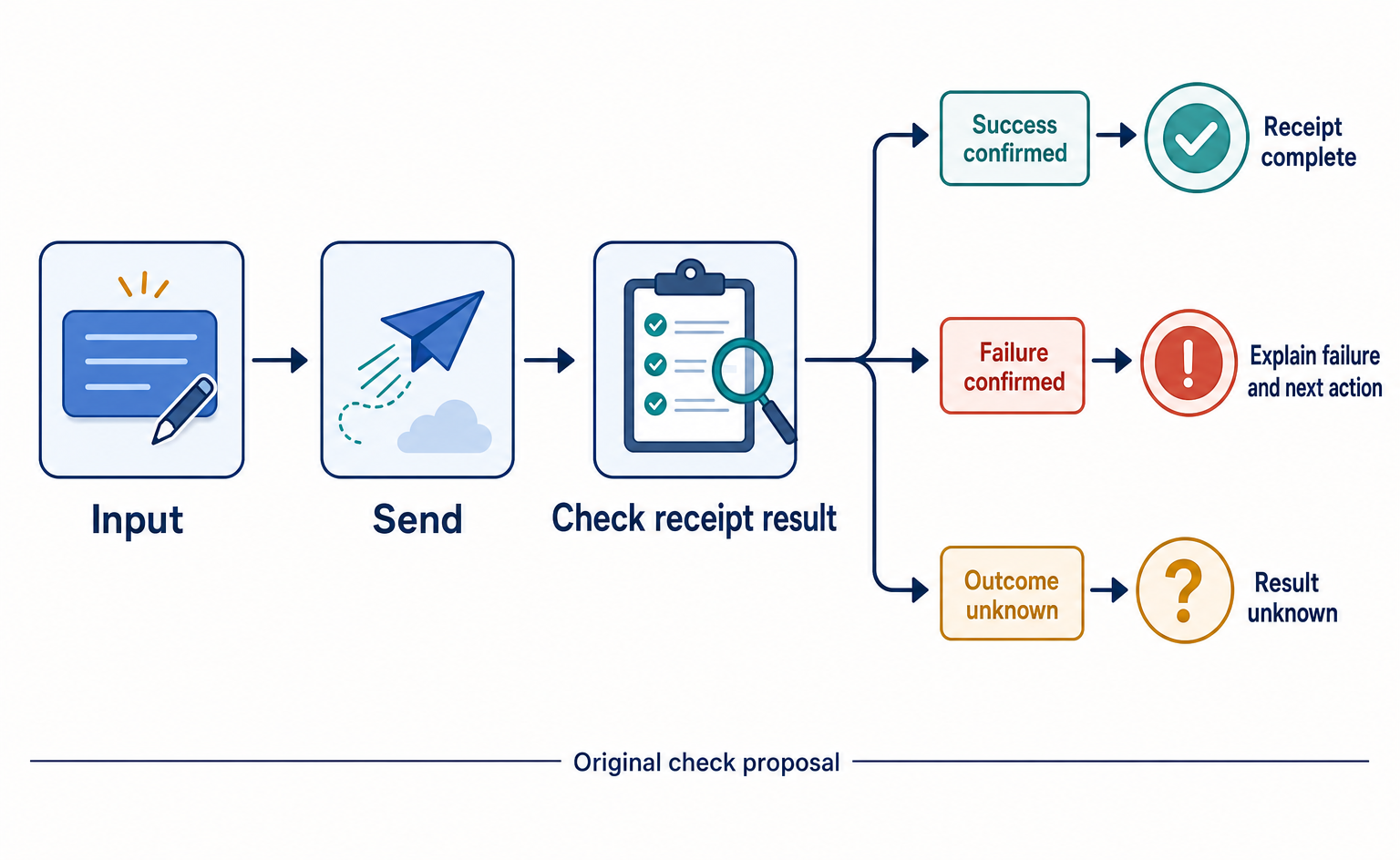
Learn how to tell customers what to enter, how to fix errors, and whether their inquiry was received. Original before-and-after examples and review tables help you check each step from clicking Submit to confirmed receipt.
Published

Measurement and site improvement
What Do Visitors from AI Do? Fix Your Entry Page Based on Their Behavior
People arrive from AI answers, yet enquiries do not follow. Use session recordings to see what happens on the entry page: how to filter recordings to AI referrals, how to use page-wide heatmaps as a supplement, what to fix for each behavior pattern and how to recheck after the change.
Published