How to Choose LLMO Tools: What Citation, Visit and Page Checks Measure
LLMO tools measure three different things: citations in AI answers, visits from AI services and page settings. Learn what free data from Search Console and Bing already shows, then compare paid citation-tracking tools on six criteria.
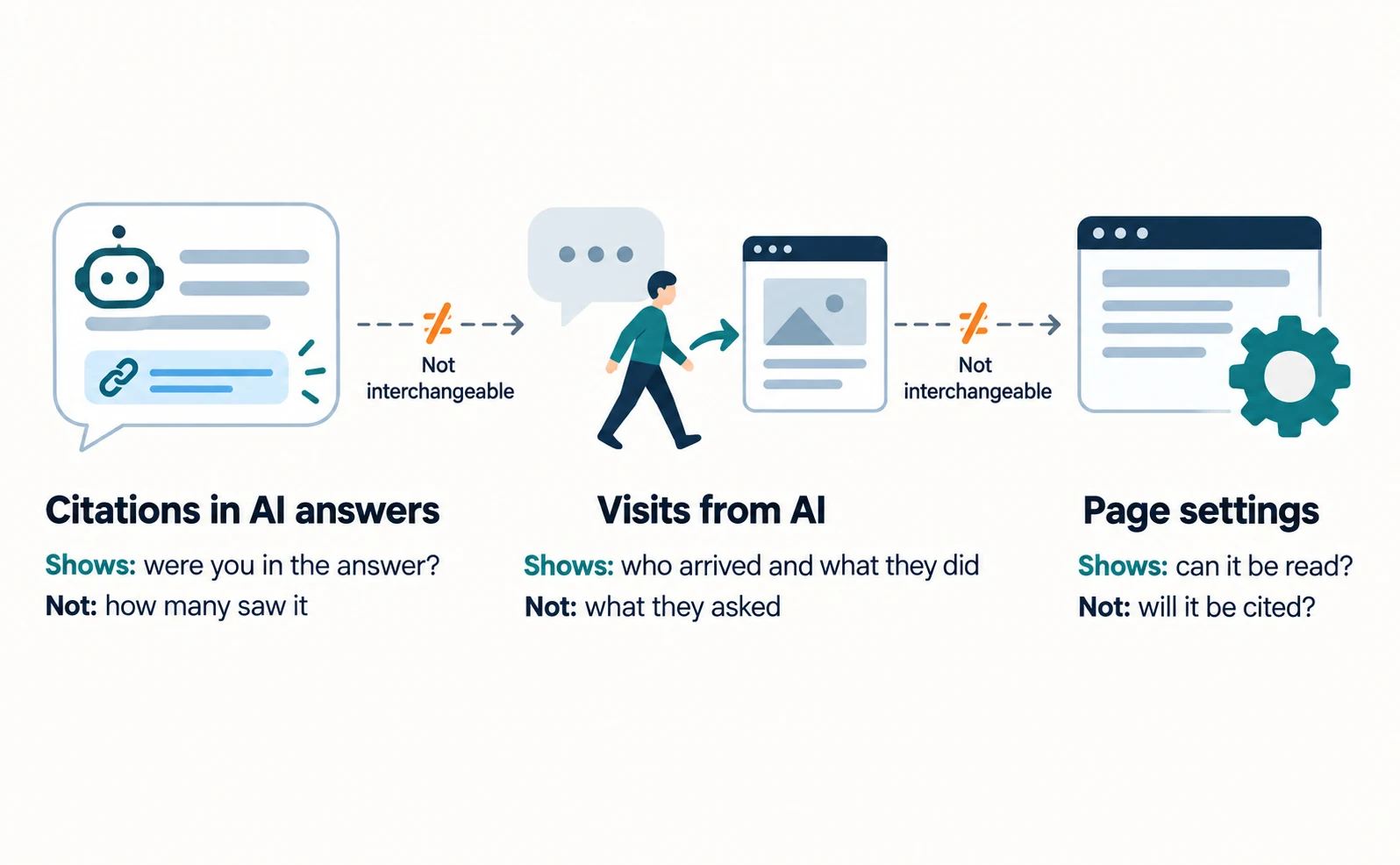
LLMO tools measure three broad things: citations in AI answers, visits that come from AI services, and page settings. They may all be sold as “AI visibility,” but the data is different.
Suppose your manager asks, “We want an AI optimization tool. Which one should we buy?” The first decision is not the product name. It is what you want to know.
This article starts with what free, first-party data from Google and Bing can show. Then it explains how to compare paid tools that fill the gaps. Information is current as of September 23, 2026.
Three Things LLMO Tools Can Measure
An LLMO tool measures citations, visits, page settings, or a combination of them. LLMO is the work of helping AI services such as ChatGPT describe your business accurately in their answers.
The table below compares the three.
| What is measured | What you learn | What you do not learn | Main data source |
|---|---|---|---|
| Citations and mentions in AI answers | Whether an answer showed a link to your page or your brand | How many people saw that answer | First-party reports, citation-tracking tools |
| Visits from AI services | How many people arrived from an AI link and what they did | What they asked the AI | Tracking tags, analytics such as GA4 |
| Page settings | Whether search and AI services can read the page | Whether the page will be cited | Page audits, Search Console |
These three cannot stand in for one another. More citations do not guarantee more visits. A higher audit score does not guarantee citations.
When you read a tool’s product page, first check which of the three it measures. That alone narrows the list considerably.
Free First-Party Data
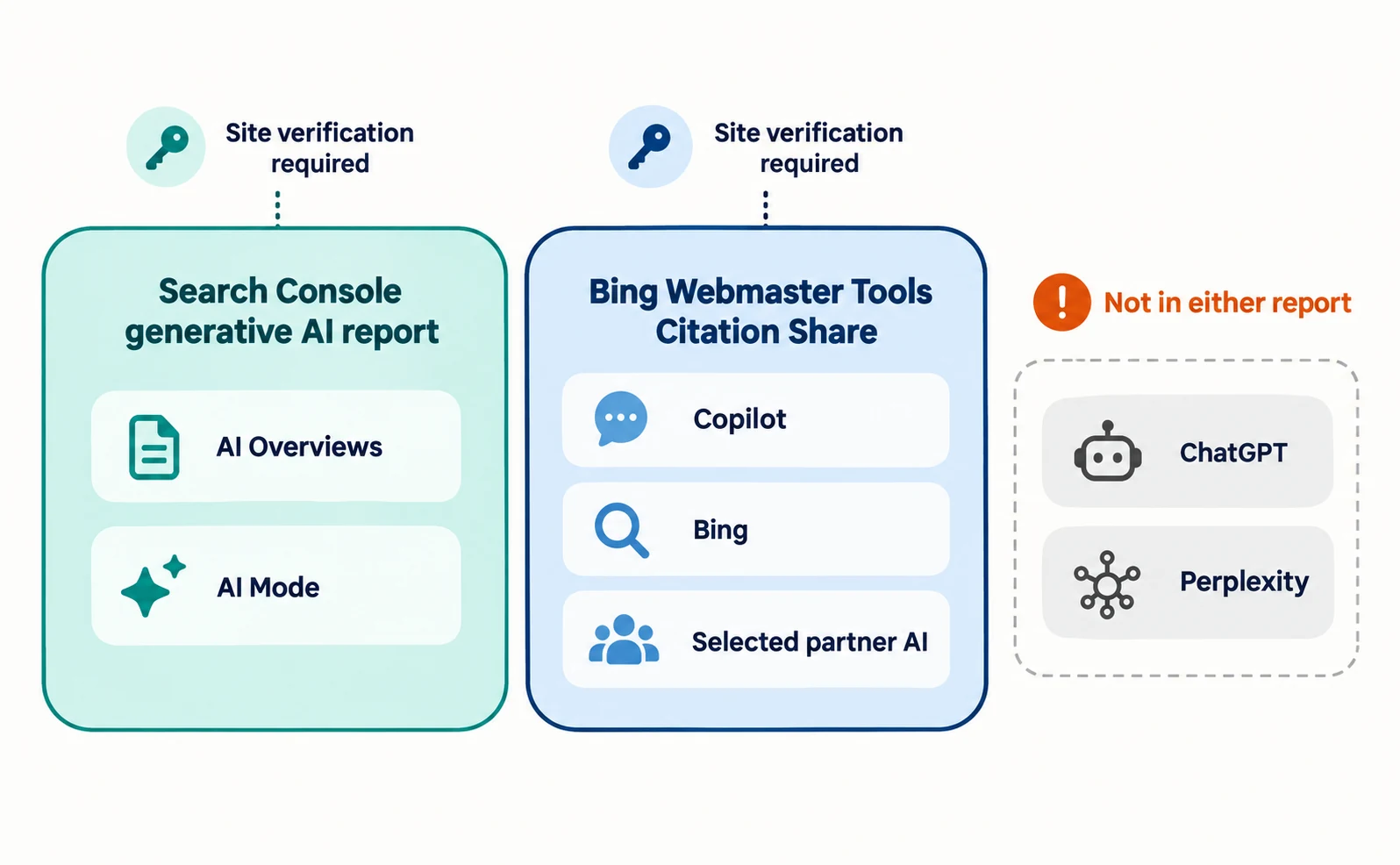
Before buying a tool, you can check part of your visibility and citations in free reports from Google and Bing. Both require you to verify and register your site.
| Report | Covers | What you learn | What you do not learn |
|---|---|---|---|
| Search Console generative AI report | Google AI Overviews and AI Mode | How often your pages were shown | The answer text or competitors’ pages |
| Citation Share in Bing Webmaster Tools | Copilot, Bing and selected partner AI experiences | Your share of citations for each query | Competitor domain names, visits |
These are figures each provider publishes about its own services. Citations in ChatGPT or Perplexity are not included in either report.
What the Search Console Generative AI Report Shows
Google announced reports for visibility in generative AI features on June 3, 2026. It later added that, as of August 31, 2026, the reports had rolled out to all websites worldwide [1].
The report shows how often links to your pages appeared in Google AI Overviews and AI Mode. You can split impressions by page, country, device and date [2]. Generative AI features in Google Discover have a separate report, and the device breakdown is available only for Search [1]. Check the report and its help page to see whether clicks or queries are available.
To get started:
- Open Search Console and select your site’s property.
- Use the “Open the Generative AI performance report” link on the help page.
- In the pages table, check which pages have the most and the fewest impressions.
If you cannot find the report, your site may not yet have enough impressions in these features. Data from Search Labs experiments is not included [2].
When you export the data, values shown as “~” or “-” become zeros [2]. Do not conclude from the file alone that a page was never shown.
What Citation Share in Bing Shows
On June 16, 2026, Bing added four preview features to the AI reports in Bing Webmaster Tools: Intents, Topics, Citation Share and Compare [3].
Citation Share is the percentage of all citations shown for a specific grounding query (a search the AI uses to find support for its answer) that went to your site [3]. Its denominator differs from a typical citation rate that counts how many answers cited you. For example, if a query showed ten citations and two were yours, your share would be 20% (an illustrative example).
Bing says this is not a ranking or a traffic share, and it does not reveal competitor domains [3]. It is not a tool for learning how far you trail a specific competitor.
Once your site is registered in Bing Webmaster Tools, you can open the AI reports. They cover Copilot, Bing and selected partner AI experiences [3].
Criteria for Choosing a Citation-Tracking Tool
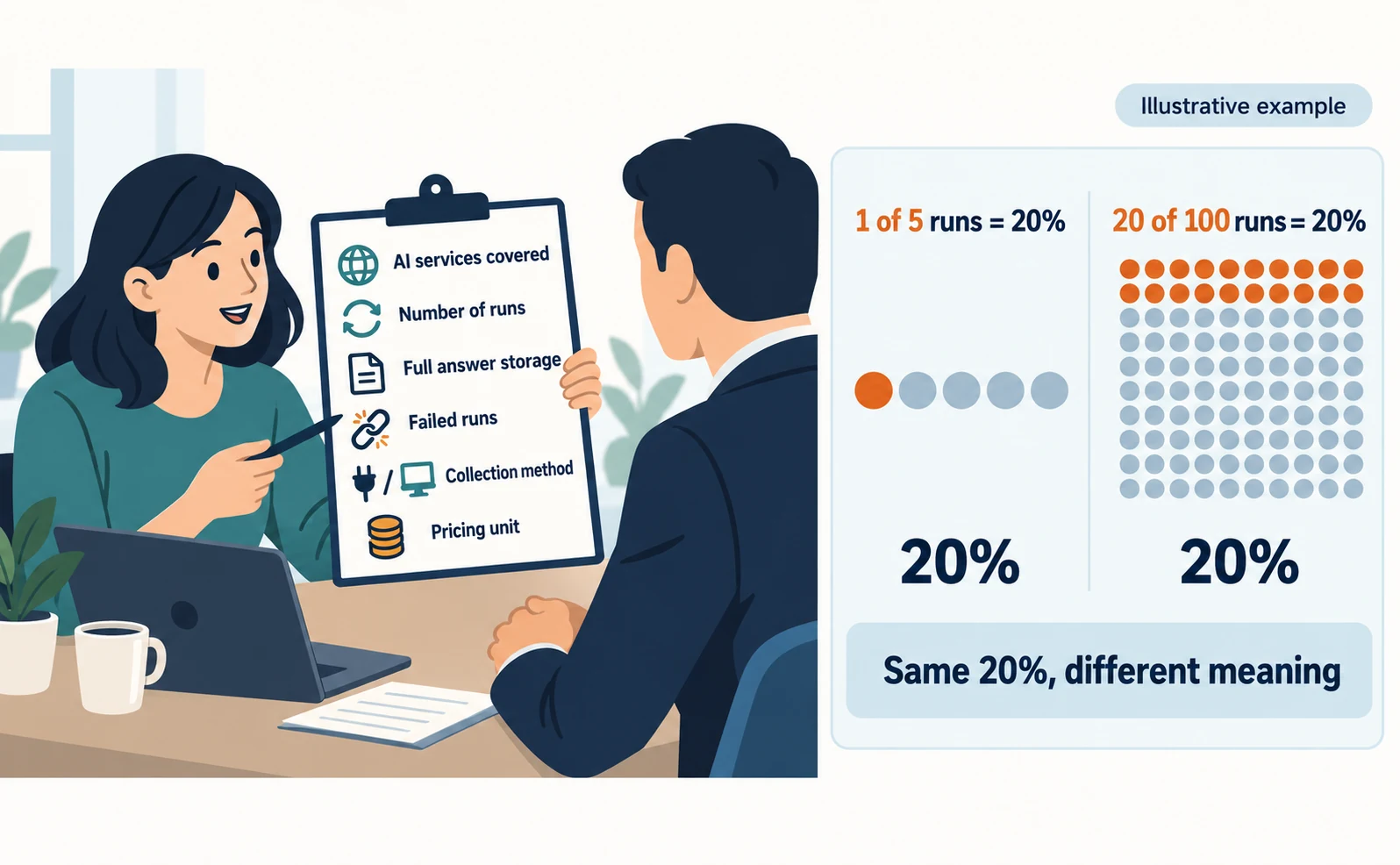
Compare paid citation-tracking tools on the six criteria below. Consider them when first-party data is not enough, for example when you need citations in ChatGPT.
| Criterion | Question to ask the vendor | Why it matters |
|---|---|---|
| AI services covered | Which AI services, countries and languages do you query? | The tool is of little use if it misses the services your customers use |
| Number of runs | How many times can the same question be asked? | AI answers vary even for the same question |
| Full answer storage | Can we read the answer text and cited links later? | A percentage alone does not tell you what to fix |
| Failed runs | Are runs that returned no answer counted in the denominator? | Counting failures as “not cited” lowers the figure |
| Collection method | Do you use an API or the consumer interface? | Conditions may differ from what users see on screen |
| Pricing unit | Do you charge by question, AI service or run? | You can estimate the cost of adding questions |
When you get a demo, bring one real question your business cares about. Ask to see what the screen shows when your site is not cited, not only a prepared success story.
Also check whether the tool shows “X out of Y runs” next to the percentage. One out of five and 20 out of 100 are both 20%, but they mean different things.
Tools for AI Visits and Page Audits
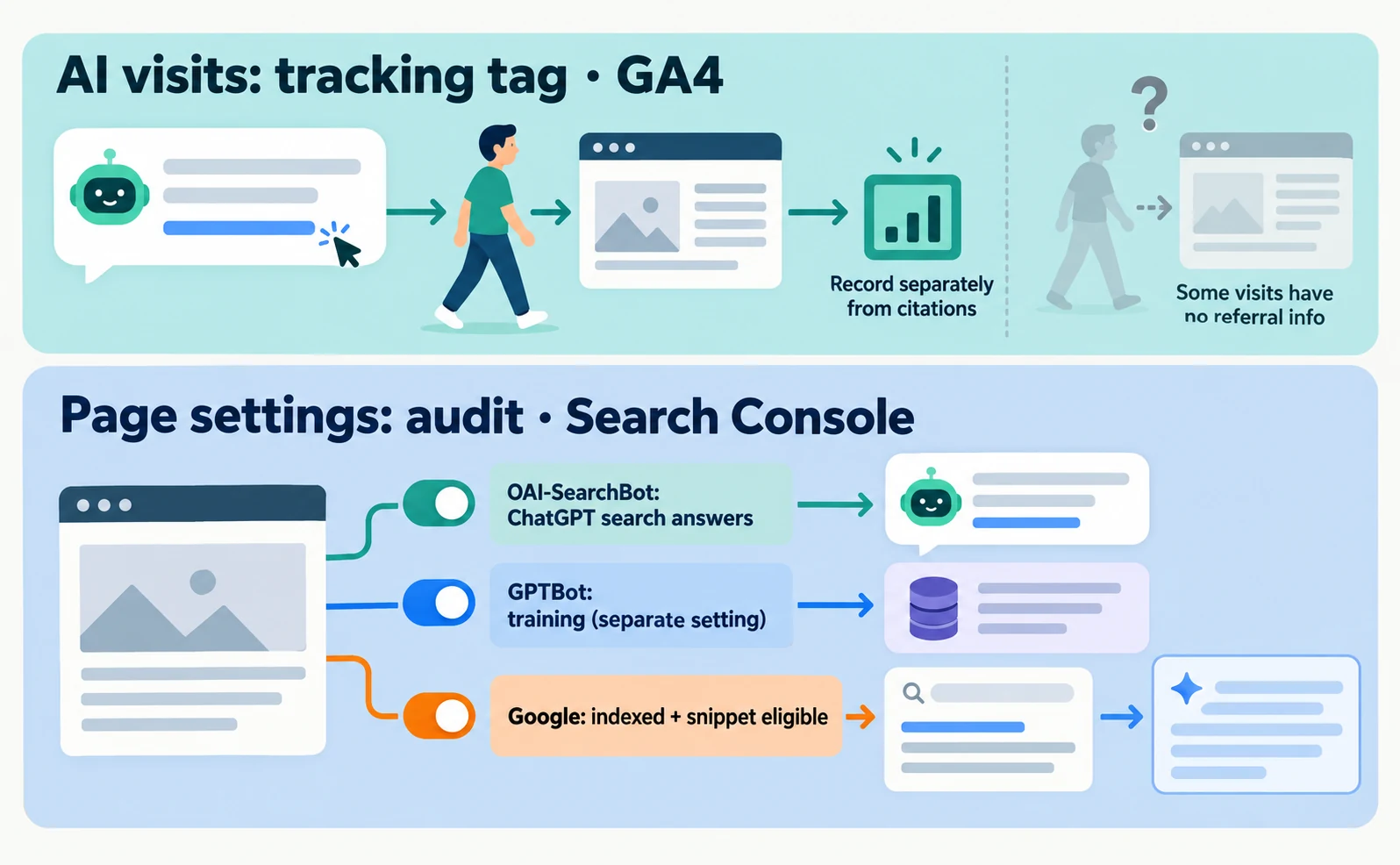
Measure visits with a tracking tag or GA4 and page settings with an audit tool and Search Console, and record them separately from citation figures.
An AI visit is a record of a person arriving on your site from a link in an AI answer. Analytics such as GA4 or a tracking tag show which AI service they came from. Some visits arrive without referral information, so not every visit can be counted.
For page settings, first confirm that search and AI services can read the page. For ChatGPT, sites that opt out of OAI-SearchBot are not shown in ChatGPT search answers, though they can still appear as navigational links [4].
GPTBot, which is used for training, is a separate setting. Blocking GPTBot does not change whether OAI-SearchBot is allowed [4]. See how AI crawlers differ for details.
Google AI Overviews and AI Mode have no additional technical requirements. Pages must be indexed and eligible to appear in Search with a snippet [5]. Before creating special AI files, confirm that the page can appear in ordinary search.
Example Tool Combinations by Goal
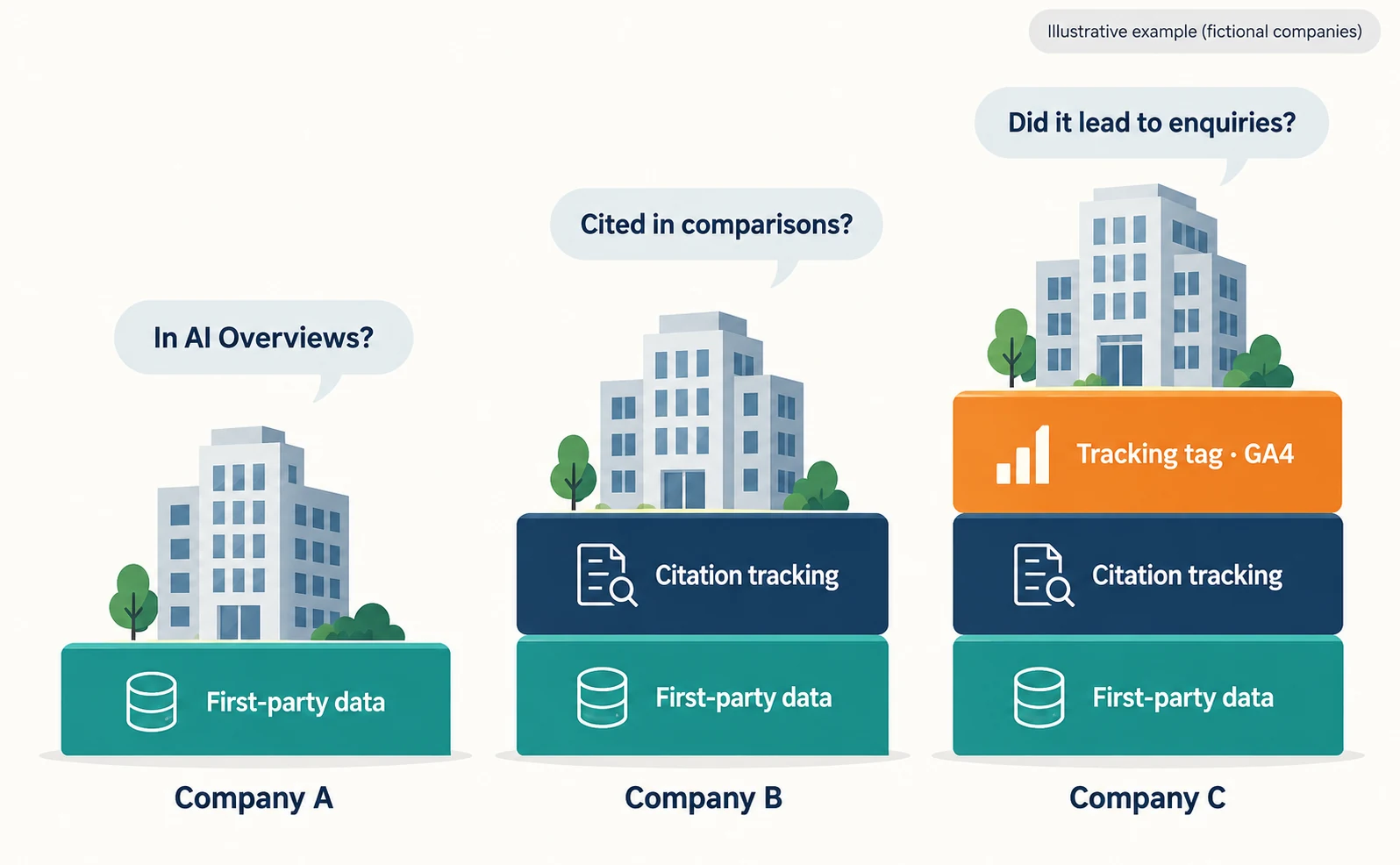
Start with free first-party data, then add citation tracking, then visit measurement, adding only what you need. The companies below are fictional examples.
| Example company (fictional) | What it wants to know | Combination |
|---|---|---|
| Company A: most traffic comes from Google | Whether its pages appear in AI Overviews | Start with the Search Console generative AI report only |
| Company B: customers compare options in ChatGPT | Whether it is cited for comparison questions | First-party data plus a citation-tracking tool |
| Company C: needs to report enquiries | Whether citations led to enquiries | First-party data, citation tracking and a tracking tag or GA4 |
You do not need everything on day one. Write down what first-party data told you and what it did not, then fill only the gaps.
In AgentSignal, the AI citation rate feature asks ChatGPT, Gemini, Perplexity and Claude your questions and records your citations and the cited sources [6]. Claude is available on paid plans. Each query to one AI service uses two credits, and the first team you create receives starter credits.
AI visits appear in “AI referrals” after you install the tracking tag, and the free URL audit checks page settings. The workflow is described in how to use AI optimization. Check the pricing page for current plan prices before you subscribe.
Whichever tool you use, do not merge citations, visits and page settings into one score. Keeping them in separate columns makes it easier to decide what to fix next.
FAQ
- Q. Can I start with free tools only?
- Yes. The Search Console generative AI report shows impressions in Google AI Overviews and AI Mode, and Bing Webmaster Tools shows citations in Bing and Copilot. Consider a paid tool when you need ongoing data on citations in other AI services such as ChatGPT.
- Q. Why does a tool’s citation rate differ from what I see in ChatGPT?
- AI answers vary even for the same question. Whether the tool uses an API and which country and language it queries also change the conditions. When comparing, match the question, AI service, number of runs and time, and read the full answers.
- Q. Can I use Bing’s Citation Share to compare against competitors?
- Competitor domain names are not shown. Bing describes it as an observational metric, not a ranking or traffic share. It is best used to watch how your own share changes over time.
Sources
- [1] Introducing Search Generative AI performance reports in Search Console (Google Search Central) — accessed 2026-09-23
- [2] Generative AI performance report (Search) (Google Search Console Help) — accessed 2026-09-23
- [3] New AI Visibility Insights in Bing Webmaster Tools: Intents, Topics, Citation Share, Compare (Microsoft Bing) — accessed 2026-09-23
- [4] Overview of OpenAI crawlers (OpenAI) — accessed 2026-09-23
- [5] AI features and your website (Google Search Central) — accessed 2026-09-23
- [6] AgentSignal features (AgentSignal) — accessed 2026-09-23
About the author
Shogo MizushimaCEO of kairos Inc. / AgentSignal Developer
Develops AgentSignal, a tool for measuring AI crawler visits and AI-referred traffic, and diagnosing AIO readiness. Writes about measurement and practical improvements for AI search using observed data.
Related articles
AIO and AI search
What Is LLMO? How It Differs from SEO and Why Some Say It Is Pointless
LLMO is the work of helping answers from ChatGPT and other AI find and accurately describe your company. Learn how it differs from SEO, why some call it pointless, how E-E-A-T relates, how to measure results and what to do in the first month.
Published
Measurement and site improvement
What Are AI Crawlers? Why Blocking GPTBot Doesn’t Remove You from ChatGPT Search
AI crawlers are programs AI companies use to read public web pages. Learn how GPTBot differs from OAI-SearchBot, how Google-Extended works, why visits can continue after a robots.txt block and how to choose settings by purpose.
Published
AIO and AI search
Airbyte reported a $100,000 ChatGPT-originated deal: the content changes behind its AIO work
Airbyte reported one $100,000 contract originating from ChatGPT. The team analyzed over 500 prompts and revised content into direct answers, lists, and steps.
Published