What Is x402? How AI Pays for APIs and How Payment Data Flows
x402 is an open standard for paying API fees programmatically with supported crypto assets. Follow a weather API payment through v2’s 402 response, payment terms, signature, verification, settlement, and results, plus budget controls and costs.
Suppose you want AI to use weather data to create a promotional plan. x402 offers a way to obtain the data one request at a time without stopping for manual payment. It is relevant to website and e-commerce managers who want AI to use paid external APIs.[1]
x402 is an open standard that builds payment for APIs and content into web communications. The payments discussed here use supported crypto assets and wallets, not card numbers. A program connected to AI uses a wallet’s signing function to make payments within authorized limits.[1][6]
The API receives payment data containing the payment terms and a signature. It does not receive the private key itself. This article follows a single payment to a weather API, from the initial terms to the result.
1. Choose the API and set the budget first
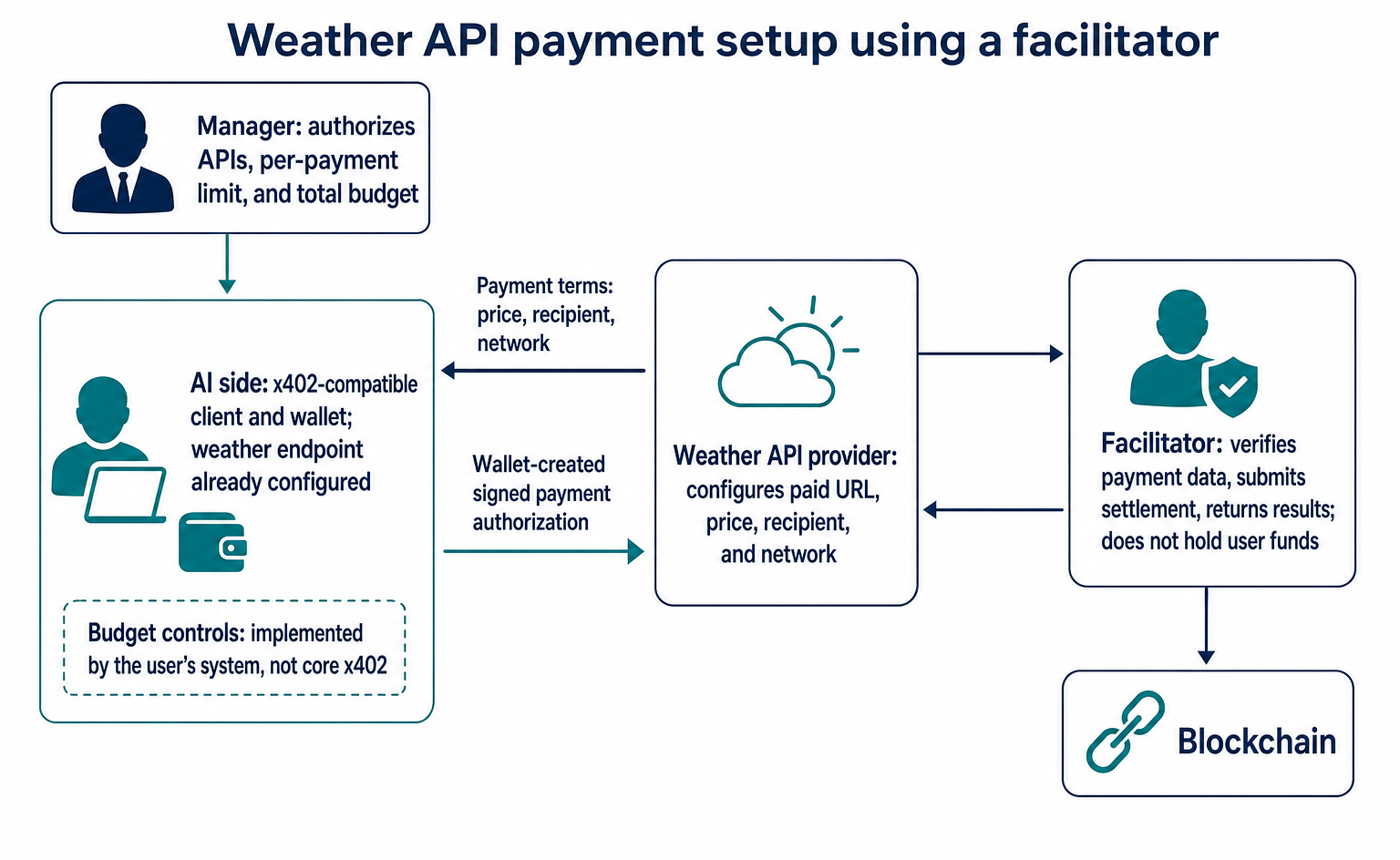
In this example, an online store manager asks AI to create a “promotional plan based on the weather.” Assume the weather API endpoint is already configured, and the AI side has an x402-compatible client and wallet. Finding an API and paying to use it are separate steps.
The manager decides which APIs are allowed, the limit per payment, and the total budget. For example: “Use only this weather API, with total API fees capped at 0.01 USDC.” The user’s system must implement these budget controls; they are not part of the core x402 specification.[5]
The API provider configures the paid URL, price, recipient, and network. It can handle verification and settlement itself or use a support service called a facilitator. The following setup uses a facilitator.[3][4]
The facilitator verifies payment data, submits a transaction to the blockchain, and returns the result to the API provider. It does not hold the user’s funds, set the manager’s budget, or determine the content of the weather information.[4]
x402 is not a standard for listing physical products or handling orders and shipping. This example pays for one use of a weather API, not for merchandise.
2. What does a $0.001 price setting become?
From here on, we focus on the EIP-3009 method for authorizing USDC transfers on EVM-based networks, within v2’s fixed-amount exact payment scheme. We use a test network called Base Sepolia and set the price to $0.001, as in the official sample. This is not an example of an actual US dollar transfer or a production payment.[3][6]
The JSON below illustrates how to read the data exchanged. Payer and recipient values such as 0xPAYER_EXAMPLE, along with the nonce, signature, and transaction identifier, are non-executable placeholders. The timestamps are also fixed illustrative values. Only asset uses the actual Base Sepolia USDC address listed in the pinned version of the official specification.[5][6]
The provider specifies the price as follows. This is part of the billing configuration, not the payment terms returned over the connection.[3]
{
  "scheme": "exact",
  "price": "$0.001",
  "network": "eip155:84532",
  "payTo": "0xSELLER_EXAMPLE"
}
In the exchanged data, PaymentRequirements.amount expresses the amount in the token’s smallest unit as an integer string, not as a dollar value. For a payment of 0.001 USDC, which has six decimal places, 0.001 × 1,000,000 = 1000, so the field is "amount": "1000". Do not copy price directly into amount.[3][5]
This example assumes that the $0.001 price setting results in a request for 0.001 USDC. To identify the asset and amount to pay, read network, asset, and amount together in the following response.
3. Receive payment terms in a 402 response
When the AI side calls GET /weather without payment data, the API returns 402 Payment Required. At this stage, 402 does not indicate a malfunction. It means “payment is required to use this resource.”[2]
v2 uses the following three headers for payment. Each contains JSON converted into Base64, a representation used for data transmission. Base64 itself is neither encryption nor a signature.[2]
| Header | Sender → Recipient | Contents |
|---|---|---|
PAYMENT-REQUIRED |
API → AI side | PaymentRequired, containing payment terms |
PAYMENT-SIGNATURE |
AI side → API | PaymentPayload, including a signature |
PAYMENT-RESPONSE |
API → AI side | SettlementResponse, containing the settlement result |
The examples below apply only to v2. Do not mix them with v1 headers or data formats. Make sure the connected client and server support the same version.
Decoding the 402 response’s PAYMENT-REQUIRED header from Base64 produces JSON like this. The optional error and extensions fields are omitted, and only one set of payment terms is accepted.[5][6]
{
  "x402Version": 2,
  "resource": {
    "url": "https://weather.example.invalid/weather"
  },
  "accepts": [
    {
      "scheme": "exact",
      "network": "eip155:84532",
      "amount": "1000",
      "asset": "0x036CbD53842c5426634e7929541eC2318f3dCF7e",
      "payTo": "0xSELLER_EXAMPLE",
      "maxTimeoutSeconds": 60,
      "extra": {
        "assetTransferMethod": "eip3009",
        "name": "USDC",
        "version": "2"
      }
    }
  ]
}
resource.url is the paid endpoint, and accepts lists the available payment terms. Each entry is a PaymentRequirements object containing the payment scheme, network, amount, asset, and recipient.[5]
maxTimeoutSeconds is the time limit for completing payment. extra contains scheme-specific information; this example specifies EIP-3009. The "2" in extra.version is token-related information. It is separate from x402Version: 2, which identifies the x402 version.[5][6]
The AI side checks these terms against its allowed destinations and budget limits. For example, if the quoted amount changes to 0.02 USDC, it exceeds the authorized total of 0.01 USDC. The system must stop before signing or request additional approval.
4. Send the signature and transfer authorization details
If the terms are accepted, the compatible client on the AI side creates the payment data. With EIP-3009, the wallet creates an EIP-712 signature for an authorization specifying who can send how much to whom, and during what period.[5][6]
The following six fields are the main items to check before signing. They are fields in the transfer authorization. This does not mean signing the entire outer PaymentPayload JSON as-is.[5]
| Field | Meaning for this payment |
|---|---|
from |
The payer’s wallet |
to |
The recipient; must match the quoted payTo |
value |
The amount in the smallest unit; "1000" here |
validAfter |
The Unix timestamp when the authorization becomes valid |
validBefore |
The Unix timestamp when the authorization expires |
nonce |
A random 32-byte value that prevents reuse |
The following is an excerpt from PaymentPayload. The required accepted field contains an exact copy of the first entry in the preceding accepts array, so it is omitted here to avoid repetition. The optional resource and extensions fields are also omitted.[5][6]
{
  "x402Version": 2,
  "payload": {
    "signature": "0xSIGNATURE_EXAMPLE",
    "authorization": {
      "from": "0xPAYER_EXAMPLE",
      "to": "0xSELLER_EXAMPLE",
      "value": "1000",
      "validAfter": "1740672094",
      "validBefore": "1740672154",
      "nonce": "0xNONCE_EXAMPLE"
    }
  }
}
Both accepted.amount and authorization.value are "1000". Likewise, accepted.payTo and authorization.to identify the same recipient. The actual EIP-3009 method requires a 65-byte signature and a 32-byte nonce. Here, illustrative text replaces them and does not meet either the length or format requirements.[6]
The AI side converts the entire PaymentPayload, including all required fields, to Base64, places it in PAYMENT-SIGNATURE, and calls the same API again. The header contains more than a signature string: it combines the selected payment terms, signature, and authorization details.[2][5]
Manager approval, permission to use the API, a wallet signature, and successful settlement are separate things. A signature does not replace human identity checks or internal approval records. If the API requires its own authentication, that must also be provided.
5. Verify the payment, then return the settlement result
The API sends the received payment data to the facilitator’s POST /verify endpoint. The request body has the following structure. paymentPayload and paymentRequirements must contain the actual objects, not strings naming those objects.[5]
x402Version        ← 2
paymentPayload     ← AI側から届いたPaymentPayload全体
paymentRequirements ← API側が提示したacceptsの先頭要素
/verify checks whether the signature, balance, amount, validity period, asset, network, and other details meet the requirements, and simulates the transfer. Verification alone does not execute a transfer on the blockchain.[5][6]
A valid payment produces a response in the following form. payer corresponds to the earlier authorization.from.[5]
{
  "isValid": true,
  "payer": "0xPAYER_EXAMPLE"
}
After verification, the API requests settlement by sending a body with the same structure to POST /settle. This exact example uses the same payment data and terms with amount: "1000". The facilitator calls the token’s transferWithAuthorization function to execute the transfer authorized by the signature.[5][6]
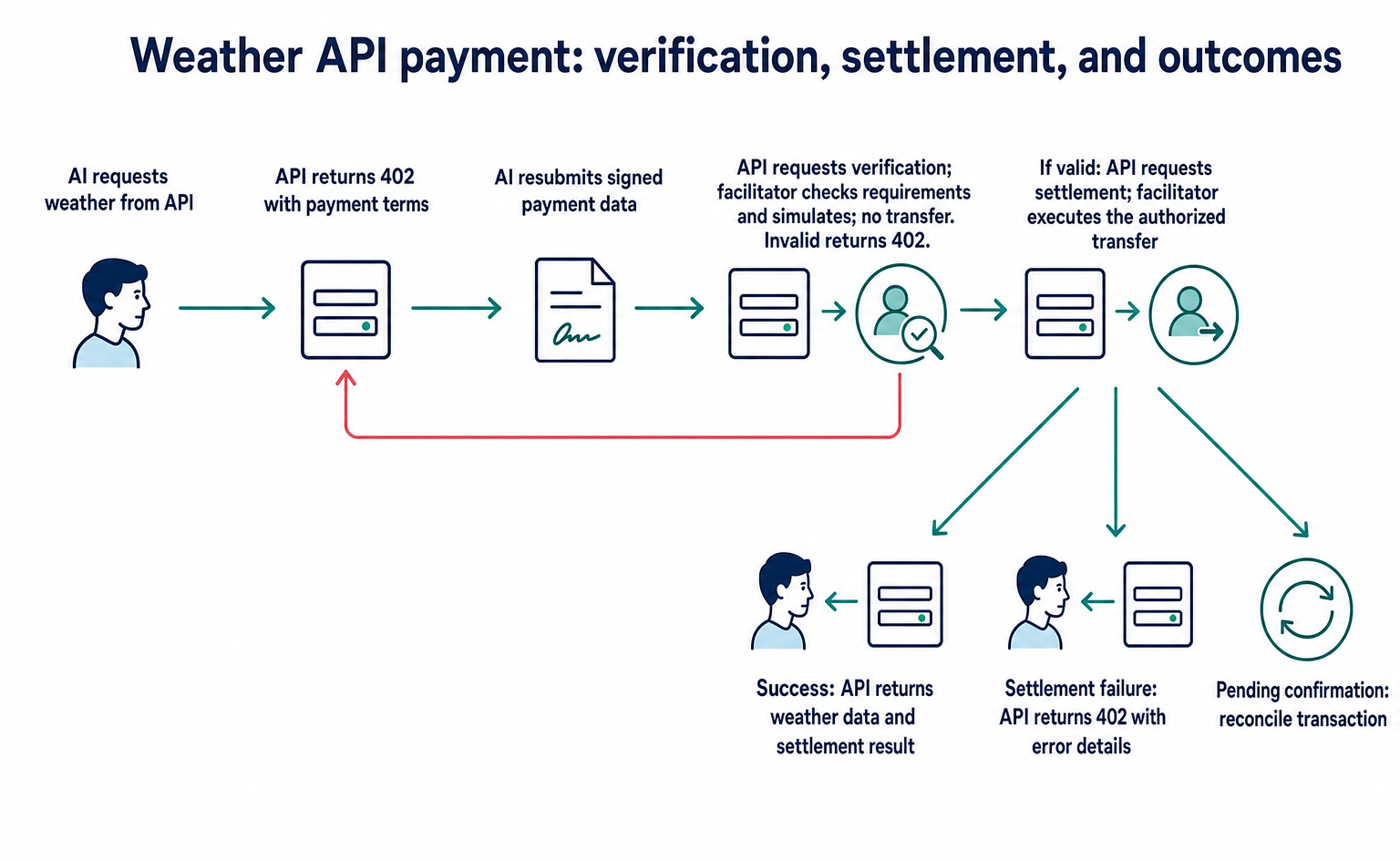
A successful settlement produces a SettlementResponse in the following form. Including the optional amount field lets you track "1000" in the same smallest unit as the original request. However, this field is not guaranteed to appear in every response.[5]
{
  "success": true,
  "payer": "0xPAYER_EXAMPLE",
  "transaction": "0xTRANSACTION_EXAMPLE",
  "network": "eip155:84532",
  "amount": "1000"
}
The API converts this settlement result to Base64 and places it in PAYMENT-RESPONSE. On success, it returns 200 OK and the weather data. This connects the stages of the same payment: “1000 in the terms → 1000 in the signed transfer amount → settlement result.”[2][4][5]
Settlement can also fail after verification. For example, the insufficient-balance error in the pinned specification has the following form. In the official HTTP flow, the API returns a 402 response with error details.[4][5]
{
  "success": false,
  "errorReason": "insufficient_funds",
  "transaction": "",
  "network": "eip155:84532"
}
settlement_pending means a transaction has been submitted, but its confirmation cannot yet be verified. This differs from a final failure. The system must check the status using the returned transaction and network before deciding whether to retry. It must not create a new payment simply because a response is slow.[4]
The order of API processing and settlement depends on the implementation. The diagram shows the official documentation’s example sequence of “verification → API processing → settlement.” The exact scheme alone does not dictate the order for every implementation. For example, Next.js’s withX402 is designed to settle only after a response with a status code below 400.[3][4]
6. Successful payment does not guarantee useful business information
The official weather sample returns the following response body. This data is intended to demonstrate the payment flow.[3]
{
  "report": {
    "weather": "sunny",
    "temperature": 70
  }
}
On its own, this does not tell you the location, the time of the weather observation or forecast, or the temperature unit. It is not enough to support a decision such as “promote products for hot weather to customers in Japan’s Kanto region tomorrow.” For actual business use, separately select a weather API that returns the location, relevant date and time, and units. Also check its terms of use and data quality.
A successful settlement does not necessarily mean you have obtained information suitable for promotions. When implementing the system, keep payment-log checks separate from business checks of the returned information.
7. What to check before implementation
First, check whether the external data you want AI to use is available through a paid API that supports x402. Then assess whether you can provide a compatible client and wallet, controls that stop spending at the budget limit, and someone responsible for recording and reconciling settlement status.
Ten uses at the example rate of 0.001 USDC total 0.01 USDC in API fees. In addition to blocking the eleventh use, budget controls must account for concurrent payments and payments awaiting confirmation.
The x402 standard has no built-in fees, but API usage and operations are not free. In this EIP-3009 method, the facilitator pays the blockchain transaction costs. Still, you must separately check the total cost, including support-service charges and server costs.[1][6]
The test endpoint https://x402.org/facilitator is intended for development and testnets. Production use requires a provider that supports the target network or your own verification and settlement setup. Check each service’s eligibility requirements for Japanese businesses, contract terms, and fund-management requirements.[4]
The next step is to check the candidate API’s output fields and payment terms, then review the seller quickstart’s testnet settings with your developer. First establish whether the API actually provides the information you want AI to buy. This avoids moving ahead with payment integration alone.[3]
Scope of this overview
This introductory explanation is based on official documentation as of September 10, 2026. The data structures refer to the v2 specification and exact EVM specification at commit dd927a26cfefc98c24b3ec38b3a8f204dad0c60d.[5][6]
The examples are not executable code. No external connections, signature verification, or actual payments have been performed. Operation and recovery procedures with your chosen SDK, as well as individual service terms for Japan, require separate checks. This article does not recommend buying or investing in crypto assets.
FAQ
- Q. Does adding x402 let any AI pay automatically?
- No. You need a client and wallet that support the API’s payment scheme, network, and asset. The user’s system must also provide controls for allowed destinations, per-payment limits, and the total budget.[1][5][6]
- Q. Does PAYMENT-SIGNATURE contain only a signature?
- In v2, it contains the entire PaymentPayload encoded in Base64. With the EIP-3009 method described here, it sends the selected payment terms, a signature, and transfer authorization data containing the payer, recipient, amount, validity period, and nonce. It does not send the private key itself.[2][5][6]
- Q. Why is amount 1000 for a $0.001 API?
- price is the server-side price setting, while amount in the exchanged data uses the token’s smallest unit. For a request of 0.001 USDC with six decimal places, 0.001 × 1,000,000 equals 1000. Check the network and asset as well.[3][5]
- Q. Is settlement complete once payment verification passes?
- No. /verify checks the payment data without executing a transfer, while /settle executes settlement. In addition to settlement failure, settlement_pending can occur when a submitted transaction’s confirmation cannot be verified. Pending confirmation is neither success nor final failure.[4][5]
- Q. Are x402 fees and operating costs all free?
- The zero-fee description applies to fees built into the standard itself. API fees, blockchain transaction costs, facilitator charges, and server operating costs are separate. In the EIP-3009 method described here, the facilitator pays transaction costs, but you must check each service’s total costs separately.[1][6]
- Q. Can a Japanese online store use it in production right away?
- In addition to selecting compatible APIs and clients, you need to check contract terms and fund-management requirements for Japanese businesses. The public facilitator at x402.org is for development and testnets. Production requires a provider that supports the target network or your own setup.[3][4]
Sources
- [1] x402 Introduction (x402公式ドキュメント) — accessed 2026-09-10
- [2] HTTP 402 (x402公式ドキュメント) — accessed 2026-09-10
- [3] Quickstart for Sellers (x402公式ドキュメント) — accessed 2026-09-10
- [4] Facilitator (x402公式ドキュメント) — accessed 2026-09-10
- [5] X402 Protocol Specification v2(固定コミット dd927a26cfefc98c24b3ec38b3a8f204dad0c60d) (x402公式リポジトリ) — accessed 2026-09-10
- [6] Scheme: exact on EVM(固定コミット dd927a26cfefc98c24b3ec38b3a8f204dad0c60d) (x402公式リポジトリ) — accessed 2026-09-10
About the author
Shogo MizushimaCEO of kairos Inc. / AgentSignal Developer
Develops AgentSignal, a tool for measuring AI crawler visits and AI-referred traffic, and diagnosing AIO readiness. Writes about measurement and practical improvements for AI search using observed data.
Related articles

AI shopping and booking
51% of US consumers use AI shopping tools. How much has product selection changed?
That does not mean AI placed 51% of orders. It is the share of US consumers who reported using at least one AI-powered shopping tool during the past month.
Published

AI shopping and booking
Same AI, different doors: why Amazon blocked Muse while Shopify offers a connection
Amazon has reportedly blocked Meta's AI agent, Muse. Meanwhile, Shop's official help lists Muse as an example of a supported AI platform.
Published

AI shopping and booking
From about $1K to over $100K a month: What did an overseas brand write to grow sales from AI search?
GR0 reports that a beauty and wellness brand's monthly sales through AI answers grew from about $1,000 to over $100,000 within months. The brand chose article topics based on AI prompt data. Here is the case in brief, plus three steps to check your own product pages.
Published