PayPal and AI Shopping: The Roles of Store Sync and Agent Ready
For e-commerce teams using PayPal: how Store Sync connects products to AI and Agent Ready handles payments. Follow ACP and UCP examples using Braintree, assess the extra connections needed, and see which eligibility conditions for Japan still need confirmation.
PayPal's AI shopping services aim to bring a store's products to people searching through conversation, then connect that discovery to purchases and payments. For e-commerce teams in Japan, they offer a way to assess how much of their existing product management, order management, and payment setup they can reuse.[1][5]
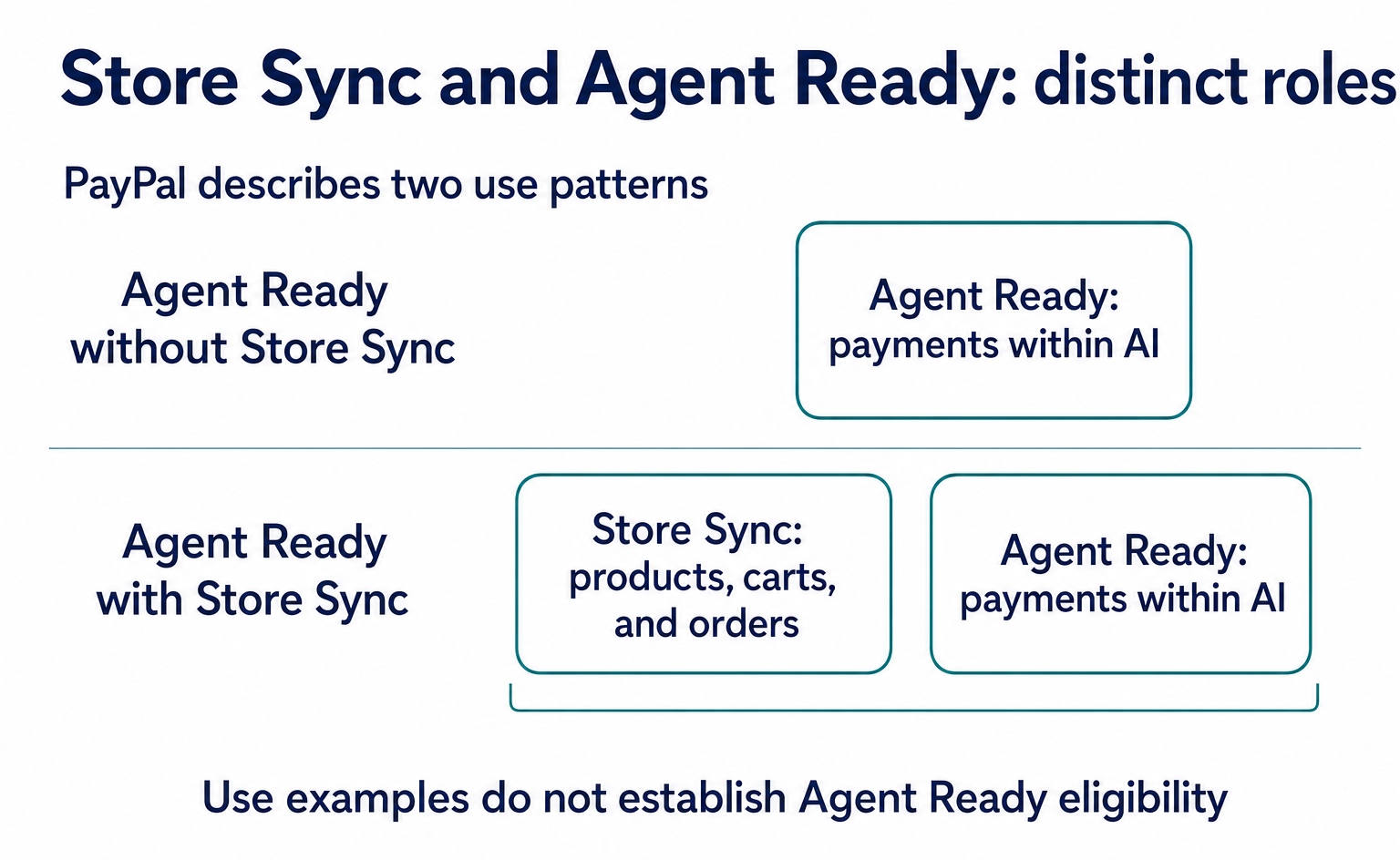
Even if you already have a PayPal button, that does not mean your products are connected to AI or that you support purchases within AI. Start by separating Store Sync, which connects products and orders, from Agent Ready, which handles payments. Then identify the connections your business still needs.
This introductory article is based on official information available as of September 10, 2026. Eligibility for businesses in Japan has not been established. Rather than provide steps for a complete rollout, it explains how to choose between the services and read PayPal's published integration examples.
1. Product connections and payments have separate roles
Store Sync delivers product catalogs to participating AI channels. It also creates and manages carts and connects to existing order management. Its role spans product discovery through post-purchase processing.[1][5]
Agent Ready provides the foundation for accepting and processing payments in AI shopping interfaces. The current PayPal.ai site describes both standalone use of Agent Ready and use with Store Sync.[5]
| What your business wants to do | Main service or materials to review | Questions for assessing extra connections |
|---|---|---|
| Help AI users find your products | Store Sync | Do you have a way to share your product catalog, inventory, and prices? |
| Connect AI-side carts and orders to your store | Store Sync | How will this connect to your existing cart and order management? |
| Accept payments initiated within AI | Agent Ready | Is there a payment route that fits your agreement and target AI channel? |
| Reuse existing Braintree processing | Agent Ready ACP and UCP integration materials | Can you add token receipt and payment processing? |
Store Sync handles products and orders, while Agent Ready handles payments. Stores that already have a way to connect products and orders to AI can consider standalone Agent Ready use alongside those connections.[1][5]
When choosing a combination, check product connections and payment agreements separately. Choosing a service is also separate from meeting the conditions for selling through each AI channel.
2. Separate agreement requirements from inquiry channels
PayPal.ai gives a broad description of Agent Ready built on existing PayPal accounts. In contrast, the developer overview of Agent Ready and the ACP and UCP integration materials covered here are for Braintree merchants. Do not define all of Agent Ready as requiring Braintree. Instead, understand that Braintree is a prerequisite for the technical examples below.[2][3][4][5]
Stores using only a standard PayPal button should first check their agreement details to see whether they use Braintree. If they do not, they should not proceed with a plan to simply add the code examples below.
If you are considering a Store Sync inquiry
PayPal.ai has a “Get Started” link and a form for contacting sales about Store Sync. If you want to make an inquiry, you can prepare the necessary information in this order.[5]
- Use “Get Started” on PayPal.ai to find the inquiry form.
- Prepare your name, phone number, business email, company name, and company website URL.
- Check the options under country and expected annual revenue to find those that fit your business.
- Read the consent terms for marketing emails and phone calls, along with the privacy policy. If you choose to send the form, select “Submit.”
The form states that all fields are required. It is a Store Sync sales inquiry channel. Submitting it does not, by itself, grant approval or complete an integration.[5]
An older general overview has a link to request access from the AI team. As of the review date, that old link redirects to PayPal.ai. However, it is unconfirmed whether the current Store Sync inquiry form is a shared application channel for Agent Ready.[1][5]
The diagram below shows an integration example using Braintree. It does not represent the eligibility requirements for Agent Ready as a whole.
3. Follow the purchase of one mug
We will now examine two PayPal-published integration examples using Braintree. We compare the ACP example for a ChatGPT app and the UCP example using Google Pay as separate routes for buying the same product.[3][4]
Here is the illustrative purchase. USD matches the currency in the charge examples in the materials. It does not indicate that stores in Japan can participate using this currency or these conditions.
| Information | Illustrative value |
|---|---|
| Product and product ID | Mug, mug-demo-01 |
| Quantity and product price | 1 item, USD 8.00 |
| Shipping, tax, and total | Shipping USD 2.00, tax USD 0.00, total USD 10.00 |
| Checkout ID | checkout-demo-01 |
| Store order ID | order-demo-01, issued when the order is saved |
Linking the product ID, quantity, shipping, and tax to this checkout ID is an illustrative store-side design. Zero tax is also an assumption for the example. In practice, tax must be calculated based on factors such as the sales destination.
For product discovery, PayPal's ChatGPT app example receives product_title, calls the store's product search process, and returns product information in structuredContent. In our example, this corresponds to searching for “mug” and returning information for mug-demo-01. It does not provide a complete definition of fields for product IDs, inventory, or prices.[3]
The store-side design links the one selected item to checkout-demo-01, calculates shipping and tax from the delivery address, and sets the final total at USD 10.00. If the delivery address is not yet known and shipping remains undecided, it is important not to treat the USD 8.00 product price as the final charge.
If you use Store Sync, the official overview leads to materials on product catalog connections and cart operations. This article covers the overview and payment integration examples, not the complete API steps for adding or updating this product.[1]
4. Example: paying from a ChatGPT app
The PayPal ACP integration example covered here is for a custom ChatGPT app built with the Apps SDK. The store provides an MCP server—a connection point through which AI can call processes—and complete_checkout to receive payment information. The app calls requestCheckout(). This is not a mandatory configuration for ACP as a whole.[3]
The information the app passes to ChatGPT's checkout screen includes the checkout ID, payment processor, merchant ID, currency, and total. Replacing part of the official example with our purchase gives the following.[3]
{
  "id": "checkout-demo-01",
  "payment_provider": {
    "provider": "braintree",
    "merchant_id": "YOUR_BRAINTREE_MERCHANT_ID",
    "supported_payment_methods": ["card"]
  },
  "status": "ready_for_payment",
  "currency": "USD",
  "totals": [
    { "type": "total", "display_text": "Total", "amount": 1000 }
  ],
  "payment_mode": "test"
}
id links to the store's checkout process. merchant_id identifies the Braintree merchant processing the payment. In this example, amount is in cents, so 1000 means USD 10.00. ready_for_payment means the checkout is ready to accept payment, not that it has been paid.
This is an illustrative excerpt that omits elements such as links from the official example. It is not a complete request. payment_mode: "test" specifies test mode; it does not indicate that this excerpt has been tested successfully.[3]
| Sender → Recipient | Input or return value | Condition for proceeding |
|---|---|---|
| Store app → ChatGPT checkout screen | Pass the purchase information above to requestCheckout() |
The store has finalized the total and purchase details |
ChatGPT → Store's complete_checkout |
checkout_session_id, buyer, payment_data |
Receive payment information authorized by the buyer |
| Store server → Braintree | payment_data.token and amount "10.00" |
Match the relevant checkout, merchant, and amount |
| Braintree → Store server | Success or failure; transaction ID on success | Evaluate the result before returning the checkout completion response |
If the received checkout_session_id is checkout-demo-01, match it to the USD 10.00 total saved by the store. payment_data.token is one-time payment information that Braintree calls a “payment method nonce.” Pass it to transaction.sale or GraphQL's chargePaymentMethod.[3]
The 1000 cents on the checkout screen and "10.00" used for the charge must represent the same amount. PayPal's published examples show 330 cents on the checkout screen and USD 10.00 in the later charge example. Take care not to connect these separate examples unchanged as a single transaction.[3]
The token has restrictions on the merchant, maximum amount, currency, and expiration. If the authorized limit for this purchase is USD 10.00, changing the quantity to two would bring the total to USD 18.00. The design must update the purchase details and authorization rather than charge under the same authorization.[3]
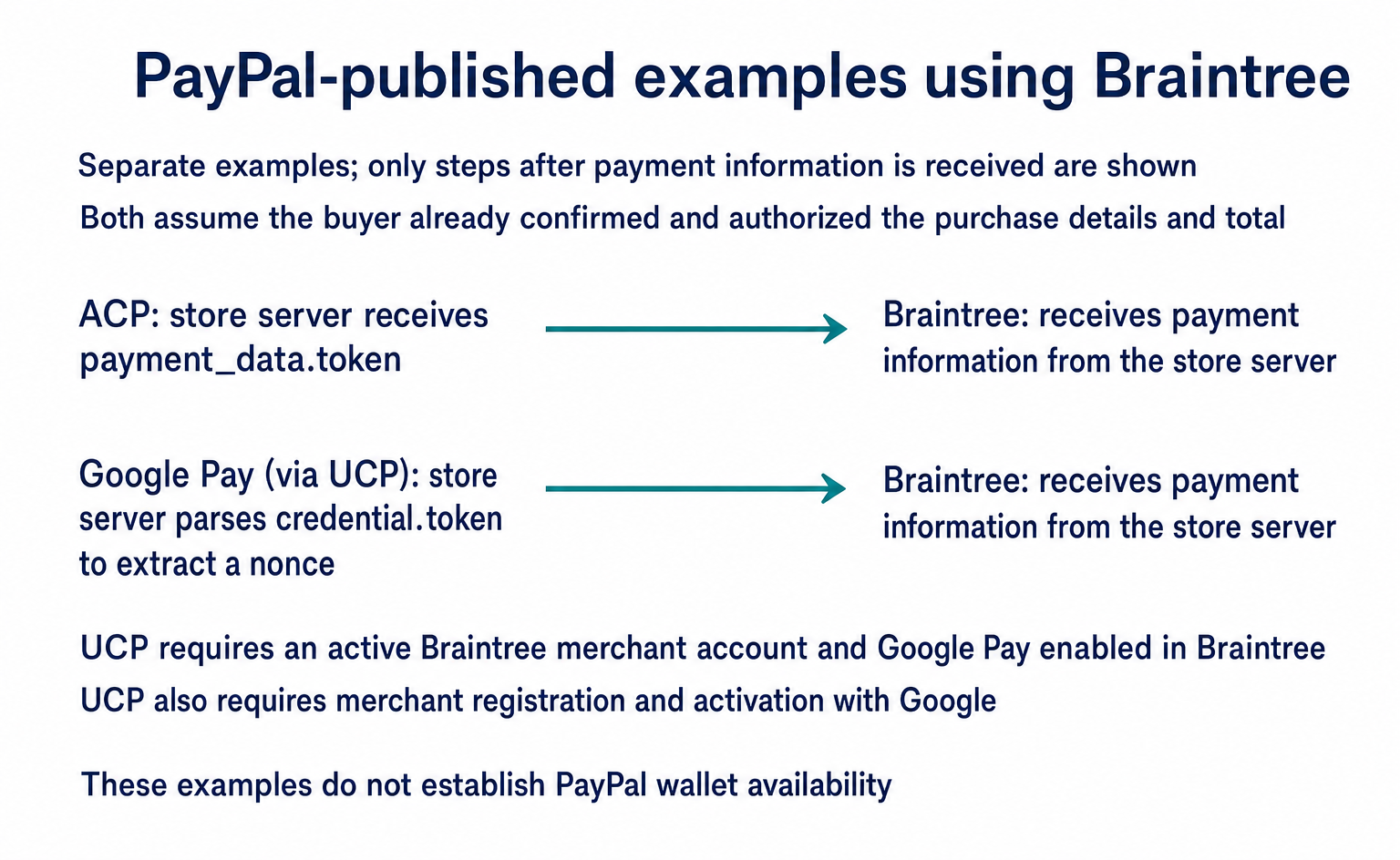
The currently supported values in these integration materials are card, applepay, and googlepay. paypal_wallet and venmo_wallet are listed as “coming soon.” The Agent Ready name alone does not establish that the PayPal wallet is available through this route.[3]
The diagram compares only what happens after payment information is received. For both routes, it assumes the buyer has already confirmed and authorized the purchase details and the USD 10.00 total. ACP uses payment_data.token; the UCP example parses credential.token to extract the nonce.[3][4]
5. Example: paying through Google
In PayPal's published UCP example, Google's server tokenizes Google Pay payment information. The store receives it and passes it to Braintree. Prerequisites are an active Braintree merchant account, Google Pay enabled in Braintree, and UCP merchant registration and activation with Google.[4]
When registering with Google, the store defines a Google Pay payment handler. Its configuration includes gateway: "braintree", braintree:merchantId, and braintree:clientKey. The value for clientKey is a Braintree tokenization key. It is configuration information used for tokenization, not the buyer's purchase authorization.[4]
For this explanation, the Google-side checkout also maps to the store's checkout-demo-01. The following assumes the buyer has already confirmed and authorized the USD 10.00 total. It does not show specific screens or authorization steps.
| Sender → Recipient | Input or return value | Store-side processing |
|---|---|---|
| Google → Store completion process | Send payment information to /checkout-session/{id}/complete |
In this illustration, map {id} to checkout-demo-01 |
| Store's receiving process → Parsing process | credential.token in the first element of payment.instruments |
Parse the JSON string; the example code retrieves nonce from the first element of androidPayCards |
| Store server → Braintree | Extracted nonce and amount "10.00" |
Check against the saved purchase total, then charge |
| Braintree → Store server | Success or failure; transaction ID on success | Link the payment result to the checkout and order |
This endpoint and parsing method belong to PayPal's published Google Pay–Braintree integration example. They do not mean that the same payment route or fields are required throughout UCP.[4]
Also, in the published received-data example, the key for the value inside the token is an empty string. It does not match the nonce key read by the subsequent code. During implementation, check the actual received format against the specification. Do not proceed to charge if the value cannot be retrieved.[4]
Receiving payment information is not the same as a successful payment. The store checks Braintree's response before returning the purchase result and updating order management.
6. Link payments to orders
Once payment for the mug succeeds, the design should save a mapping between checkout ID checkout-demo-01, store order ID order-demo-01, and the Braintree transaction ID. This lets staff trace which order a payment belongs to when investigating inquiries or processing failures.
PayPal's ACP success response example returns status: "completed" and order information. It uses the Braintree transaction ID for order.id. If your order management system issues a separate order ID, do not treat the two as the same identifier. Keep a mapping between them.[3]
When designing operations, distinguish between an order-save failure after successful payment and a request resent because the response was interrupted. Business staff and developers need to agree on which record establishes that payment is complete and how to prevent duplicate charges when a request is resent.
The materials state that one-time payment information from Google Pay expires after three hours, even if unused. They also warn against using the same value both to charge and to save a payment method for future use. A design therefore cannot unconditionally reuse the same token after a failure.[4]
7. Decide what your business needs to add
Assess three areas: products, checkout and orders, and payments. First, operations staff should list where product information is managed, existing routes for sharing it with AI, where orders are saved, and the status of PayPal and Braintree agreements.
- If there is no route connecting products or carts to AI, investigate Store Sync's scope.
- If product and order connections already exist, investigate the conditions for standalone Agent Ready use.
- If you use Braintree, review either the ACP example or the Google Pay–UCP example with developers, depending on the target AI.
- If you only use a PayPal button, do not start by implementing the Braintree examples. First confirm which Agent Ready conditions apply to your business.
What has been checked
The field labels on the Store Sync inquiry form have been checked. The country options, eligibility for Japan, screen and approval conditions after submission, and current Agent Ready application channel remain unconfirmed. No form was submitted and no live payment was made.
The technical sections are intended to help readers understand PayPal's public examples. They are not implementation instructions covering everything from product registration through authentication and checkout completion, nor do they guarantee compliance with all ACP and UCP schemas. Before development proceeds, verify the target specification version, received data, payment results, order saving, and retry handling together.
FAQ
- Q. Does having a PayPal payment button make my store ready for AI shopping?
- The button alone does not make your store ready. Review separately how products reach AI, how checkout and order management connect, and how you receive payments initiated within AI. Also distinguish the broad description of Agent Ready from the developer integration examples using Braintree.[1][2][5]
- Q. Are both Store Sync and Agent Ready required?
- PayPal describes both standalone use of Agent Ready and use with Store Sync. Whether you need Store Sync depends on whether you already have a way to connect products and orders to AI. You must separately confirm your business's eligibility and the conditions for the target AI channels.[5]
- Q. Can online stores in Japan apply?
- The reviewed materials do not establish eligibility for businesses in Japan. PayPal.ai has a Store Sync sales inquiry form. Its field labels for name, contact details, company information, country, and expected annual revenue have been checked, but the country options and screen after submission have not. It is also unconfirmed whether this form serves as a shared application channel for Agent Ready.[1][5]
- Q. Is Braintree required to use Agent Ready?
- It is not possible to conclude that Braintree is required for all of Agent Ready. The current PayPal.ai site describes a service built on existing PayPal accounts. The developer ACP and UCP materials covered here are integration examples using Braintree. Confirm which route applies to your business's agreement.[2][3][4][5]
- Q. Can I use the PayPal wallet through ChatGPT's ACP integration?
- In the PayPal integration materials for ChatGPT apps covered here, the currently supported values are card, applepay, and googlepay. paypal_wallet and venmo_wallet are listed as coming soon. This describes support in that particular integration example, not a complete list of Agent Ready payment methods.[3]
- Q. Can I connect everything by copying the official code?
- The code should not be treated as a complete integration. The ACP materials use different amounts in the checkout screen and charge examples. The UCP materials have a mismatch between the nonce key in the received-data example and the parsing code. The JSON in this article is also an illustrative excerpt. Check the specification version and data format you will use, then test external connections, payment results, order saving, and retry handling.[3][4]
Sources
- [1] Agentic commerce services overview (PayPal) — accessed 2026-09-10
- [2] Agent Ready overview (PayPal) — accessed 2026-09-10
- [3] Agentic Commerce Protocol integration (PayPal) — accessed 2026-09-10
- [4] Universal Commerce Protocol integration (PayPal) — accessed 2026-09-10
- [5] PayPal Agentic Commerce Services (PayPal) — accessed 2026-09-10
About the author
Shogo MizushimaCEO of kairos Inc. / AgentSignal Developer
Develops AgentSignal, a tool for measuring AI crawler visits and AI-referred traffic, and diagnosing AIO readiness. Writes about measurement and practical improvements for AI search using observed data.
Related articles
AI shopping and booking
How to List Products on ChatGPT: From ACP Product Integration to Orders
A step-by-step guide to applying for product integration, sending and updating product data, and directing shoppers to checkout. Learn when order APIs are needed, how to test version 2026-04-17, and which features were available or still proposed as of September 10, 2026.
Published
AI shopping and booking
How to Sell Products Through Google’s AI: From UCP Application to Orders
A guide for ecommerce teams to Merchant Center product registration, UCP country eligibility and applications, Google Pay setup, and order API integration. Covers conditions as of September 10, 2026, plus testing and approval checks.
Published
AI shopping and booking
51% of US consumers use AI shopping tools. How much has product selection changed?
That does not mean AI placed 51% of orders. It is the share of US consumers who reported using at least one AI-powered shopping tool during the past month.
Published