Meta’s Muse AI and Link: What Changes for Your Store’s Payments?
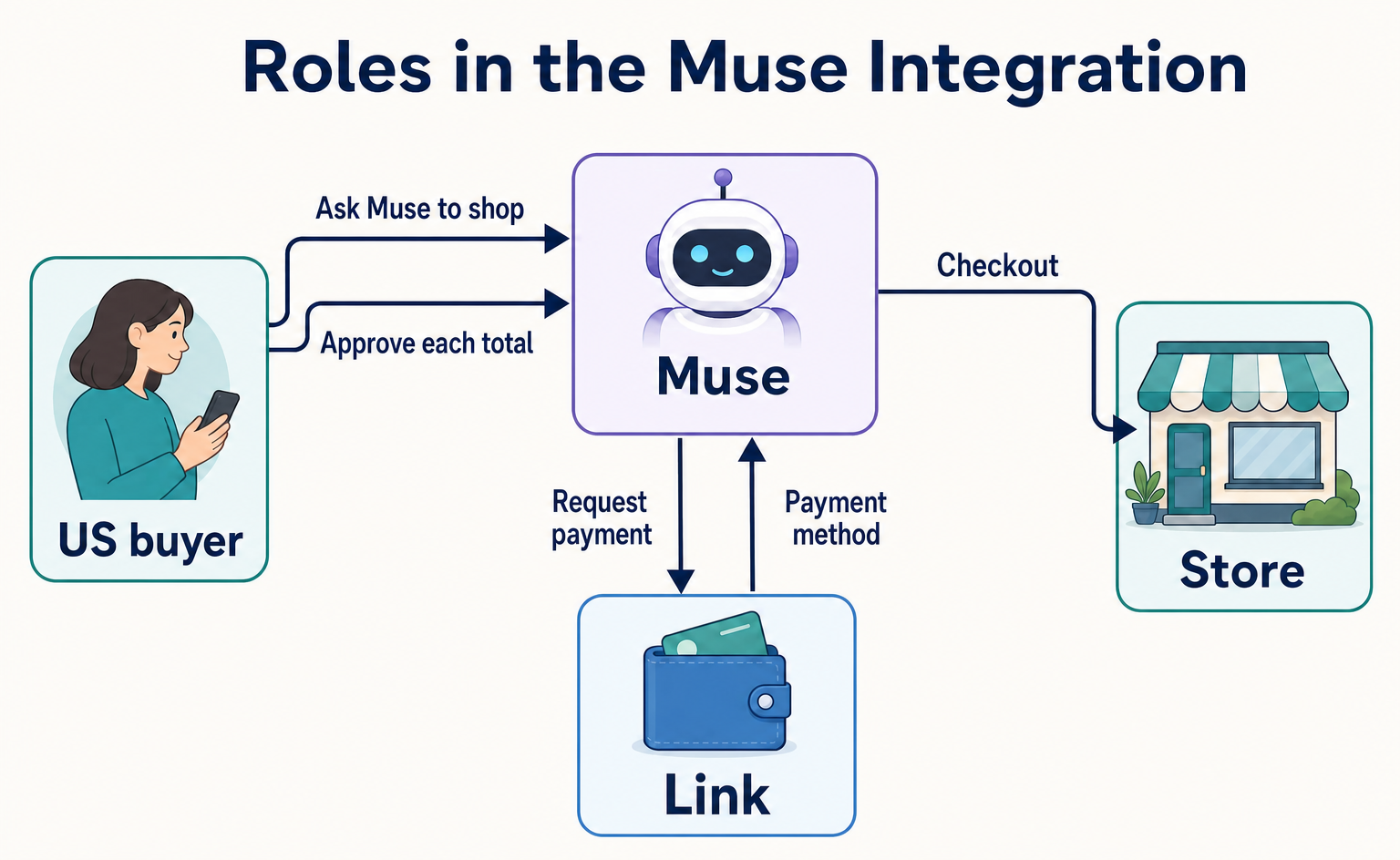
What Meta’s Muse and Stripe’s Link integration means for ecommerce managers in Japan: US buyer eligibility, two payment routes for stores, and why payments are separate from product listings. Learn how the Muse announcement differs from the public Link CLI documentation.
Does receiving orders from Meta’s Muse AI require a special product registration process or a Stripe contract? What this announcement confirms is a way for US buyers to let Muse handle payments through Link. It is not presented as a service for registering a store’s products with Muse or getting them recommended.[1]
This article helps managers of online stores in Japan assess how the integration relates to their existing payment setup. We follow one shopping example through two cases: a store that accepts Link and one that does not. This provides a basis for avoiding the assumption that signing up for Stripe alone will get products listed.
The announcement was published on September 8, 2026, and the references were checked on September 14, 2026. The explanation below is based on the official announcement and public pages reviewed. It does not report verified account setup or a successful purchase using an actual Muse account.[1]
1. Muse handles the shopping, while Link supports the payment
Muse is an AI provided by Meta that carries out tasks people ask it to do. This type of AI is called an “agent.” Link is a payment service provided by Stripe. In this integration, it acts as a wallet controlled by the buyer.[1][2]
For example, if a buyer asks an AI to find a product but still has to enter card details at the end, part of the checkout process remains a manual task. This integration lets the AI handle the payment portion as well. According to the announcement, buyers approve the total for every transaction without exposing their underlying payment details to Muse.[1]
For stores, this means there is a route to receive payment through Link or card payments even when a buyer delegates the process to AI. However, this is not a customer acquisition system. It primarily supports payment at the time of purchase. Its effect on orders or sales at individual stores in Japan has not been verified.[1][4]
2. The payment route depends on whether the store accepts Link
The announcement describes two ways to pay stores. At stores that accept Link, Muse uses a saved payment method. At other stores, it uses a one-time virtual card for the approved purchase. A virtual card is card information used for online payments, rather than a physical card.[1]
| What the store accepts | What Muse uses | What this tells the store |
|---|---|---|
| Link | The buyer’s preferred payment method saved in Link | There is a route for payment through Link |
| Other payment methods, but not Link | A one-time virtual card issued by Link for the approved purchase | There is a card payment route even without Link support |
The second route does not mean purchases are possible at stores with no payment method available. The general Link documentation says one-time virtual cards are used at merchants that accept online card payments. When assessing your own store, start by checking whether your current checkout accepts Link or online card payments.[4]
For the rest of this article, we use an illustrative example of a US buyer purchasing one water bottle. Assume the product costs US$40, shipping and tax total US$8, and the total payment is US$48. These are not an actual product, price, or purchase result.
If the store accepts Link, Muse proceeds through the route that uses the buyer’s saved payment method in Link. If the store does not accept Link, the route uses a one-time virtual card issued by Link for that approved purchase. In either case, the announcement says the buyer approves the transaction total within the Muse chat.[1]
This does not support the conclusion that every store must switch its payment processing to Stripe to receive orders from Muse. Nor does it establish that a purchase will always succeed at any store with an existing card payment option. Link’s payment routes and the successful completion of the entire checkout process at an individual store need to be considered separately.[1][4]
3. Stores in Japan and buyers in Japan face different conditions
Stripe’s announcement about the Muse integration covers US consumers. It does not say that consumers in Japan can use it. Link’s global user base should not be taken to mean that the Muse integration is available in the same regions.[1]
Meanwhile, the developer documentation for Link CLI says that buyers must be US consumers, but merchants may be outside the US. Link CLI is a command-line interface: a tool developers use to call Link functions through text commands. Under these conditions, there is no need to rule out a store solely because it is based in Japan.[3][4]
However, that explanation alone does not establish that Muse can purchase from every store in Japan. The geographic conditions in the documentation do not guarantee that Muse can find an individual store’s products or complete an order there. For ecommerce managers in Japan, this is relevant as a potential route for receiving orders from US buyers, rather than as an offering for Japanese consumers.[1][3]
Do not confuse Muse’s approval screen with the general Link approval screen
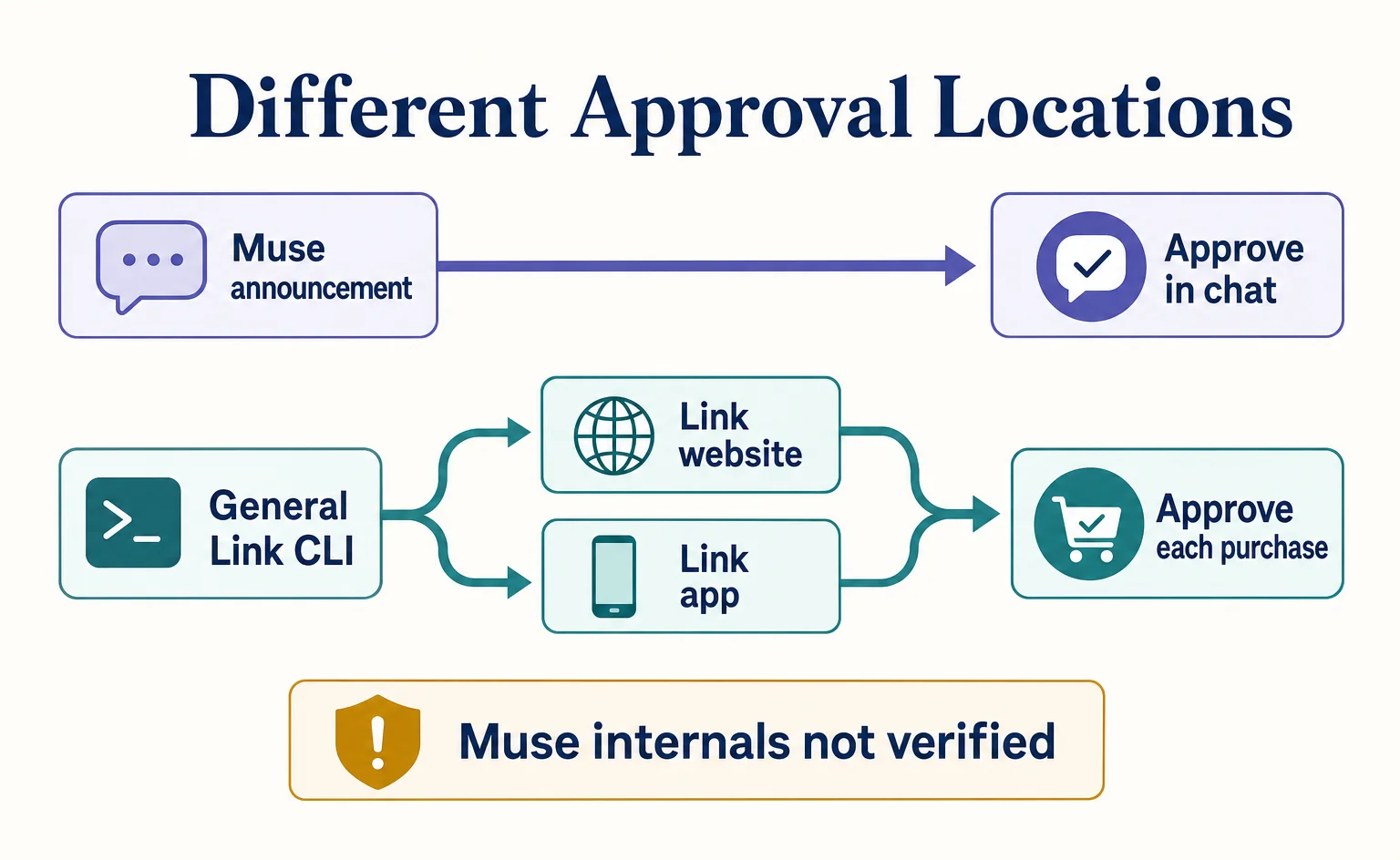
The Muse announcement says buyers approve each total “within the chat.” By contrast, the general Link CLI documentation says buyers approve each purchase request on the Link website or in the mobile app. Link’s consumer-facing page also describes approval in the app.[1][2][4]
For that reason, screens shown in Link’s guidance cannot be presented as actual Muse screens. The materials reviewed here do not confirm specific button names in Muse or the sequence of screens after connecting an account. The general Link mechanism can provide background, but it cannot be substituted for Muse operating instructions.
4. Following a US$48 payment through the public documentation
Here we follow the one-time virtual card route at a store that accepts online card payments, using the same example of buying one water bottle. The following is background on Link CLI, not a verified account of Muse’s internal implementation. We assume the product and store have already been chosen, the quantity is one, and the total of US$48, including shipping and tax, is known.[3][4]
Initial permission is separate from approval for each purchase
Before an AI uses Link, it obtains permission from the buyer. The mechanism used for this permission is called OAuth. It allows the AI to use Link functions within the scope the buyer has authorized.[3]
Link CLI calls Link using information that represents this permission. Payment functions require payment permissions, but obtaining them does not mean the AI can freely make all subsequent purchases. It separately asks the buyer to approve the US$48 water bottle purchase.[3][4]
The AI sends Link the purchase details and amount
The AI sends Link the purchase amount, the store’s name and URL, and an explanation of what it is buying and why. The data asking for permission to make this payment is called a “spend request.” When requesting a virtual card, the store’s name and URL are required.[4]
In the water bottle example, the request distinguishes the quantity of one, the US$40 product price, the US$8 shipping and tax, and the US$48 total. In the public documentation, amounts are expressed in the currency’s smallest unit, so US$48 becomes 4800, and the currency is usd, meaning US dollars. These are illustrative values, not instructions to enter them in a store’s admin screen.[4]
The store URL sent here identifies where this purchase will take place. It is not a URL submitted by the store as an application for a Muse listing. A spend request can include product display information, but there is no basis for treating that as a Muse product registration feature.[1][4]
After approval, the AI receives payment details and purchases from the store
Link returns an approval URL for the AI to present to the buyer, along with an ID identifying the spend request. The buyer reviews the US$48 request on the Link website or in the app. In this general flow, installing the mobile app is not required for approval.[4]
The AI uses the same spend request ID to check the approval status. It then uses the one-time card details obtained after approval in the store’s checkout. This ID identifies the record requesting permission to pay; it is not an order number issued by the store.[4]
In other words, receiving payment details from Link does not finish the purchase at the store. The store’s checkout still has to be completed. The public documentation also treats “approved” and “payment completed” as separate states. Buyer approval alone is not sufficient for the store to decide to ship the product.[4]
Do not treat an amount change or a pending approval as success
Suppose the final total for the water bottle rises from US$48 to US$52. In the general Link system, an increase requires the buyer to approve it again. There are also conditions governing whether the amount on an approved request can be increased. Neither the initial permission to use Link nor approval of US$48 can be treated as authorization to pay US$52.[4]
Likewise, if checking the approval status stops partway through, that does not establish whether the purchase succeeded or failed. The public documentation says to check the actual state of the same request again. The standard limit in the general documentation is US$500 per request, but there is no basis for calling that a Muse-specific purchase limit.[4]
5. This announcement does not explain how to get products discovered
This announcement does not establish exactly where Muse obtains product information. The materials reviewed also do not specify how product recommendations are ranked or provide a dedicated channel for stores to register products with Muse. Supporting payment and getting products featured are separate decisions.[1]
The public Link CLI page links to other functions related to product search and purchase processing. Those links alone do not establish that Muse uses the same route to obtain product information. It is important not to equate a list of publicly available general functions with the internal processes adopted by Muse.[3]
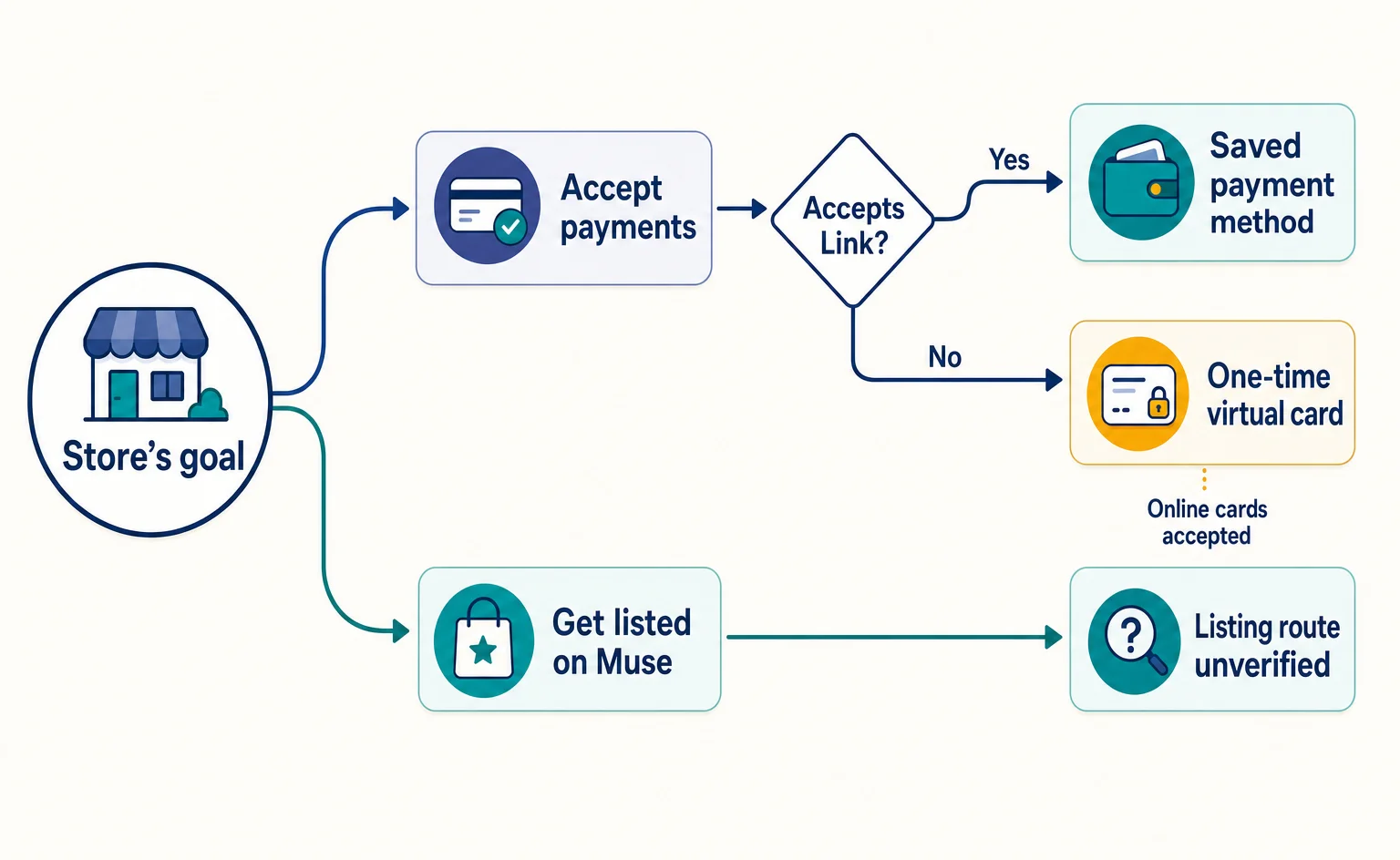
In the water bottle example, we can explain a route for paying US$48, but we do not know why Muse would have selected that store’s bottle beforehand. We cannot advise that stores with Stripe contracts get priority or that adding Link leads to recommendations. Not finding a dedicated registration method also does not prove that no registration program exists or will exist in the future.[1][3]
If you are considering how to prepare your store for purchases through other AI services, examining the processes needed beyond payment as separate issues can help narrow the scope of development.
6. Clarify your goal before changing your existing payment setup
If your goal is to accept payments that US buyers have delegated to AI, this announcement provides useful information for assessing your existing payment setup. Because it describes a virtual card route for stores that do not accept Link, there is no need to decide to switch to Stripe based on this announcement alone.[1]
If your goal is to get your products listed or recommended by Muse, the four sources reviewed here do not provide enough information to explain how to register. The additional information to look for is where Muse obtains product information, the participation requirements for merchants, and the application route for listings. When these are published, they will need to be assessed separately from your payment contract.
You can check the announcement in Stripe’s announcement of the Muse integration, and the buyer-controlled wallet concept on Link’s page for agents. Technical staff researching general connection methods can consult the Link CLI documentation for US consumers and the documentation on per-purchase approval and obtaining payment details. Do not treat these as application channels for product listings on Muse.[1][2][3][4]
Link’s page also lists features such as detailed controls over when payments can proceed without per-purchase approval as “Coming soon,” meaning they are planned for the future. Those future general features cannot be used to override the current Muse announcement’s requirement for approval each time. At this point, the change stores should recognize is an expansion of the routes through which a buyer’s AI can carry out shopping using existing payment methods.[1][2]
FAQ
- Q. Is a Stripe contract required to receive orders from Muse?
- This announcement does not establish that every store needs a Stripe contract. For stores that do not accept Link, it describes a payment route using a one-time virtual card for the approved purchase. However, it does not guarantee a successful purchase at any individual store.[1][4]
- Q. Can consumers in Japan connect Link to Muse and shop?
- This Muse integration announcement covers US consumers. The materials reviewed do not confirm availability for consumers in Japan.[1]
- Q. Are stores in Japan excluded?
- The general Link CLI documentation says merchants may be outside the US. However, it does not verify that Muse can obtain product information from individual stores in Japan and complete purchases there.[3][4]
- Q. Will adding Link get my products recommended by Muse?
- Recommendations have not been confirmed. This announcement concerns a payment integration. The provided materials do not specify Muse’s product information sources, recommendation ranking criteria, or a dedicated product registration channel.[1][3]
- Q. Once I give an AI permission to use Link, can it buy freely?
- Permission to use Link and approval for each purchase are separate. The Muse announcement says buyers approve every transaction total within the chat. In the general Link CLI flow, buyers approve purchase requests on the Link website or in the app.[1][3][4]
Sources
- [1] Stripe helps Muse, Meta's new personal AI agent, shop across the internet with Link (Stripe) — accessed 2026-09-14
- [2] Give your agent a wallet you control. (Stripe) — accessed 2026-09-14
- [3] Link CLI | Stripe ドキュメント (Stripe) — accessed 2026-09-14
- [4] 支出リクエストで決済認証情報を取得する | Stripe ドキュメント (Stripe) — accessed 2026-09-14
About the author
Shogo MizushimaCEO of kairos Inc. / AgentSignal Developer
Develops AgentSignal, a tool for measuring AI crawler visits and AI-referred traffic, and diagnosing AIO readiness. Writes about measurement and practical improvements for AI search using observed data.
Related articles
AI shopping and booking
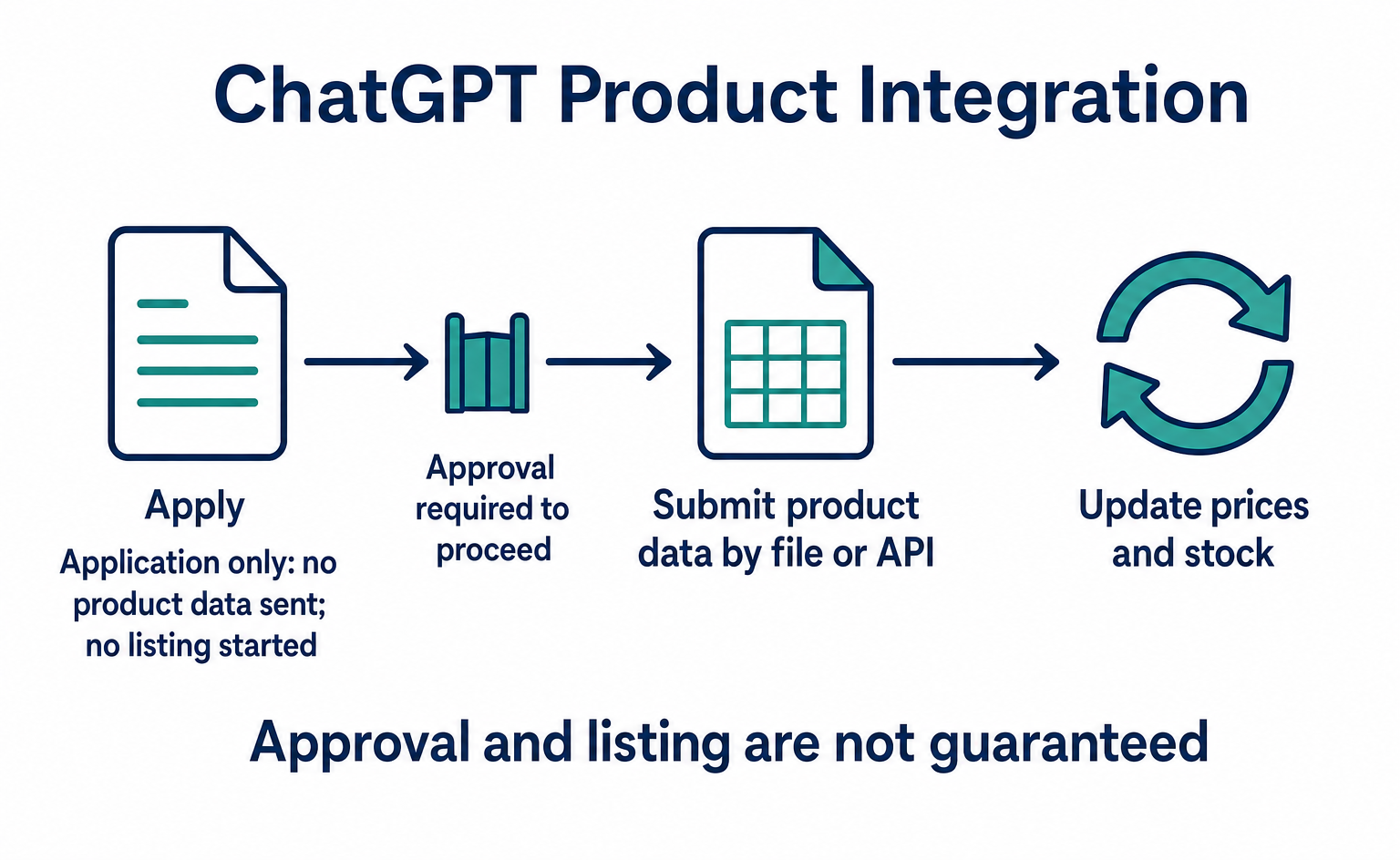
How to List Products on ChatGPT: From ACP Product Integration to Orders
A step-by-step guide to applying for product integration, sending and updating product data, and directing shoppers to checkout. Learn when order APIs are needed, how to test version 2026-04-17, and which features were available or still proposed as of September 10, 2026.
Published
AI shopping and booking
PayPal and AI Shopping: The Roles of Store Sync and Agent Ready
For e-commerce teams using PayPal: how Store Sync connects products to AI and Agent Ready handles payments. Follow ACP and UCP examples using Braintree, assess the extra connections needed, and see which eligibility conditions for Japan still need confirmation.
Published

AI shopping and booking
51% of US consumers use AI shopping tools. How much has product selection changed?
That does not mean AI placed 51% of orders. It is the share of US consumers who reported using at least one AI-powered shopping tool during the past month.
Published