What Is Organization Structured Data? Aligning Company Details and Official Links
Mistaken for a same-name company, or your site name and authors don’t show correctly? Align your company overview and official links, then describe them with Organization, WebSite and author structured data, and check the results after publishing.
You search your company name and see another company’s address. The site name in search results is not the one you expected. You are not sure your article authors are being conveyed correctly. People responsible for company information run into situations like these.
This article explains how to separate the symptoms first, decide on correct company details internally, and then describe them with Organization, WebSite and author structured data. It is not a process that guarantees corrections to search results. Information was checked on September 23, 2026.
Separate another company’s results from errors in your own details
First, record whether what you saw is another company’s page or outdated information on your own page. If a same-name company simply appears alongside you, that is no reason to change the address on your own site.
From here we use a fictional company, Komorebi Setsubi Co., Ltd. It maintains air conditioning for business customers in Nagoya and worries about being confused with another company of the same name.
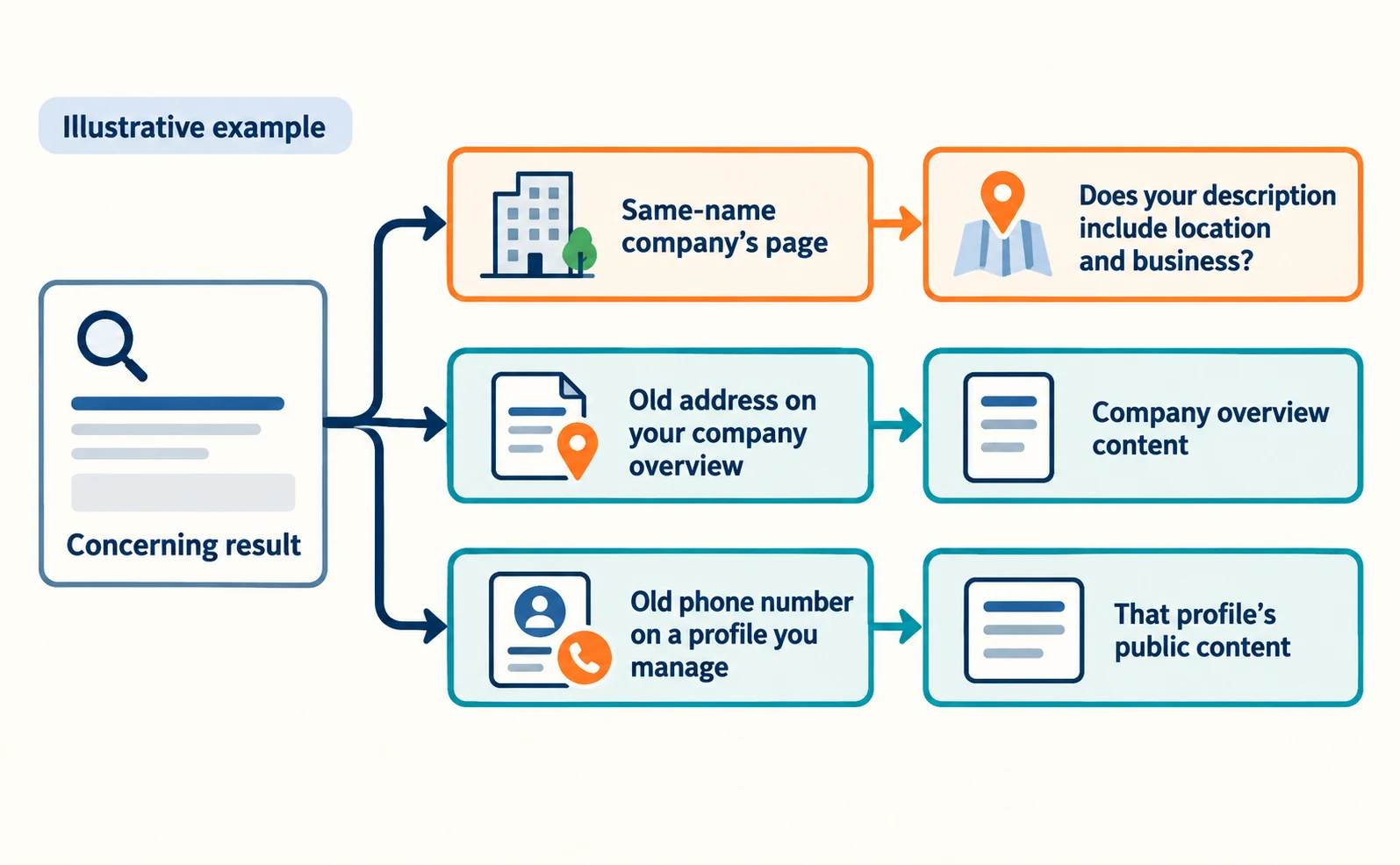
The person in charge enters the company name into Google Search and notes the page title and link URL of any concerning result. Next, they add a location or business type, such as “Komorebi Setsubi Co., Ltd. Nagoya,” and record which search showed the concerning result. This records what appeared at that moment.
| Observation (example) | Classification | Where to look first |
|---|---|---|
| A same-name company appears | Another company’s page | Whether your description includes location and business |
| Your company overview shows an old address | Your page is outdated | The company overview content |
| Your official profile shows an old phone number | An external page you manage is outdated | That profile’s public content |
Align your company overview and official profiles to one reference
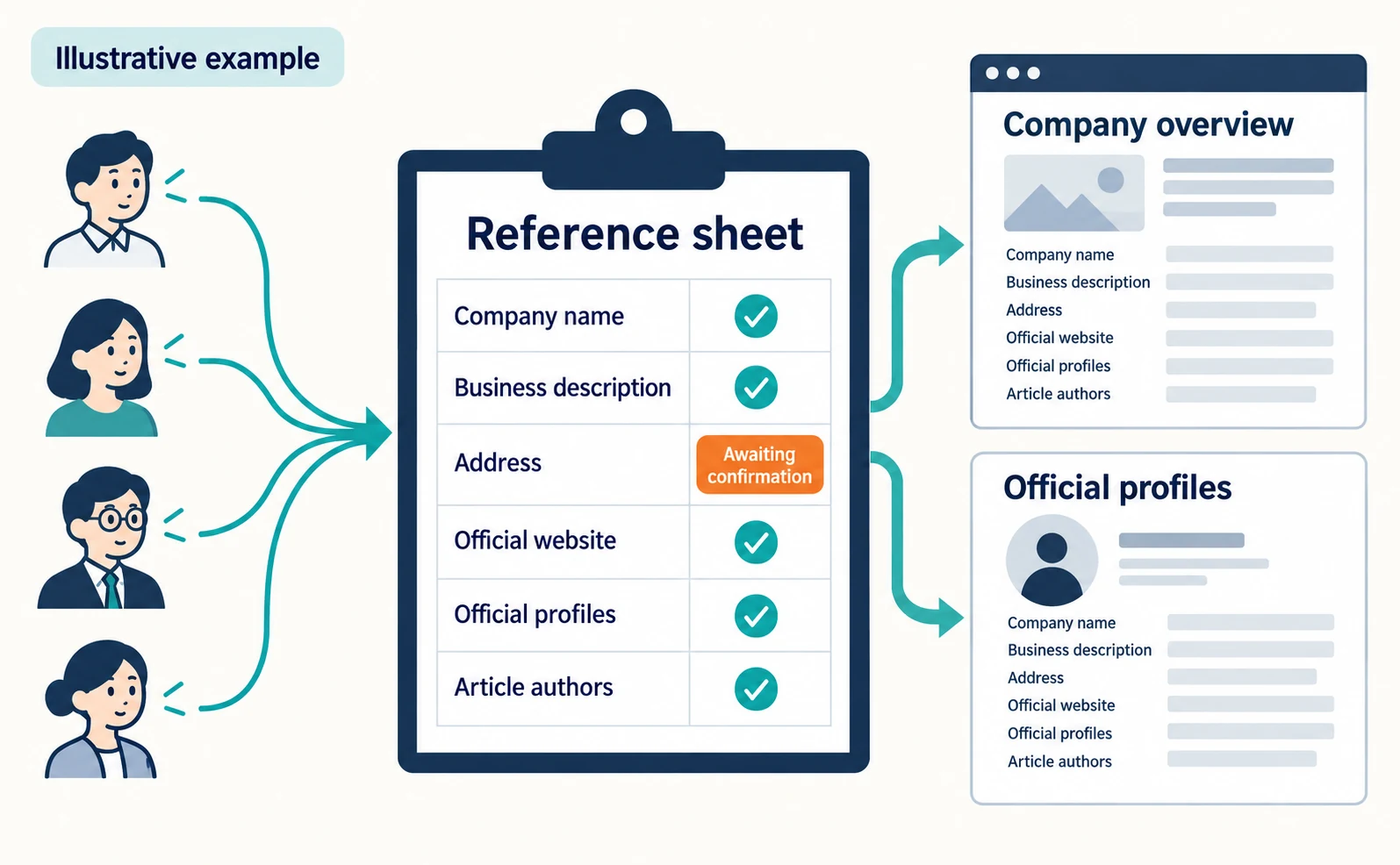
Put the company details you have confirmed internally into one reference sheet, and update your company overview and the profiles you manage to match it. Do not guess the correct address from search results; check with general affairs or the inquiries team. Mark unknown items “awaiting confirmation” rather than filling them in.
| Item | Example entry (illustrative) | Who confirms |
|---|---|---|
| Company name | Komorebi Setsubi Co., Ltd. | General affairs |
| Business description | Air-conditioning maintenance for businesses in Nagoya | Business lead |
| Address | Copy the confirmed head office address | General affairs |
| Official website | Official homepage URL | Site administrator |
| Official profiles | URLs of social profiles you manage | Account manager |
| Article authors | Names shown on author pages | Editor |
If the company overview only says “Welcome to Komorebi Setsubi,” change it to a sentence such as “Komorebi Setsubi Co., Ltd. provides air-conditioning maintenance for businesses in Nagoya.” This gives readers something to tell you apart from another company.
Convey company details with Organization structured data
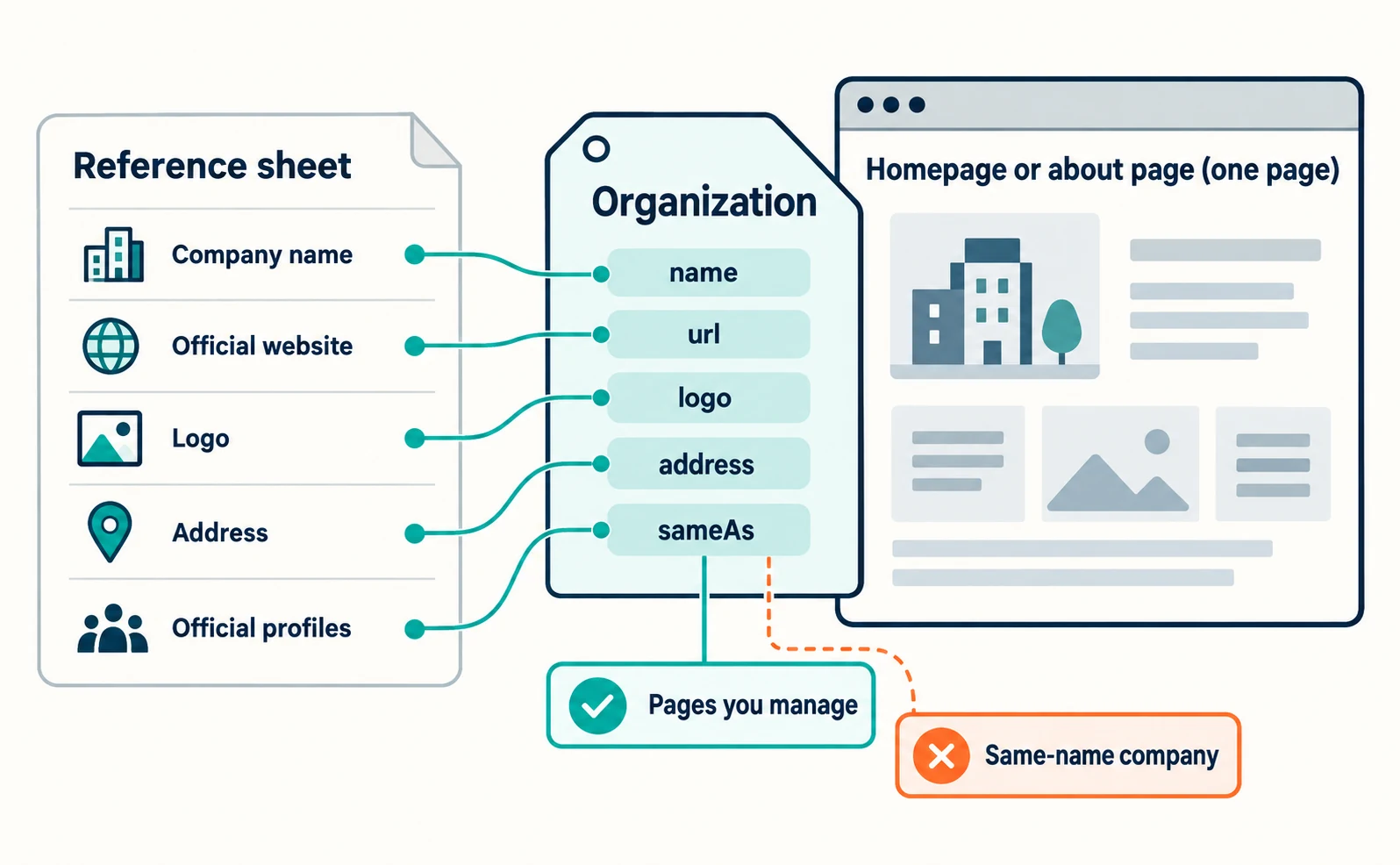
Organization is structured data that conveys your company name, official website, logo, address and official profiles in a format Google can read easily. Google says it helps distinguish your organization from others.[1]
Place it on the homepage or a single page describing the company, such as an about page; it does not need to be on every page. There are no required properties; add the ones that apply.[1] Google recommends the most specific type, such as OnlineStore for an online shop.[1]
| Property | Meaning | From which part of the reference sheet |
|---|---|---|
name |
Organization name; use the same name as your site name[1] | The form of the company name used as your site name |
url |
Official website URL | Official website |
logo |
Company logo image | Where the current logo is |
address |
Address | Address |
sameAs |
URL of a page on another site with information about you[1] | Official profiles |
legalName |
Registered legal name, if different from name[1] |
Confirmed by general affairs |
sameAs can include your profiles on social media or review sites.[1] For this task, limit it to pages you have confirmed your company manages. Do not include articles that merely mention your name or a same-name company.
Convey your site name with WebSite structured data
To indicate the site name shown in search results, use WebSite structured data on your homepage. The site name is the name of the whole site, separate from each page’s title.[2]
The required properties are name (the site name) and url (the homepage URL), placed on the domain or subdomain homepage. You can offer abbreviations as options with alternateName.[2] A subdirectory such as example.com/news cannot have its own site name.[2]
<script type="application/ld+json">
{
  "@context": "https://schema.org",
  "@type": "WebSite",
  "name": "Komorebi Setsubi",
  "alternateName": "Komorebi Setsubi Co., Ltd.",
  "url": "https://example.com/"
}
</script>
The values and URL above are illustrative. Google chooses site names automatically, so your preference may not be used. Using the same name in your homepage title and headings reduces inconsistency.[2]
How to handle article author information (Person)
In Article structured data, list in author all the authors shown on the page. Use the Person type for people and Organization for companies.[3]
Google asks that author.name contain only the name, without job titles or words like “posted by.” It also recommends adding the author page URL with url (or sameAs).[3] If there are several authors, list each one separately.[3]
Google’s documentation does not say author markup increases trust or citations. The purpose is to match the authors visible on the page.
After publishing, check content, data and search appearance separately
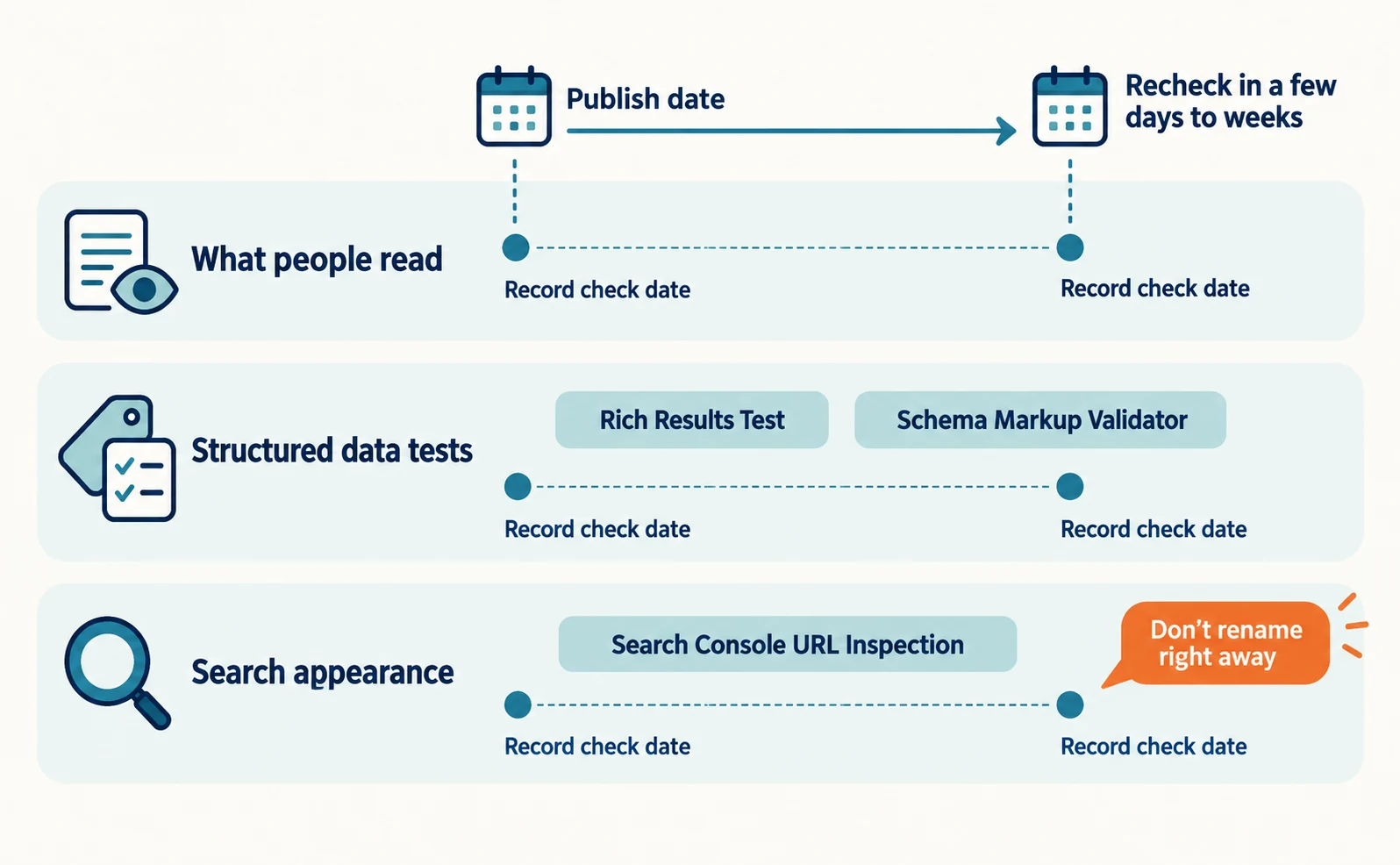
After publishing, record “what people read,” “structured data tests” and “how search shows it” separately, with dates.
Test Organization in the Rich Results Test, and after publishing use URL Inspection in Search Console to see how Google views the page.[1] Site names, however, are not supported in the Rich Results Test. Use the Schema Markup Validator to check syntax, along with URL Inspection.[2]
Site name changes can take from a few days to a few weeks after recrawling.[2] If nothing changes right away, do not switch to another name immediately; record the check date and compare later.
AI search needs no special markup. Google says there are no additional technical requirements for AI Overviews and similar features, and lists making structured data match the visible text on the page.[4]
Mismatches between company details and sales terms can also cause problems in Merchant Center reviews. See “Merchant Center Misrepresentation: How to Check Business Details and Sales Terms.”
FAQ
- Q. Will author markup make AI trust us more?
- The Google documentation we checked does not say author markup increases trust or citations. The purpose is to match the structured data to the authors shown on the page.
- Q. What should I fix if my site name is wrong in search?
- Align the name in the homepage WebSite structured data with the name in your homepage title and headings. You can offer abbreviations with alternateName. Changes can take a few days to a few weeks.
- Q. Does Organization need to be on every page?
- Google recommends placing it on the homepage or a single page describing the company, and says it does not need to be on every page.
Sources
- [1] Organization (Organization) structured data (Google Search Central) — accessed 2026-09-23
- [2] Provide a site name to Google Search (Google Search Central) — accessed 2026-09-23
- [3] Article (Article, NewsArticle, BlogPosting) structured data (Google Search Central) — accessed 2026-09-23
- [4] AI features and your website (Google Search Central) — accessed 2026-09-23
About the author
Shogo MizushimaCEO of kairos Inc. / AgentSignal Developer
Develops AgentSignal, a tool for measuring AI crawler visits and AI-referred traffic, and diagnosing AIO readiness. Writes about measurement and practical improvements for AI search using observed data.
Related articles
AI shopping and booking
Merchant Center Misrepresentation: How to Check Business Details and Sales Terms
Learn how to read a Merchant Center misrepresentation notice, check business details and sales terms, and record corrections before requesting a review. Includes original sample worksheets. This is not a checklist that guarantees an issue will be lifted.
Published
AIO and AI search
What Is AIO? Its Two Meanings and Where to Start with AI Optimization
AIO has two meanings: work to get your company featured in AI answers, and Google Search’s AI Overviews. Learn how it relates to SEO, what to confirm in a proposal, what Search Console and Bing reports show, and your first tasks.
Published
AI shopping and booking
Google Shows the Wrong Price: 3 Places to Check After a Price Cut
If Google still shows an old price after you lower it on your product page, compare the page, the product data sent to Google, and the sale conditions. A fictional example explains where to make corrections and how to check approval status afterward.
Published