How to Read Bing AI Performance: Pages Cited by AI and Citation Share
Learn how to use AI Performance in Bing Webmaster Tools to see which of your pages were cited in Copilot and other AI answers. Covers how to read Intents, Topics, Citation Share and Compare without confusing them with rankings or traffic.
Are your pages being used in AI answers? If so, which pages would benefit from more detail? AI Performance in Bing Webmaster Tools lets you look for clues in your own site’s records.
Bing Webmaster Tools is Microsoft’s management interface for website owners. This article explains what the report’s numbers mean and how to read four features added in June 2026. Information was checked on September 23, 2026.
Bing AI Performance shows your pages cited in Copilot and similar services
AI Performance shows which of your pages were cited in answers from Microsoft Copilot, AI-generated summaries in Bing and selected partner services.[1]
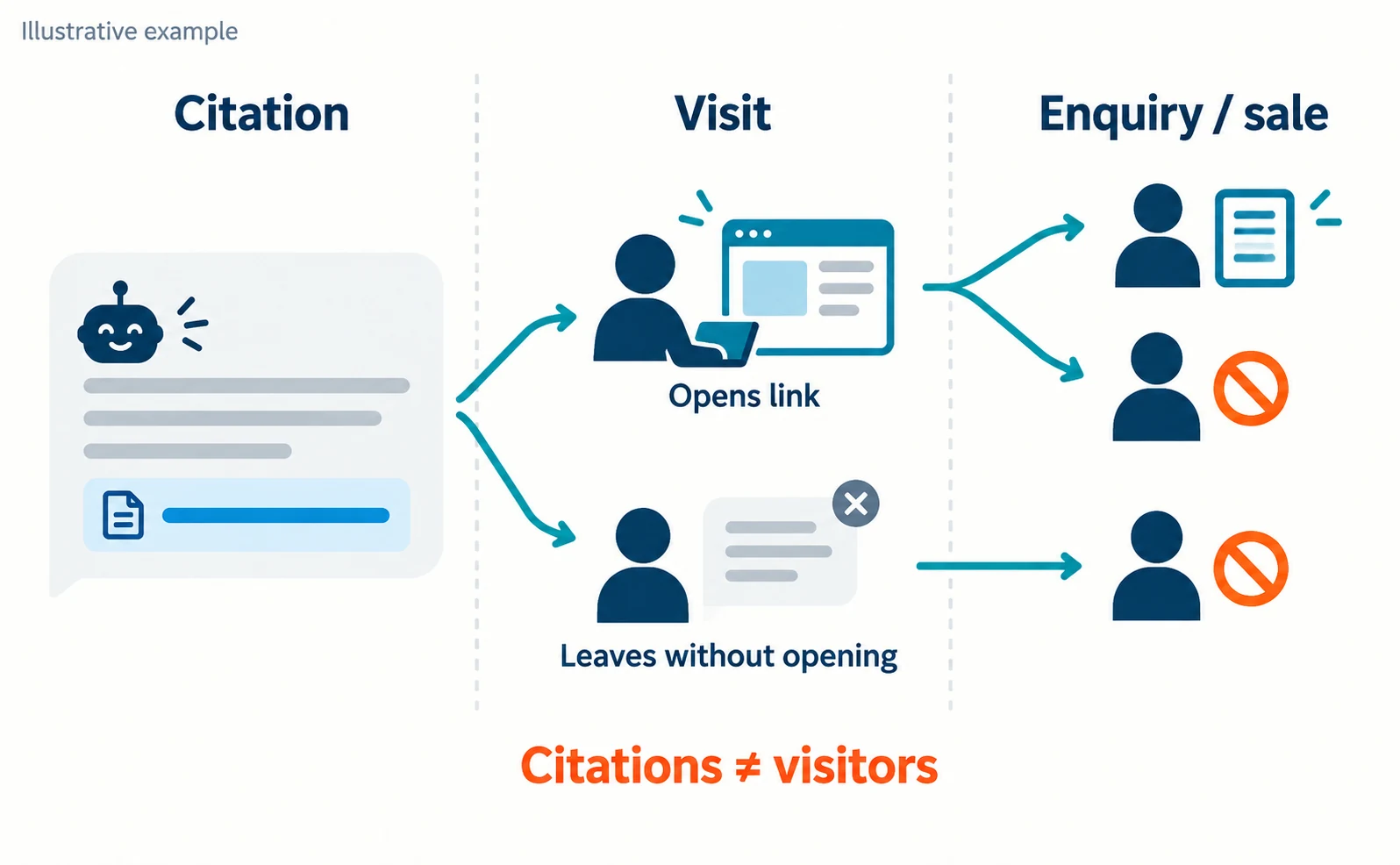
A citation means the AI shows a link to a page as support for its answer.
Suppose an AI answer cites a training company’s pricing page. Someone reading the answer might open the link, or might finish without opening it. This training company is a hypothetical example used to explain how things work.
You therefore cannot count citations as visitors. Not every visitor applies, either, so check enquiries and sales separately.
The two basic metrics are as follows.[1]
| Interface item | What it counts | Common misreading |
|---|---|---|
| Total citations | Times your content was cited during the period | Not clicks or enquiries |
| Average cited pages | Average number of distinct pages cited per day | Not a ranking or measure of importance |
The page-level list shows how many times each page was cited. This is also a citation count, not page importance or ranking.[1]
Registering with Bing Webmaster Tools and opening AI Performance
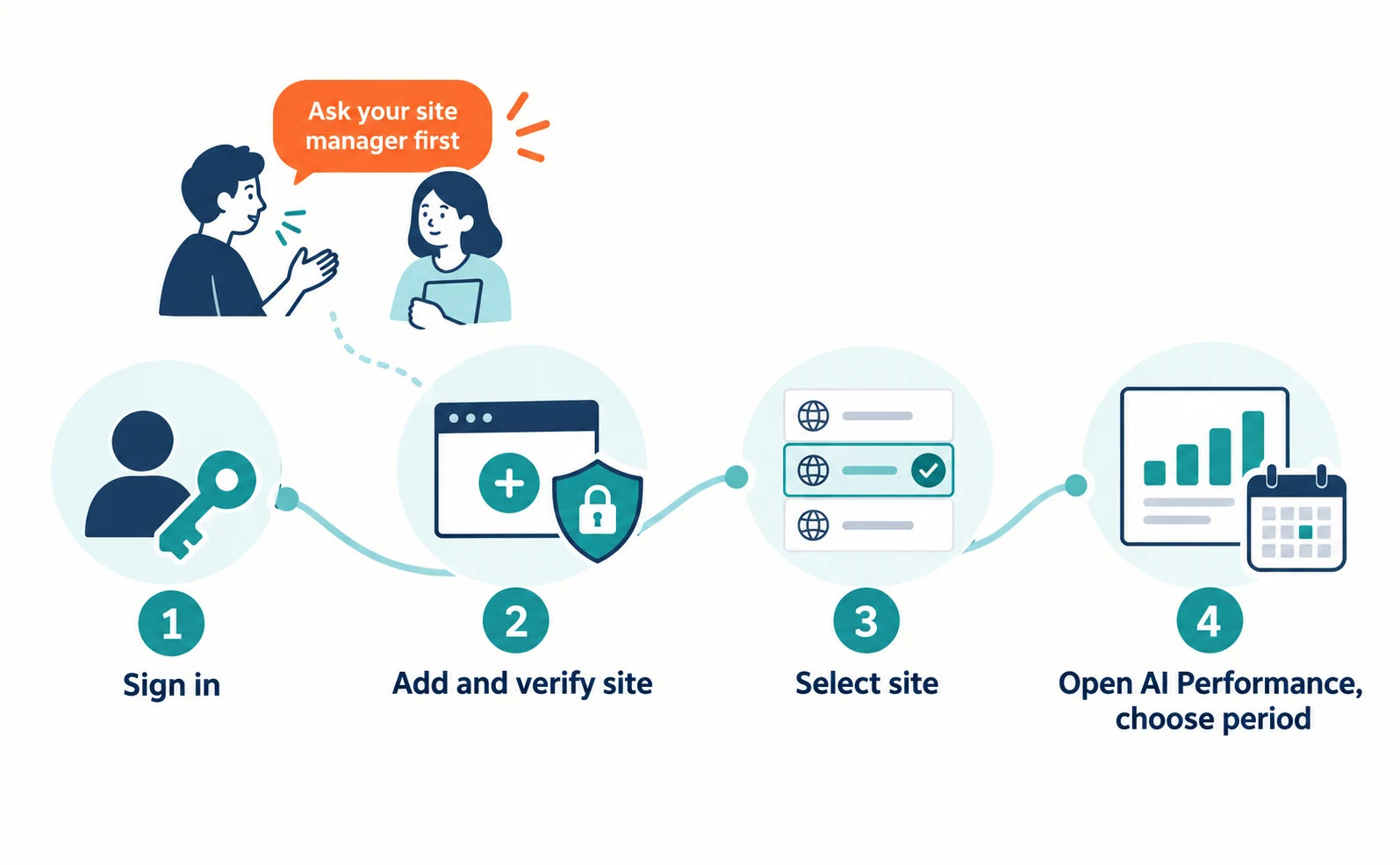
Register your site in Bing Webmaster Tools, verify that you manage it, select the site and open the AI Performance report.
Follow these steps.
- Open Bing Webmaster Tools and sign in.
- If your site is already registered, select it. If not, follow the on-screen guidance to add and verify it.
- With the site selected, open the AI Performance report.
- Choose the period you want to examine.
Verification prevents others from viewing management information for your site. You may need permission to change site settings, so ask the person who manages your site first to avoid registering the same site twice.
If you manage several sites, also check that you selected the right one, such as your corporate site rather than your store.
Citation records will not necessarily appear immediately after registration.
How to read grounding queries, Intents and Topics
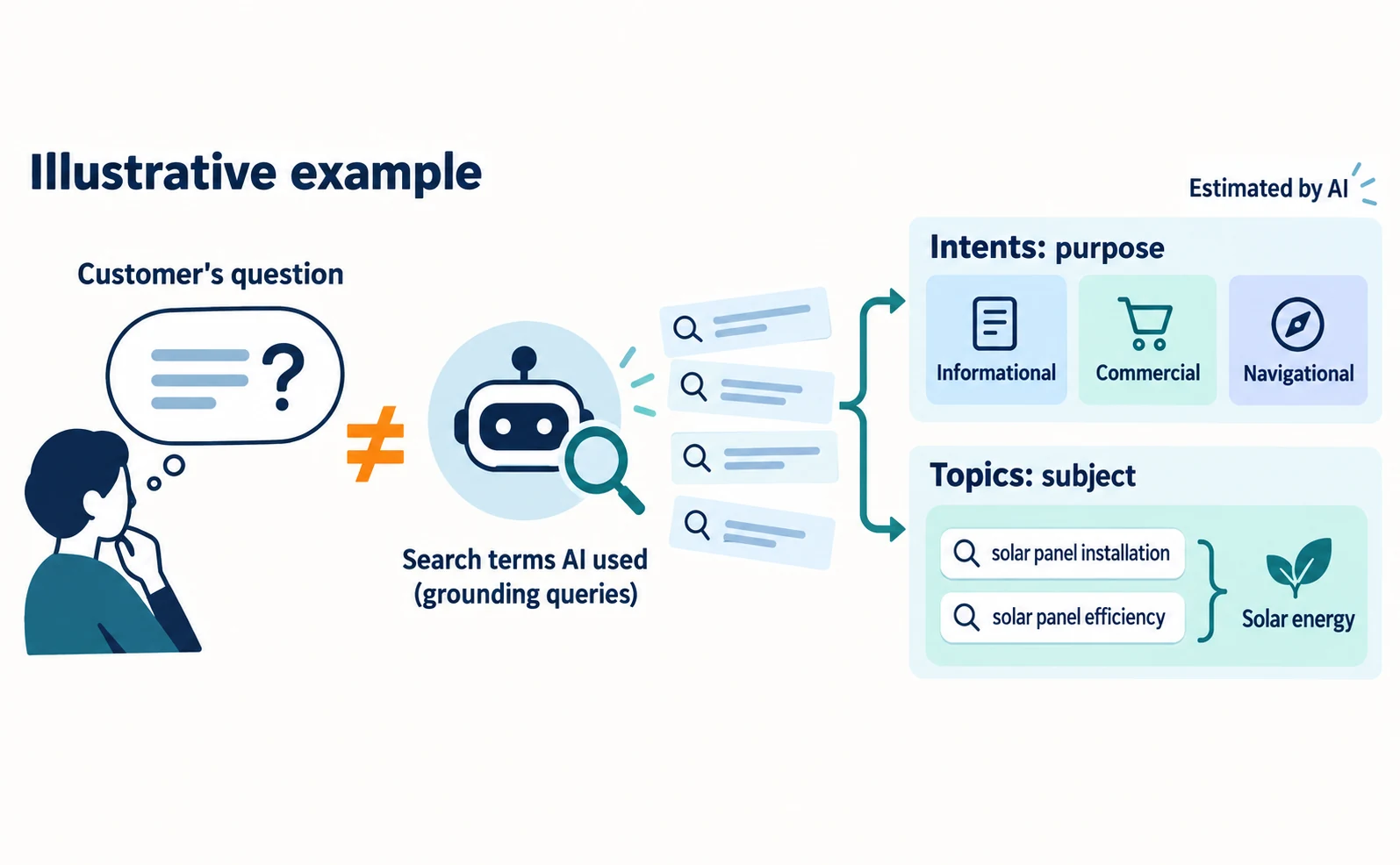
Grounding queries are the search terms AI used to find supporting information for its answers. Intents and Topics are AI-estimated classifications of those terms. Use them as clues to find information your pages lack.
They are phrases the AI itself used, not the text a customer typed. What you see is a sample of overall citation activity.[1]
On June 16, 2026, Microsoft added four features as a preview: Intents, Topics, Citation Share and Compare.[2]
| Feature | What it shows | How to use it |
|---|---|---|
| Intents | Purpose categories for search terms, such as informational, commercial or navigational | Learn what kinds of answers cite you |
| Topics | Related search terms grouped by subject | Find areas where you are cited and areas that are missing |
For example, search terms about solar panel installation or efficiency may be grouped into a single solar energy topic.[2]
Here is an example of how to use this. Suppose your pricing page is cited for commercial search terms. Check whether the page explains what the price includes and when extra charges apply.
The classifications are AI estimates. Microsoft notes that during the preview some labels may be broad, especially for specialized fields.[2] Do not read a Topics label as recognition that you are an expert.
Citation Share is neither a ranking nor a traffic share
Citation Share is your share of all citations shown for a specific search term. It is not a search ranking or a share of visitors.[2]
Consider an illustrative example. If a search term had 100 citations in total and 20 were yours, your Citation Share would be 20%. This is a hypothetical calculation, not Bing data.
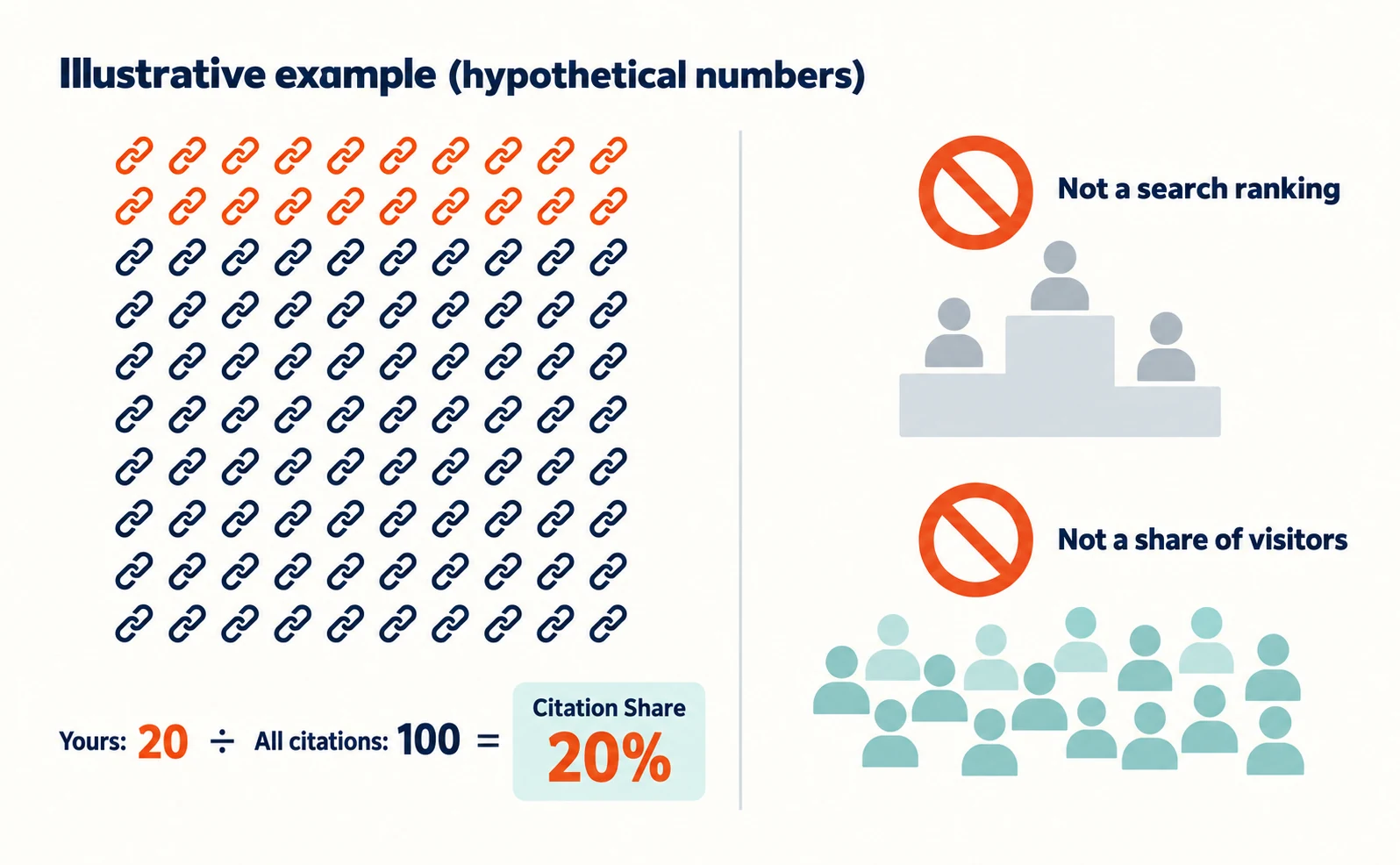
A 20% share does not mean a particular ranking. The denominator is the number of citations, not the number of people searching.
It also differs from a citation rate that counts how many AI answers cited you out of all answers.
Microsoft describes this as an observational metric. It is not a ranking system or competitor scorecard, and it does not show competitor domains. It does not represent traffic share or assign quality scores to content.[2]
Note that the share and the count do not always move together.
| Period | Total citations | Your citations | Share |
|---|---|---|---|
| Earlier period | 100 | 20 | 20% |
| Later period | 200 | 30 | 15% |
In this hypothetical example, your citations rose by ten, but your share fell. Do not judge performance from the share alone; read it with the count and period.
Use Compare to check before and after page edits
After editing a page, record the date and use Compare to overlay periods of the same length. Even if things change, do not conclude that the edit caused it.
Compare overlays a previous period on the current chart. For example, you can compare the last 30 days with the 30 days before, or choose custom dates.[2]
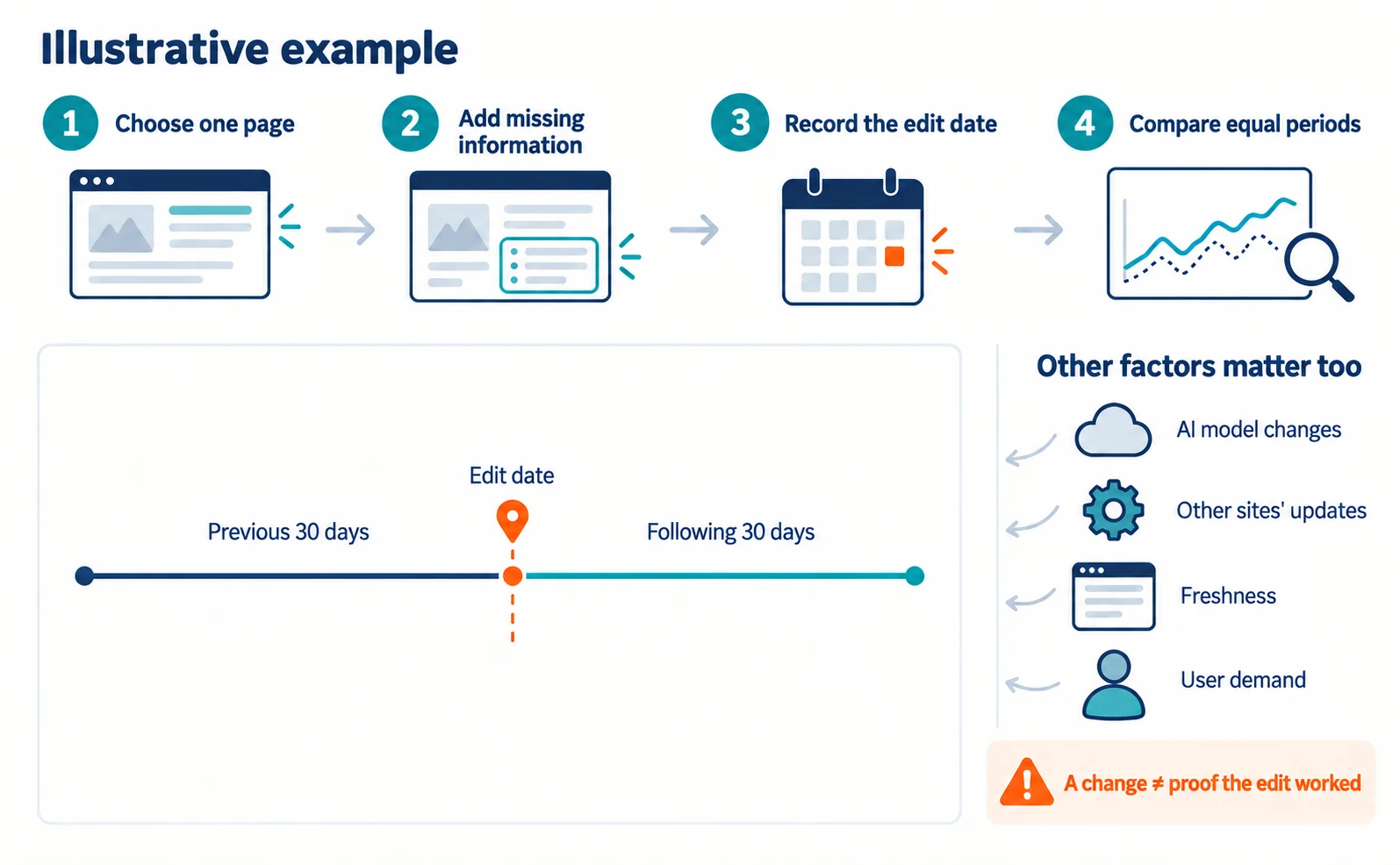
Here is an example workflow.
- Choose one page that is being cited.
- Add information readers need to decide, such as pricing conditions or which companies the service suits and does not suit.
- Record the date and page you changed.
- After some time, use Compare to compare the periods before and after the change.
Citation activity is also affected by changes in AI models, other sites’ updates, freshness and shifts in user demand.[2] Checking once the day after an edit is not enough, so decide in advance when you will check next.
If you edit many pages on the same day, it becomes harder to tell which change mattered. Improve important pages one at a time, and watch visits and enquiries as well as citations.
For the overall idea of appearing in AI answers, see our explanation of LLMO. For repeatedly checking AI answers to specific questions, see how to use AI Optimization.
Start by checking which of your pages are cited. Then choose one page and add the information readers are missing.
FAQ
- Q. Can I see competitors’ shares in Citation Share?
- No. Microsoft says Citation Share does not show competitor domains. It is a metric for observing changes in your own share.
- Q. Are Intents and Topics generally available features?
- As of the June 16, 2026 announcement, they are in preview. The classifications are AI estimates and may be broad for specialized fields.
- Q. Does this measure Google’s AI Overviews?
- This report covers Microsoft Copilot, AI summaries in Bing and selected partner services. Google’s AI Overviews are not included.
Sources
- [1] Introducing AI Performance in Bing Webmaster Tools Public Preview (Microsoft Bing) — accessed 2026-09-23
- [2] New AI Visibility Insights in Bing Webmaster Tools: Intents, Topics, Citation Share, Compare (Microsoft Bing) — accessed 2026-09-23
About the author
Shogo MizushimaCEO of kairos Inc. / AgentSignal Developer
Develops AgentSignal, a tool for measuring AI crawler visits and AI-referred traffic, and diagnosing AIO readiness. Writes about measurement and practical improvements for AI search using observed data.
Related articles
AIO and AI search
What Is LLMO? How It Differs from SEO and Why Some Say It Is Pointless
LLMO is the work of helping answers from ChatGPT and other AI find and accurately describe your company. Learn how it differs from SEO, why some call it pointless, how E-E-A-T relates, how to measure results and what to do in the first month.
Published
AIO and AI search
Ranking First but Not Cited by AI? How Query Fan-Out Works
Query fan-out is a technique in which AI may run several related searches to answer one question. Learn why a first-place page may not be cited, which related questions your pages should answer, and what you can observe in Search Console and Bing.
Published
AIO and AI search
Airbyte reported a $100,000 ChatGPT-originated deal: the content changes behind its AIO work
Airbyte reported one $100,000 contract originating from ChatGPT. The team analyzed over 500 prompts and revised content into direct answers, lists, and steps.
Published