What Is AP2? Following the Data from AI Product Search to Order
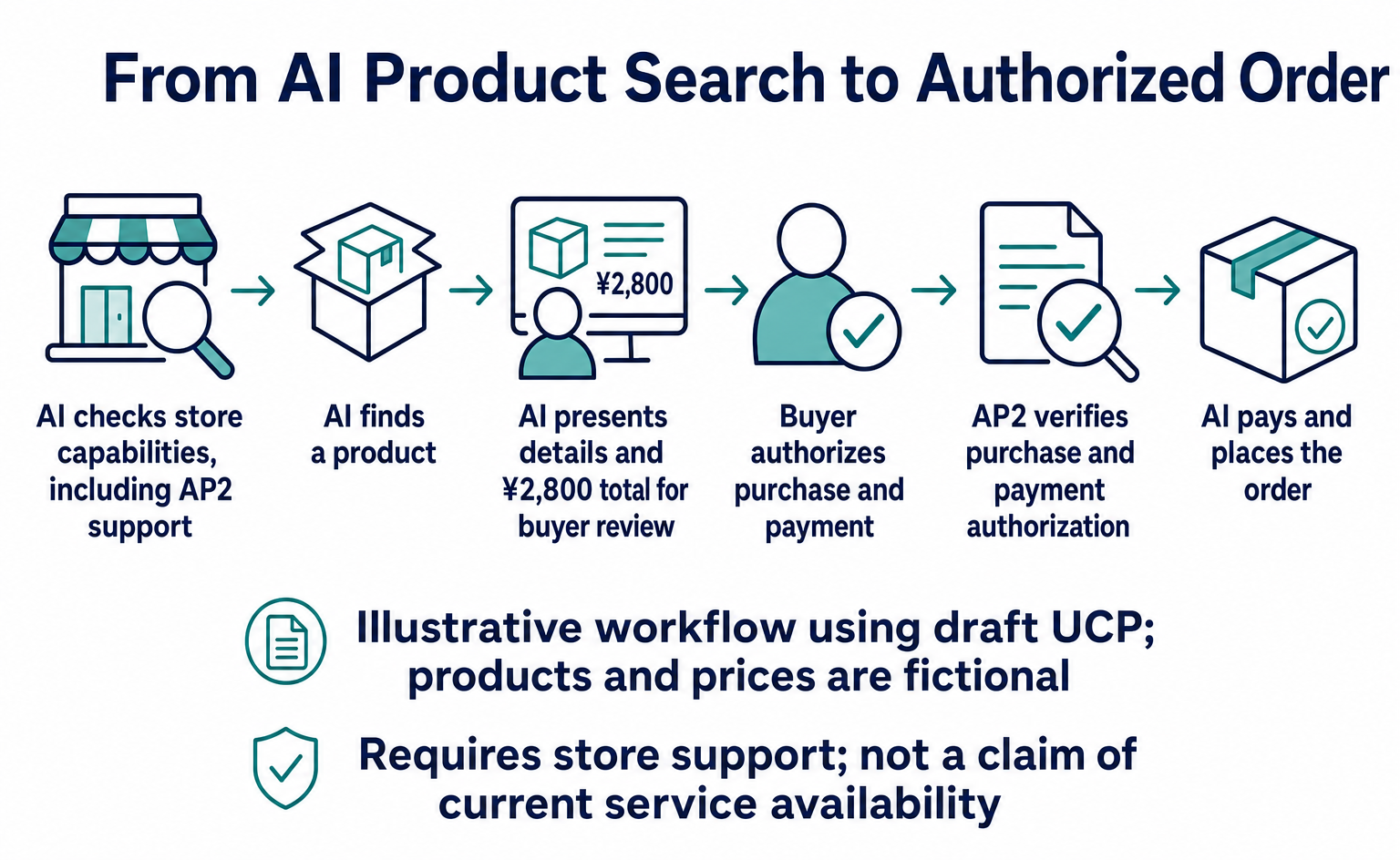
AP2 provides shared rules for checking whether an AI order matches the buyer’s authorization. Follow the same product ID and amounts through search, shipping costs, approval, payment and ordering, with benefits for online stores and the specification’s status as of September 10, 2026.
AP2 is a shared set of rules that lets stores and payment companies check whether a purchase made by AI matches the buyer’s authorization. For example, if the buyer authorized one box but AI submits an order for two, AP2 helps prevent the purchase from proceeding unchanged [1][3][4].
For buyers, it enables systems that let them specify products and a budget, then leave the purchase to AI. For online stores, the benefit is being able to check authorization for AI orders using data. This requires compatible shopping AI, store ordering systems and payment integrations [7][9].
Here, we follow AI as it reads a store’s information, finds a product, obtains purchase authorization and places an order. An API is an interface through which AI and the store’s system exchange information. We use published API names and data fields, and explain what those fields mean.
The review date is September 10, 2026. This article refers to AP2’s public specification v0.2 and, for product search and order examples, the UCP specification under development, or draft. The examples explain how the system works. They do not show that stores in Japan can immediately accept orders through a particular AI service [9][10][11][12].
Where does AP2 help in shopping?
First, imagine a buyer asking a shopping AI:
I want one box containing five packs of A4 copy paper from this store. Find it for no more than ¥3,000 including shipping, and show me the details before buying.
Assume the buyer gives AI the store’s URL. The product and prices are fictional examples. Finding an unfamiliar store through search would happen before this example begins.
The shopping process runs as follows: check store capabilities → find a product → confirm the total → authorize the purchase → pay and order. AP2 handles the part that checks whether the buyer authorized the purchase. This example uses UCP for the APIs that find products and create purchase checkouts [9][10][11].
AP2 itself has no interface for registering products in AI search. It supports situations where you have already prepared products to be discovered and want AI to handle the purchase as well. For registering products with Google, see Preparing to Get Started with Google AI Shopping [6][9].
1. AI reads the store’s API location and supported capabilities
Suppose the store URL supplied by the buyer is https://shop.example.com. A UCP-compatible store publishes its API connection details and supported capabilities at the following location [10].
GET https://shop.example.com/.well-known/ucp
AI needs to know whether it can search products, whether the store accepts orders and whether it supports AP2. The published information includes fields such as these.
| Published field | What AI learns |
|---|---|
endpoint within ucp.services |
The API address: https://shop.example.com/ucp in this example |
dev.ucp.shopping.catalog.search |
Product search is supported |
dev.ucp.shopping.checkout |
Checkouts can be created and updated |
dev.ucp.common.payment.ap2_mandate |
AP2 purchase authorization can be exchanged |
This table explains selected official fields. The actual published information also needs supported specification versions, payment methods and public keys for verifying signatures, among other details. AP2 is used when both the store and the AI side are confirmed to support it [12].
Knowing the store’s URL does not let AI control everything. This step establishes the connection details and capabilities both sides can use. Publishing UCP capability information is also separate from passing a particular AI service’s seller review.
2. AI searches for products and receives the product ID to use in the order
If the store supports product search, AI calls its POST /catalog/search API. In this example, the address is as follows [10].
POST https://shop.example.com/ucp/catalog/search
Here is an example of the search criteria AI sends to the store.
{
  "query": "A4コピー用紙 5冊入り",
  "context": { "address_country": "JP" },
  "pagination": { "limit": 3 }
}
query contains the search terms, address_country provides country information relevant to the purchase, and limit sets the number of results returned at once. Specifying a country does not itself mean sales to that country are permitted. Sales eligibility is checked during checkout [10].
The following extract shows information about a purchasable product in the store’s response. It is one entry within variants under products in the full search results [13].
{
  "id": "PAPER-A4-5",
  "title": "A4コピー用紙 5冊入り・1箱",
  "description": { "plain": "500枚入りを5冊まとめた1箱" },
  "price": { "amount": 2400, "currency": "JPY" },
  "availability": { "available": true }
}
AI now reads that the product ID to use in the order is PAPER-A4-5, the product costs ¥2,400 and it is in stock. Since one box contains five packs, the order quantity is “1.” The amount including shipping is not yet final.
The same product ID is used in the following steps. This avoids confusion with a similarly named product or an item sold as a single pack. This product search step is not purchase authorization under AP2.
The HTTP and JSON shown here are extracts that explain the process. Actual UCP REST communication includes headers such as UCP-Agent, which points to information about the AI service, and must follow the destination’s authentication requirements. The example URLs are not real order destinations [10][11].
3. AI creates a checkout, and the store returns a total including shipping
Next, AI asks the store to create a checkout for one box of this product. UCP uses POST /checkout-sessions for this [11].
POST https://shop.example.com/ucp/checkout-sessions
{
  "line_items": [
    { "item": { "id": "PAPER-A4-5" }, "quantity": 1 }
  ]
}
line_items is the list of products to order. AI supplies the product ID and quantity; the store’s system sets the price. This call alone neither makes a payment nor finalizes an order [11].
Suppose the store returns chk_001 as the checkout ID. If a delivery address or shipping method is needed, AI updates this checkout using information confirmed with the buyer [11][14].
PUT https://shop.example.com/ucp/checkout-sessions/chk_001
Shipping must not be assumed to cost ¥0 while the delivery address is still undecided. In this example, assume the address and standard shipping have been confirmed, and the store returns a product cost of ¥2,400, shipping of ¥400, additional tax of ¥0 and a total of ¥2,800. These amounts are illustrative. Tax calculations follow the store’s settings.
Here is an extract showing only the ID, status and amounts from the final response.
{
  "id": "chk_001",
  "status": "ready_for_complete",
  "currency": "JPY",
  "totals": [
    { "type": "subtotal", "amount": 2400 },
    { "type": "fulfillment", "amount": 400 },
    { "type": "tax", "amount": 0 },
    { "type": "total", "amount": 2800 }
  ]
}
ready_for_complete means the checkout is ready to proceed to order completion. total is the full amount payable. AI checks whether ¥2,800 including shipping—not just the ¥2,400 product price—is within the ¥3,000 budget [11][14].
When AP2 is used, the store also digitally signs the purchase details. The UCP field is ap2.merchant_authorization. The AI side verifies the signature and checks that the amount and products have not been altered before showing them to the buyer [12].
4. The buyer authorizes buying this one box for ¥2,800
Only now does the buyer review the finalized details. For example, a confirmation screen would need information such as the following.
| Detail to confirm | This example |
|---|---|
| Store | Sample Stationery Store |
| Product and quantity | One box of PAPER-A4-5 |
| Delivery | Standard shipping to the buyer’s specified address |
| Total payment | ¥2,800 including shipping |
| Payment method | A saved card selected by the buyer |
This explains what needs to be confirmed; it is not a reproduction of an official screen. AP2 uses a mechanism that displays the details correctly and collects approval, rather than relying only on AI-generated free-form text [8][9].
Linking what AI may buy with how much it may pay
AP2 v0.2 includes a Checkout Mandate for authorizing purchase details and a Payment Mandate for authorizing payment. Here, think of a mandate as the purchase or payment details that AI is authorized to act on [3][4].
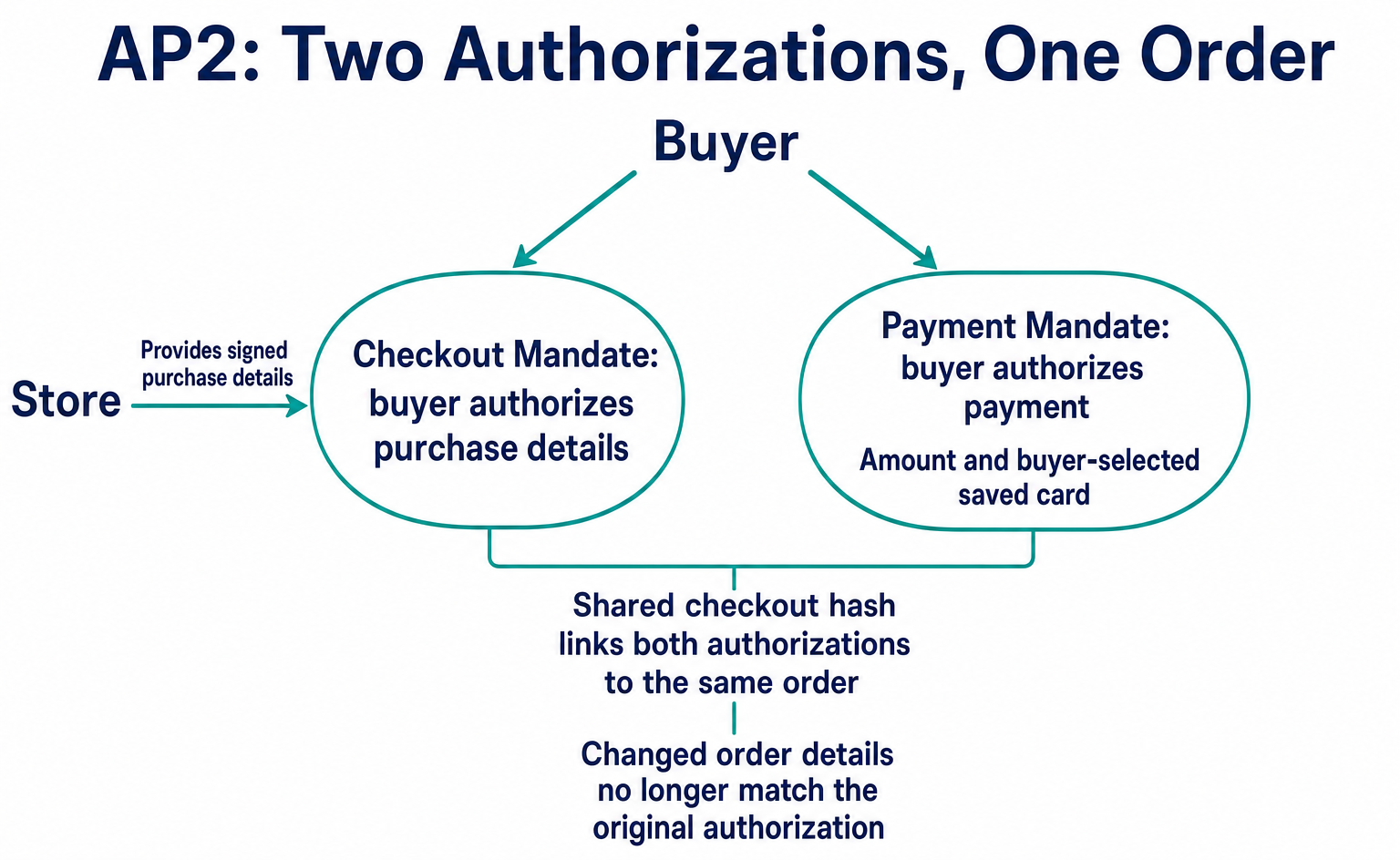
In a readable form, the purchase authorization data looks like this. This is an illustrative example of the fields inside the data, not the signed data actually transmitted. Values beginning with EXAMPLE_ are temporary strings that must be replaced [3].
{
  "vct": "mandate.checkout.1",
  "checkout_jwt": "EXAMPLE_MERCHANT_SIGNED_CHECKOUT",
  "checkout_hash": "EXAMPLE_CHECKOUT_HASH"
}
checkout_jwt contains the purchase details signed by the store. In this case, that means one box of PAPER-A4-5, checkout chk_001 and a total of ¥2,800.
checkout_hash is a matching value calculated from that signed data. If the product, quantity, amount or other details change, they no longer match the original authorization. This prevents authorization for a ¥2,800 order from being reused unchanged for a ¥3,200 order [3][9].
The payment authorization includes the same matching value. The following extract shows the link between the amount and the purchase details. Actual data also includes details such as the payee and payment method [4].
{
  "vct": "mandate.payment.1",
  "transaction_id": "EXAMPLE_CHECKOUT_HASH",
  "payment_amount": { "currency": "JPY", "amount": 2800 }
}
The value in transaction_id and the earlier checkout_hash refer to the same purchase details. This makes it possible to verify the relationship: pay ¥2,800 for the authorized purchase of one box. The matching value used here is not the order reference chk_001 itself.
Simply writing this text in JSON does not constitute the buyer’s authorization. In practice, the approved details are put into a signed format, and the store and payment provider verify the signature and the purchase it covers [8][9].
5. AI submits authorization data, and the store proceeds with payment and ordering
Once the buyer has authorized the purchase, the AI side prepares the information needed for payment. In AP2 v0.2’s basic flow, the payment credential provider verifies the payment authorization and returns payment credentials for this purchase. AI sends those credentials to the store together with the purchase authorization [2][9].
The UCP API for requesting order completion is as follows [11].
POST https://shop.example.com/ucp/checkout-sessions/chk_001/complete
In UCP’s AP2 extension, purchase authorization goes in ap2.checkout_mandate. Payment-side information is passed in credential.token for the selected payment method. The following extract includes only the parts needed to show the destination and field locations [12].
{
  "payment": {
    "instruments": [
      {
        "id": "instr_1",
        "handler_id": "handler_example",
        "type": "card",
        "selected": true,
        "credential": {
          "type": "PAYMENT_GATEWAY",
          "token": "EXAMPLE_PAYMENT_TOKEN_NOT_PAYABLE"
        }
      }
    ]
  },
  "ap2": {
    "checkout_mandate": "EXAMPLE_SIGNED_CHECKOUT_MANDATE"
  }
}
handler_id identifies the payment connection configuration published by the store. You do not add a card number to this example. Placeholder tokens and signatures cannot be used for payment. The actual format follows the specifications of the payment provider being connected [12][15].
This is a point where care is needed when combining the public documentation. AP2 v0.2 defines how signed purchase data is matched and the basic flow for receiving payment credentials. Meanwhile, the UCP draft referenced here describes a store signature kept separate from the message body and where to place a token containing payment authorization. The extracts in this article do not establish that the two sets of signed data can interoperate unchanged. An implementation must align the versions and payment approaches used by both sides [3][4][9][12].
The store does not ship immediately upon receipt
The store verifies the purchase authorization and checks that the products, quantities and amounts match the current checkout. It then proceeds to payment-side verification and payment processing [12].
| What the store receives | Decision in this example |
|---|---|
| Valid authorization for one box at ¥2,800 that matches the current checkout | Payment processing can proceed. Payment success must be checked separately |
| The current total has changed to ¥3,200 | Authorization for ¥2,800 cannot be used to proceed |
| Purchase authorization is missing even though AP2 was agreed upon | Treat as an error such as mandate_required |
| The signature is invalid or the authorization has expired | Reject the authorization |
When the store completes the order, the UCP response includes completed and order information. Here is an example of part of that result [11][16].
{
  "id": "chk_001",
  "status": "completed",
  "order": {
    "id": "order_001",
    "permalink_url": "https://shop.example.com/orders/order_001"
  }
}
After receiving this response, AI gives the buyer the order number and a place to check the order. chk_001 is the checkout ID; order_001 is the ID of the completed order. AI must not report “Your order has been placed” just because it sees the earlier ready_for_complete status.
What if AI is allowed to buy within set conditions without asking each time?
In the example above, the buyer confirms the ¥2,800 purchase at the end. AP2 also supports a flow where the buyer authorizes conditions in advance and AI purchases within them [2][9].
For example, the buyer might say, “You may buy one box of PAPER-A4-5 from this store if it costs no more than ¥3,000 including shipping.” The buyer first reviews and authorizes conditions such as the product, store and amount. This does not give AI unrestricted discretion for each purchase.
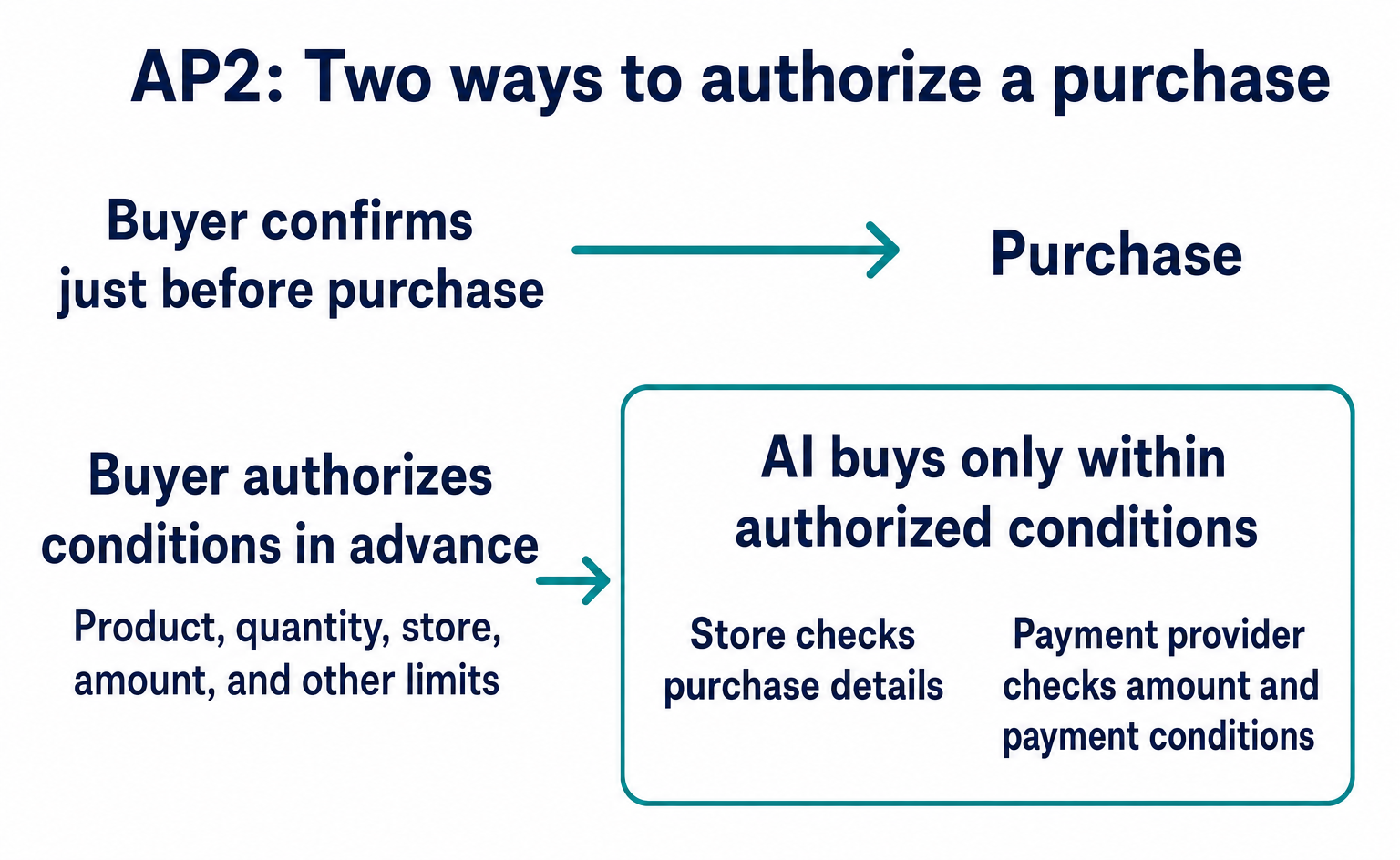
The following is an actual AP2 condition field for setting a payment limit. It is an example of one condition, not the complete advance authorization data [4].
{
  "type": "payment.amount_range",
  "currency": "JPY",
  "max": 3000
}
The checkout.line_items condition can specify the products and quantities to purchase [3].
{
  "type": "checkout.line_items",
  "items": [
    {
      "id": "line_1",
      "acceptable_items": [{ "id": "PAPER-A4-5", "title": "A4コピー用紙 5冊入り・1箱" }],
      "quantity": 1
    }
  ]
}
In practice, these conditions are combined with others, such as the store, payment method, the delegated AI’s key and an expiration time. The store verifies that the purchase details meet the conditions, while the payment provider checks the amount and other payment conditions. Price monitoring to find the right time to buy is a separate feature that the shopping AI must provide [3][4][9].
The ¥2,800 total in this example is within the limit. If shipping increases and brings the total to ¥3,200, the purchase falls outside the conditions. Even if AI decides that buying at a slightly higher price would be worthwhile, it cannot proceed on this authorization alone.
Even when conditions are set in advance, authorization is still created for the actual purchase details. The verifying parties receive both the conditions the buyer authorized earlier and the purchase details AI selected within those conditions. This is not a system that approves payment based only on the words “¥3,000 budget” [8][9].
Benefits for online stores and what is available now
For online stores, AP2’s value is the ability to compare orders received from AI with the details the buyer authorized. Buyers can delegate purchasing as well as product search to AI. Stores can use their systems to verify the basis for accepting those orders [1][7][9].
Purchase and payment authorizations can also serve as records for reviewing transactions later. However, they do not eliminate the need to handle returns or fraud, and AP2 alone does not automatically determine liability [5][9].
Based on the material reviewed on September 10, 2026, AP2 provides public specifications and developer samples. The official FAQ explains that the samples use simulated payment processing. No process was identified through which an ordinary store could register for AP2 membership and immediately start receiving AI orders [6].
For stores that want AI to discover their products, the first consideration is supplying product information to their sales channels. AP2 becomes relevant when a store already has an integration that lets AI proceed through checkout and needs a way to verify the buyer’s authorization.
In this example, AP2’s role is to let AI, the store and the payment provider verify authorization to “buy one box of PAPER-A4-5 for ¥2,800.” Following the process from product discovery onward makes clear which part of the purchase this technology supports.
FAQ
- Q. What is AP2 actually used for?
- When AI shops on a buyer’s behalf, AP2 lets the store and payment provider check whether the buyer authorized the purchase. The buyer can either confirm just before purchase or set conditions in advance and let AI act within them [9].
- Q. How does it help online stores?
- Stores can check an AI order against the products, quantities and payment the buyer authorized before accepting it. The benefit is that systems can verify authorization rather than relying only on a statement that “the AI said it could buy this” [3][4][7].
- Q. Can I register products with AI through AP2?
- AP2 is not a product listing service. You still need integrations that deliver product information to AI, along with the store’s ordering and payment systems. AP2 handles authorization when AI proceeds with a purchase [6][7].
- Q. Who implements AP2?
- Developers working on shopping AI, online ordering systems and payment integrations implement their respective roles. Stores using an e-commerce service need to check support from that service and its connected providers [7].
- Q. Will using AP2 increase sales?
- The public specification’s role is to verify authorization for AI purchases. This review did not establish that supporting AP2 increases a company’s sales. It cannot be presented as a promise of better product listing or customer acquisition results.
- Q. Can I sign up and use it right now?
- The official guidance reviewed on September 10, 2026 did not identify a common merchant registration process for AP2. Public specifications and developer samples are available, but the samples use simulated payment processing. Production use in your online store requires compatible connections and payment support [6][7].
- Q. Does AP2 also define product search and order APIs?
- Product search and order update APIs themselves are outside AP2’s scope. This article uses product search and order APIs from the UCP draft to explain how AP2 authorization data can fit into a purchase flow. It is not a tested example of interoperability or successful payment [9][10][11][12].
Sources
- [1] AP2 — Agent Payments Protocol (AP2) — accessed 2026-09-10
- [2] Flows (AP2) — accessed 2026-09-10
- [3] Checkout Mandate (AP2) — accessed 2026-09-10
- [4] Payment Mandate (AP2) — accessed 2026-09-10
- [5] Security and Privacy Considerations (AP2) — accessed 2026-09-10
- [6] FAQ (AP2) — accessed 2026-09-10
- [7] Implementation Considerations (AP2) — accessed 2026-09-10
- [8] Agent Authorization Framework (AP2) — accessed 2026-09-10
- [9] Agentic Payment Protocol v0.2 (AP2) — accessed 2026-09-10
- [10] Catalog REST Binding (draft) (UCP) — accessed 2026-09-10
- [11] Checkout REST Binding (draft) (UCP) — accessed 2026-09-10
- [12] AP2 Mandates Extension (draft) (UCP) — accessed 2026-09-10
- [13] Variant schema (fixed commit) (UCP) — accessed 2026-09-10
- [14] Fulfillment Extension (draft) (UCP) — accessed 2026-09-10
- [15] Payment Handlers (UCP) — accessed 2026-09-10
- [16] Order Confirmation schema (fixed commit) (UCP) — accessed 2026-09-10
About the author
Shogo MizushimaCEO of kairos Inc. / AgentSignal Developer
Develops AgentSignal, a tool for measuring AI crawler visits and AI-referred traffic, and diagnosing AIO readiness. Writes about measurement and practical improvements for AI search using observed data.
Related articles
Measurement and site improvement
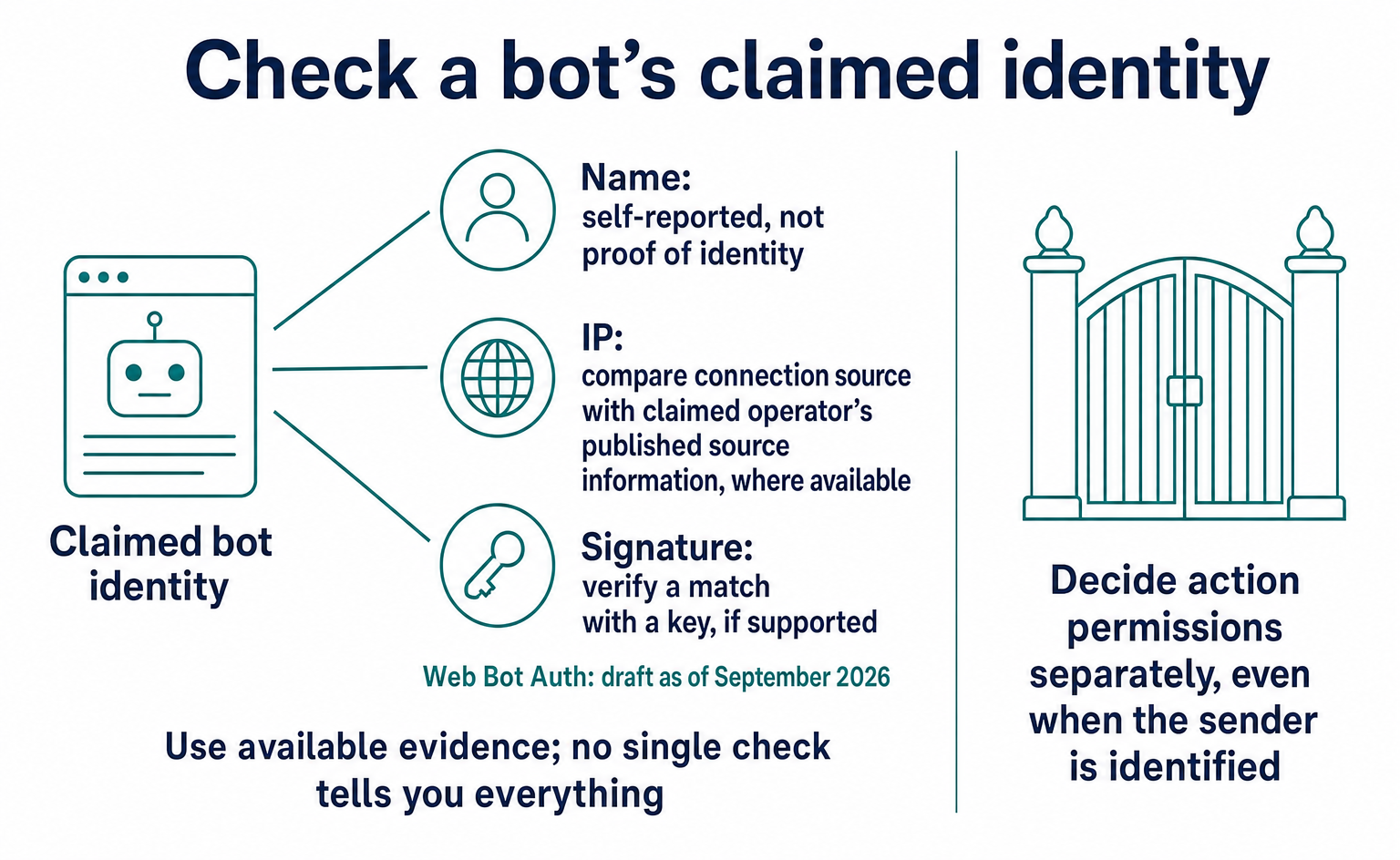
Is Traffic Claiming to Be GPTBot Genuine? How Web Bot Auth Works
A GPTBot name alone does not prove who sent a request. Learn how to check official IP ranges and signatures, how Web Bot Auth differs from RFC 9421, and what remained in draft as of September 2026. Includes a checklist for your web agency and guidance on recording unverified traffic.
Published
Connecting AI and the web
What Is WebMCP? How AI Operates Websites and Current Support
WebMCP tells AI which actions a website offers, such as product search and adding items to a cart. As of September 2026, it is not a formal standard. Learn about support in Chrome, Edge, ChatGPT, Cloudflare and Shopify, what to ask developers, and how to test and record actions.
Published

AI shopping and booking
51% of US consumers use AI shopping tools. How much has product selection changed?
That does not mean AI placed 51% of orders. It is the share of US consumers who reported using at least one AI-powered shopping tool during the past month.
Published