How Can AI Find Your Products? Checks Highlighted by Azoma
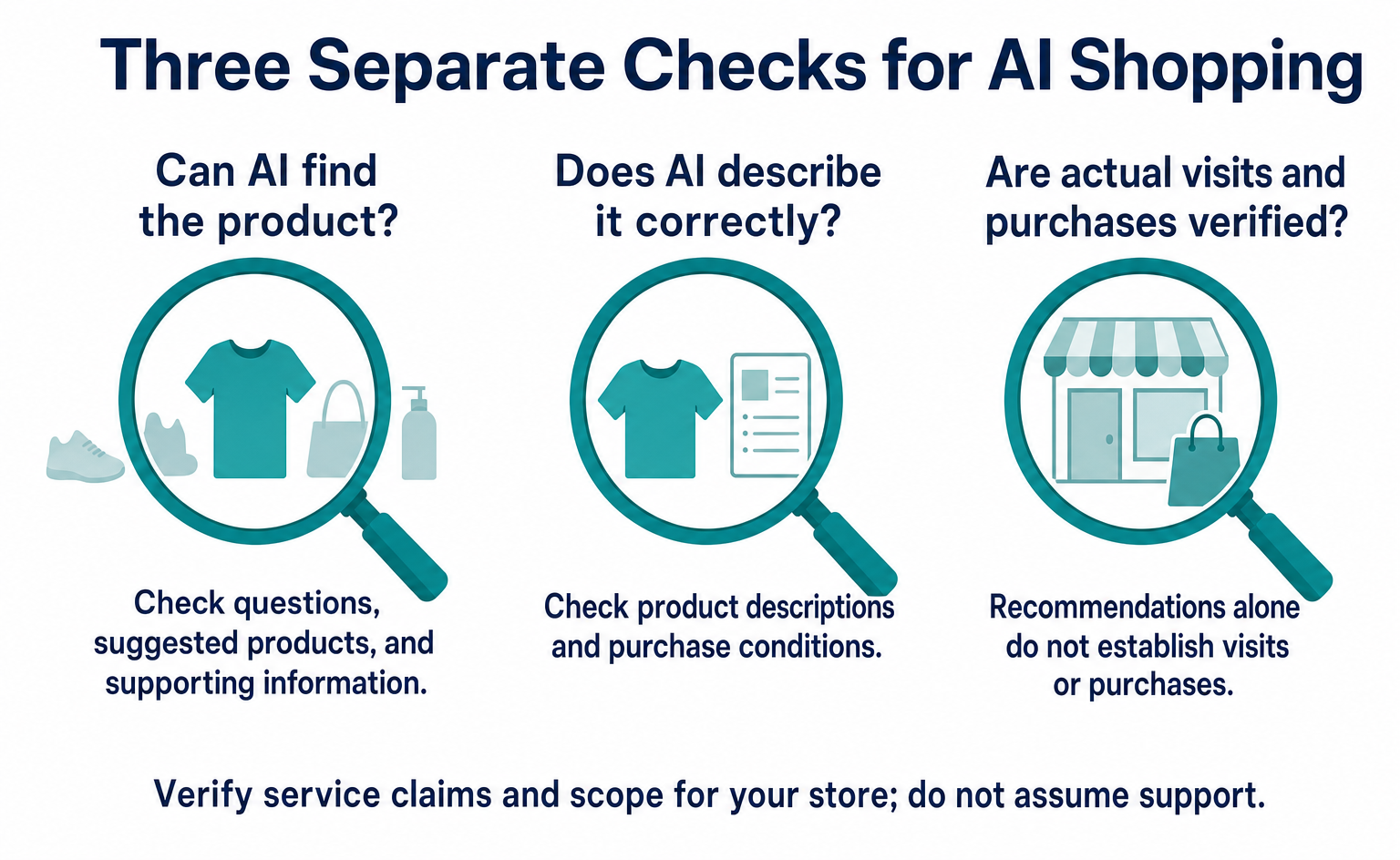
Based on Azoma’s September 7, 2026 announcement, learn what to check in product details, pricing, stock, shipping, and returns. Includes questions to test AI answers, ways to investigate errors, and steps to track visits and purchases, starting with a few products.
If you want AI to recommend your products, first check whether it receives accurate product descriptions and purchase conditions. On September 7, 2026, Azoma announced its approach to optimizing for AI that helps people shop [1].
Suppose an online store manager asks AI to find a product, but only competitors’ products appear. They may wonder, “Should we add more product copy?” or “Do we need a new setting?” Start by checking what question was asked, which products were suggested, and what information supported those suggestions.
This article outlines the announcement and the order of checks for an online store. The information is current as of September 8, 2026. We do not view this announcement as a reason for every online store to subscribe to a dedicated tool immediately. It is more useful as a prompt to review product information and checking methods.
1. What did Azoma announce?
The announcement describes an ongoing approach to shopping AI, from making products easier to find to correcting information. Azoma provides services for this work. The announcement was issued by the company itself.
Azoma calls this approach Agentic Commerce Optimisation, or ACO. It uses the term to mean efforts to help AI find products, understand them, and suggest them as shopping options [1].
The announcement describes checking how multiple AI services handle products, comparing the cited information and competitors’ products, and extending corrections across product ranges. It does not establish a single right approach for every AI service or an official industry standard.
Separate the service pitch from what prospective customers need to verify. Even if a service says it supports a wide range of AI, you still need to check what it can examine for the countries, products, and languages in which you sell. A promotional description alone cannot tell you whether it will increase your sales.
For example, if you want to know why your product is not recommended, a count of how often it appeared will not tell you what to fix next. Is the product description wrong? Are the test questions different from those you intended? Do the purchase conditions prevent someone from buying it? Your team needs a way to investigate further.
It is easier to start by deciding where to add checks to existing work than by learning a new term. One starting point is to let the people who register products, write descriptions, run ads, and check orders see the same product information.
We also cover ways to have your business mentioned in AI answers in LLMO basics. Here, we focus on information needed to choose products, including uses, prices, stock, and shipping.
2. People were already turning to AI for shopping advice
AI shopping assistance did not begin with the September 7 announcement. Reading new announcements separately from descriptions of earlier services helps clarify what has changed.
Amazon describes a system that uses product information, reviews, and customer questions and answers to compare products and answer questions. Its official page also states that the former name, Rufus, changed to Alexa for Shopping on May 13, 2026 [3].
Walmart’s June 6, 2025 announcement of Sparky introduced features for summarizing reviews and suggesting options based on product differences and intended uses. It distinguished features available at that time from those planned for later [4].
| Date | Documented event | What to check when reading |
|---|---|---|
| June 6, 2025 | Walmart announced Sparky | Separate features available then from later plans |
| May 13, 2026 | Amazon states that Rufus was renamed Alexa for Shopping | Do not count the old and current names as separate services |
| September 7, 2026 | Azoma announced approaches to AI product recommendations and checks for choosing tools | Read it as a provider’s announcement, not an independent comparative study |
| September 8, 2026 | This article reviewed official announcements and explanations | Distinguish the new announcement from existing systems |
A recent date alone does not establish a need to rush adoption. First check where your customers look for products and what is available there.
Features described overseas may not be equally available to users in Japan. Check whether a feature works in an app, in a browser, or both, and whether country or account restrictions apply. Record the date and environment used in your checks.
Answering questions about products is also different from completing an order. Even if AI says, “This product looks suitable,” payment may not be available in the same place. A person may need to open the product page and buy it there.
The first question for an online store manager is, “How are our products described where our current customers shop?” There is no need to treat forecasts of future purchases as today’s order numbers for your business.
3. Separate “appearing as an option” from “selling”
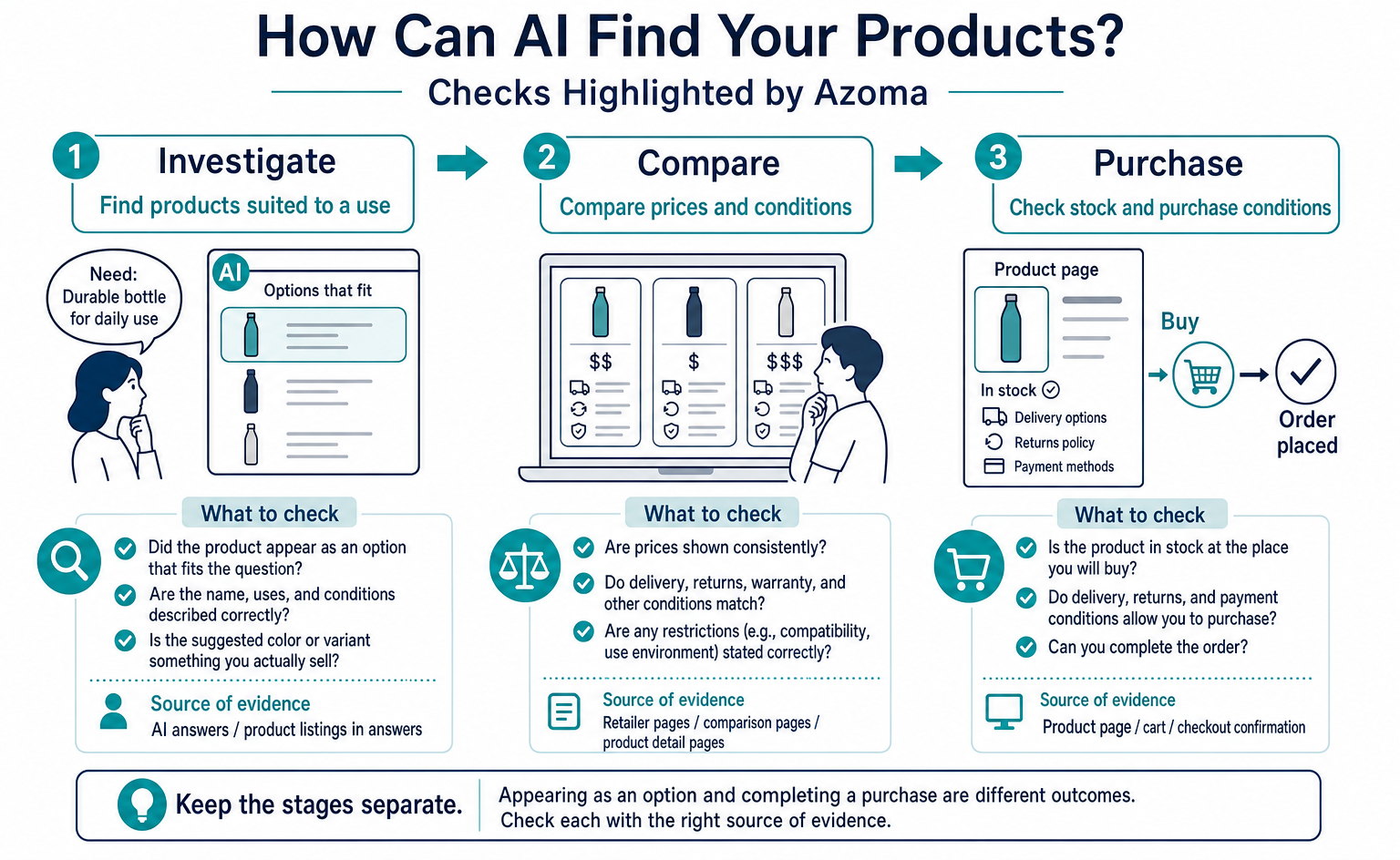
Even when a product appears in an AI answer, check separately whether it led to visits or purchases. Combining these outcomes makes it hard to see what improved.
First, check whether the product appeared as an option that fits the question. Next, check whether its name, uses, and conditions were described correctly. Then investigate whether anyone opened the link and whether an order was placed. Each requires a different source of evidence.
For example, an answer is not satisfactory if AI names the product correctly but wrongly says it is dishwasher-safe. The same applies if it suggests a color you do not sell. Treating appearance counts alone as a result can hide errors in the description.
Conversely, one answer that omits the product does not prove that the entire site has a problem. Reconsider whether the question suits your products and whether you actually sell an item that meets the conditions. Asking for “the cheapest option” is different from asking for “something I can repair and use for a long time.”
Keep separate notes on whether the product was found, the description was correct, the link led to the right page, a visit occurred, and an order was placed. Before combining everything into one score, agree on what each measure counts.
When connecting results to sales, decide the comparison period and how to count orders in advance. If discounts or advertising changes happen at the same time, it becomes difficult to isolate the effect of correcting product descriptions. Report what you know separately from what you do not yet know.
Rather than rushing to conclude, “Sales increased because we appeared in AI,” write, “The product name appeared, but the description contained an error,” or “We confirmed visits, but their connection to orders is unverified.” Those statements help you choose the next task. Observations are useful evidence even while improvements are still underway.
4. What to check first on product pages
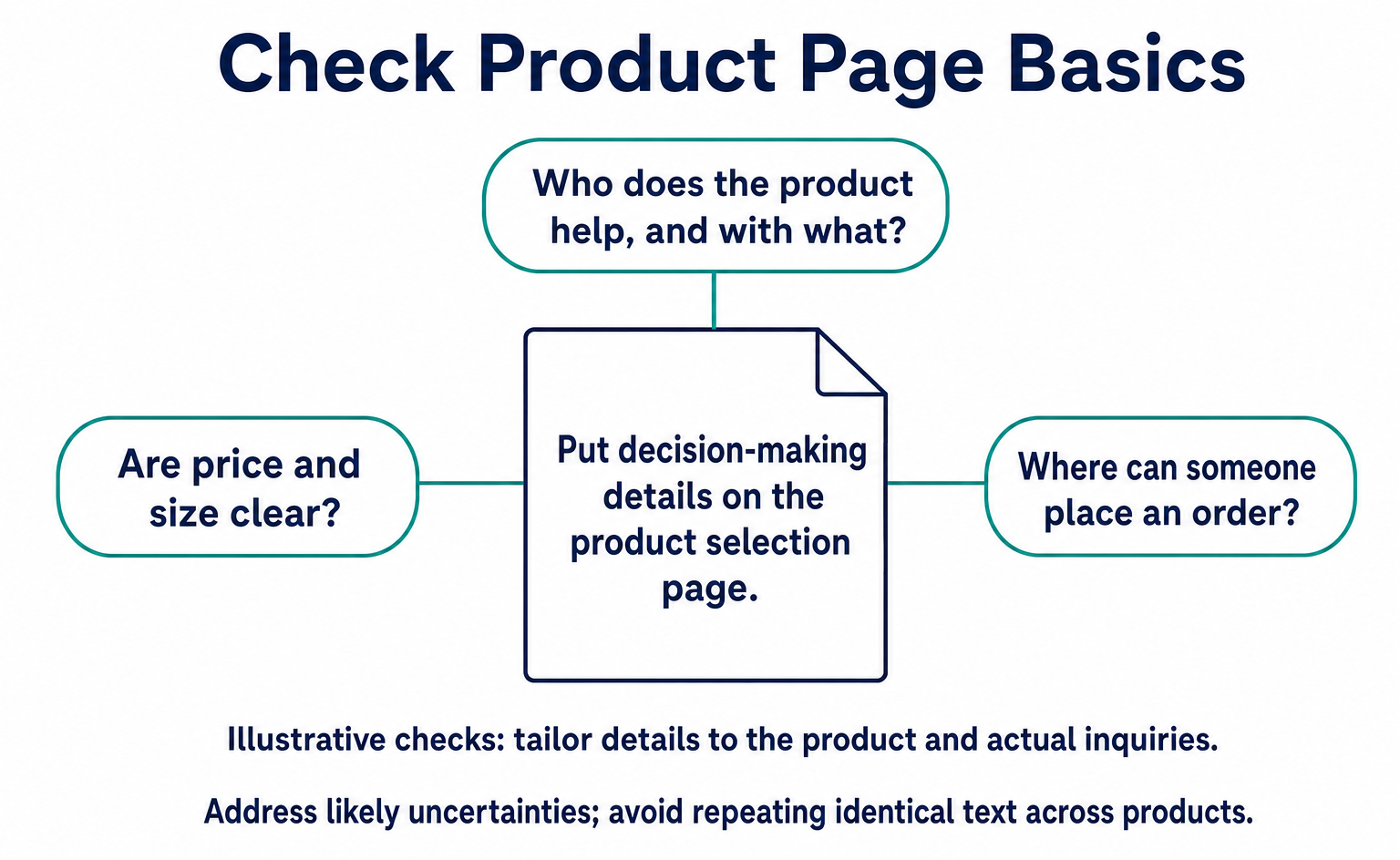
Before adding lengthy copy about a product’s appeal, check whether the information needed to buy it is complete. A correct product name alone does not help readers judge suitability if uses and conditions are unclear.
Google’s product data guidance includes fields such as name, description, image, price, and availability. Not every product needs the same fields; requirements vary by product and sales channel [6]. Start by checking the information required for the products you sell.
| Information to check | What readers want to know | Common omissions |
|---|---|---|
| Product name and model number | Which product is being described? | Older products or similarly named items are mixed in |
| Uses and unsuitable uses | Does it fit my purpose? | Benefits are listed, but unsuitable uses are unclear |
| Size, capacity, and materials | Will it fit my belongings or the place where I will use it? | Photos alone do not provide enough information |
| Price and extra charges | How much will I pay in total? | Member pricing or shipping conditions are elsewhere |
| Stock and shipping | Can I order it, and will it arrive when I need it? | Differences by color or size are unclear |
| Returns and exchanges | What can I do if it does not suit me? | Product-specific exceptions or contact details are hard to find |
Choose one product and try answering the questions in this table using only public pages. If an answer exists only in internal documents, check what you can publish and add it where needed.
For example, if you sell storage products, “holds plenty” does not tell someone whether an item will fit on their shelf. Consider details needed for an actual decision: external versus internal dimensions, space needed to open the lid, and whether items can be stacked.
These are illustrative examples. Decide what to add based on the product itself and actual inquiries. Rather than adding the same text to every product, briefly explain the points likely to cause uncertainty for that item.
Also consider where the explanation belongs. If dimensions needed for comparison appear only just before purchase, people cannot check them earlier. Make sure information needed to choose a product is available on the page where people choose it.
When adding information, avoid leaving outdated descriptions in place. Check for contradictions such as “cannot be washed” in the main text and “can be washed” in the FAQ. If answers differ within a page, verify the correct specifications and make them consistent.
Check that product photos match the items currently sold. If the photos make it unclear whether accessories are included, add an explanation. Read the page as a first-time visitor and consider whether someone might assume that everything pictured is included.
5. Align pricing, stock, and returns information
Check for conflicting information about the same product on your site and other sales channels. Fixing one page can still leave old descriptions elsewhere.
Google Merchant Center is a service for sending product information to Google. Its pricing guidance requires the submitted amount and currency to match those shown on the product page and at checkout [7].
The check for a store manager is straightforward. Pick one product and review its normal product page, the information sent to sales channels, and the actual checkout screen, in that order. Make sure you are selecting the same product under the same conditions.
For products whose prices vary by color or size, check whether only the cheapest combination is prominently displayed. Also make sure you are comparing the item alone with the same item alone, rather than a set with accessories. This avoids labeling prices as incorrect when they apply to different conditions.
Apply the same approach to stock. Distinguish overall product availability from availability for the selected color or size. Explain whether the item is a preorder, has a confirmed restock date, or can ship immediately, based on the actual sales situation.
If shipping conditions vary by region or order time, make those conditions easy to find. “Next-day delivery” alone does not tell readers whether it applies everywhere. Distinguish the date an item leaves the warehouse from the date it arrives.
For returns, align your guidance with the store’s actual conditions. Google also provides settings for communicating return periods, methods, and fees to Search [9]. Check the actual policy first, then make sure the page’s explanation matches it.
Record the date checked and where the information is managed. If each price change requires manual updates on several screens, an old value may remain somewhere. Deciding who updates what makes it easier to repeat the checks at the next change.
If you find an incorrect price in an AI answer, simply asking the AI to correct itself does not update public information. First check the source pages or product data your business can edit. If the cited source is another company’s sales page, check the process for sending correct information to that sales channel’s contact point.
Even after a correction, the AI answer may not change immediately. Record “date source information was corrected” separately from “date AI answer was checked again.” This distinguishes completion of the information update from its appearance in an answer.
6. What questions should you test with AI?
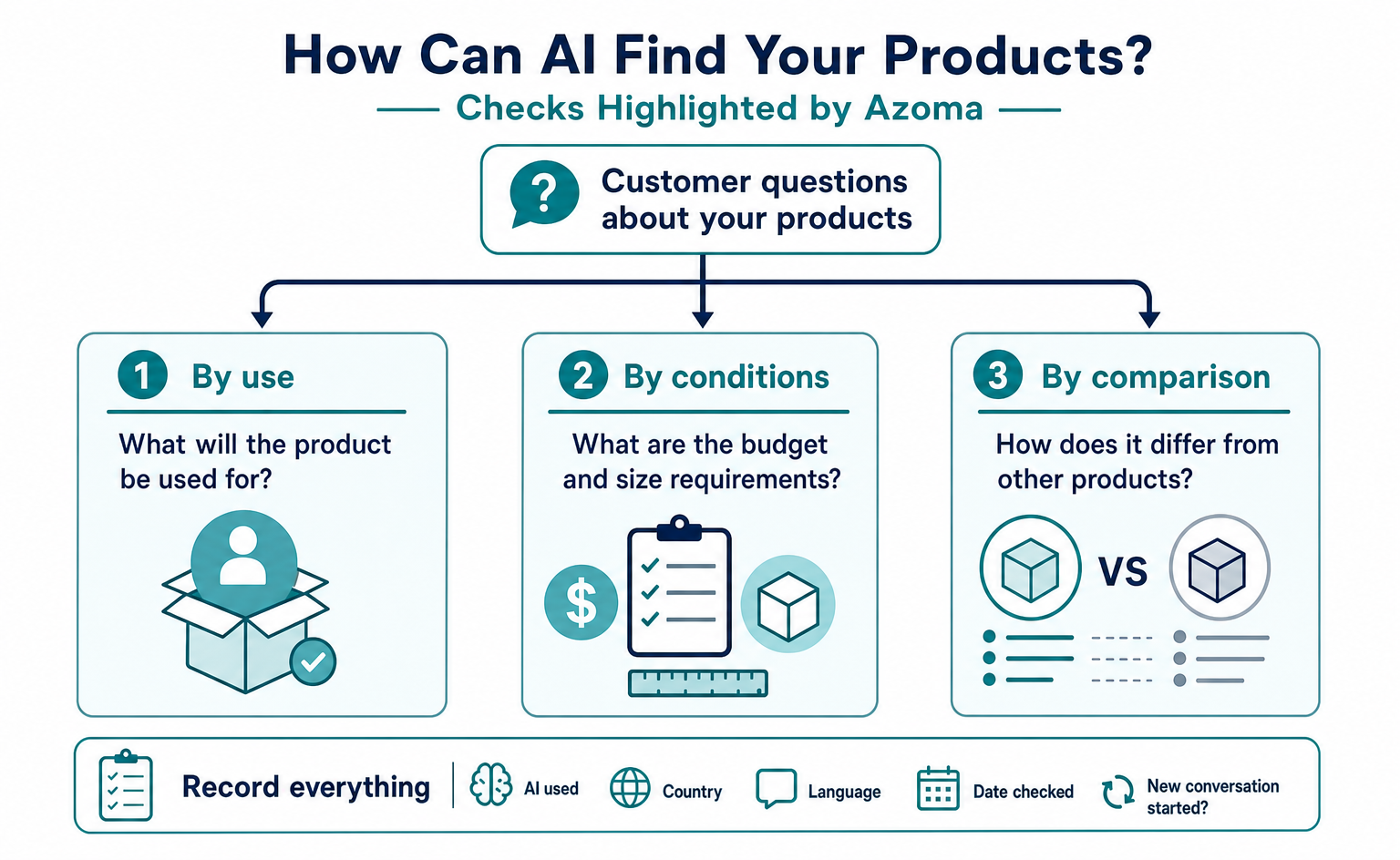
Test questions from people who know the product name separately from questions from people who have not chosen a product yet. Questions containing your product name alone cannot show how readily it appears among comparison options.
Start with everyday inquiries and questions received in stores. Choose questions that reveal who needs help and with what, rather than stringing together invented buzzwords. Do not include personal information or unpublished customer inquiries.
| Question type | Illustrative question | What to check |
|---|---|---|
| Search by use | I want a water bottle that fits easily in a work bag | Are the suggestions suitable for the use? |
| Compare conditions | I want to compare water bottles by weight and ease of cleaning | Do the comparison reasons match the specifications? |
| Specify a product | Is this model of water bottle dishwasher-safe? | Does the answer identify the correct product? |
| Ask about purchase conditions | Where can I check whether this product is in stock? | Does it direct users to current sellers? |
| Ask about exceptions | What drinks should not go in this product? | Does it correctly describe unsuitable uses? |
Adapt these to your products and begin with questions whose answers you can verify. Prepare the correct product specifications before reading the AI response, so you do not judge it only by how well it is written.
Avoid packing too many conditions into a question. Specifying price, color, size, use, and delivery date at once makes it harder to investigate why a product did not appear. Start with the most important conditions and use separate questions to check others as needed.
Conversely, adding such detailed conditions that only your product remains does not show whether it would appear in ordinary shopping. Keep checks that specify a model number separate from comparisons by people who do not know the product name.
Save the exact question text. “Light and easy to clean” is not the same as “easy to clean and durable.” For later comparison, record whether you changed the question or repeated the same one.
Also record the AI used, country, language, date checked, and whether you started a new conversation. If test environments differ, note those differences rather than presenting results as directly comparable. These records support ongoing checks for your business; they should not be treated as rigorous market research.
When your product is absent, also look at which products appeared instead. Do not establish why a competitor appeared based only on the AI’s explanation. Compare the suggested products’ public information with the question’s conditions, starting with differences you can verify.
7. Check the settings behind product pages too
Align the product information shown on screen with the information sent to search services. If you ask your web team to check this, explaining that goal helps move the discussion forward.
Alongside text for people to read, a product page can include settings that communicate prices, stock, and other information in a defined format. This is called structured data. Google describes it as a way to convey product page information in search results [5].
The name may sound technical, but the checks are the same as for the product page. Is the product name correct? Is the price current? Does the stock status match actual availability? Instead of asking someone to “add some AI code,” you can say, “I want to check that the values sent to Search match what appears on screen.”
Pages that sell products may need different settings from pages that only describe them. Review Google’s guidance for merchant pages and choose settings appropriate for your page [8]. Copying another site’s settings unchanged is not enough.
Your commerce system or theme may already provide the necessary information. Before adding anything, ask the web team what is already in place. Avoid conflicts between automatically generated information and information added later.
Include the product page URL, correct product name, checked price and stock status, and your concern in the request. You do not need to learn technical terms first. You can ask, “This page says the item is in stock. Does the information provided to Search say the same?”
After a correction, check both the format and the content. A format check may show no errors, yet the content can still contain an obsolete price or the name of a product you do not sell. Review it alongside the actual product page with the person responsible.
Google says that no special settings or dedicated structured data are needed to appear in AI Overviews or AI Mode [10]. This guidance applies to Google’s AI search. It does not mean that participation conditions are identical for every other company’s shopping features.
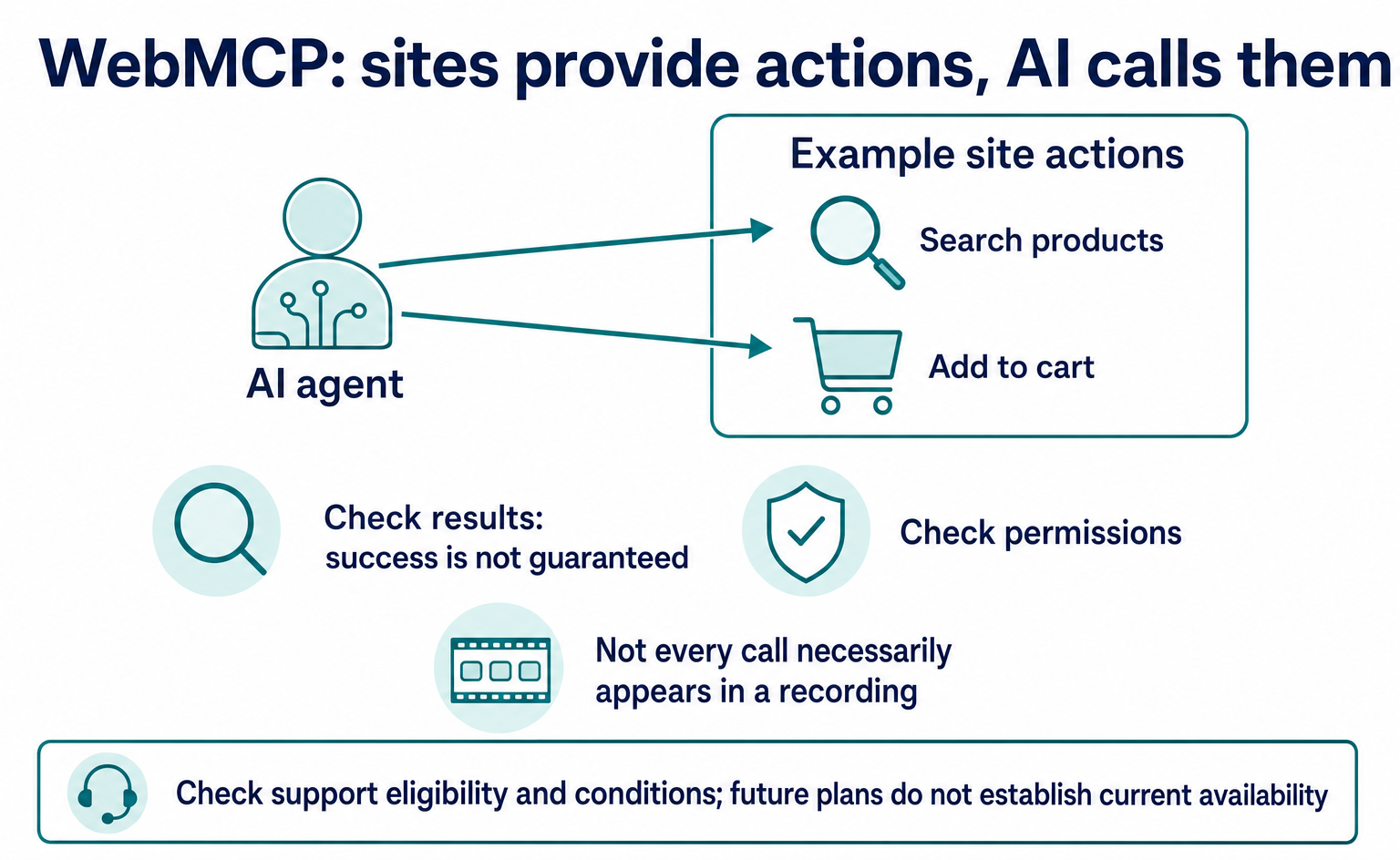
Also treat WebMCP, which tells AI about actions such as site search and booking, separately from the task of providing correct product information. Making site actions available does not guarantee that a product will be selected as an option. See the WebMCP guide for an explanation of the mechanism.
First align your product information, then consider whether there are actions you want AI to handle. Defining one goal at a time—finding a product, specifying conditions, or checking stock—makes it easier to discuss the settings needed.
8. How to investigate incorrect AI descriptions
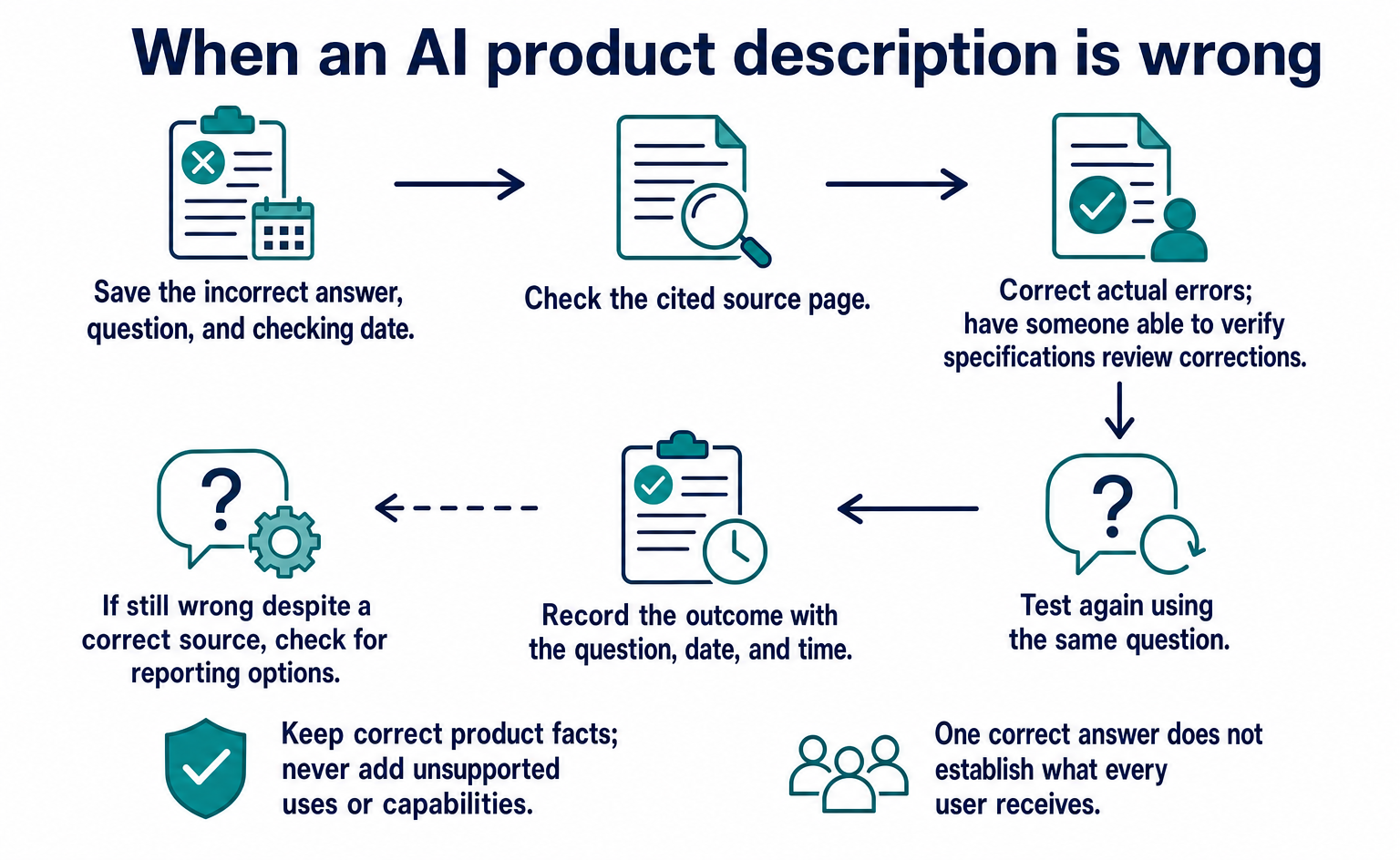
When you find a wrong answer, save the question, answer, sources, and correct product information together. A report that only says “the AI was wrong” does not let another team member check the same situation.
Suppose an answer says that a part can be washed in its entirety when it cannot. First check which product the answer describes. Look for confusion with a similarly named product or an older model.
If source links appear, open them and read the content. Check whether the linked page contains that description and whether it refers to the right product. A displayed link alone does not prove that the entire answer is based on that page.
If there is no link, record that you could not verify the source. Avoid guesses such as “it must have read the reviews” or “it must not have seen our site.” That lets others distinguish observations from assumptions later.
| Item to record | What to save | Next action |
|---|---|---|
| Environment checked | AI name, date, language, and interface used | Check again under matching conditions |
| Question | The exact text entered | Check whether it matches an expected customer question |
| Problem in the answer | What is wrong about the name, use, price, or other detail | Verify the correct specifications |
| Sources | Displayed links, or “none displayed” | Check the pages for errors |
| Where to correct information | Your page, a sales channel, or the product information management screen | Ask the person responsible for that location |
| Follow-up check | Correction date and date the answer was checked again | Record information corrections separately from answer changes |
At first, creating this record for one problem is enough. Work through the process from discovery to correction once before building a comprehensive list of all products.
If your own page is wrong, verify the specifications and correct it. If another company’s sales page is outdated, find the contact for updating listing information. If the AI gives an incorrect explanation despite referring to a correct page, record that fact and check the service’s reporting feature or other reporting options.
In every case, do not change correct product information to match an AI answer. Also avoid adding unsupported uses or capabilities to make the description more appealing. Someone who can verify the product specifications should check the corrections.
Return to the same question for the follow-up check. If you keep changing it until a favorable answer appears, you cannot tell what changed. Record any investigation using a different question as a separate check.
One correct answer does not confirm that every user receives the same answer. When reporting a correction’s outcome, include the conditions: “It was displayed correctly at this date and time for this question.” This becomes a reference point for continued work.
9. Build a sustainable process with a few products
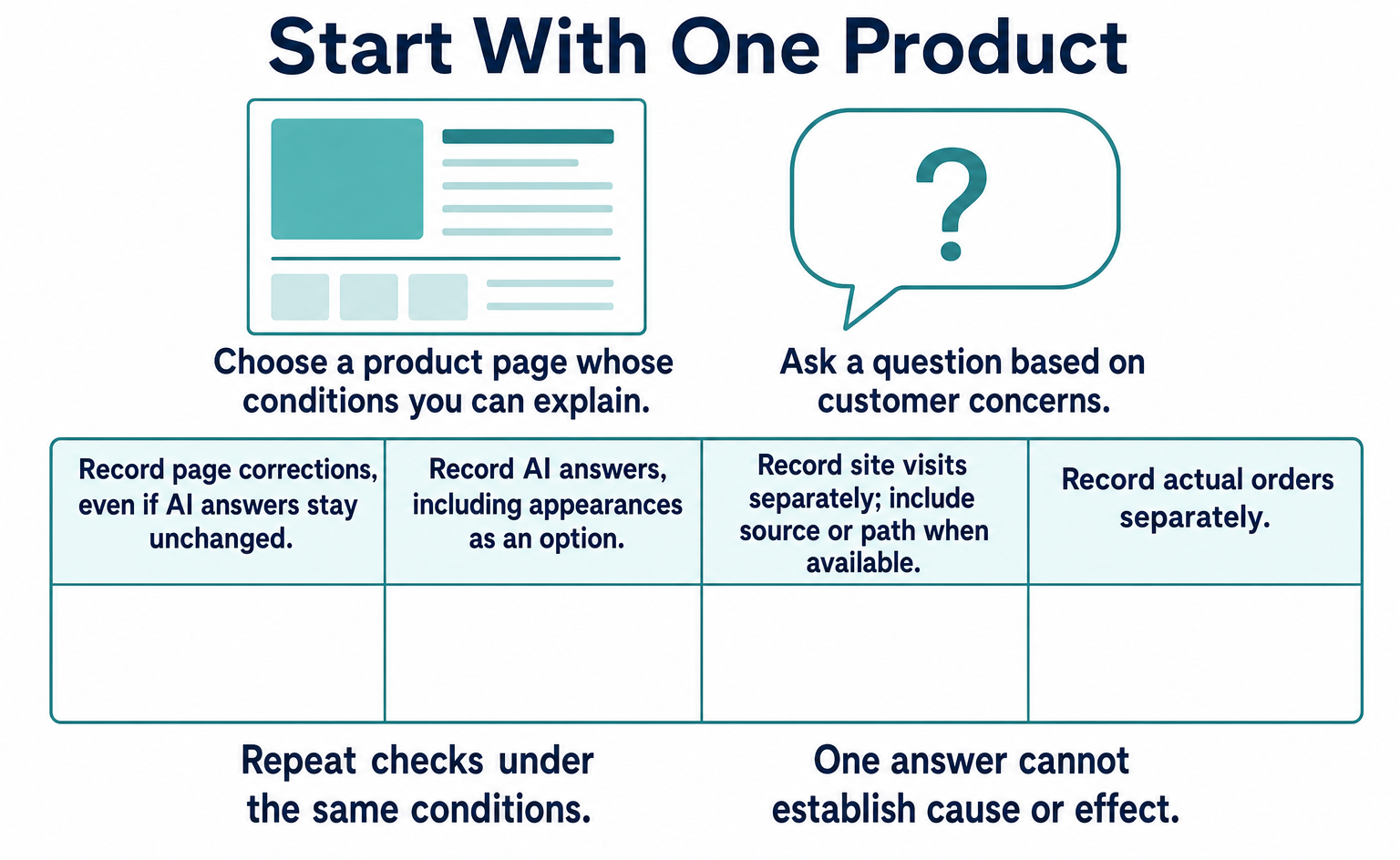
Start with products whose information someone can verify and for which customer questions are easy to gather. Trying to check every product at once can leave errors discovered but not corrected.
Do not limit the selection to bestsellers. Products that attract many inquiries, have changed specifications, or are easy to misdescribe because of color or size variations are also candidates. Choose according to what you want to investigate.
The following is an example of how to start small. It is not a procedure whose effectiveness Azoma has validated. Use it as a way for your team to continue checking and correcting information.
| Step | What to do | Sign that the task is complete |
|---|---|---|
| 1 | Select products and questions customers are likely to ask | Someone has been assigned to verify the specifications |
| 2 | Review product pages and sales-channel descriptions | Conflicting information and places to correct it are recorded |
| 3 | Ask AI the questions and save the answers and sources | The questions and checking conditions can be reproduced later |
| 4 | Correct verified errors or missing information | The responsible person has checked the correct information and changes |
| 5 | Check again under the same conditions | Changed and unchanged points are recorded separately |
| 6 | Review visit and order records | Changes in answers are not confused with effects on sales |
After one complete cycle, decide whether to add more products. If checks grow faster than corrections, review responsibilities and request methods before expanding the scope.
Assign responsibility for product information too. The person writing copy may not be able to decide prices or return conditions. Make clear whom to consult—for example, the product team for specifications, the sales team for pricing, and the web team for page updates.
Send the correct information together with the location that needs updating. “Please optimize for AI” does not define the work. A request such as “The capacity descriptions differ between this product page and the sales channel, so we want to verify the specification and align them” is easier to route to the right people.
Prioritize information that could cause problems if buyers misunderstand it. Unsupported uses, incorrect prices, and stock that cannot actually be ordered deserve attention before more appealing promotional copy. Do not prioritize solely by the amount of text involved.
Define when to pause work as well. If the correct specifications are unknown, there is no contact for requesting a sales-channel update, or no environment is available for checking the AI response, record the reason. Finding a reliable contact or source becomes the next task, rather than filling gaps with guesses.
Set the checking frequency according to how products change. Items with frequently changing prices or stock do not need the same routine as those with stable specifications. Separate checks triggered by changes from regular checks.
Internal reports can also be short. Recording “products checked,” “problems found,” “places corrected,” and “next checks” supports handovers without a lengthy market explanation every time.
10. Questions to ask when comparing dedicated tools
Check whether a tool helps you investigate what to fix, not just how often products appear. More screens of numbers will not move daily work forward unless someone is responsible for corrections and knows how to make them.
The 5Cs introduced by Azoma and the Digital Shelf Institute cover gaps in information, customer questions, sources, answer accuracy, and customers acquired [2]. When reading their public explanations, translating the terms into checks your business can perform is more useful than memorizing the names.
If possible, bring one of your own products and one question to a tool demonstration. Ask to see not only prepared success stories but also what the tool reveals when the product is absent or the explanation is wrong.
| What to ask | Why it matters |
|---|---|
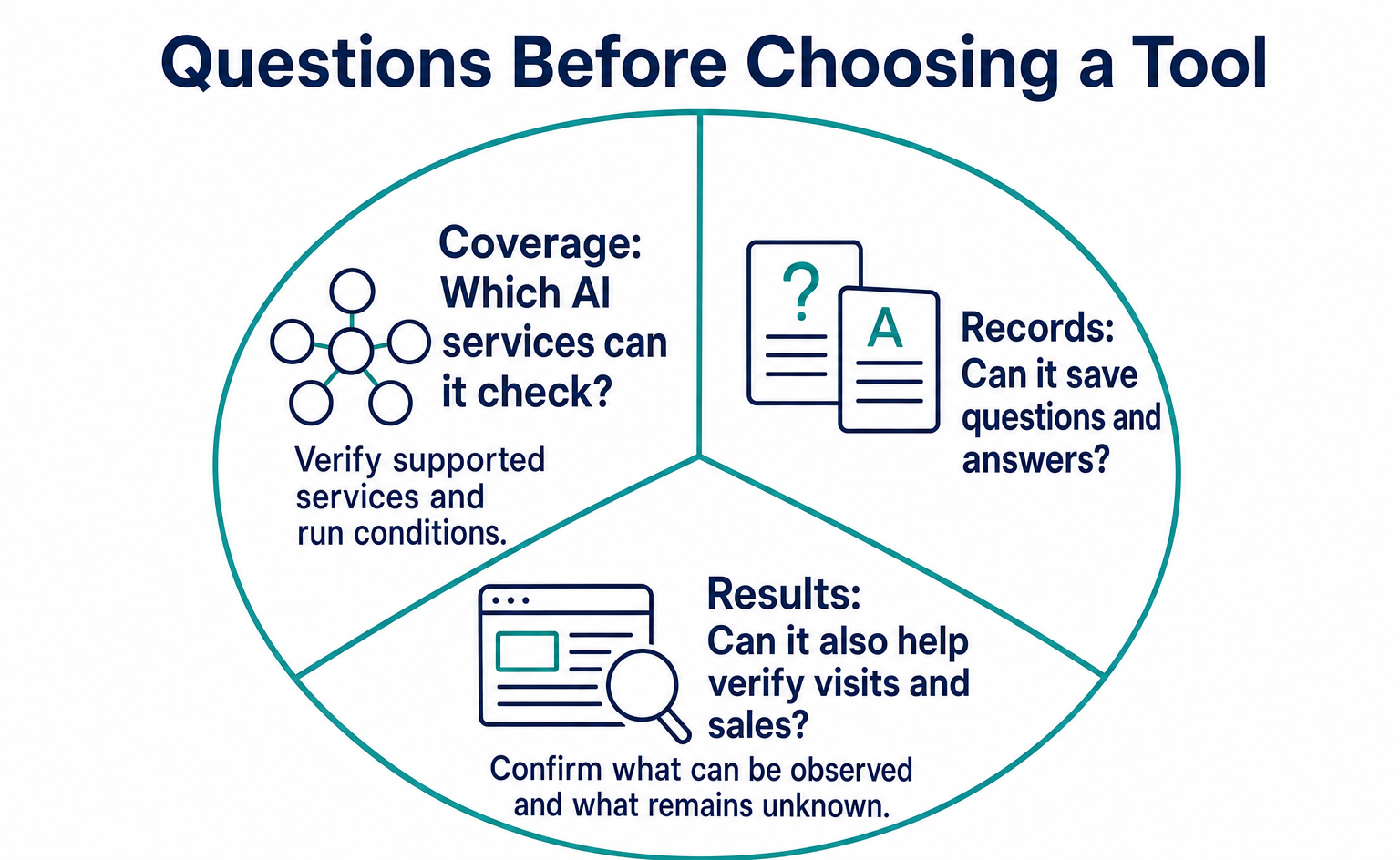
| Which AI services, countries, and languages are covered? | Check the fit with your customers’ environment |
| Can we save the actual questions and answers? | Let team members reread the evidence behind scores |
| Can we inspect the sources displayed? | Investigate which information might need correction |
| Can we compare answers with correct product specifications? | Avoid treating a product-name mention alone as success |
| After an error is found, who corrects what? | Check whether your team can sustain the work |
| How are usage allowances and extra charges determined? | Understand the burden of adding products or questions |
Check actual contract terms and pricing using the guidance available at the time. Do not fill comparison tables with guessed prices you have not verified.
Ask about differences between AI services too. Whether the same questions are tested in the same way, and whether countries or access conditions differ, affects how numbers can be compared. A larger number of supported AI services does not by itself make a tool suitable for your business.
For source analysis, ask what the tool can verify and what remains unknown. Collecting links displayed in answers, comparing answers with product descriptions, and suggesting possible corrections serve different purposes.
If many findings cannot be corrected promptly by your team, you may need to organize information management before adopting a tool. If product data is split across departments, first decide where to verify the correct information. Installing a dashboard does not resolve internal verification work.
Rather than committing to long-term operation immediately, test with a clearly defined problem. Describe the goal as a task: not just “We want to count appearances,” but “We want to see whether we can find incorrect descriptions of product uses and pass them to the responsible person.”
You may need a new service, or your existing systems may be enough. Comparing options after checking your own gaps helps distinguish necessary features from those you will not yet use.
11. What should you check with AgentSignal?
Check appearances in AI answers separately from activity after someone reaches your site. When using AgentSignal, make clear what you can observe and record.
AIO analysis can be used to check appearances in supported AI services for questions you set. Start by registering product-name questions separately from questions based on intended use, then read the answers and relevant pages. Check the actual settings screen for available AI services and run conditions.
The tracking tag, by contrast, records visits and on-screen actions on your own site. If someone arrives through a link in an AI answer, it can provide evidence of which pages they viewed next and where they interacted.
Installing the tag does not reveal what appeared inside Amazon’s or Walmart’s apps. Your own tag also cannot show whether a product was added to a cart or paid for on another company’s interface.
Even if a record looks like an AI visit, do not treat it as a product recommendation. A visit to read a page and inclusion in an answer are different events. Visitor classification also does not mean that identity has been verified through a cryptographic signature or similar method.
Once you confirm a visit, first check whether the visitor can move forward from the product page. Record observable behavior, such as moving back and forth to find shipping guidance or encountering a form error. Do not infer the person’s feelings from screen actions alone.
Use your own order records to verify purchases too. An AI-referred visit occurring on the same day as increased sales does not establish a direct connection. Check other changes made at the same time, such as advertising or pricing.
To start with setup, use the tracking tag installation guide. The free AIO check is another starting point for checking public pages for basic problems. However, its score does not guarantee inclusion in shopping AI or purchases.
Report “appearance in an answer,” “visit to our site,” and “order on our site” separately so that different readers interpret the records consistently. Starting with what your business can observe also makes it easier to identify missing records and whom to consult next.
12. To start today, review one product
Choose one product and check whether its public pages can answer customer questions. You do not need to commit to a large research plan or a new system first.
Begin by reviewing common questions with someone who knows the product well. Consider whether people choose mainly by price, hesitate because they do not know where it can be used, or worry about whether the size will fit. Inquiries can also reveal the words people use when they do not know the product name.
Next, look for information that answers those questions on the product page. Conditions that seem obvious internally may be missing from the page. Even when information is present, check whether it is buried in a long description.
For example, when explaining product care, do not stop at “easy to maintain.” Check which parts should be removed for washing and whether any cleaning methods are prohibited. If there are many steps, a simple diagram may help. Do not fill in unverified specifications merely to make the explanation clearer.
Test AI questions after reviewing the page. Knowing the correct answer makes it easier to spot product mix-ups or missing conditions. Look not only at whether the product appears, but also at how it is described.
If you find a problem, choose one place to correct. Start with the product name if it is wrong, or the use description if it is incomplete. If you change many places at once, keep a change list so you can later see what you did.
A correction request can be as short as the following example. Adapt it to the product and situation before using it.
This request concerns this product page. The AI answer says the accessory is included with the main item, but it is currently sold separately. We would like to check the descriptions on the product page and sales channels and make them consistent so the accessory’s status is clear. Please tell us who can verify the correct specifications and which locations need updating.
When you receive a response, record what was corrected. Even if different people update the information and recheck AI answers, they can hand over the work using the same notes. Defining what you want to verify in advance helps avoid an ambiguous report that simply says, “We took action.”
If the result does not change, that does not mean all the work was wasted. Record the correction of a product-page error separately from the lack of a change in the AI answer. You can then decide whether to inspect another source or wait before checking again.
Conversely, even a good answer does not justify widely presenting that single result as a success story. Continue checking under the same conditions and review available inquiry and order records too. Starting small is not about producing attractive numbers quickly. It is about enabling your team to keep checking for itself.
If you choose one action to take from Azoma’s announcement, compare product information with AI answers. Rather than adding work to match a new term, consider what to add to your current checks to deliver accurate information to buyers.
Summary
- On September 7, 2026, Azoma announced approaches to shopping AI and checks for selecting tools. It did not announce an industry-wide standard.
- Before seeking product recommendations, check that uses, prices, stock, shipping, and returns information is complete, accurate, and consistent.
- Save AI questions, answers, sources, and checking dates, and compare answers with actual specifications. Do not determine causes or effects from one answer.
- Record appearances as an AI option, visits to your site, and actual orders separately.
- Start with a few products and build a process for finding information, correcting it, and checking again.
FAQ
- Q. What is ACO?
- It is a term for efforts to help shopping AI find products, understand them, and suggest them as options. Azoma uses this term; it is not a shared participation standard for all AI services.
- Q. Will correcting product information guarantee that AI recommends it?
- No. Start by checking whether AI gives incorrect prices or uses. Verify information corrections, inclusion in AI suggestions, and actual purchases separately.
- Q. Where should I start if my product does not appear in AI answers?
- Check whether the question suits your product, then review the product page’s uses, price, stock, and shipping information. If the AI shows sources, check those pages too. Do not identify a cause from a single answer.
- Q. Do I need WebMCP?
- WebMCP is a mechanism for telling AI about actions available on a site, such as search and booking. It is not a universal requirement for having products selected as candidates. Check product information first, and consider WebMCP separately if there are actions you want AI to perform.
- Q. Should I subscribe to an AI optimization tool right away?
- You can start with a few products and questions customers are likely to ask. Identify the AI services, countries, languages, ways to save answers, and people who can make corrections. Comparing tools becomes easier once you know which tasks are hard to sustain manually.
- Q. Can AgentSignal also track purchases within Amazon or Walmart?
- A tracking tag on your own site cannot show answers or purchases inside another company’s app. Use checks of answers from supported AI services separately from records of visits and actions on your own site. Also use your own order records to verify purchases.
Sources
- [1] Agentic Commerce Optimisation: Azoma on Which Platforms Help Brands Get Recommended by AI Shopping Agents (Azoma / GlobeNewswire) — accessed 2026-09
- [2] The 5Cs of Agentic Commerce Optimization (Azoma / Digital Shelf Institute) — accessed 2026-09
- [3] Amazon announces Rufus, a new generative AI-powered conversational shopping experience (Amazon) — accessed 2026-09
- [4] Walmart: The Future of Shopping Is Agentic. Meet Sparky. (Walmart) — accessed 2026-09
- [5] Introduction to Product structured data (Google Search Central) — accessed 2026-09
- [6] Product data specification (Google Merchant Center) — accessed 2026-09
- [7] Price [price] (Google Merchant Center) — accessed 2026-09
- [8] Merchant listing structured data (Google Search Central) — accessed 2026-09
- [9] Merchant return policy structured data (Google Search Central) — accessed 2026-09
- [10] AI features and your website (Google Search Central) — accessed 2026-09
About the author
Shogo MizushimaCEO of kairos Inc. / AgentSignal Developer
Develops AgentSignal, a tool for measuring AI crawler visits and AI-referred traffic, and diagnosing AIO readiness. Writes about measurement and practical improvements for AI search using observed data.
Related articles
AIO and AI search
What Is LLMO? How It Differs from SEO and Why Some Say It Is Pointless
LLMO is the work of helping answers from ChatGPT and other AI find and accurately describe your company. Learn how it differs from SEO, why some call it pointless, how E-E-A-T relates, how to measure results and what to do in the first month.
Published
Connecting AI and the web
What Is WebMCP? How AI Operates Websites and Current Support
WebMCP tells AI which actions a website offers, such as product search and adding items to a cart. As of September 2026, it is not a formal standard. Learn about support in Chrome, Edge, ChatGPT, Cloudflare and Shopify, what to ask developers, and how to test and record actions.
Published
Measurement and site improvement
What Are AI Crawlers? Why Blocking GPTBot Doesn’t Remove You from ChatGPT Search
AI crawlers are programs AI companies use to read public web pages. Learn how GPTBot differs from OAI-SearchBot, how Google-Extended works, why visits can continue after a robots.txt block and how to choose settings by purpose.
Published