A2A vs. MCP: How to Delegate Research and Quotes to AI
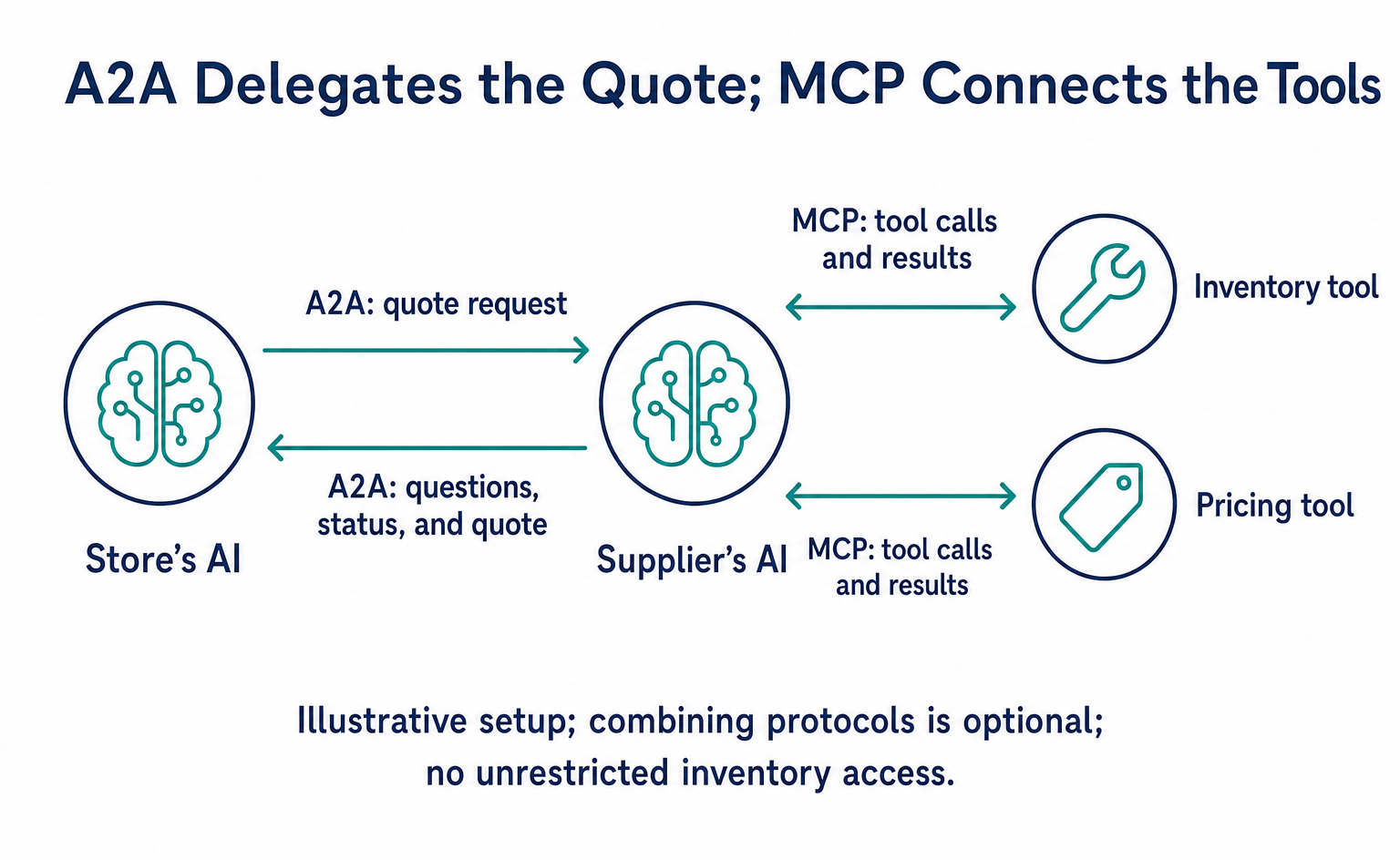
A2A provides common rules for asking another AI to do work and receiving progress updates and results. Follow a quote for 100 mugs to see how it differs from MCP, from checking the connection to receiving the quote, using the official 1.0.0 data formats.
A2A provides common rules for asking independently built AIs to do work and receiving progress updates and results. MCP provides common rules for an AI to use tools, such as inventory records or price calculations. For example, a system could use A2A to ask a supplier for a quote, and MCP to check inventory when preparing that quote.[1]
For an online store, the benefit is a consistent way to pass requests and results between business systems. However, you still need the other AI, an inventory-checking function, and permission to use them. This is not about signing up for a product registration service called A2A.
This article follows an online store as it requests a quote for 100 mugs, from preparation to checking the result. It assumes the store has received connection details and a product catalog from a supplier it has a contract with, and that both parties use the same product IDs. The amounts, quantities, and identifiers are illustrative. The examples refer to the official specification labeled “Latest Released Version 1.0.0,” checked on September 10, 2026, and use fields for HTTP communication.[2]
A2A and MCP connect to different things
When a staff member asks an AI to research sourcing options, the AI carries out several tasks. It may choose a tool and check inventory, or ask another company's AI for a quote.
| What you want to do | Mechanism used in this example | What you receive |
|---|---|---|
| Check quantities in an inventory system | An inventory-checking tool exposed through MCP | The tool's result, such as stock quantities |
| Ask a supplier's AI for a quote | A2A | Follow-up questions, processing status, and the quote |
| Have a person decide to buy and place an order | A separately prepared order process | The order acceptance result |
The official A2A explanation also describes AI-to-AI collaboration and AI-to-tool connections as complementary. There is no requirement to use both together. If you only need to check inventory once, you may not need a mechanism for handing work to an independent AI.[1]
For work that involves asking several suppliers, waiting for replies, and answering questions about missing details, A2A's progress-tracking mechanism is worth considering. You must still separately assess whether the quote is correct and whether the recipient is trustworthy.
The quoting AI and inventory-checking tool in the diagram form an illustrative setup. A2A and MCP do not give unrestricted access to any company's inventory.
1. Check the recipient and the work it can handle
First, you need the connection details for the AI you want to ask. The recipient can provide an Agent Card, a guide in JSON format. It lists the AI's name, capabilities, connection details, supported communication methods, authentication requirements, and other information in a machine-readable form.[2]
The official specification includes an example of retrieving /.well-known/agent-card.json. If a supplier provides its information at this path, for example, the requester reads it to check whether the AI handles quotes. Publishing this file does not automatically register the AI with every other AI.[2]
An extract showing only the card's connection details looks like this. The URL is fictional. This partial example omits the name, list of capabilities, authentication requirements, and other details, so it cannot serve as a complete Agent Card.
{
  "supportedInterfaces": [
    {
      "url": "https://supplier.example/a2a",
      "protocolBinding": "HTTP+JSON",
      "protocolVersion": "1.0"
    }
  ]
}
supportedInterfaces lists the supported connection methods. The requester selects a method both parties can use and its corresponding URL. A card can list several methods, so check the recipient's card rather than copying a URL or communication method from another article.[2]
If authentication is required, prepare connection credentials using the specified method. Publishing a card and granting permission to use the service are separate matters. This example starts with access to a contracted supplier and permission to request a quote.
2. Specify the agreed product and quantity in the request
The store's staff member wants 100 mugs. We will use mug-001 as the product identifier and msg-quote-001 as the message ID assigned by the requester. Product IDs and message IDs serve different purposes, so keep them separate.
The requesting AI sends the requirements through an A2A operation called Send Message. The official HTTP example uses POST /message:send, with the request content in the body's message field. Follow the recipient's actual settings for constructing the connection URL and authenticating.[2]
{
  "message": {
    "role": "ROLE_USER",
    "messageId": "msg-quote-001",
    "parts": [
      {"text": "mug-001を100個、東京都内へ届ける場合の税込総額と納期を見積もってください。発注はしません。"}
    ]
  },
  "configuration": {"returnImmediately": true}
}
This example places an illustrative request in the official message format. parts holds the content to communicate. It uses text here, but the specification also supports files and structured data. returnImmediately: true asks for the work record to be returned before processing finishes. This differs from asking to wait until completion.[2]
The statement “Do not place an order” makes the scope of this job clear. In a real system, you must restrict ordering through available operations and permissions, not just written instructions. Permission to send a request is not the same as permission to make a purchase.
3. The recipient AI uses tools to prepare the quote
The supplier's AI receives the request and checks inventory and prices. If it uses MCP for this internal process, it could pass the product ID to an inventory-checking tool and receive the stock quantity.[1]
The following table illustrates tools the supplier defines itself. Their names and fields are not an inventory API defined by MCP.
| Example input to the tool | Example result from the tool | What the AI assesses next |
|---|---|---|
| Product ID: mug-001 | Stock: 120 units | Whether it can supply the requested 100 units |
| Product ID: mug-001; quantity: 100 units | Product cost: ¥50,000 | Whether the price matches the quantity |
| Delivery destination: within Tokyo | Shipping: ¥2,000 | Whether the quote includes shipping |
In MCP communication, the tool call uses tools/call, the tool name goes in params.name, and the input goes in params.arguments. The following example body follows the MCP 2025-11-25 format. It is sent from the quoting AI to the supplier's tool, assuming the MCP connection, initialization, and tool-list retrieval are already complete.[4]
{"jsonrpc":"2.0","id":1,"method":"tools/call","params":{"name":"check_stock","arguments":{"product_id":"mug-001"}}}
tools/call and similar fields are part of MCP. By contrast, check_stock and product_id are names defined by the supplier, not part of a common MCP product API. Suppose the tool returns the following response.[4]
{"jsonrpc":"2.0","id":1,"result":{"content":[{"type":"text","text":"mug-001の在庫は120個です"}],"isError":false}}
The request and response share the same id, which lets the system match the result to the inquiry. In this case, the supplier can provide 100 units, but it would not have enough stock for a request for 150. Whether to report a shortage or propose split deliveries is the supplier's business decision. The common rules do not decide this automatically.
For this illustration, assume the product cost and shipping both include tax, with no additional charges. The total is then ¥52,000. In practice, calculate taxes, discounts, and delivery timing according to your business rules.
A2A does not require the other AI to share all its internal inventory records or decision-making processes. The requester coordinates through the agreed work and the returned results. That makes it useful to specify the required quantity, shipping details, and delivery timing when making the request.[1][2]
4. Use the task ID to distinguish pending work from completed work
For work that does not finish immediately, the recipient can return a processing record called a Task. The receiving party issues the ID for a new Task. This is separate from the messageId the requester assigned at the start.[2]
An extract from a Send Message response returned during processing could look like this. The received task.id becomes the ID used for subsequent tracking.[2]
{"task":{"id":"task-quote-001","contextId":"context-quote-001","status":{"state":"TASK_STATE_WORKING"}}}
After receiving an ID such as task-quote-001, the requester tracks that task's status. The official specification includes states for processing, additional input required, completion, failure, and other situations. A successful exchange alone does not mean the quote is ready.[2]
If more details are needed, continue answering under the same Task. For example, the supplier may ask for a preferred delivery date because the delivery area alone is not enough to determine timing. Send a new Send Message with taskId set to task-quote-001, contextId set to context-quote-001, and a new messageId. Put the preferred date in parts[].text. Using the same task ID links the answer to the original request for 100 units.[2]
You can check progress with Get Task, receive a continuous stream of updates, or receive notifications. Streaming and notifications require support from the recipient, and notifications also require a prepared destination. Not every recipient supports every notification method.[2]
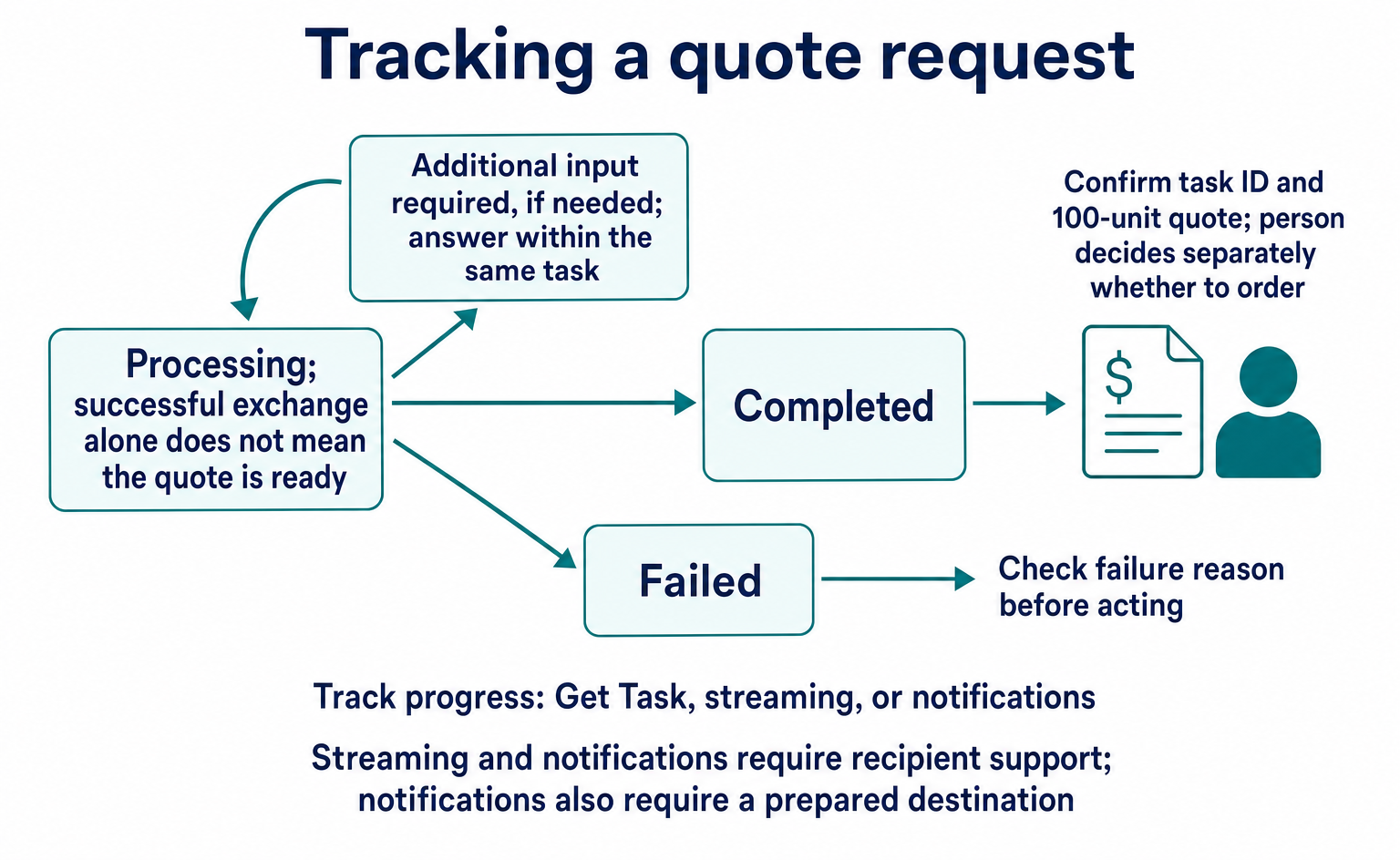
In this example, check the task ID and the result's contents to confirm that the quote for the requested 100 units has arrived. If processing fails, check the reason before taking action. Avoid repeatedly requesting the same work without checking the result.
5. Receive the result and decide separately whether to order
Here, the requester calls Get Task over HTTP using GET /tasks/task-quote-001 to check the status. The end of the URL is the id of the task to retrieve. The returned Task can contain its status and artifacts. The artifacts field represents outputs produced by the work—in this example, the quote text.[2]
The following is an illustrative Task returned by Get Task. It does not include an outer task field like the Send Message response. The amounts are the same as in the previous stage. This is not a quote actually retrieved from a supplier's system.
{
  "id": "task-quote-001",
  "contextId": "context-quote-001",
  "status": {
    "state": "TASK_STATE_COMPLETED"
  },
  "artifacts": [
    {
      "artifactId": "quote-result-001",
      "name": "mug-001の見積もり",
      "parts": [
        {
          "text": "mug-001を100個。税込商品代50,000円、税込送料2,000円、合計52,000円。納期は発注後5営業日。発注は未実施です。"
        }
      ]
    }
  ]
}
The staff member can check whether the product, quantity, tax-inclusive total, and delivery timing match the request. Here, TASK_STATE_COMPLETED means the work of preparing the quote is complete. It does not mean the goods have been reserved, paid for, or shipped. Even a completed quoting task may report a quantity shortage or a different delivery date, so read the contents too.[2]
To proceed with an order, separately provide approval of the purchase details and a process for accepting the order. A2A standardizes the exchange of requests and results, but this quote example alone does not define what constitutes a confirmed order.
Where could this help your business?
To identify a useful application, choose one job that currently requires staff to move between several systems. Examples include requesting supplier quotes, contacting an internal billing team, or checking conditions with a booking service.
If you only need to read specific fields from inventory records, the first thing you need is a data-reading tool. If the work involves asking another AI to investigate, answering follow-up questions, and waiting for completion, A2A's mechanisms for requests, progress, and results become relevant.[1]
An official A2A announcement dated August 27, 2026, reported that A2A was joining the Agentic AI Foundation. This is cited as background on its governance, not as new news from September 10, 2026.[3]
The data in this article illustrates how to read the formats on the official pages labeled 1.0.0. It does not represent tests of actual connections, authentication, or ordering. Align your chosen SDK—the software development kit used for implementation—with the version the recipient supports. A starting point for deciding whether to adopt A2A is to test whether you can receive intermediate status updates and the required results for the same request.
FAQ
- Q. Is MCP required to use A2A?
- There is no requirement to combine them. The official documentation describes an architecture that uses A2A for collaboration between AIs and MCP for connections to individual tools. Choose according to the recipient and the work.[1]
- Q. Will publishing an Agent Card register my products with ChatGPT?
- An Agent Card describes an AI's capabilities and connection details. It is not a product registration mechanism and does not guarantee automatic discovery by a particular AI service.[2]
- Q. Does a completed Task mean an order has gone through?
- It depends on the work requested. This article requests a quote, so completion does not place an order. If you want to order, separately confirm the necessary permission and the result of the order process.
- Q. Can I connect using the data shown here?
- The connection details and identifiers are illustrative. This is not a ready-to-run implementation: an actual recipient, supported version, authentication, and business processes have not been prepared. The examples explain the fields and their roles in the official specification.[2]
Sources
- [1] A2A and MCP: Detailed Comparison (A2A Project) — accessed 2026-09-10
- [2] A2A Protocol Specification — Latest Released Version 1.0.0 (A2A Project) — accessed 2026-09-10
- [3] A New Chapter for A2A: Joining the Agentic AI Foundation (A2A Project) — accessed 2026-09-10
- [4] Tools — MCP specification 2025-11-25 (MCP) — accessed 2026-09-10
About the author
Shogo MizushimaCEO of kairos Inc. / AgentSignal Developer
Develops AgentSignal, a tool for measuring AI crawler visits and AI-referred traffic, and diagnosing AIO readiness. Writes about measurement and practical improvements for AI search using observed data.
Related articles
Connecting AI and the web
WebMCP forms can now pass: reading the Lighthouse 13.5 audit changes
Lighthouse is a tool for auditing websites. This update makes a site's form coverage for WebMCP easier to interpret in the audit output.
Published
Connecting AI and the web
Algolia MCP: Let Connected AI Search Your Product Data
Prepare product data, create an Algolia Public MCP URL, connect a compatible AI client and test prices and availability. Understand the limits of read-only search.
Published
Connecting AI and the web
Four stores in one Claude conversation: a MitoOps MCP case
See how a four-store business connected Claude to order data, then follow a limited read-access trial with prompts, checks and current-documentation caveats.
Published