What Is Visa TAP? How Stores Recognize AI Shopping Requests
Learn how Visa Trusted Agent Protocol helps a website verify visiting AI agents. Follow the signed-request flow, understand what verification proves, and distinguish agent identity from permission to place an order or charge a customer.
When an AI assistant visits an online store to shop for someone, the store may struggle to distinguish it from unwanted automated traffic. Visa TAP lets stores verify digital signatures sent by AI and determine whether requests come from an AI approved under Visa’s program. This can help stores decide whether to allow product browsing. But checking a signature alone does not establish permission to buy or confirm a successful payment.[1][2]
This article is an introduction for people considering how Japanese online stores should handle AI traffic. It uses official materials available as of September 10, 2026, to explain what stores can verify and what their ordering and payment systems still need to do. No version number or publication date could be confirmed in the specification text reviewed, so it is not treated as a new announcement on that date or as a dated, final specification.
| Topic | Confirmed status and evidence | What can currently be concluded |
|---|---|---|
| How AI is recognized | Visa’s specification describes signature fields and the verification process.[2] | It explains what stores or website protection services verify. |
| Product availability stage | The overview page says development and rollout are ongoing.[3] | The listed features cannot be treated as available to every store. |
| Eligibility for Japanese stores | Eligible countries and application procedures could not be confirmed in the official materials. | There is no basis for saying stores can enable it immediately through an admin dashboard. |
First, distinguish between a publicly available specification and a feature available through a service your store uses. What follows explains how the mechanism works to support an adoption decision. It is not an implementation guide.
1. Giving stores a way to verify unfamiliar AI
Visa TAP’s main role is to attach verifiable information to an AI request, even when the store has never encountered that AI before. Its full name is Trusted Agent Protocol. Visa’s guidance is aimed at stores and website protection providers that want to recognize Visa-approved AI.[1][2]
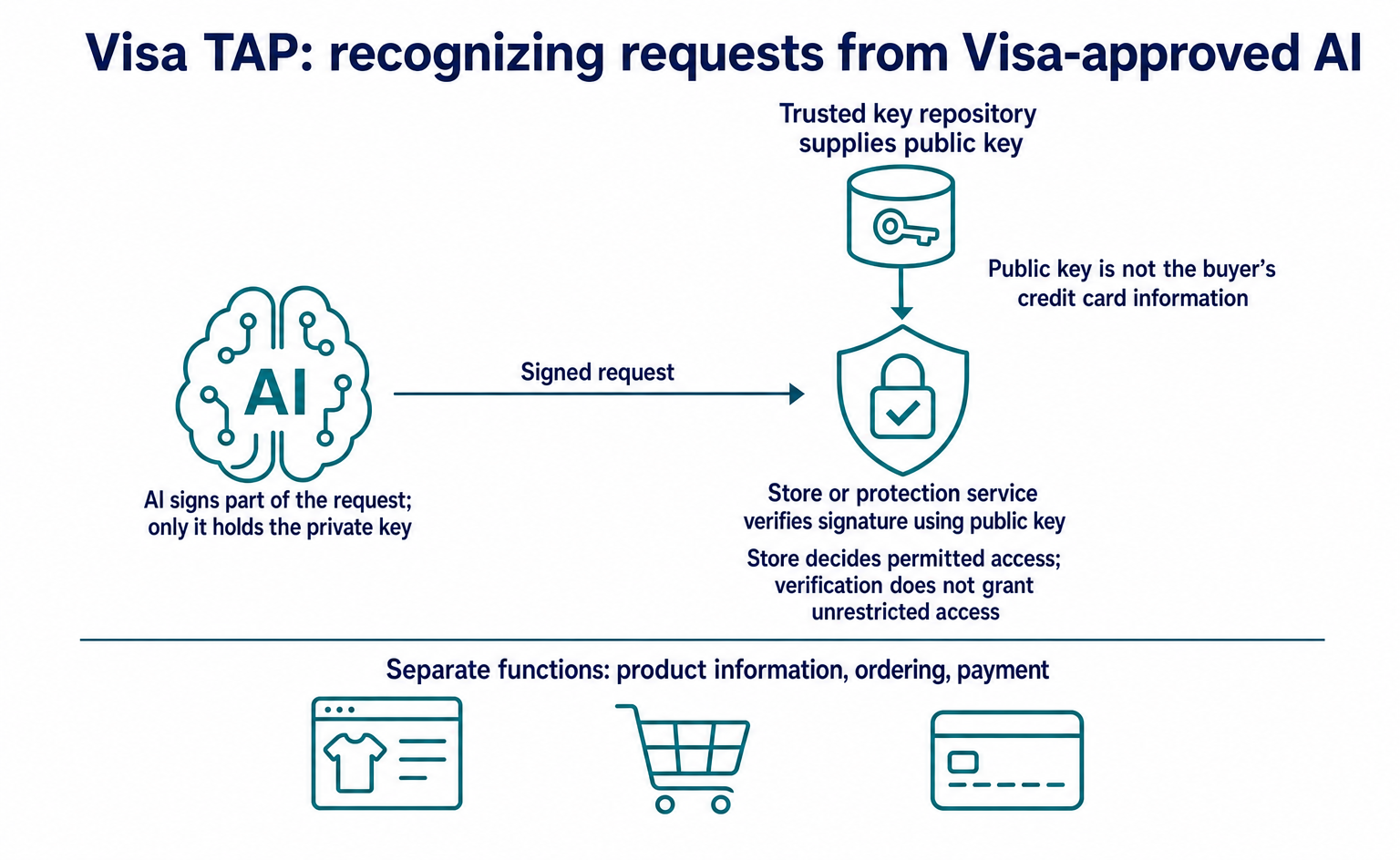
The AI signs part of a request using a private key that only it holds. The store checks that signature using a public key obtained from a trusted key repository. A public key is used to verify signatures; it is not the user’s credit card information.[2]
For stores, the benefit is a way to determine whether requests come from approved AI without relying only on text claiming an AI identity or the source IP address. Stores can use this to allow only the access needed for shopping, rather than blocking all automated browsing. However, no measured reduction in mistaken blocking or fraud was confirmed in the official materials.[2][3]
Verification can take place on the store’s server or through a protection service that handles traffic before it reaches the site. Either way, the store still decides what to allow after verification. The mechanism does not give a verified AI unrestricted access to the admin dashboard or permission to act on every product.[2]
The diagram shows the part of TAP that recognizes incoming AI requests. TAP also includes mechanisms that link customer and payment information through signatures. Stores still need separate ways for AI to discover products, retrieve stock and shipping information, and save orders.[2]
2. Following TAP’s role through one purchase
The following fictional example follows the purchase of one mug. Its product ID is MUG-001, the currency is JPY, the tax-inclusive product price is ¥2,800, and shipping costs ¥500. Assuming the delivery address can be confirmed, the total is ¥3,300. These are illustrative figures, not actual sales terms or request records.
Suppose a buyer asks an AI assistant: “Find one of these mugs for no more than ¥3,500 including shipping.” In this example, the AI already knows the store’s product URL through a search service or a similar source, and the buyer gives final confirmation before purchase. This does not mean TAP provides product discovery or a buyer confirmation screen.
When the AI accesses the store’s product page, it attaches a TAP recognition signature. The store verifies the signature and decides whether to allow product browsing. If it allows access, the store’s product page or existing API returns price and stock information. TAP itself is not an API that returns a product catalog or inventory.[2]
Next, the store’s checkout process calculates shipping from the delivery address. In this example, the store’s checkout ID is CHK-001, and it shows the buyer one item with a total of ¥3,300. This ID is a fictional identifier used to follow the process, not a TAP field name.
After the buyer approves these details, the AI proceeds with the purchase. The store verifies the purchase signature and necessary payment information, then passes them to its existing payment process. The example assumes that a separate order ID, ORD-001, is returned only after the store receives the payment result and its order process successfully establishes the order. Successful signature verification, creation of a checkout, and completion of an order are different outcomes.[2]
3. What the signature headers contain
The store reads not only the signature itself, but also what it covers, when it expires, and its purpose. HTTP headers are information attached to requests for pages or APIs. TAP’s AI recognition uses two headers: Signature-Input and Signature.[2]
Signature-Input contains the items covered by the signature and information needed for verification. Signature contains the signature value. In the official example, sig2 is the label linking the two. The presence of a label or headers does not complete the check. Verification with a public key is still required.[2]
| Field | What the store reads |
|---|---|
@authority and @path |
The destination domain or similar address information, and the page path. |
created and expires |
The signature’s creation time and expiration time. |
keyid and alg |
The identifier of the public key used for verification, and the signature algorithm. |
nonce |
An identifier used to link requests and check for reuse. |
tag |
Whether the request is for product browsing or proceeding with payment. |
For the mug’s product page, the browsing tag agent-browser-auth identifies the purpose. Requests that proceed to checkout use the payment tag agent-payer-auth. However, this text does not mean “¥3,300 has been paid.”[2]
The official browsing example lists @authority and @path as covered by the signature. The idea is to verify the store’s domain and the product page’s path together, for example. That example alone does not establish that the URL query, quantity, amount, and entire request body are also signed.[2]
A request to read the mug’s product page can be followed as shown below. This is an excerpt for explaining the headers. The domain, product path, key ID, and nonce are fictional, and a valid signature value has been omitted. It is not a complete example that will work if sent.[2]
GET /products/MUG-001 HTTP/1.1
Host: shop.example
Signature-Input: sig2=("@authority" "@path");created=1789016400;expires=1789016700;keyid="demo-key";alg="Ed25519";nonce="demo-request-001";tag="agent-browser-auth"
The store checks the signed destination shop.example and path /products/MUG-001, along with the times, key, and purpose. In this example, expiration is 300 seconds after creation. If verification succeeds, the store can proceed to return information such as “MUG-001, ¥2,800 each, in stock” from its product page. The way product information is returned is a store-provided function, not a shared TAP API.
A signature protects only the content actually included in its coverage. Do not assume that every part of an order is protected against alteration just because the request has a signature.
4. How stores check expiration, keys, and signatures
The store checks required fields, examines expiration and reuse, and verifies the signature with a public key. The specification lists missing required fields, violations of expiration rules, failure to retrieve a key, a revoked key, and failed signature verification among the reasons to block a request.[2]
The timing rule requires the creation time to be before the current time, the expiration time to be after it, and the interval between creation and expiration to be no more than eight minutes. For nonce, the specification describes rejecting a value already recorded if the store retains records for the most recent eight minutes. Simply reading the headers does not automatically prevent reuse.[2]
Finally, the store constructs a signature_base from the incoming request. This is a string that arranges the content to be verified in a defined format. Order and whitespace affect verification, so the store must follow the specification it adopts rather than create its own similar-looking string.[1][2]
After successful verification, the store can allow access to continue only for the stated purpose. For example, if it verifies a request to browse the mug, it could return product information without automatically allowing a purchase.[2][3]
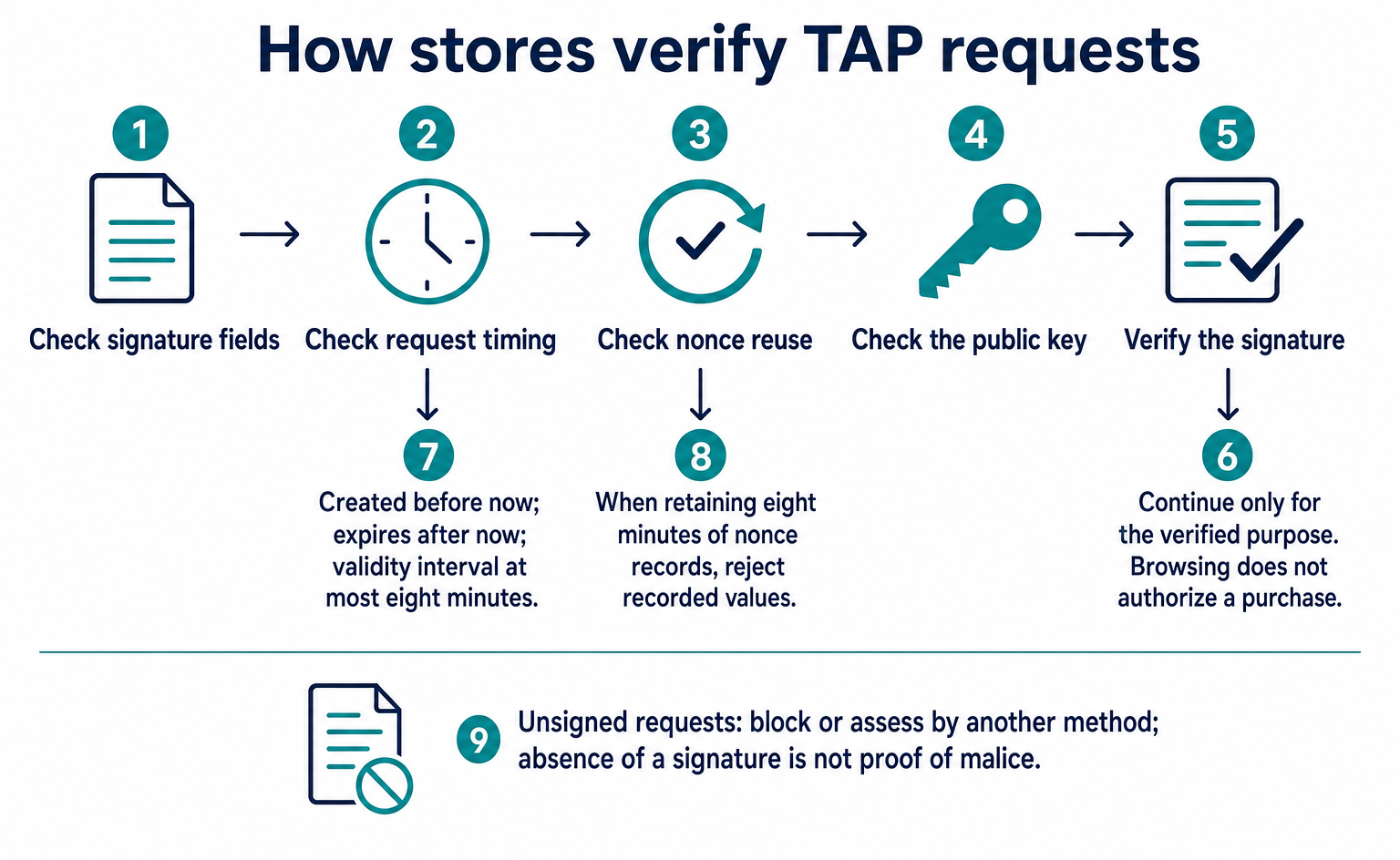
A request without a TAP signature cannot be recognized as coming from approved AI through this method. That alone does not establish malicious intent. The specification lets stores choose whether to block the request or use another method to decide whether it may continue.[2]
5. AI recognition, customer matching, and payment information are separate
Alongside the signature used to recognize AI, the TAP specification includes information for matching customers and a mechanism for carrying payment information. Separating these three roles makes clear what signature verification can establish.[2]
| Mechanism | What it checks or uses | What it does not establish on its own |
|---|---|---|
| Agent Recognition Signature | Whether a request comes from approved AI, and whether it is for browsing or payment | Purchase conditions for a specific item or payment success |
| Agentic Consumer Recognition Object | Information for matching a customer to the store’s existing customer records | Permission to log in automatically to a store account |
| Agentic Payment Container | Payment information and its signature | Payment provider approval or a completed order |
Even when the store receives customer information, it still needs a process to match it against its own account records. The specification includes nonce, idToken, contextualData, kid, alg, and signature. In the description using Visa’s ID Token, the store must maintain a table linking information such as hashed email addresses to existing customer accounts.[2]
The nonce in the customer information is linked to the one in the request header. The kid identifies a public key and corresponds to keyid in the header. These checks help prevent the store from confusing customer information brought in from a different request.[2]
The Agentic Payment Container also includes nonce, kid, alg, and signature. Its contents vary by payment method. Envisioned contents include a hash of information for a card-entry form or payment information for another method. This is not a claim that one shared token enables payment at every store.[2]
In the example using an existing card-entry form, the store calculates a hash from the payment information entered in the form and checks whether it matches the received payment-information hash. A hash is a value used to compare content. If the values do not match, the store does not proceed with that payment information. Even if they match, the store has not necessarily received payment. It still needs to process the payment through the payment provider and check the result.[2]
In the mug example, even a valid AI signature does not resolve a quantity error: two mugs would differ from the original request. Assuming the same ¥500 shipping charge, the total would be ¥6,100, also exceeding the ¥3,500 limit. A mechanism must check the purchase conditions. agent-payer-auth alone cannot replace checks on quantity or the spending limit.
6. The published examples cannot be used unchanged for implementation
The materials reviewed contain points where the rules and samples need clarification. Expiration is a prominent example. The verification rule sets a maximum of eight minutes, but created and expires in the published header example are 3,600 seconds, or 60 minutes, apart. Copying those values would not satisfy the rule.[2]
Field names also differ. Some header examples use keyId, while the required-fields table uses keyid. Customer information uses idToken in the table and IdToken in the example. Published object examples also have missing separators that prevent them from being valid JSON as written.[2]
The overview page describes receiving identifying information through query parameters, while the specification text describes placing customer and payment information in the request body. This remains a difference between the official materials. Selecting convenient fields from each and combining them does not produce a complete, established request example.[2][3]
Signature algorithms also differ: the header example uses Ed25519, while the customer and payment information examples use PS256. The payment-information hash is named paymentCredentialsHash in the example but credentialHash in the section heading. This article limits its header excerpt to a browsing example. When extending a flow through payment, these names and algorithms should not be independently changed to make them uniform.[2]
For these reasons, this article does not provide verified requests or fabricated valid signatures. The official specification lists https://mcp.visa.com/.well-known/jwks as the location for public keys. The store retrieves the key list from this address and selects the key matching the request’s keyid.[2] No live connection, signature verification, interoperability testing, or actual payment has been performed.
7. How TAP relates to Web Bot Auth, and what to consider for your store
Visa’s specification says the AI recognition signature is based on RFC 9421, HTTP Message Signatures, and aligns with Web Bot Auth. RFC 9421 serves as the foundation for signing requests. TAP describes shopping purposes and links to customer and payment information. They cannot be treated as the same specification.[2]
Nor does the word “standard” on Visa’s overview page establish that TAP as a whole has received final approval from a standards body. The specification text describes it as a proposal. The overview page warns that development and rollout are ongoing and that the illustrated features and flows are potential ones.[2][3]
The official materials reviewed do not confirm eligibility requirements for Japanese stores, available protection services, pricing, or the setup screens provided after application. This does not mean no access route exists. It means these materials alone do not support a promise that a store can adopt it.
Consider its relevance to your store in three parts:
- TAP is relevant if you want to verify signatures on requests from shopping AI before allowing access.
- If you want AI to list your products, you need a separate integration to deliver product information.
- If you want to complete orders placed through AI, you need separate mechanisms to handle buyer permission, order details, and payment results.
TAP gives stores more evidence to use when deciding whether to accept AI traffic. Distinguishing recognition of approved AI from authorization of a purchase, receipt of payment, and completion of an order helps clarify what existing e-commerce systems still need to handle.[2]
FAQ
- Q. Can a store accept an order if the Visa TAP signature is valid?
- Signature verification alone cannot determine whether to accept an order. After checking that browsing or payment requests come from approved AI, the store still needs to handle purchase conditions, buyer permission, stock, payment results, and other requirements. The specification also says access after verification can be restricted to a specific purpose.[2]
- Q. Are all bots without a Visa TAP signature malicious?
- No. The absence of a signature alone does not establish malicious intent. It means TAP cannot recognize the bot as approved AI. The specification lets the store choose whether to block the request or use another method to decide whether it may continue.[2]
- Q. Is Visa TAP the same as Web Bot Auth or RFC 9421?
- They cannot be treated as the same specification. Visa’s specification says its AI recognition signature is based on RFC 9421 and aligns with Web Bot Auth. TAP also describes shopping purposes and links to customer and payment information.[2]
- Q. Can Japanese online stores sign up immediately?
- The materials available as of September 10, 2026, do not confirm eligibility requirements or specific application procedures for Japanese stores. The overview page warns that development and rollout are ongoing. This does not establish that no access route exists, but there is no basis for saying stores can start using it immediately through an admin dashboard.[1][3]
- Q. Will the signature sample on the official page work if I copy it?
- It is not guaranteed to work. The supplied specification sets an expiration interval of no more than eight minutes, while the published header example uses 60 minutes. Field names also differ, and JSON examples have missing separators. This article therefore does not treat the samples as having passed live connection or signature-verification tests.[2]
Sources
- [1] Getting Started with Visa's Trusted Agent Protocol (Visa) — accessed 2026-09-10
- [2] Trusted Agent Protocol — Merchant Specifications (Visa) — accessed 2026-09-10
- [3] Trusted Agent Protocol (Visa) — accessed 2026-09-10
About the author
Shogo MizushimaCEO of kairos Inc. / AgentSignal Developer
Develops AgentSignal, a tool for measuring AI crawler visits and AI-referred traffic, and diagnosing AIO readiness. Writes about measurement and practical improvements for AI search using observed data.
Related articles
Measurement and site improvement
Is Traffic Claiming to Be GPTBot Genuine? How Web Bot Auth Works
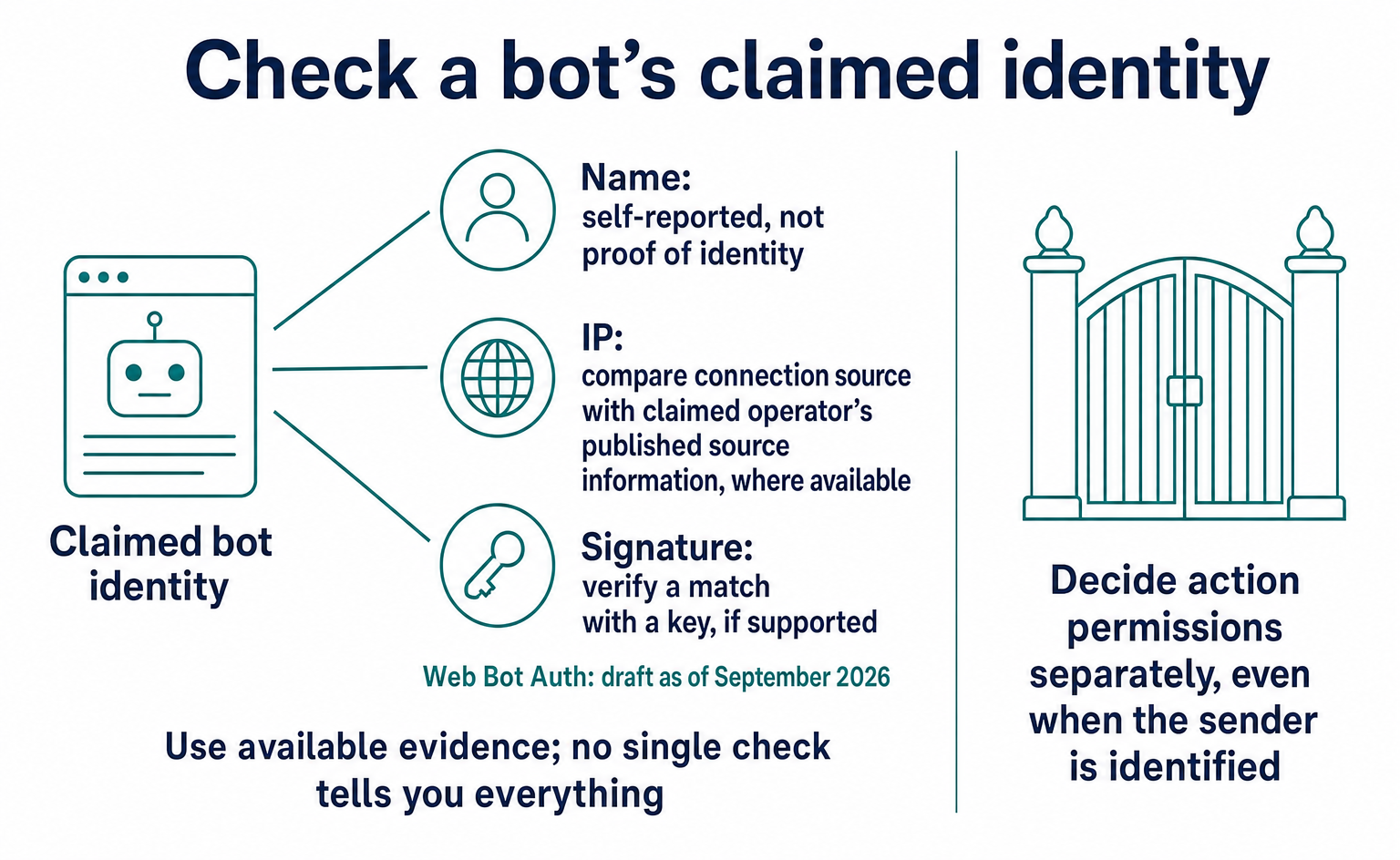
A GPTBot name alone does not prove who sent a request. Learn how to check official IP ranges and signatures, how Web Bot Auth differs from RFC 9421, and what remained in draft as of September 2026. Includes a checklist for your web agency and guidance on recording unverified traffic.
Published
AI shopping and booking
What Is AP2? Following the Data from AI Product Search to Order
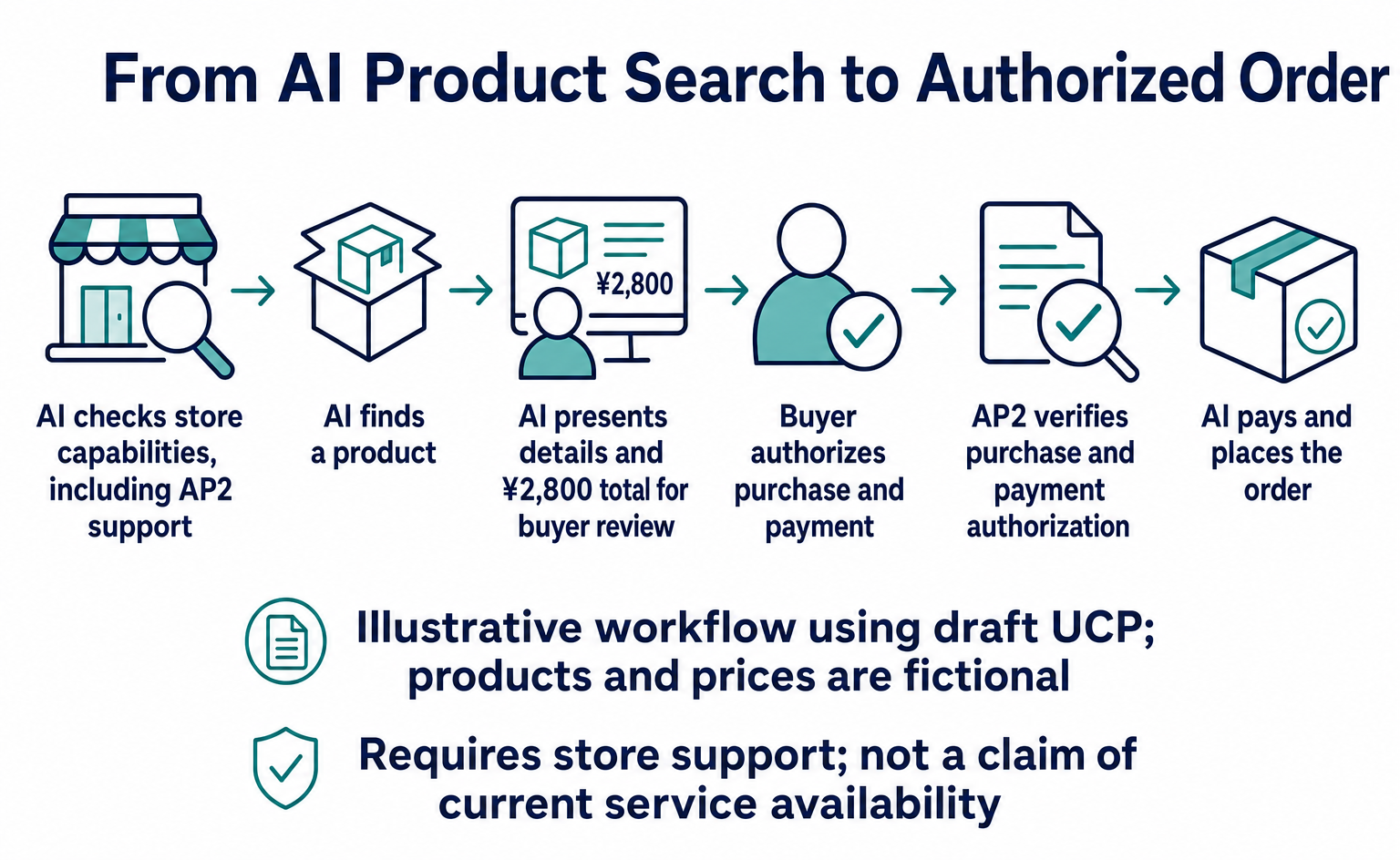
AP2 provides shared rules for checking whether an AI order matches the buyer’s authorization. Follow the same product ID and amounts through search, shipping costs, approval, payment and ordering, with benefits for online stores and the specification’s status as of September 10, 2026.
Published
AI shopping and booking
How to List Products on ChatGPT: From ACP Product Integration to Orders
A step-by-step guide to applying for product integration, sending and updating product data, and directing shoppers to checkout. Learn when order APIs are needed, how to test version 2026-04-17, and which features were available or still proposed as of September 10, 2026.
Published