What Is MPP? How AI Pays for API Usage and Stripe’s Role
MPP sets common rules for programs such as AI to pay for APIs and services. Learn how pricing, payment and data delivery work, what Stripe’s public code does, and how testing differs from live payments.
You ask AI to research something, but it stops because the data it needs costs money. For data sellers, requiring registration or a monthly subscription for a small purchase also makes it harder for AI to use their services.
MPP (Machine Payments Protocol) sets common rules for programs such as AI to pay for APIs and services. An API is an interface that lets another program access data or processing functions. Instead of a person filling out a purchase form each time, programs exchange pricing and payment information directly.[1][2]
This article is for businesses that provide paid data or web-based functions. It explains what MPP can do, Stripe’s role, and how far you can go with the public implementation examples. The information was checked on September 12, 2026. Stripe and Tempo announced MPP on March 18, 2026; it is not a new announcement today.[1]
Selling more than products: a single use of data or processing
Consider an AI planning a business trip that needs detailed weather data just once. Assume the API provider charges for each use. This is an illustrative example, not the pricing of an actual weather service.
If the AI decides free pages are not enough, work stalls if someone must register for another service and enter payment details each time. MPP defines the exchange that lets a compatible AI program receive terms and pricing, then pay within its authorized limits.[2]
For a company selling data, this offers a way to add paid access for programs alongside a purchase screen for people. For users, it reduces the need for someone to operate a payment screen every time the AI needs an external function.
MPP is not a way to register your products in ChatGPT’s product listings. If you want to prepare a store’s bags for product recommendations, look into product information integration. If you want to accept orders for those bags, look into purchase integration. MPP focuses on payments for API and service usage.[2]
State the price, verify payment, then return the data
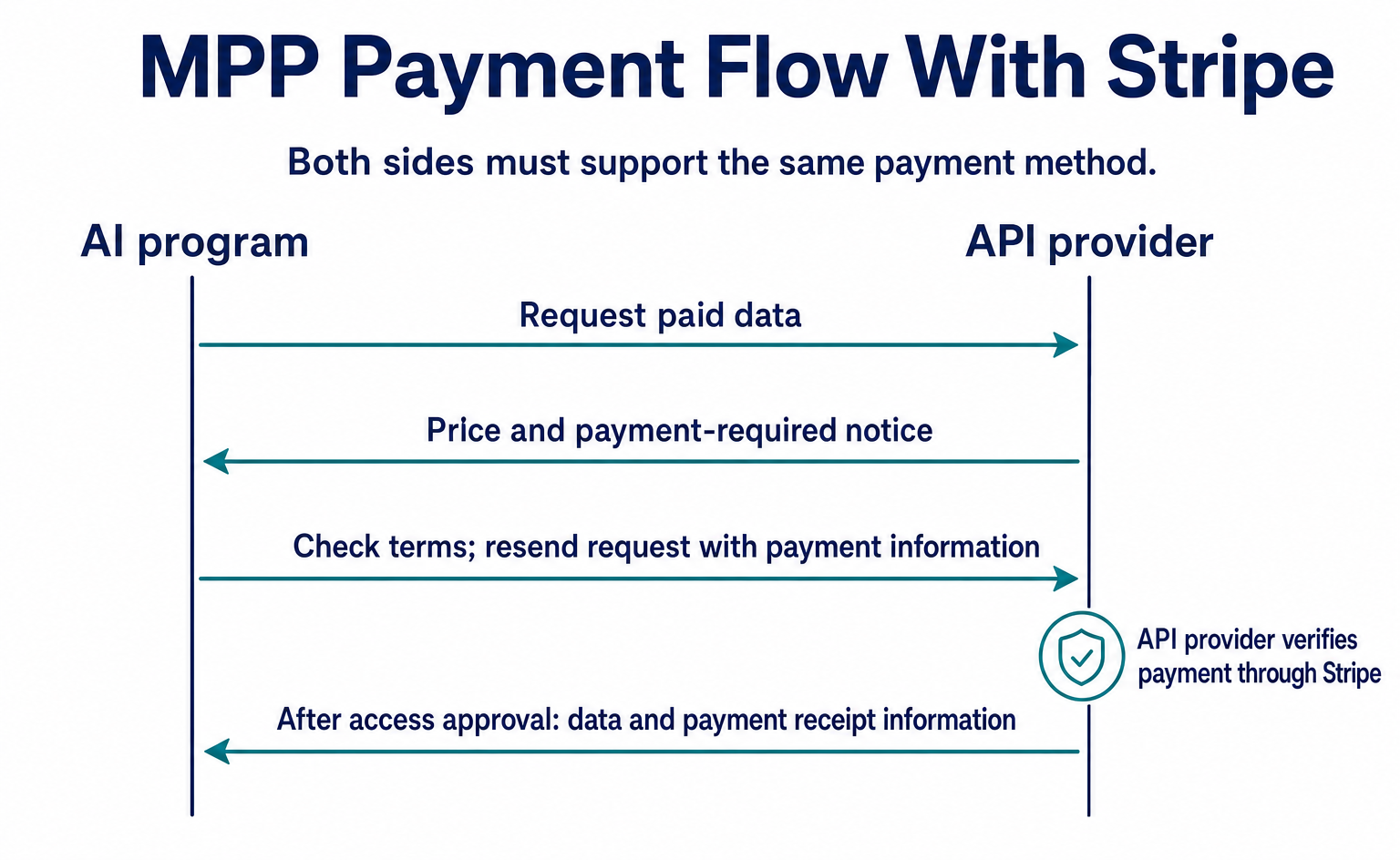
MPP follows the sequence below. Both the AI program and the API provider must support the same payment method.[3]
- The AI program requests the data it needs from the API.
- The API provider responds with the price and a notice that payment is required.
- The AI program checks the payment terms and sends the request again, this time with payment information.
- The API provider verifies the payment.
- Once access is approved, the API returns the data and payment receipt information.
The initial pricing response uses HTTP’s 402 Payment Required. HTTP is the system used to exchange information on the web, and 402 is the response number meaning “payment required.” Like 404 for a page that cannot be found, it reports the outcome of a request with a number.[3]
The pricing notice is called a Challenge, the payment information sent back by the AI is a Credential, and the receipt information is a Receipt. Rather than memorizing these terms, it is easier to follow the flow as three parts: “pricing notice,” “information needed for payment,” and “confirmation of receipt.”
Stripe handles payment processing and receipt of funds
MPP provides the common rules. Stripe provides functions for accepting payments under those rules. Stripe’s guide describes a setup that verifies payment on the API side and credits the funds to the provider’s Stripe balance. Refunds can also be handled through Stripe’s dashboard or refund API.[2]
Supported payment options include cards and supported stablecoins. Stablecoins are crypto assets that aim to track the value of currencies such as the US dollar. Check which networks and currencies your chosen implementation supports.[2]
For card payments, an SPT (Shared Payment Token) provides payment information with limits on its permitted use and validity period, rather than sharing the card number itself. It is not permission to use the card without limits.[2]
The API provider still needs to build its own service logic: what data to sell, how much to charge, what to return after payment, and how to handle failures. Signing up for Stripe alone does not create an API that sells your data.
Businesses in Japan should first check the availability requirements for their chosen payment method. Stripe’s guidance says that using stablecoins outside the United States requires an application that includes the account ID. Treat publication of the standard and the ability to accept those payments through your own account as separate questions.[2]
Where do you set the price in the public code?
Stripe’s MPP implementation guide provides code for charging for API access. The program runs on the data provider’s server. A server is a computer that receives and processes requests from outside.[4]
The official sample uses development components called mppx and stripe. Initial setup requires a Stripe secret key and an ID identifying the company’s Stripe profile. The profile ID is set as networkId.[4]
The central payment-checking logic looks like this. This excerpt is based on the official sample and shows only the relevant parts. It omits connection settings and startup code, so it is not something you can copy and deploy on its own.
const payment = await mppx.charge({ amount: '0.50' })(request);
if (payment.status === 402) return payment.challenge;
return payment.withReceipt(Response.json({ data: '...' }));
The official example charges US$0.50 per use. The first line checks for that payment. If payment is still required, the second line returns the pricing notice. Once payment is verified, the third line returns the result with receipt information attached.[4]
data: '...' is a placeholder, not actual weather data. To build a weather API, you need to implement this part so it returns forecast information your company can provide. Running the pricing code alone does not generate forecast data.
Also, amount: '0.50' here is a setting passed to a development component. You cannot assume that the way an amount is represented in an exchange can be copied directly into data for another payment method. Use the format defined for each payment method.[3][4]
Check what the payment is for and how much it costs
MPP’s HTTP approach passes information mainly in the following places. Headers are fields attached to the message body that carry information such as content type and authentication details.[3][5]
| Where information is passed | Purpose |
|---|---|
WWW-Authenticate: Payment |
The API provider states the price and payment method |
Authorization: Payment |
The standard field where the AI program returns information needed for payment |
Payment-Receipt |
Indicates that payment has been received |
The pricing notice contains an id that distinguishes the notice, a realm that identifies its scope, a method for the payment method, an intent describing the purpose, such as a one-time payment, and a request containing the specific payment terms. The contents of request are converted into a form suitable for transmission in the header field.[5]
In the weather-data example, the AI should not pay based only on a description such as “one use of the forecast.” It checks the actual amount, currency, recipient and expiration time. Because the description and payment terms may differ, it uses the amount data to make its decision.[3]
If the payment information is invalid, the API responds that payment is required again, rather than returning the data as a successful result. The implementation also needs safeguards against reusing the same payment information and against processing the same operation more than once when a request is retried.[3]
The company delegating usage to AI should set more than a per-payment limit. It should also decide which APIs the AI can pay for and how many times. Even a low-cost API adds up when called repeatedly. “AI can pay” and “AI can pay without limits” are not the same operating policy.
Use test payment settings when trying it out
Developers evaluating adoption can consult Stripe’s public sample and the implementation guide. The guide includes verification commands, but running checks with live settings may move real money.[4]
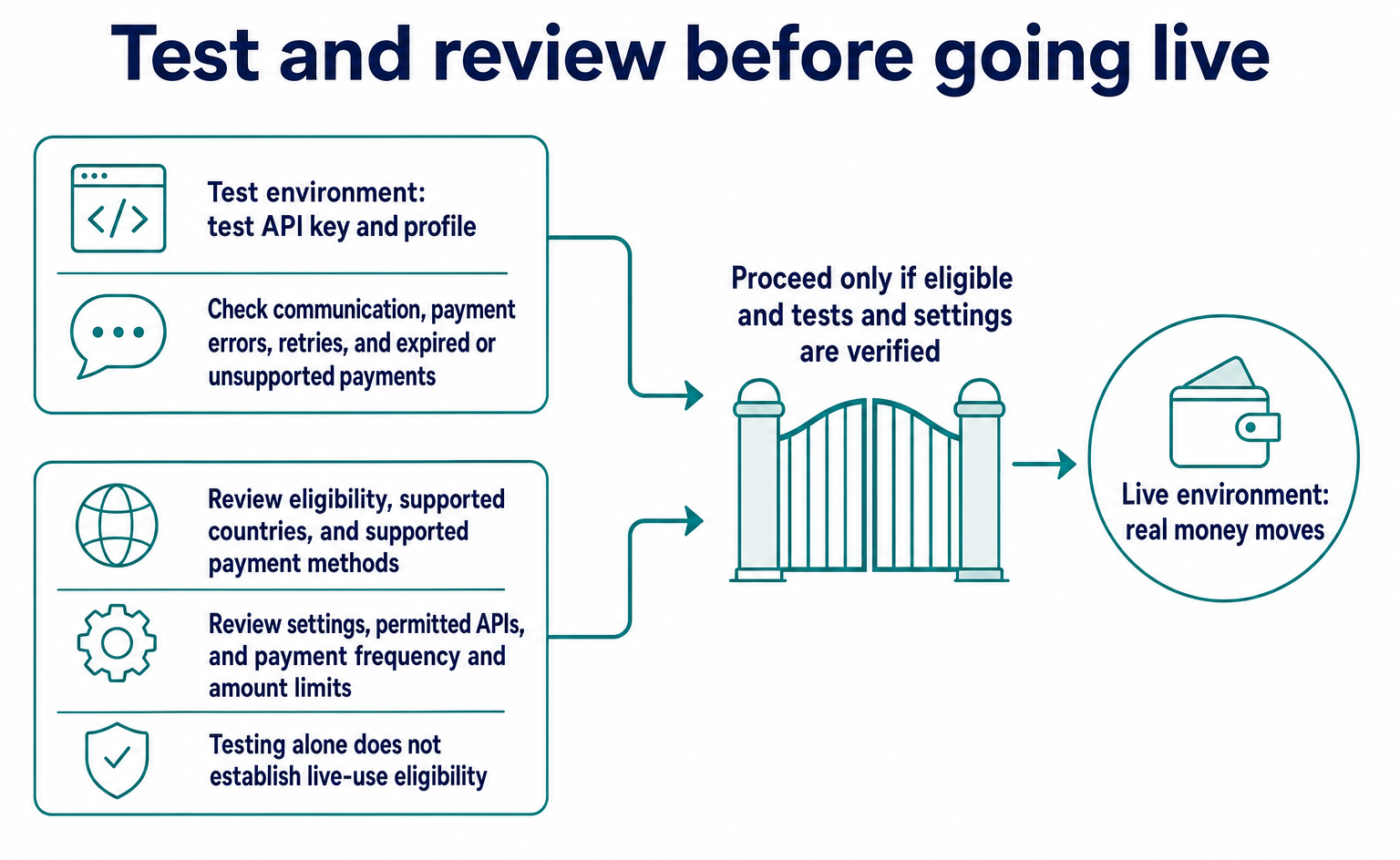
Start in a sandbox, meaning Stripe’s test environment, with a test API key and profile. Then confirm that a request without payment information returns 402, that a valid test payment results in data being returned, and that an invalid payment does not grant access.[4]
Test more than one successful payment. Also check retries, expired payments, and payment methods the requesting program does not support. When keeping server records, make sure secrets that could be used for payment are not written directly into logs.[3]
For this article, we reviewed the code and public specifications. We did not enter into a Stripe agreement, obtain usage approval, make actual payments, or connect to a live API. Determine whether your company can use it only after checking supported countries and payment methods.
Compare MPP with x402 by looking at the payment methods too
x402 is also a standard that uses HTTP 402 to handle payments for API usage. Using the same response number does not necessarily mean the information exchanged or supported payment methods are the same.[2][3]
Stripe provides guidance for both MPP and x402. In its materials as of September 12, 2026, Stripe lists cards and supported stablecoins for MPP, and supported stablecoins for x402. This describes Stripe’s offering, not an assessment of every implementation from other companies.[2]
When choosing for your business, consider how the purchasing AI can pay, which methods the receiving company can use, and whether the fees and operations suit small purchases. Rather than choosing by how new a name sounds, judge whether the approach lets you deliver the data you want to sell to the people who need it and receive payment correctly.
FAQ
- Q. Is this a way to register products with ChatGPT?
- MPP mainly handles payments for paid API and service usage. It serves a different purpose from product discovery or a store’s purchasing functions.[2]
- Q. Does using a verification command mean no money will move?
- With live settings, real money may move. Start by checking in Stripe’s sandbox with test settings.[4]
Sources
- [1] Introducing the Machine Payments Protocol (Stripe) — accessed 2026-09-12
- [2] Machine payments (Stripe) — accessed 2026-09-12
- [3] Protocol overview (MPP) — accessed 2026-09-12
- [4] MPP integration guide (Stripe) — accessed 2026-09-12
- [5] Challenges (MPP) — accessed 2026-09-12
About the author
Shogo MizushimaCEO of kairos Inc. / AgentSignal Developer
Develops AgentSignal, a tool for measuring AI crawler visits and AI-referred traffic, and diagnosing AIO readiness. Writes about measurement and practical improvements for AI search using observed data.
Related articles

AI shopping and booking
51% of US consumers use AI shopping tools. How much has product selection changed?
That does not mean AI placed 51% of orders. It is the share of US consumers who reported using at least one AI-powered shopping tool during the past month.
Published
AI shopping and booking
Same AI, different doors: why Amazon blocked Muse while Shopify offers a connection
Amazon has reportedly blocked Meta's AI agent, Muse. Meanwhile, Shop's official help lists Muse as an example of a supported AI platform.
Published
AI shopping and booking
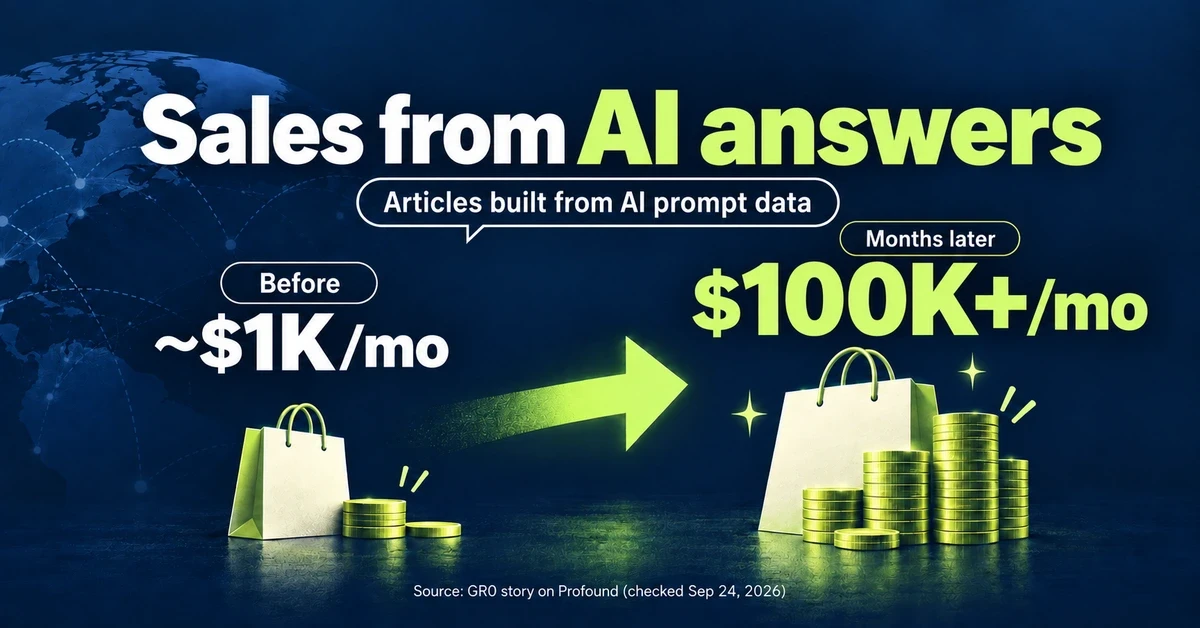
From about $1K to over $100K a month: What did an overseas brand write to grow sales from AI search?
GR0 reports that a beauty and wellness brand's monthly sales through AI answers grew from about $1,000 to over $100,000 within months. The brand chose article topics based on AI prompt data. Here is the case in brief, plus three steps to check your own product pages.
Published