What Is Google’s AI Booking Assistance? From Finding a Table to Confirming a Reservation
Google’s AI finds tables across booking sites and directs users to book. Learn how Canada’s AI Mode, announced US plans, and Actions Center direct booking differ, with a four-person example and guidance on what restaurants manage.
Google’s AI booking assistance helps users find available tables for their preferred date, time, and party size without moving between multiple booking sites. In Canada, AI Mode presents options with links to complete reservations with partners. It helps users find restaurants and gives restaurants a way to direct people whose needs match their availability to a booking destination.[1]
However, finding an available table and confirming a reservation are different things. Staff who manage restaurant websites or external booking services in Japan should understand where users complete the booking process and where the restaurant receives the confirmation. This helps separate the information the restaurant needs to maintain from the booking service’s responsibilities.
1. First, distinguish the two booking paths
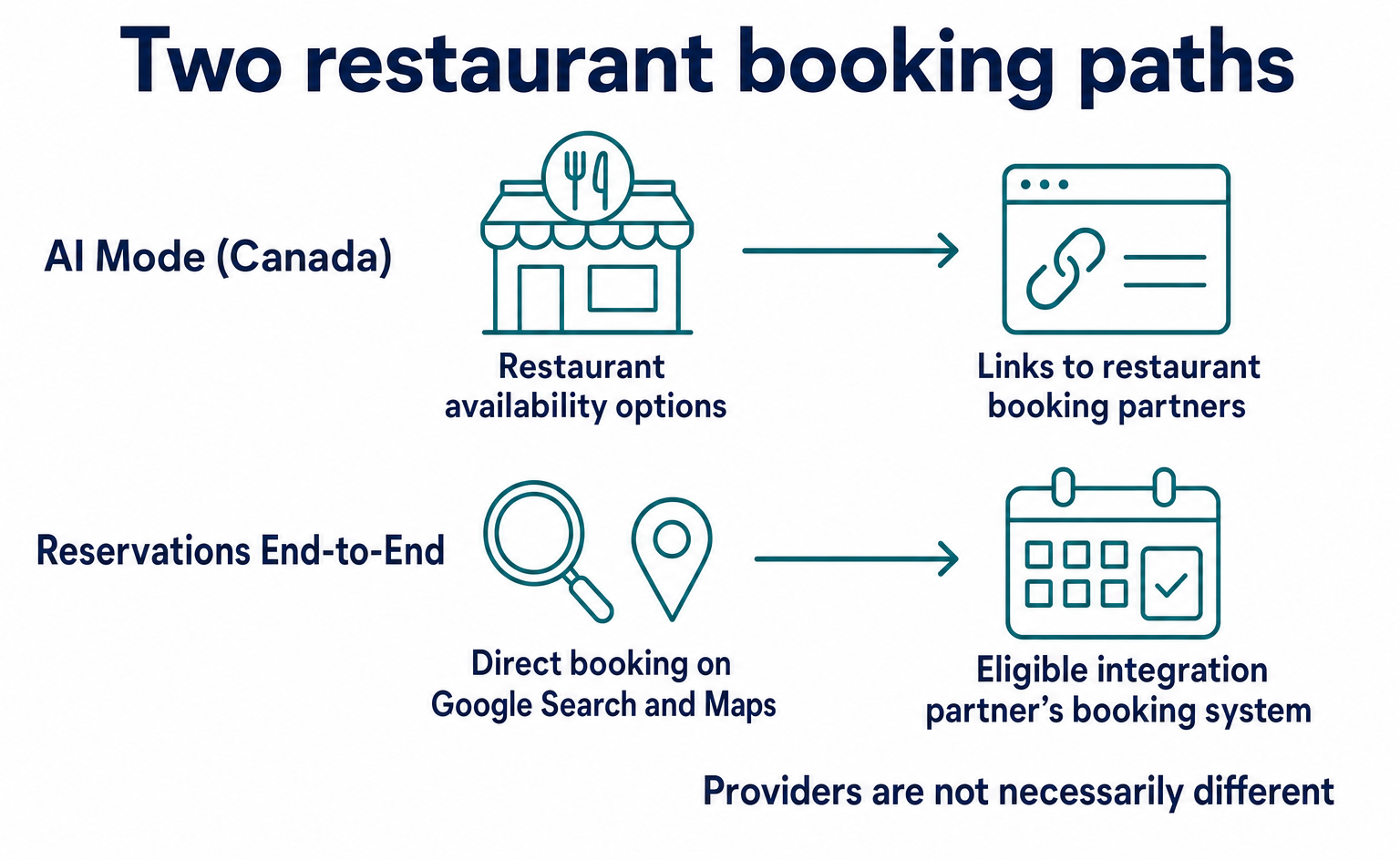
AI Mode, as announced for Canada, checks multiple reservation services and restaurant websites for real-time availability that matches the user’s needs. Users choose an option and complete their reservation with a partner such as OpenTable or Libro.[1]
Actions Center, meanwhile, offers an integration called “Reservations End-to-End,” which allows users to book restaurants directly on Google Search and Maps. It connects Google with the systems of integration partners that handle reservations.[3]
| Booking path | What the user does | Where the reservation is completed |
|---|---|---|
| Canada’s AI Mode | States their preferences, then follows an available option to a booking destination | A partner booking service or another booking destination |
| Reservations End-to-End | Books on Google Search or Maps | A booking path on Google, connected to an integration partner’s reservation system |
The two paths differ in where users complete their reservations. This does not necessarily mean that different companies provide the integrations.
If a restaurant uses an external booking service, its first step should be to identify which path that service’s Google integration supports, rather than build a new system. A label such as “Google-compatible” does not tell you whether the service receives referrals from availability searches or supports direct booking on Google.
2. Follow a reservation for four through to completion
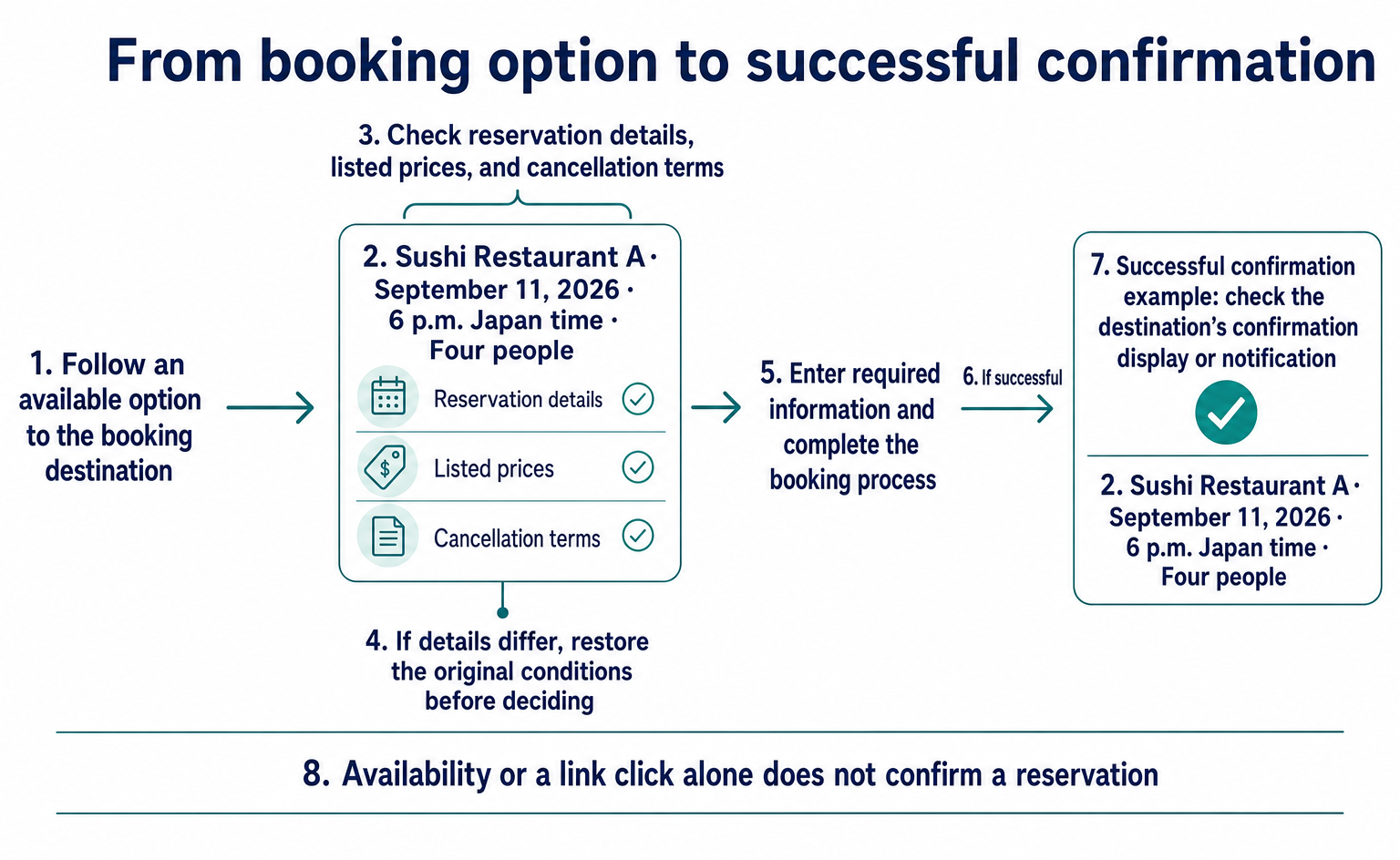
For illustration, we will follow a request to “book Sushi Restaurant A for four people at 6 p.m. Japan time on Friday, September 11, 2026.” This is not an example of a real restaurant or of feature availability in Japan. It keeps the date, time, and party size constant to show the role of each stage.
Find an available table
The user provides preferences such as location, cuisine, date, time, and party size. AI availability search presents matching options and links to booking destinations.[1]
At this stage, the user knows that Sushi Restaurant A has a potentially suitable table available. This reduces the need to re-enter “Friday at 6 p.m. for four” across multiple sites. It does not mean that a reservation has been created for the restaurant to accept.
Check the details at the booking destination
The user selects an option and checks that the booking destination shows “Sushi Restaurant A, September 11, 6 p.m., four people.” As with a typical reservation, the user also reads any listed prices and cancellation terms, enters the required information, and proceeds.
If the date, time, or party size differs, the user should return to conditions that match the original request before deciding. For example, if a table for four cannot be selected and the user changes the party size to three, that is a different reservation from the original request.
Receive the confirmation result after completing the process
After completing the booking process, the user checks the restaurant, date, time, and party size in the booking destination’s confirmation display or notification. The dividing line is the confirmation result returned by the booking destination—not an availability display or a link click.
The restaurant also needs to ensure that the accepted reservation appears in its booking records as “Sushi Restaurant A, September 11, 6 p.m., four people.” To explain this distinction, the next section looks at availability checks and booking creation in the public API for Actions Center, which is a separate booking path.
3. What differs in the API?
This section covers Actions Center’s API for integration partners. It does not describe AI Mode’s internal communication specifications. Google sends requests to an integration partner’s booking server, and the partner returns availability or booking creation results.[5][6][7]
For nontechnical restaurant staff, the important point is not to memorize the fields. It is to understand that checking availability and creating a reservation are separate processes. The excerpts below use official fields for illustration. They are not complete data ready to send.
Availability checks ask: “Can this be booked now?”
With BatchAvailabilityLookup, the integration partner’s booking server receives a query from Google and checks whether the specified slots are currently valid and available. It receives a merchant_id identifying the restaurant and a slot_time array listing the slots to check, then returns availability for each slot.[6]
| Field | Meaning in the Sushi Restaurant A example |
|---|---|
merchant_id |
The ID identifying Sushi Restaurant A. We use example-sushi-a for illustration. |
slot_time[].service_id |
The ID of the service being booked. We use example-dinner for illustration. |
slot_time[].start_sec |
The Unix timestamp in seconds corresponding to September 11 at 6 p.m. Japan time |
slot_time[].duration_sec |
The length of the booking slot. This example uses 7,200 seconds, or two hours. |
slot_time[].resource_ids |
Resource information, such as party size, used to identify the slot |
slot_time_availability[].available |
A true-or-false value indicating whether the queried slot is available |
The party size of four is also part of the information identifying the slot. The availability check uses the field name resource_ids, while the booking creation sample below uses resources. The two sets of data should not be treated as having exactly the same structure.[4][6]
A result of available: true means that the specified slot is available at the time of the query. It does not mean that a reservation has been saved. If the table is no longer available when the booking is created, that later process may fail.[5][6]
Booking creation asks: “Create a reservation with these details”
When a user starts a booking, Google sends a CreateBooking request to the integration partner’s booking server. The official definition requires the booking slot, slot; user details, user_information; and a request-identifying idempotency_token.[4][5]
The slot portion specifying the same Sushi Restaurant A, date, time, and party size of four can be represented as follows. The value 1789117200 expresses September 11, 2026, at 6 p.m. Japan time in Unix seconds.
{
  "slot": {
    "merchant_id": "example-sushi-a",
    "service_id": "example-dinner",
    "start_sec": "1789117200",
    "duration_sec": "7200",
    "resources": { "party_size": 4 },
    "confirmation_mode": "CONFIRMATION_MODE_SYNCHRONOUS"
  }
}
party_size specifies four people, and confirmation_mode indicates a booking that is confirmed synchronously. This excerpt shows only the slot portion. User details and the token identifying the request are omitted.[4]
The user information sent by Google includes the user’s name, phone number, and email address. The integration partner receives this information and the slot, creates the reservation in its own booking system, and returns the result.[5]
Check the booking ID and status for synchronous success
In the official synchronous success sample, the response’s booking includes the new reservation’s booking_id and status: "CONFIRMED". It also returns slot details for the same restaurant, date, time, and party size, allowing the result to be matched to the requested reservation.[4]
{
  "booking": {
    "booking_id": "example-booking-001",
    "status": "CONFIRMED",
    "slot": {
      "merchant_id": "example-sushi-a",
      "service_id": "example-dinner",
      "start_sec": "1789117200",
      "duration_sec": "7200",
      "resources": { "party_size": 4 },
      "confirmation_mode": "CONFIRMATION_MODE_SYNCHRONOUS"
    }
  }
}
This booking ID is an illustrative value, not an actual confirmed reservation record. An ID returned on success is used to identify the reservation in later booking lookups or updates.[5]
If creation fails, booking_failure returns a business reason, such as the slot no longer being available. The specification places business failures in the response body rather than reporting them as non-200 HTTP errors. Therefore, a successful data exchange alone does not mean the reservation is confirmed.[4][5]
The idempotency_token prevents the same reservation from being created twice when a request is retried. If a reservation has already been created with the same token, the system returns that reservation.[4][5]
The examples so far are limited to synchronous success. Booking confirmation and payment are also separate. The official sample includes both CONFIRMED and PREPAYMENT_NOT_PROVIDED, so confirmation status alone does not establish that advance payment has been made.[4]
4. Availability by region and participation requirements
Read each announcement separately to determine its geographical scope. The materials referenced as of September 10, 2026, describe a launch in Canada and planned expansion in the United States.
| Material | Announcement or description | Audience or eligibility indicated |
|---|---|---|
| Article for Canada dated April 10, 2026 | Restaurant availability searches and links to booking destinations through AI Mode, available from that day | Users in Canada[1] |
| Search announcement dated May 19, 2026 | Expansion of booking assistance to local experiences and services, showing prices, availability, and booking links | At the time of the announcement, a US rollout was planned for summer 2026[2] |
| Reservations End-to-End overview | Direct booking on Search and Maps, and integration participation requirements | Eligible integration partners and supported restaurants[3] |
The May announcement also describes a feature that lets users ask Google to call businesses in certain categories. Even if the same article includes Search features intended for a global audience, that does not establish worldwide availability of booking assistance.[2]
Actions Center participation requirements include a direct contractual relationship between the integration partner and every restaurant covered, restaurant data that matches locations on Google Maps, and services that can be booked under the specified definitions. Simply listing a restaurant’s name and address does not meet these conditions.[3]
Participation proceeds through the Partner interest form or a Google representative after checking technical implementation capabilities. Managing an integration in Actions Center comes after an invitation to get started. The guidance does not say that individual restaurants can use it immediately after submitting a form.[3]
5. Three areas restaurants should organize
Restaurant staff should first distinguish the information they can edit from the systems managed by their booking service. In the Sushi Restaurant A example, clarify who manages the restaurant description, slots that accept four people, and records of confirmed reservations.
| Area to manage | What the restaurant should establish | What concerns the booking service |
|---|---|---|
| Restaurant information | Keep the name, location, cuisine, and other details accurate | Matching the restaurant’s information on Google |
| Bookable slots | Align available dates and times, party sizes, and duration with actual operations | Keeping availability data consistent with inventory at booking creation |
| Confirmed reservations | Know where reservations arrive and how the restaurant handles them | Saving booking IDs and statuses, and handling failures and retries |
Updating availability is a separate task from updating information used to attract customers. The official documentation also states that an integration may be disabled if availability checks do not accurately reflect actual inventory and booking creation frequently returns availability errors.[5]
Restaurants using an external booking service can start by organizing their booking conditions and identifying where to check reservations received through that service. Implementing APIs and authentication is the integration partner’s responsibility. This does not mean that every staff member who manages restaurant listings needs to develop a system themselves.
If a restaurant operates its own booking system, it needs to consider not only returning availability but also creating reservations, handling failures, and preventing duplicates. The official booking server implementation documentation covers HTTPS, HTTP Basic authentication, sandbox testing, and links to Node.js and Java templates.[7]
6. What to check before making a decision
Restaurants in Japan can narrow their assessment by first checking which booking path their current booking service supports and whether confirmed reservations enter their existing management system. The starting point is to separate work on restaurant information and booking conditions from technical integration with Google.
The official materials referenced here do not establish availability or listing requirements for the same AI booking assistance in Japan, completion of the US rollout, or the technical connection between AI Mode and Actions Center. How booking details carry over to individual booking destinations, and what their confirmation screens show, also need to be checked for each service used.
This article is an introductory explanation based on materials available as of September 10, 2026. The API examples adapt portions of the public specifications for illustration. They do not reproduce actual reservations, payments, or actions in a management interface.
FAQ
- Q. Is my reservation complete once Google’s AI finds an available table?
- No. Finding an available option does not complete a reservation. Canada’s AI Mode checks multiple reservation services and restaurant websites, then provides links to finish booking with partners such as OpenTable and Libro. Users complete the process at the booking destination and check the confirmation result.[1]
- Q. Can restaurants in Japan use the same AI booking assistance as those in Canada?
- The referenced materials do not establish eligibility for users or restaurants in Japan. The Canadian launch and the announcement of a US rollout in summer 2026 do not indicate availability in Japan.[1][2]
- Q. Will joining Actions Center make my restaurant appear in AI Mode?
- The referenced materials do not guarantee inclusion. Reservations End-to-End documentation describes direct booking on Search and Maps. Its relationship to AI Mode’s selection of options and internal technical integrations requires separate confirmation.[1][3]
- Q. Do restaurant staff need to build a booking API themselves?
- Not every restaurant staff member needs to do this. Actions Center’s technical integration is intended for integration partners that meet conditions such as having contracts with restaurants and the ability to implement the integration. Restaurants using an external booking service should distinguish managing their own listings and booking conditions from the service’s technical integration work.[3]
- Q. How does the API distinguish availability checks from confirmed reservations?
- The available field in BatchAvailabilityLookup indicates whether a specified slot is currently available. CreateBooking requests the creation of a reservation. Its official synchronous success sample returns booking_id and status: "CONFIRMED". Failures are reported through booking_failure, so a successful HTTP exchange alone does not establish that a reservation was created.[4][5][6]
- Q. Does a confirmed reservation mean payment is complete?
- No. Confirmation status alone does not establish that payment has been made. The official CreateBooking sample includes PREPAYMENT_NOT_PROVIDED alongside a CONFIRMED reservation. Booking status and payment status must be treated separately.[4]
Sources
- [1] Booking restaurants in Canada just got easier with AI (Google) — accessed 2026-09-10
- [2] A new era for AI Search (Google) — accessed 2026-09-10
- [3] Reservations End-to-End — Overview and Eligibility (Google for Developers) — accessed 2026-09-10
- [4] CreateBooking Samples and Definitions (Google for Developers) — accessed 2026-09-10
- [5] CreateBooking Ready (Google for Developers) — accessed 2026-09-10
- [6] BatchAvailabilityLookup method (Google for Developers) — accessed 2026-09-10
- [7] Implement the booking server (Google for Developers) — accessed 2026-09-10
About the author
Shogo MizushimaCEO of kairos Inc. / AgentSignal Developer
Develops AgentSignal, a tool for measuring AI crawler visits and AI-referred traffic, and diagnosing AIO readiness. Writes about measurement and practical improvements for AI search using observed data.
Related articles

AI shopping and booking
51% of US consumers use AI shopping tools. How much has product selection changed?
That does not mean AI placed 51% of orders. It is the share of US consumers who reported using at least one AI-powered shopping tool during the past month.
Published
AI shopping and booking
Same AI, different doors: why Amazon blocked Muse while Shopify offers a connection
Amazon has reportedly blocked Meta's AI agent, Muse. Meanwhile, Shop's official help lists Muse as an example of a supported AI platform.
Published
AI shopping and booking
From about $1K to over $100K a month: What did an overseas brand write to grow sales from AI search?
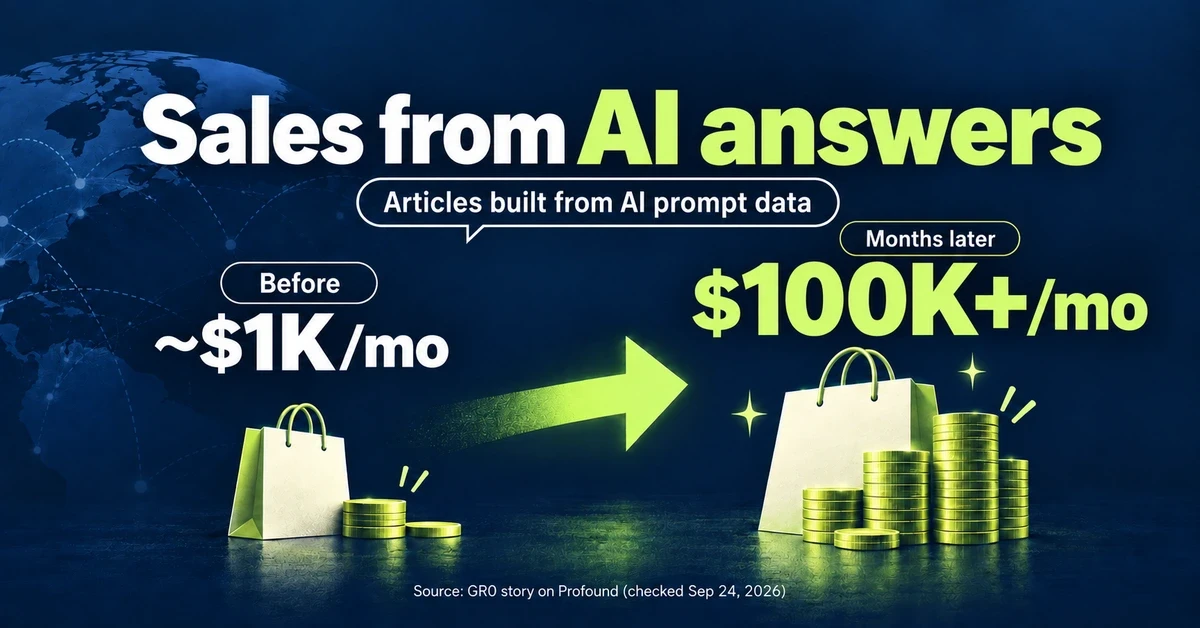
GR0 reports that a beauty and wellness brand's monthly sales through AI answers grew from about $1,000 to over $100,000 within months. The brand chose article topics based on AI prompt data. Here is the case in brief, plus three steps to check your own product pages.
Published