
Recordings of AI agent visits
See what AI agents did on your site,in a recording, then fix it.
More AI agents, such as Meta Muse, now operate websites in a browser. Most analytics tools count them as human visits and cannot show where they stopped. Add one line of tag and AgentSignal detects the visit, replays the recording, and helps you fix the element that blocked it.
Screens were captured on a sample site (a fictional online store). The numbers are sample values.
How visitors are classified
Every visit is recorded as human, AI agent, or bot
When AI agent visits are mixed with human visits, you misread why people left or did not finish. AgentSignal labels each visit.
Human
Regular visitors. Measured and recorded as before.
Recorded
AI agent
An AI operating your site in a browser on a person's behalf. Its actions are recorded, with the outcome and the places it got stuck.
Recorded
Bot or crawler
Programs that fetch pages for search or training. They are not recorded and do not use your recording quota.
Not recorded
How it works
From installing the tag to shipping a fix, in 7 steps
Each step shows the actual dashboard. Steps 03 and 06 are screen videos.
STEP 01
Add one line of tag
Copy the one-line tag shown under Settings → Tracking tag and paste it into the <head> of your site. It also works as a Custom HTML tag in Google Tag Manager.
Once it is installed, measurement and recording start automatically when a visit arrives.
STEP 02
Find AI agent visits in the recordings list
Open Recordings to see visits split into human, AI agent, and bot. The top of the list shows the number of AI agent visits, the share that completed their goal, and the number that got stuck.
Pick a visit to replay by its outcome, such as a failed form or an input error.
| Started at | Duration | PV | Landing | Referrer | Device | Type | Outcome | |
|---|---|---|---|---|---|---|---|---|
| 11/23/26, 10:37 AM | 0m 12s | 1 | shop.example.com/products/wool-blanket | — | AI agent likelihood: high | Form failedInput errorRepeated clicks2 fixes | ||
| 11/23/26, 9:02 AM | 0m 48s | 3 | shop.example.com/products/linen-shirt | https://chatgpt.com/ | ChatGPT-User | Converted | ||
| 11/23/26, 7:45 AM | 0m 21s | 2 | shop.example.com/cart | — | Perplexity | BlockedBlocking popup1 fixes |
STEP 03
Replay the recording to see what the AI did
Press the play button in the list to watch which pages the agent moved through and what it operated, starting from the first page it opened.
The action timeline lists page changes, clicks, repeated clicks, inputs, and submissions with timestamps.
STEP 04
Check why the visit was judged to be an AI agent
The Who visited panel shows the evidence. AIs that state their name, such as ChatGPT-User, are confirmed. AIs that do not are estimated from behavior, with high or medium confidence.
A human visit can be judged as an AI agent, so you can check the evidence together with the recording.
Who visited
- Claims to be desktop Chrome on Linux (matches observed AI-agent traffic)
- Comes from a Cloudflare data center IP (not a home connection)
- 3 of 3 clicks had no mouse movement right before
- The browser reports automation (navigator.webdriver)
Some AI agents (for example Meta Muse) do not publish a dedicated user agent or IP list, so this is a behavior-based estimate. Human visits may be classified as an AI agent.
Where it got stuck
STEP 05
Pinpoint where the agent got stuck
Click an item under Where it got stuck and the recording jumps to that moment. For repeated clicks you see what happened right after the click. For input errors you see which field stopped it.
You learn which button or field to fix, down to the element.
Who visited
- Claims to be desktop Chrome on Linux (matches observed AI-agent traffic)
- Comes from a Cloudflare data center IP (not a home connection)
- 3 of 3 clicks had no mouse movement right before
- The browser reports automation (navigator.webdriver)
Some AI agents (for example Meta Muse) do not publish a dedicated user agent or IP list, so this is a behavior-based estimate. Human visits may be classified as an AI agent.
Where it got stuck
STEP 06
Create a fix for the element that blocked the agent
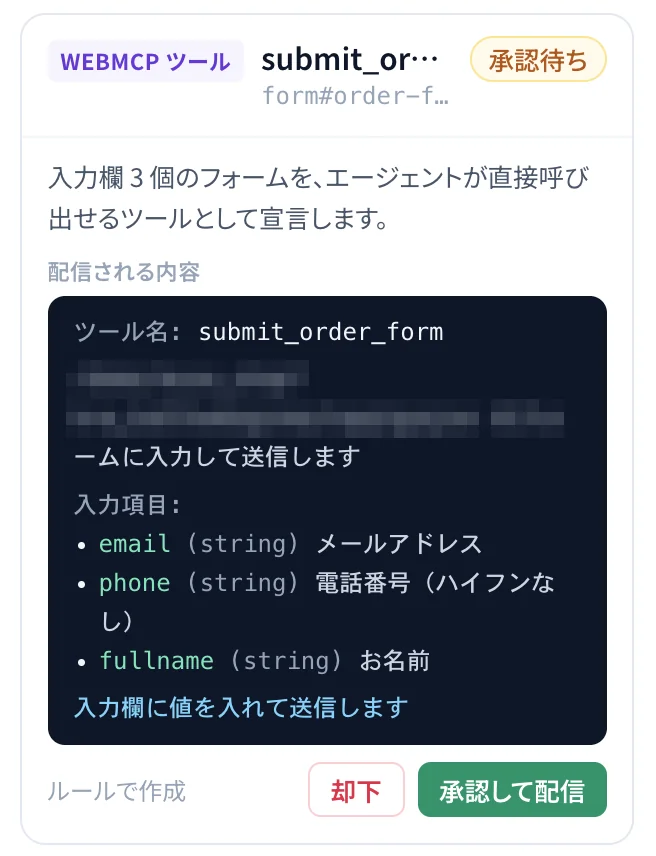
Press Create a fix to get a proposal for the blocked element. There are two kinds: adding a label to an unnamed button, and declaring a form as a tool that AI agents can call directly.
The free plan creates proposals with fixed rules. AI generation is available on paid plans. You can create proposals up to 10 times per site per day.
STEP 07
Review the proposal, then approve and ship it
The proposal card shows what will be applied to which element. Press Approve and deliver and the proposal is applied to your site through the tracking tag.
Only approved proposals are delivered. You can stop or revert a proposal after it is applied.
Screens were captured on a sample site (a fictional online store). The numbers are sample values.
What a recording shows
Not a count. Each visit, replayed one by one.
Counts and percentages cannot tell you why an AI agent failed to reach its goal. A recording shows the moment it stopped.
What counts tell you
- How many AI agent visits you had
- Which pages were fetched
- Their share of all visits
What AgentSignal recordings tell you
- The actions during the visit, replayed as they happened
- Which button or field the agent got stuck on
- How many visits completed their goal and how many stopped partway
What can be identified
Some visits are confirmed and some are estimated
Identifying AI agents has limits. Confirmed and estimated visits are shown separately, and every estimate comes with its evidence.
- AIs that state their name are confirmed
- AIs that identify themselves in the User-Agent, such as ChatGPT-User, are confirmed as AI agents.
- AIs that do not are estimated from behavior
- AIs such as Meta Muse that publish no dedicated identifier are estimated from signals such as arriving from a data center IP or clicking without any mouse movement beforehand. Confidence is shown as high or medium.
- The judgment can be wrong
- A human visit can be judged as an AI agent. The evidence and the recording are there so you can decide.
Frequently asked questions
Can I use it for free?
Yes, there is a free plan. Without a credit card you can install the tag, record AI agent visits, and create rule-based proposals. The free plan has a limit on measured visits, which is listed on the pricing page.
How is this different from an analytics tool?
Beyond counting visits, it replays each AI agent visit as a recording and keeps where the agent got stuck. You can keep using your current analytics alongside it.
Which AI agents can it identify?
AIs that state their name, such as ChatGPT-User, are confirmed. AIs that operate a browser without stating a name are estimated from behavior. Because a human visit can be judged as an AI agent, the evidence is shown in the recording details.
What do I need to do to set it up?
Paste one line of tracking tag into the <head> of your site. You can also install it through Google Tag Manager.
How are fixes applied to my site?
Only the proposals you approve are applied, through the tracking tag. No arbitrary script is delivered. Proposals that declare a form as a tool only work in browsers that support WebMCP. You can stop or revert a proposal after it is applied.
Do recordings keep what visitors type?
You choose one of three masking levels: passwords only, all input fields, or input fields plus body text. What is typed into input fields is not sent to the AI when a proposal is created.
Start by looking
Can the AI agents visiting your site finish what they came to do?
Add one line of tag and check in a recording how far AI agents got.
- Free plan available
- No credit card required
- Starts with one line of tag
Sign up with a Google or Microsoft account, or with an email address.